
1. Уводзіны
Дзякуй за пакупкуasing the Blackstar ID:Core Stereo 10 Sugar Skull V2 Limited Edition amplifier. This 10-watt (2x5W) stereo combo amplifier is designed to provide a versatile and high-quality sound experience for electric guitarists. It features Blackstar's patented ISF (Infinite Shape Feature) control, a range of voices, and built-in effects, making it ideal for practice, recording, and small performances. This manual provides essential information for safe and effective use of your ampзадымнік.
2. Важныя інструкцыі па бяспецы
- Прачытайце інструкцыі: Прачытайце ўсе інструкцыі па тэхніцы бяспекі і эксплуатацыі перад выкарыстаннем гэтага прадукта.
- Захаваць інструкцыі: Захоўвайце гэтыя інструкцыі для выкарыстання ў будучыні.
- Звярніце ўвагу на папярэджанні: Выконвайце ўсе папярэджанні на прыладзе і ў інструкцыі па эксплуатацыі.
- Вада і вільгаць: Не выкарыстоўвайце гэты прыбор паблізу вады.
- Уборка: Чысціце толькі сухой анучай.
- Вентыляцыя: Не блакуйце вентыляцыйныя адтуліны. Усталюйце ў адпаведнасці з інструкцыямі вытворцы.
- Цяпло: Не ўстанаўлівайце побач з крыніцамі цяпла, такімі як радыятары, абагравальнікі, пліты або іншыя прылады (у тым ліку ampLifiers), якія вырабляюць цяпло.
- Абарона шнура харчавання: Абараняйце сеткавы шнур ад наступання або заціскання, асабліва ў месцах вілкі, разеткі і месца выхаду з прылады.
- Адключыце разетку падчас навальніцы: Адключайце гэты прыбор ад сеткі падчас навальніцы або калі ён не выкарыстоўваецца на працягу доўгага часу.
- Абслугоўванне: Звяртайцеся да кваліфікаванага абслугоўваючага персаналу. Тэхнічнае абслугоўванне патрабуецца, калі прылада была пашкоджана якім-небудзь чынам, напрыклад, пашкоджаны шнур сілкавання або вілка, была праліта вадкасць або ў прыладу ўпалі прадметы, прылада падвяргалася ўздзеянню дажджу або вільгаці, не працуе належным чынам , або быў адкінуты.
3. Змесціва ўпакоўкі
Калі ласка, пастаўце галачку для наступных пунктаў:
- Blackstar ID:Core Stereo 10 Sugar Skull V2 Limited Edition Ampзадымнік
- Блок харчавання
- Кабель USB
- Кіраўніцтва карыстальніка (гэты дакумент)
4. Элементы кіравання і функцыі
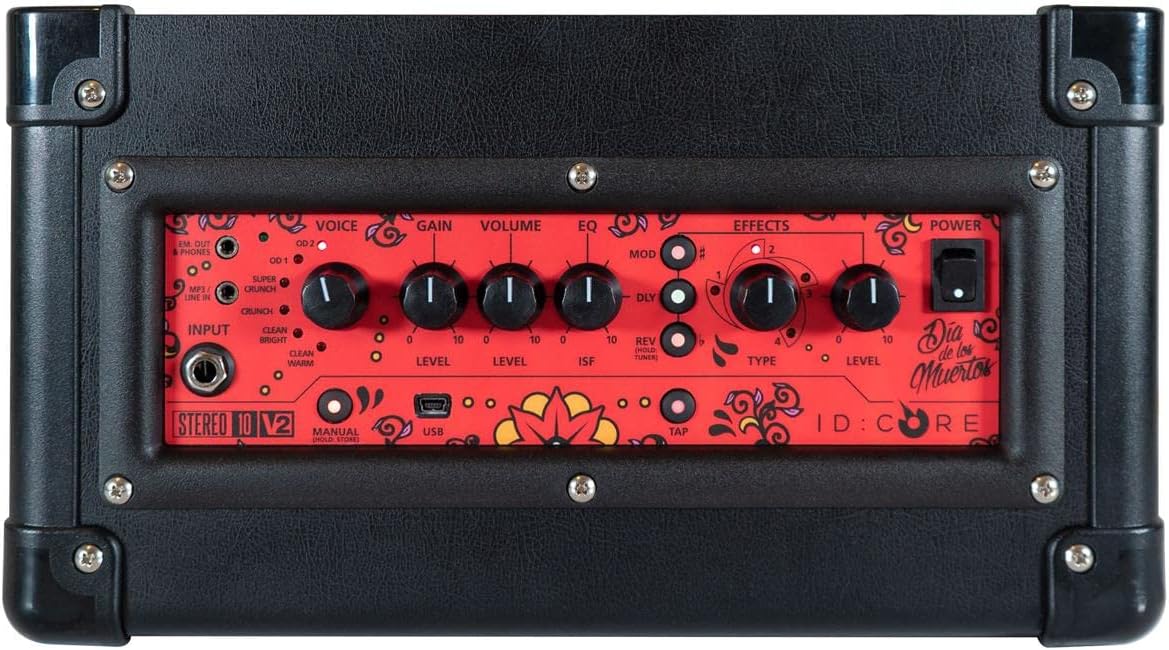
Выява: Уверсе view з amplifier's control panel, showing all knobs, buttons, and input/output jacks.
Элементы кіравання на пярэдняй панэлі:
- Увод: 6.35mm (1/4") jack for connecting your guitar.
- Голас: Rotary switch to select one of six Blackstar voices: Clean Warm, Clean Bright, Crunch, Super Crunch, OD 1, OD 2.
- Узмацненне: Кіруе ступенню перагрузкі або дысторсіі.
- Аб'ём: Рэгулюе агульны ўзровень выхаднога гуку ampзадымнік.
- EQ: Рэгулятар тэмбру.
- ISF (элемент бясконцай формы): Patented control that shifts the tone stack response between a USA-style (counter-clockwise) and a UK-style (clockwise) ampзадымнік.
- Мод (мадуляцыя): Rotary switch to select and adjust the level of modulation effects (Chorus, Flanger, Phaser, Tremolo).
- Dly (Delay): Rotary switch to select and adjust the level of delay effects (Linear, Analogue, Tape, Multi).
- Rev (Reverb): Rotary switch to select and adjust the level of reverb effects (Room, Hall, Spring, Plate).
- Тып: Selects the specific effect type within the Mod, Dly, or Rev categories.
- узровень: Adjusts the overall level of the selected effect.
- Націсніце: Button to set the tempo for time-based effects (Delay, Tremolo).
- Магутнасць: On/Off switch for the ampзадымнік.
- USB: USB-B port for connecting to a computer for recording and using Blackstar's Architect software.
- Em. Out / Phones: 6.35mm (1/4") jack for headphones or direct recording output with speaker emulation.
- MP3 / Line In: 3.5mm (1/8") stereo jack for connecting external audio devices like MP3 players or phones.

Выява: спераду view of the Blackstar ID:Core Stereo 10 ampвыратавальнік, шоуasing the unique Sugar Skull V2 design on the speaker grille.
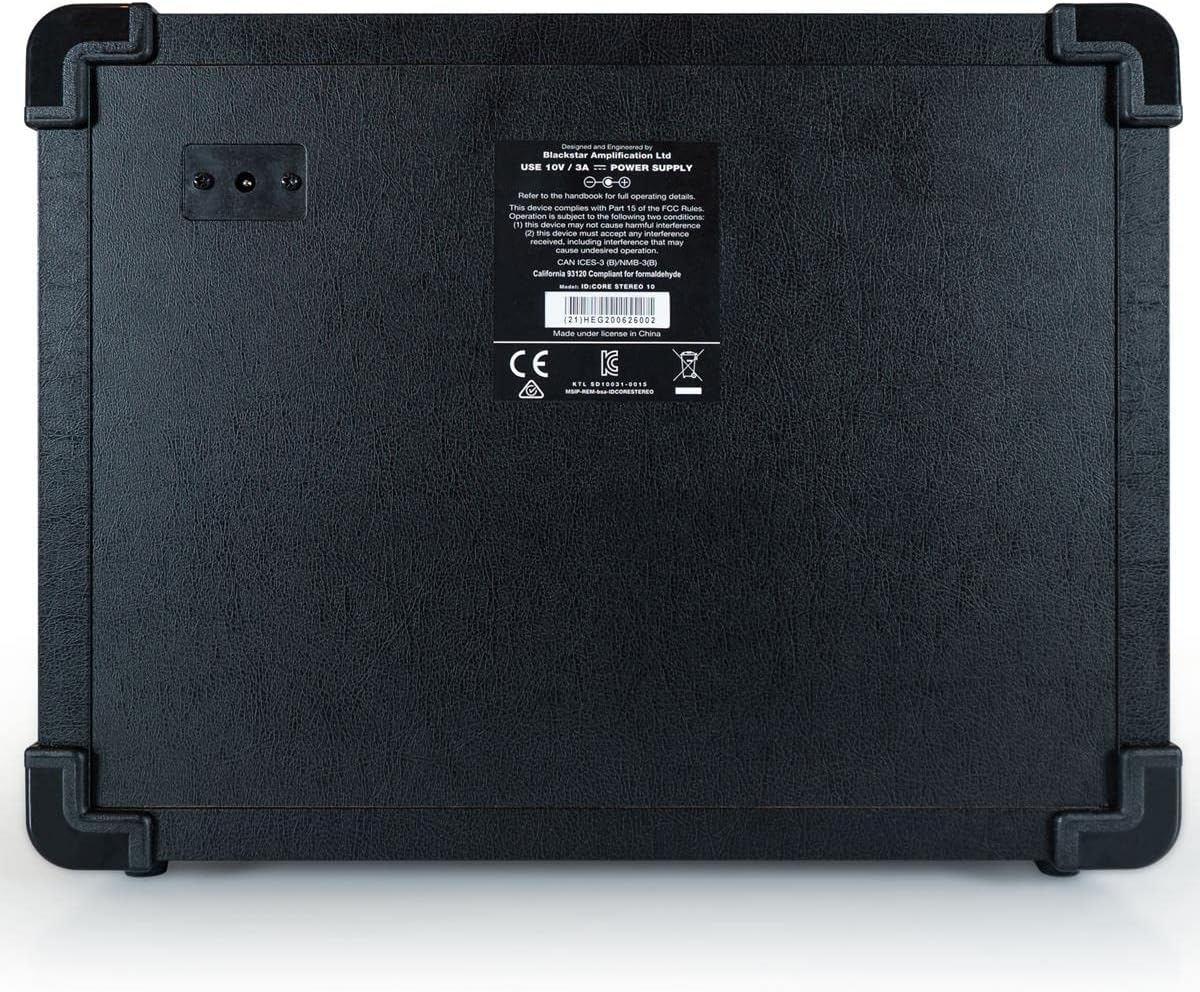
Выява: Задняя частка view of the Blackstar ID:Core Stereo 10 amplifier, displaying the product information label and power input.
5. Настройка
- Распакаванне: Акуратна зніміце amplifier and all accessories from the packaging. Retain the packaging for future transport or storage.
- Размяшчэнне: Месца ampРазмяшчайце прыладу на ўстойлівай роўнай паверхні. Забяспечце належную вентыляцыю вакол прылады. Пазбягайце размяшчэння яе побач з крыніцамі цяпла або пад прамымі сонечнымі прамянямі.
- Падключэнне сілкавання: Connect the supplied power supply unit to the DC input jack on the rear of the amplifier. Plug the power supply into a suitable mains outlet. Ensure the ampПерад падключэннем пераканайцеся, што выключальнік харчавання Liferier знаходзіцца ў становішчы ВЫКЛ.
- Падключэнне гітары: Падключыце электрагітару да Увод jack on the front panel using a standard 6.35mm (1/4") instrument cable.
- Знешні аўдыё (дадаткова): To play along with music, connect an MP3 player, phone, or other audio source to the MP3 / лінейны ўваход jack using a 3.5mm stereo cable.
- Падключэнне USB (неабавязкова): For recording or using the Blackstar Architect software, connect the amplifier to your computer using the supplied USB cable.
6. Інструкцыя па эксплуатацыі
- Уключэнне: Ensure all connections are secure, then switch the Магутнасць button to the ON position. The power indicator light will illuminate.
- Задаць гучнасць: Пачніце з Аб'ём knob at a low setting to avoid sudden loud sounds.
- Выберыце голас: Павярнуць Голас switch to choose your desired amplifier type (e.g., Clean Warm, Crunch, OD 1).
- Наладзіць узмацненне: Выкарыстоўвайце Узмацненне knob to control the amount of drive. Lower settings provide cleaner tones, while higher settings introduce more distortion.
- Shape Tone with EQ and ISF: Адрэгулюйце EQ knob for general tone shaping. Experiment with the ISF control to blend between American (tight low-end, aggressive mids) and British (woodier, less aggressive) amplifier characteristics.
- Ужыць эфекты:
- Select a modulation, delay, or reverb effect using the мод, Длай, або Рэв rotary switches.
- Выкарыстоўвайце Тып knob to select a specific effect within that category (e.g., Chorus, Flanger for Mod).
- Adjust the effect's intensity with the Узровень ручка.
- For time-based effects (Delay, Tremolo), press the Націсніце button repeatedly at your desired tempo to synchronize the effect.
- Headphone/Recording Output: Падключыце навушнікі да Em. Out / Phones jack for silent practice. This output also provides a speaker-emulated signal for direct recording.
- Аўдыё USB: When connected to a computer via USB, the amplifier acts as an audio interface, allowing you to record your guitar directly into a DAW or use the Blackstar Architect software for deeper editing and patch management.
- Выключэнне: Пасля завяршэння павярніце Аб'ём down, then switch the Магутнасць кнопку ў становішча OFF.
7. Тэхнічнае абслугоўванне
- Уборка: Ачысціць amplifier's exterior with a soft, dry cloth. Do not use abrasive cleaners, solvents, or waxes.
- захоўванне: Калі прылада не выкарыстоўваецца працяглы час, захоўвайце яе amplifier in a dry, cool place, away from direct sunlight and extreme temperatures.
- Вентыляцыя: Ensure that the ventilation openings are always clear to prevent overheating.
- Сыход за кабелем: Always handle power and instrument cables carefully. Avoid bending or kinking them sharply.
8. Выпраўленне непаладак
| праблема | Магчымая прычына | Рашэнне |
|---|---|---|
| Няма гуку з ampзадымнік |
|
|
| Poor sound quality / Buzzing noise |
|
|
| Эфекты не працуюць |
|
|
9. Тэхнічныя характарыстыкі
- мадэль: IDCORE10 V3
- Выхад ватtage: 10 Watts (2 x 5W Stereo)
- Дакладчыкі: 2 x 3" Blackstar Speakers
- Галасы: 6 (Чысты цёплы, Чысты яркі, Хрумсткі, Суперхрумсткі, OD 1, OD 2)
- Эфекты: Modulation (Chorus, Flanger, Phaser, Tremolo), Delay (Linear, Analogue, Tape, Multi), Reverb (Room, Hall, Spring, Plate)
- элементы кіравання: Voice, Gain, Volume, EQ, ISF, Mod, Dly, Rev, Type, Level, Tap, Power
- Уваходы: Guitar Input (6.35mm jack), MP3/Line In (3.5mm stereo jack), USB-B
- Выхады: Emulated Out/Headphones (6.35mm jack)
- Крыніца харчавання: Правадная электрычная
- Сумяшчальныя прылады: Электрагітара
- Вага прадмета: 10 фунта (4.54 кг)
- Памеры прадукту: 16 х 18 х 14 цалі (40.6 х 45.7 х 35.6 см)
- ASIN: B08Z88WN8T
10. Гарантыя і падтрымка
Чорная зорка Amplification products are designed and manufactured to the highest standards. For detailed warranty information specific to your region and product, please refer to the warranty card included with your purchase or visit the official Blackstar Ampвызваленне website. For technical support or service inquiries, please contact your authorized Blackstar dealer or Blackstar customer support directly.
Інтэрнэт-рэсурсы:
- Чорная зорка AmpАфіцыйны прадстаўнік па пытаннях ліфікацыі Webсайт: www.blackstaramps.com
- Blackstar Architect Software: www.blackstaramps.com/architect