
1. Уводзіны
The D-Link DIR-825M AC1200 MU-MIMO Gigabit Router is a high-performance networking device designed to provide fast and reliable wireless connectivity for your home or small office. Featuring 802.11ac MU-MIMO wireless technology, it delivers enhanced speed, extended range, and improved efficiency for multiple devices simultaneously. This router includes four Gigabit Ethernet LAN ports for high-speed wired connections and a USB 2.0 port for convenient local network sharing. It supports various operating modes, offering flexibility to suit different networking requirements.
2. Змесціва ўпакоўкі
Пераканайцеся, што ваш пакет змяшчае наступныя элементы:
- D-Link DIR-825M AC1200 MU-MIMO Gigabit Router
- Адаптар сілкавання
- Кабель Ethernet
- Quick Installation Guide (may vary by region)
If any items are missing or damaged, please contact your local D-Link reseller.
3. Фізічны канецview
Familiarize yourself with the various components and ports of your D-Link DIR-825M router.

Малюнак 3.1: Фронт view of the D-Link DIR-825M AC1200 MU-MIMO Gigabit Router, showcasing its four external antennas and the D-Link logo on the top panel.
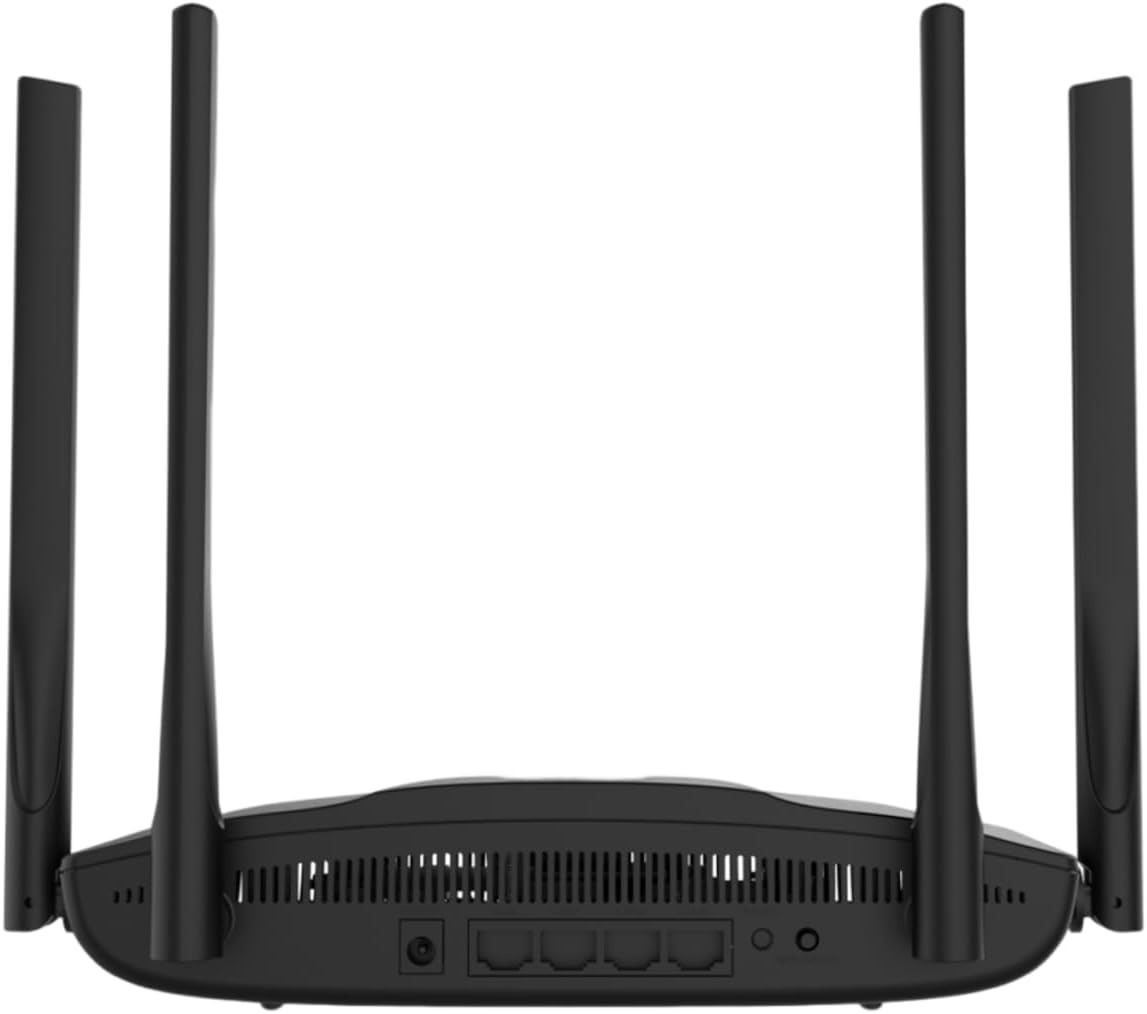
Малюнак 3.2: Тыл view of the D-Link DIR-825M router, detailing the power input, WAN port, four Gigabit LAN ports, USB 2.0 port, Reset button, and WPS button.
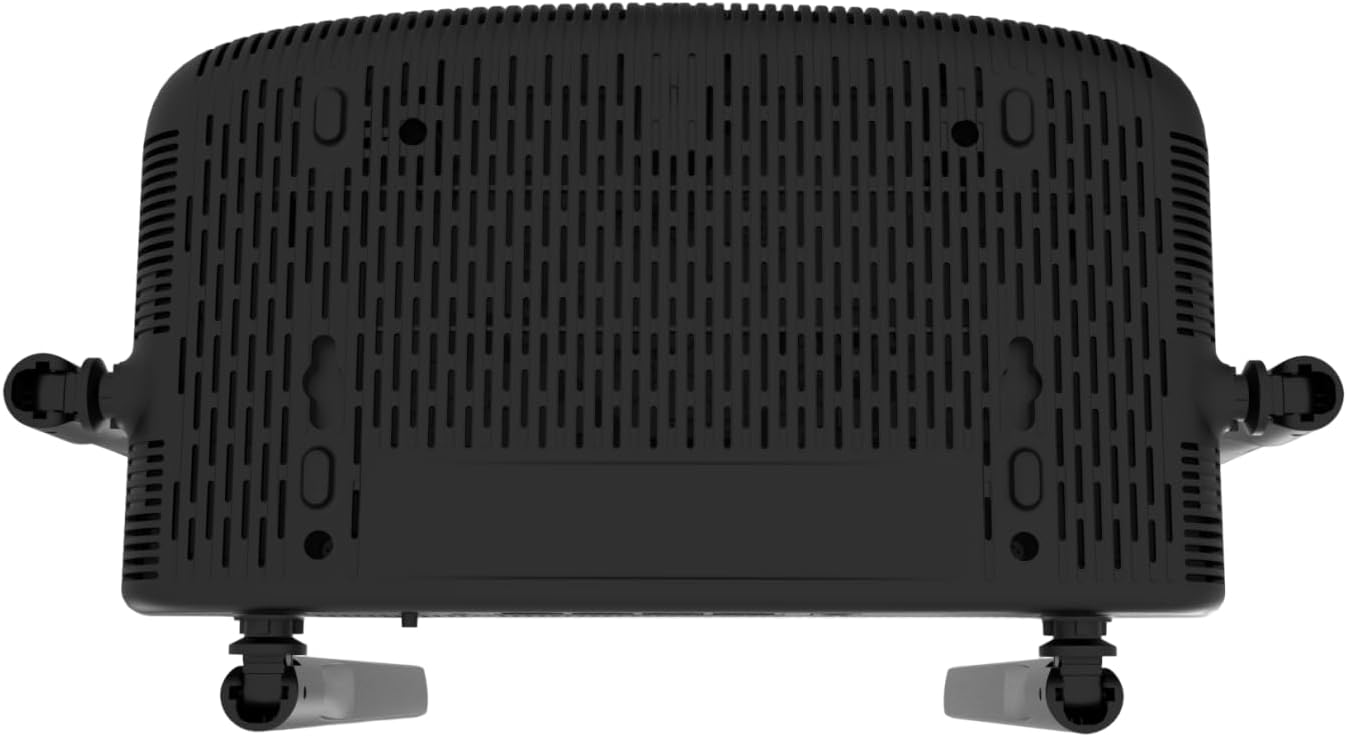
Малюнак 3.3: Знізу view of the D-Link DIR-825M router, illustrating the ventilation grilles for heat dissipation and mounting holes for wall installation.
3.1 Індыкатары пярэдняй панэлі
- Святлодыёд харчавання: Паказвае стан харчавання прылады.
- Інтэрнэт LED: Паказвае стан падключэння да Інтэрнэту.
- Святлодыёдныя індыкатары Wi-Fi (2.4 ГГц/5 ГГц): Паказвае актыўнасць бесправадной сеткі для кожнага дыяпазону.
3.2 Парты і кнопкі на задняй панэлі
- Раз'ём харчавання: Падключаецца да адаптара харчавання, які ўваходзіць у камплект.
- WAN Port (Internet): Connects to your modem or internet service provider's equipment.
- Парты LAN (1-4): Connect wired devices such as computers, gaming consoles, or network storage. These are Gigabit Ethernet ports.
- Порт USB 2.0: Для падключэння USB-назапашвальнікаў для сумеснага выкарыстання files у вашай сетцы.
- Кнопка WPS: For quickly connecting WPS-compatible wireless devices.
- Кнопка скіду: Used to restore the router to its factory default settings. Press and hold for 10 seconds with a paperclip.
4. Настройка
Follow these steps for initial setup of your D-Link DIR-825M router.
4.1 Устаноўка абсталявання
- Размяшчэнне маршрутызатара: Place the router in a central location in your home or office, away from obstructions and sources of interference. Adjust the antennas vertically for optimal signal coverage.
- Падключыце харчаванне: Connect the provided power adapter to the router's power connector and then plug it into a power outlet. Ensure the Power LED illuminates.
- Падключэнне да мадэма: Connect an Ethernet cable from your modem's LAN port to the WAN (Internet) port on the DIR-825M router.
- Падключэнне правадных прылад (неабавязкова): For wired connections, connect an Ethernet cable from your computer or other network devices to any of the LAN ports (1-4) on the router.
4.2 Пачатковая канфігурацыя
- Падключэнне да маршрутызатара:
- Wired: Пераканайцеся, што ваш камп'ютар падлучаны да LAN-порта маршрутызатара.
- Бесправадная сувязь: Connect to the default Wi-Fi network (SSID and password are typically printed on a label on the bottom of the router).
- Доступ Web інтэрфейс: Адкрыйце a web браўзер (напрыклад, Chrome, Firefox, Edge) і ўвядзіце
http://dlinkrouter.localorhttp://192.168.0.1у адрасны радок. Націсніце Enter. - Увайсці: Увядзіце імя карыстальніка па змаўчанні (звычайна
admin) and password (often blank oradmin, check the router label). - Запусціце майстар налады: Follow the on-screen instructions of the D-Link Setup Wizard. This wizard will guide you through configuring your internet connection type (e.g., DHCP, PPPoE), setting up your new Wi-Fi network name (SSID) and password, and establishing an administrator password for the router.
- Захаваць налады: After completing the wizard, save your settings and restart the router if prompted.
5. Рэжымы працы
The D-Link DIR-825M supports multiple operating modes to adapt to various networking needs.
- Рэжым маршрутызатара (па змаўчанні): In this mode, the device acts as a primary router, connecting to your modem to provide internet access to all connected wired and wireless devices on your local network. It performs Network Address Translation (NAT) and manages IP addresses.
- Рэжым кропкі доступу (AP): This mode allows the DIR-825M to extend an existing wired network with wireless capabilities. It connects to an existing router via an Ethernet cable and broadcasts a Wi-Fi signal, essentially turning a wired network into a wireless one without performing routing functions.
- Рэжым рэтранслятара: Also known as Wi-Fi Extender mode, this allows the DIR-825M to wirelessly extend the coverage of an existing Wi-Fi network. It connects to an existing Wi-Fi signal and re-broadcasts it, helping to eliminate Wi-Fi dead zones.
- WISP Repeater Mode: Wireless Internet Service Provider (WISP) Repeater mode enables the router to connect wirelessly to a WISP access point and then share that internet connection with both wired and wireless clients on your local network. This is useful in areas where wired internet access is unavailable.
- Wi-Fi Client Mode: In this mode, the DIR-825M acts as a wireless adapter for a wired device. It connects wirelessly to an existing Wi-Fi network and provides an Ethernet connection for a single wired device that does not have its own Wi-Fi capability.
You can switch between these modes through the router's web-based management interface, typically found under the 'Operation Mode' or 'System Settings' section.
6. Тэхнічнае абслугоўванне
Рэгулярнае тэхнічнае абслугоўванне забяспечвае аптымальную прадукцыйнасць і даўгавечнасць вашага маршрутызатара.
6.1 Абнаўленне прашыўкі
D-Link periodically releases firmware updates to improve performance, add new features, and address security vulnerabilities. It is recommended to keep your router's firmware up-to-date.
- Visit the official D-Link support webсайт для вашага рэгіёну.
- Пошук your model (DIR-825M) and download the latest firmware file.
- Log in to your router's web інтэрфейс кіравання.
- Navigate to the 'Tools' or 'Maintenance' section, then 'Firmware Upgrade'.
- Загрузіце спампаваную прашыўку file і выконвайце інструкцыі на экране. Do not power off the router during the update process.
6.2 Скід да заводскіх налад
A factory reset can resolve persistent configuration issues or be performed before transferring ownership of the device. This will erase all custom settings and restore the router to its original factory defaults.
- With the router powered on, locate the Reset button on the rear panel (refer to Figure 3.2).
- Using a paperclip or a similar pointed object, press and hold the Reset button for approximately 10 seconds.
- Release the button when the Power LED starts blinking or changes color.
- The router will restart with factory default settings. You will need to reconfigure it as per Section 4.2.
6.3 Ачыстка
To ensure proper ventilation and prevent overheating, keep the router clean and free from dust. Use a soft, dry cloth to wipe the exterior. Do not use liquid cleaners or aerosols.
7. Выпраўленне непаладак
This section provides solutions to common issues you might encounter with your D-Link DIR-825M router.
7.1 Няма падключэння да Інтэрнэту
- Праверце кабелі: Пераканайцеся, што ўсе кабелі Ethernet надзейна падключаны да правільных партоў (WAN да мадэма, LAN да прылад).
- Статус мадэма: Verify that your modem is working correctly and has an active internet connection. Restart your modem if necessary.
- Канфігурацыя маршрутызатара: Увайдзіце ў сістэму маршрутызатара web interface and check your internet connection settings. Ensure the correct connection type (e.g., DHCP, PPPoE) is selected and credentials are correct if required.
- Перазапуск прылад: Power cycle your modem, router, and connected devices in that order.
7.2 Poor Wi-Fi Signal or Coverage
- Размяшчэнне маршрутызатара: Перанясіце маршрутызатар у больш цэнтральнае месца, далей ад сцен, буйных металічных прадметаў і іншых электронных прылад, якія могуць выклікаць перашкоды.
- Рэгуляванне антэны: Adjust the router's antennas to different angles to optimize signal propagation.
- Перашкоды: Other wireless devices (cordless phones, microwaves, Bluetooth devices) can interfere with Wi-Fi. Try changing the Wi-Fi channel in the router settings.
- Перашкоды: Walls, floors, and ceilings can degrade Wi-Fi signals. Consider using Repeater mode or additional access points for larger areas.
7.3 Немагчыма атрымаць доступ да маршрутызатара Web Інтэрфейс
- IP-адрас: Ensure you are using the correct IP address (
http://dlinkrouter.localorhttp://192.168.0.1). - падключэнне: Verify your device is properly connected to the router, either via Ethernet cable or the router's Wi-Fi network.
- Налады IP: Пераканайцеся, што сеткавы адаптар вашага кампутара настроены на аўтаматычнае атрыманне IP-адраса (DHCP).
- Кэш браўзера: Ачысціць свой web кэш і файлы cookie браўзера або паспрабуйце іншы браўзер.
- Брандмаўэр/Антывірус: Часова адключыце любы брандмаўэр або антывіруснае праграмнае забеспячэнне на вашым кампутары, якія могуць блакаваць доступ.
- Скід да заводскіх налад: If all else fails, perform a factory reset (Section 6.2) and try accessing the interface with default credentials.
8. Тэхнічныя характарыстыкі
| Марка | D-Link |
| мадэль | ДЫР-825М |
| бесправадной стандарт | 802.11ac (Wi-Fi 5), 802.11n, 802.11g, 802.11b |
| Хуткасць бесправадной сувязі | AC1200 (Up to 300 Mbps on 2.4GHz, 867 Mbps on 5GHz) |
| Дыяпазон частот | Двухдыяпазонны (2.4 ГГц і 5 ГГц) |
| Парты Ethernet | 4 x 10/100/1000 Gigabit LAN Ports, 1 x 10/100/1000 Gigabit WAN Port |
| Порт USB | 1 порта USB 2.0 |
| Антэны | 4 знешнія антэны |
| Памеры (Д х Ш х У) | 19.7 х 14 х 4.4 см |
| Вага | 360 г |
| Рэжымы працы | Router, Access Point, Repeater, WISP Repeater, Wi-Fi Client |
| Увод магутнасці | 230 вольт (пераменны ток) |
| Сумяшчальныя прылады | Ноўтбук, персанальны камп'ютар, разумны тэлевізар, планшэт |
9. Інфармацыя па бяспецы
Калі ласка, прачытайце і выконвайце гэтыя рэкамендацыі па бяспецы, каб забяспечыць бяспечную працу вашай прылады:
- Use only the power adapter supplied with the product. Using an unauthorized power adapter may damage the device and void your warranty.
- Do not expose the device to water, rain, moisture, or extreme temperatures.
- Ensure adequate ventilation around the device. Do not block any ventilation openings.
- Не адкрывайце прыладу casing. Унутры няма дэталяў, якія можа абслугоўваць карыстальнік.
- Keep the device away from direct sunlight, heat sources, and flammable materials.
- Гэта прылада прызначана толькі для выкарыстання ў памяшканні.
- Захоўваць у месцах, недаступных дзецям.
10. Гарантыя і падтрымка
For detailed warranty information, please refer to the warranty card included with your D-Link DIR-825M router or visit the official D-Link webсайт для вашага рэгіёну. Умовы гарантыі могуць адрознівацца ў залежнасці ад краіны.
For technical support, product registration, and access to the latest drivers and firmware, please visit the D-Link support portal:
- D-Link Global Support: https://www.dlink.com/support
You may also find contact information for local D-Link customer service on their webсайт.