
Уводзіны
This manual provides detailed instructions for the installation, operation, and maintenance of your Arcchio Logan LED Floor Lamp. This modern LED floor lamp is designed to provide efficient and adaptable lighting for office environments and workspaces. It features advanced functionalities such as a touch dimmer, CCT (Correlated Color Temperature) control, motion sensor, and daylight sensor to optimize your lighting experience.

Figure 1: Arcchio Logan LED Floor Lamp, a sleek silver floor lamp with a rectangular head and U-shaped base.
Важныя інструкцыі па бяспецы
Калі ласка, уважліва прачытайце гэтыя інструкцыі перад устаноўкай і выкарыстаннем. Захоўвайце гэта кіраўніцтва для далейшага выкарыстання.
- Перад устаноўкай, чысткай або тэхнічным абслугоўваннем пераканайцеся, што электрасілкаванне адключана.
- This product is for indoor use only (IP20 rating). Do not expose to water or high humidity.
- Калі вы не ўпэўненыя, усталёўку павінен выконваць кваліфікаваны электрык.
- Не спрабуйце мадыфікаваць або рамантаваць лamp yourself. Contact qualified service personnel.
- Захоўвайце ўпаковачныя матэрыялы далей ад дзяцей.
- Пераканайцеся, што lamp размяшчаецца на роўнай, устойлівай паверхні, каб прадухіліць перакульванне.
Змест пакета
Перад пачаткам усталёўкі пераканайцеся, што ўсе кампаненты наяўныя і не пашкоджаныя.
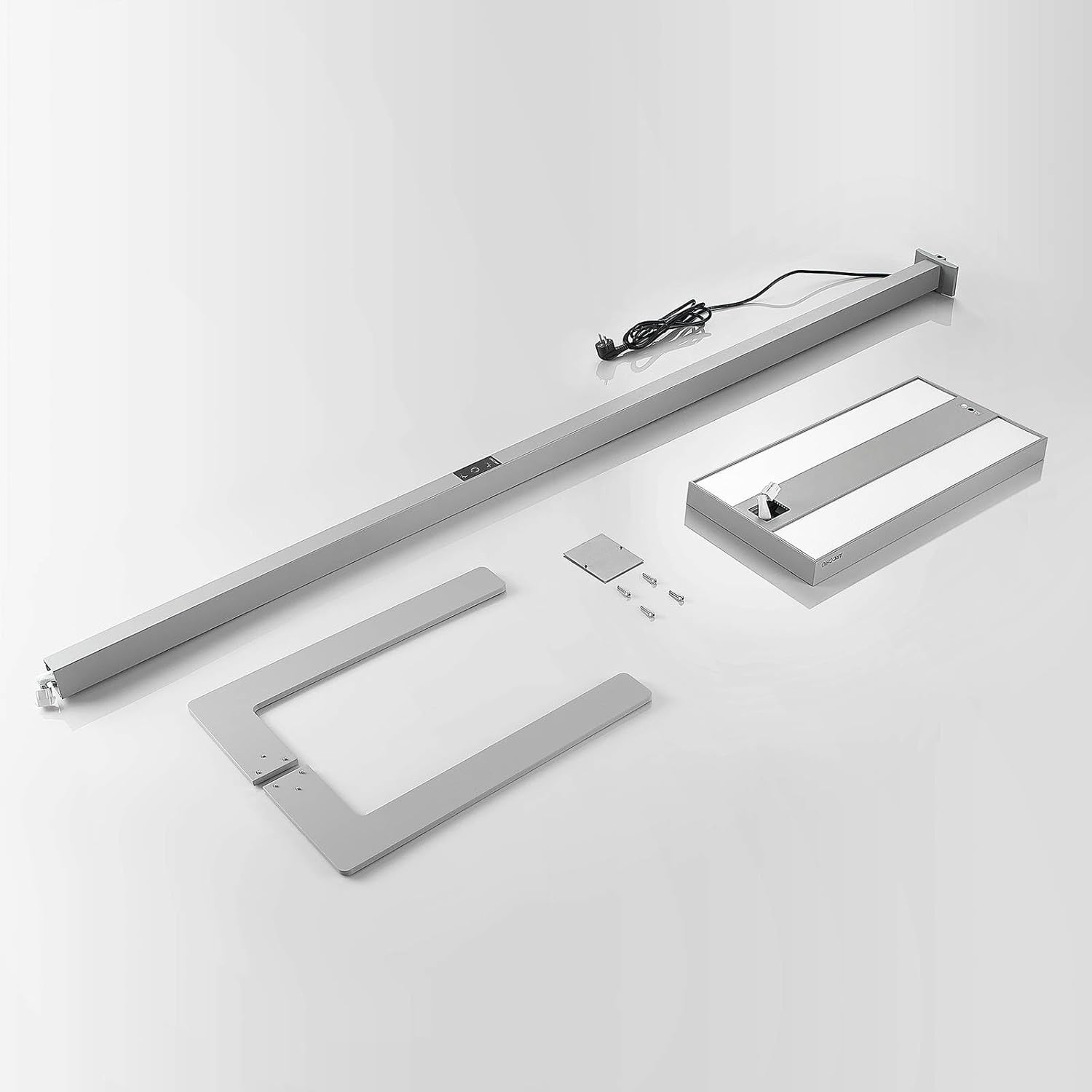
Figure 2: All components of the Arcchio Logan LED Floor Lamp laid out, including the base, main pole, lamp head, and power cable.
- Святлодыёд Lamp Галава
- Галоўны полюс
- U-shaped Base
- Сілавы кабель
- Mounting Hardware (screws, tools if applicable)
- Убудаваная святлодыёдная крыніца святла
Настройка і ўстаноўка
Follow these steps to assemble and set up your Arcchio Logan LED Floor Lamp:
- Збярыце аснову: Attach the main pole securely to the U-shaped base using the provided screws. Ensure all connections are tight.
- Прыкладзеце L.amp Кіраўнік: Падключыце святлодыёд lamp head to the top of the main pole. Ensure the electrical connection is properly seated and the head is firmly attached.
- Размясціце Lamp: Змесціце lamp in your desired workspace. The U-shaped base is designed to fit around desk legs, allowing for optimal positioning next to your workstation.
- Падключэнне да сілкавання: Падключыце кабель харчавання да стандартнай электрычнай разеткі 230 В.
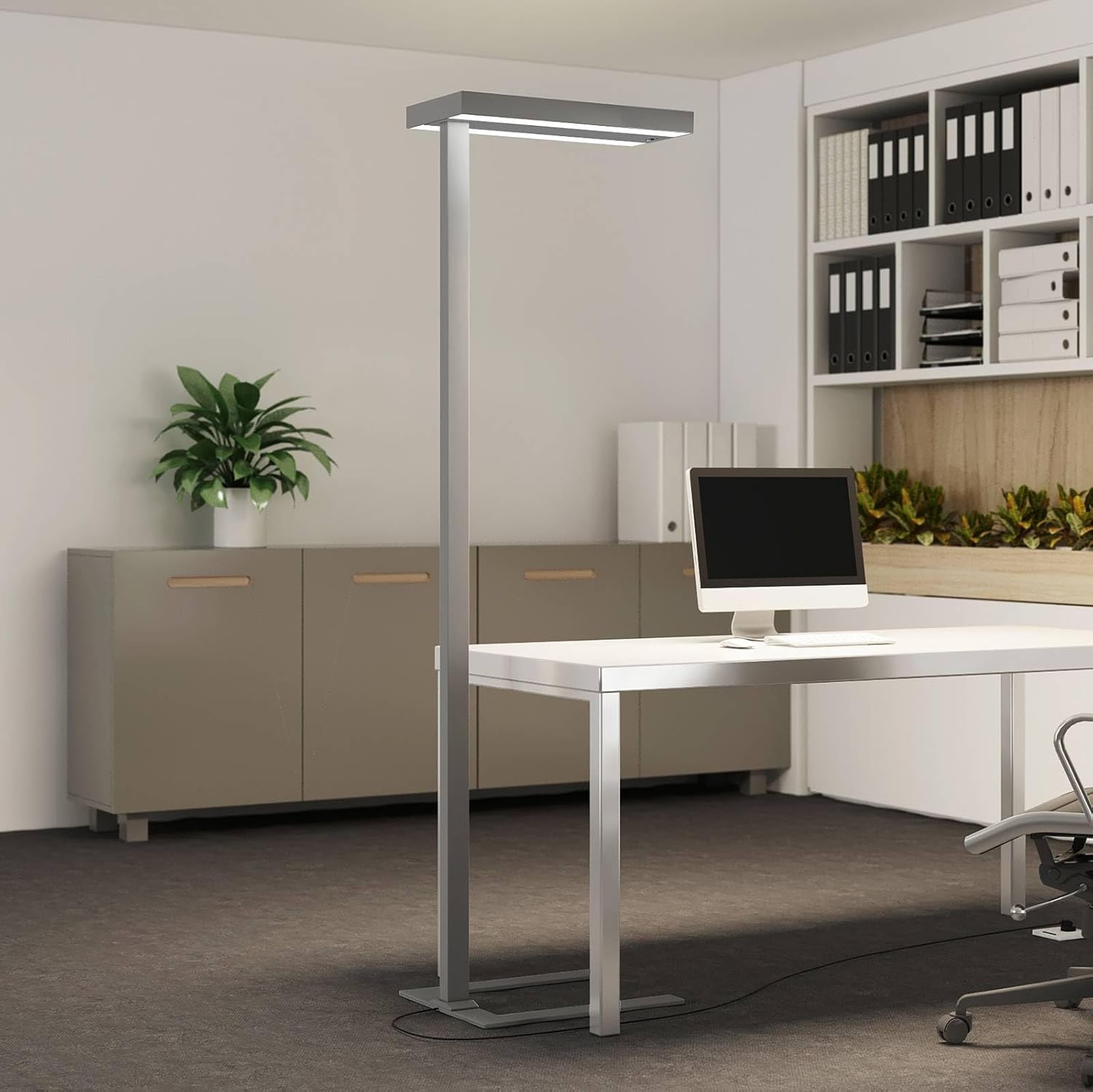
Figure 3: The Arcchio Logan LED Floor Lamp positioned in an office setting, demonstrating its U-shaped base fitting around a desk.
Інструкцыя па эксплуатацыі
The Arcchio Logan LED Floor Lamp features an intuitive touch control panel for various functions.

Figure 4: Close-up of the touch control panel on the lamp's main pole, showing icons for power, dimming, and color temperature adjustment.
- Уключэнне/выключэнне харчавання: Press the power icon on the touch panel to turn the lamp уключана або выключана.
- Функцыя зацямнення:
- Touch the dimming icon (sun/brightness symbol) to adjust the light intensity.
- У лamp provides both direct light (downwards onto the workspace) and indirect light (upwards for ambient illumination). Both can be dimmed separately via the touch panel.
- CCT (Correlated Color Temperature) Control:
- Touch the CCT icon (color temperature symbol) to change the white light color. This allows you to switch between different shades of white light to suit your preference or task.
- Датчык руху:
- The integrated motion sensor automatically turns the light on when activity is detected.
- If no activity is detected for 30 minutes, the lamp will automatically turn off to save energy.
- Датчык дзённага святла:
- The daylight sensor automatically adjusts the lamp's brightness based on the ambient light levels in the room. This ensures consistent illumination and energy efficiency.

Малюнак 5: ніжні бок view з лamp head, highlighting the integrated motion and daylight sensors.
Тэхнічнае абслугоўванне
- Уборка: Адключыце сілкаванне перад чысткай. Выкарыстоўвайце мяккую сухую тканіну, каб выцерці лamp. Не выкарыстоўвайце абразіўныя ачышчальнікі або растваральнікі.
- Святлодыёдная крыніца святла: The LED light source is integrated and not user-replaceable. If the LEDs fail, contact customer support.
Ліквідацыю непаладак
| праблема | Магчымая прычына | Рашэнне |
|---|---|---|
| Lamp не ўключаецца. | Няма крыніцы харчавання. Lamp выключана. | Праверце, ці надзейна падключаны кабель харчавання. Press the power button on the touch panel. |
| Dimming or CCT function not working. | Incorrect touch input. Часовы збой праграмнага забеспячэння. | Ensure you are touching the correct icon. Disconnect power for 10 seconds and reconnect. |
| Датчык руху не рэгіструе рух. | Датчык заблакаваны. Incorrect sensitivity setting (if adjustable). | Ensure the sensor area (underside of lamp head) is clear. (No explicit sensitivity setting mentioned, assume fixed). |
| Святло занадта хутка выключаецца. | Motion sensor timeout. | У лamp is designed to turn off after 30 minutes of inactivity. Ensure continuous movement in the sensor's range if prolonged illumination is desired. |
Тэхнічныя характарыстыкі
| Асаблівасць | Дэталь |
|---|---|
| Марка | Арккіа |
| Нумар мадэлі | 9968060 |
| Памеры прадукту (Д х Ш х У) | 61 см х 28 см х 198.6 см |
| Вага | 12.2 кг |
| Матэрыял | Алюміній, пластык |
| Колер | Silver (RAL 9006) |
| тtage | 230 Вольт |
| Код IP | IP20 (выкарыстанне ў памяшканні) |
| Клас абароны | I |
| Ватtage | 100 ват |
| Светлавы струмень | 13800 люмен |
| Каляровая тэмпература | Adjustable CCT (e.g., 3000 Kelvin mentioned as a base, but CCT implies range) |
| Асаблівасці | Touch Dimmer, Motion Sensor, Daylight Sensor, CCT Function, Flicker-free, SDCM <3, UGR <17, Direct and Indirect Light |
| Рэйтынг энергаэфектыўнасці | D (New EU energy label) |

Figure 6: EU Energy Label for the Arcchio Logan LED Floor Lamp, indicating an energy efficiency class of D.
For more detailed product information, refer to the EPREL database: https://eprel.ec.europa.eu/qr/743905
Інфармацыя аб гарантыі
For warranty details, please refer to the terms and conditions provided by your retailer at the time of purchase. Keep your proof of purchase for any warranty claims.
Падтрымка кліентаў
If you encounter any issues or have questions not covered in this manual, please contact Arcchio customer support or your authorized retailer for assistance.