
Уводзіны
This manual provides instructions for the YOSUN Universal Remote Control, model AKB72915239. This remote is designed to be compatible with a wide range of LG LCD and LED Smart TVs, offering a direct replacement for many original LG remote models. It aims to provide essential functions for controlling your LG television.
The remote control operates using infrared technology and requires two AAA batteries (not included) for power. It is designed for ease of use, typically requiring no complex programming or setup for basic television functions.
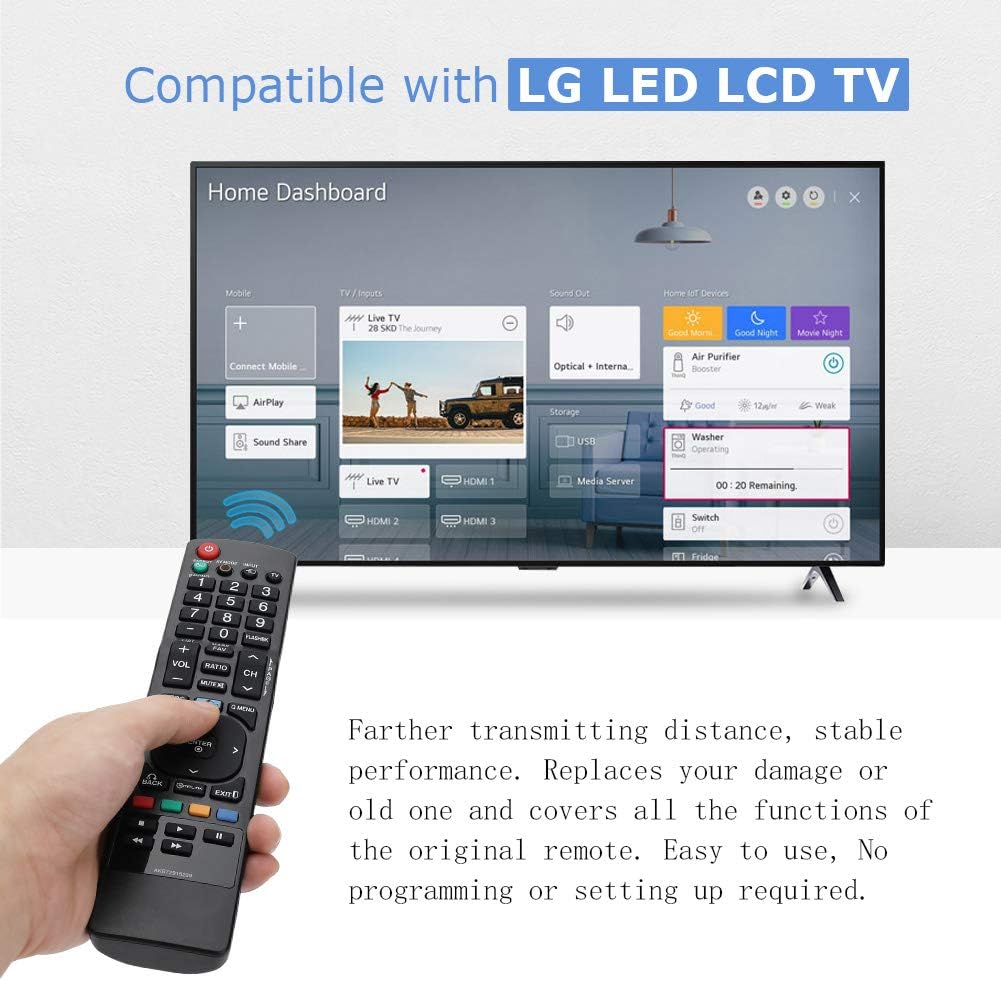
Image: The YOSUN remote control being held, with an LG Smart TV displaying its home dashboard, illustrating the remote's compatibility and function.
Сумяшчальнасць
The YOSUN Universal Remote Control is compatible with various LG LCD and LED Smart TV models. It is designed to replace many original LG remote controls. For specific compatibility, refer to the list of compatible original LG remote model numbers provided below.
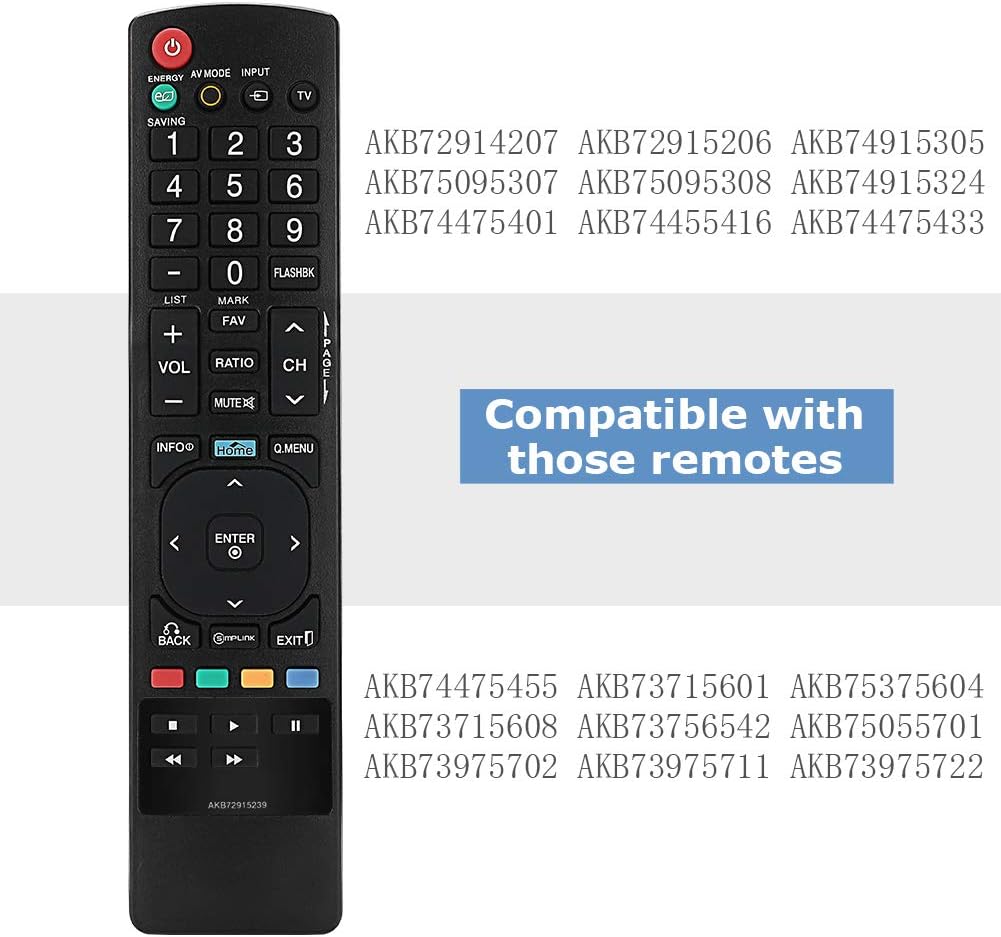
Image: The YOSUN remote control displaying a list of LG remote model numbers it is compatible with, such as AKB72914207, AKB72915206, AKB74915305, AKB75095307, AKB75095308, AKB74915324, AKB74475401, AKB74455416, AKB74475433, AKB74475455, AKB73715601, AKB75375604, AKB73715608, AKB73756542, AKB75055701, AKB73975702, AKB73975711, and AKB73975722.
Настройка
This remote control is designed for immediate use with compatible LG televisions. No programming or complex setup procedures are typically required.
- Усталюйце батарэі: Open the battery compartment on the back of the remote control. Insert two AAA batteries, ensuring correct polarity (+ and -). Close the battery compartment securely.
- Уключэнне тэлевізара: Point the remote control towards your LG television and press the УЛАДА button. The television should respond.
- Тэставыя функцыі: Test basic functions such as volume control (VOL+/-), channel change (CH+/-), and input selection (INPUT).
If the remote does not function immediately, ensure the batteries are correctly installed and have sufficient charge. Verify that the remote's infrared emitter is not obstructed and that there is a clear line of sight to the TV's IR receiver.

Image: The YOSUN remote control highlighting its plug-and-play nature, indicating no programming or setup is required for operation.
Інструкцыя па эксплуатацыі
The YOSUN Universal Remote Control provides standard functions for controlling your LG television. Below is a general guide to its buttons and their primary uses.

Image: A person using the YOSUN remote control to operate an LG Smart TV, demonstrating typical usage scenarios.
Функцыі кнопак

Выява: Падрабязны view of the YOSUN remote control, illustrating the layout and labels of each button, along with their corresponding functions.
- УЛАДА: Уключае або выключае тэлевізар.
- ЭНЕРГАЗБЯРЭЖЭННЕ: Activates or deactivates the TV's energy-saving mode to reduce power consumption.
- РЭЖЫМ AV: Switches between various picture and sound modes such as Cinema/THX, Game, or Sport mode.
- УВОД: Selects the input source (e.g., HDMI 1, HDMI 2, AV).
- TV: Selects the TV mode directly.
- Кнопкі з лічбамі (0-9): Непасрэдны выбар каналаў.
- ФЛЭШБК: Alternates between the last two channels viewрэд.
- СПІС: Accesses the saved channels list.
- ГУЧНАСЦЬ +/-: Рэгулюе ўзровень гучнасці.
- CH +/-: Змена каналаў.
- АБРАШАНАЕ: Accesses your favorite channel list.
- МУК: Mutes or unmutes the television sound.
- ІНФА: Displays information on the TV screen.
- ДОМ: Press to access the LG Home dashboard. Hold down to access your most recently used apps and notifications. Note: On some Smart TV models, this button may function as a settings button rather than directly opening the Smart TV home screen.
- Q.МЕНЮ: Opens a list of quick menu options for frequently used functions.
- Кнопкі навігацыі (Уверх, Уніз, Улева, Управа, ENTER): Навігацыя па меню і пацвярджэнне выбару.
- НАЗАД: Returns to the previous step or menu.
- SIMPLINK: Controls external devices connected to your LG TV via HDMI. This enables control of devices like Blu-ray players or soundbars using the TV remote.
- ВЫХАД: Выхад з бягучага меню або праграмы.
- Color Buttons (RED, GREEN, YELLOW, BLUE): Shortcut keys for interactive functions, often context-dependent within menus or applications.
- Playback Controls (Rewind, Play, Fast Forward, Stop, Pause): Кіраванне прайграваннем медыяфайлаў.
Тэхнічнае абслугоўванне
To ensure optimal performance and longevity of your YOSUN Universal Remote Control, follow these maintenance guidelines:
- Замена батарэі: When the remote's performance degrades or it stops responding, replace the batteries. Use two new AAA batteries. Ensure correct polarity when inserting.
- Уборка: Працярыце пульт дыстанцыйнага кіравання мяккай сухой тканінай. Для выдалення ўстойлівага бруду злёгкуamp можна выкарыстоўваць тканіну, але пераканайцеся, што вільгаць не трапляе ў пульт. Не выкарыстоўвайце абразіўныя ачышчальнікі або растваральнікі.
- захоўванне: Store the remote in a dry place, away from direct sunlight and extreme temperatures. If the remote will not be used for an extended period, remove the batteries to prevent leakage.
- Апрацоўка: Пазбягайце падзення пульта дыстанцыйнага кіравання або моцных удараў, бо гэта можа пашкодзіць унутраныя кампаненты.

Выява: Задняя частка view of the YOSUN remote control with the battery cover removed, illustrating the compartment for two AAA batteries.
Ліквідацыю непаладак
If you encounter issues with your YOSUN Universal Remote Control, refer to the following troubleshooting steps:
- Пульт не адказвае:
- Праверце, ці правільна ўстаўлены батарэйкі з захаваннем палярнасці.
- Замяніце старыя батарэйкі новымі батарэйкамі тыпу ААА.
- Ensure there is a clear line of sight between the remote and the TV's infrared receiver. Remove any obstructions.
- Пераканайцеся, што пульт накіраваны непасрэдна на тэлевізар.
- Кнопкі не працуюць:
- If only specific buttons are not working, try cleaning the remote as described in the Maintenance section.
- Ensure the remote is not wet or damaged.
- "HOME" Button Does Not Open Smart TV Dashboard:
- On some LG Smart TV models, the "HOME" button on this universal remote may function as a "Settings" button or a different menu access, rather than directly opening the Smart TV's main application dashboard. This is a characteristic of some universal remote designs and not a defect.
- Refer to your TV's original remote or on-screen menus to access the Smart TV dashboard if this function is critical.
- Абмежаваны дыяпазон:
- Пераканайцеся, што батарэйкі свежыя.
- Remove any objects blocking the remote's signal path to the TV.
- The maximum effective range is approximately 8 meters (26 feet).
Тэхнічныя характарыстыкі
| Марка | YOSUN |
| Нумар мадэлі | AKB72915239 |
| Сумяшчальныя прылады | LG LCD TV, LG LED Smart TVs |
| Тэхналогія падлучэння | Інфрачырвоны (ВК) |
| Колькасць кнопак | 44 |
| Максімальны дыяпазон | 8 Meters (approximately 26 feet) |
| Тып батарэі | ААА |
| Неабходная колькасць батарэй | 2 |
Гарантыя і падтрымка
Information regarding specific warranty terms or direct customer support for the YOSUN Universal Remote Control is not provided in this manual. For warranty claims or technical assistance, please refer to the retailer or platform where the product was purchased, or consult the manufacturer's official webсайт, калі ёсць.