
Уводзіны
Thank you for choosing the Ringway TB810A Electronic Keyboard. This manual provides essential information for the safe and efficient use of your instrument. Please read it thoroughly before operating the keyboard and keep it for future reference.
Інфармацыя па бяспецы
- крыніца харчавання: Выкарыстоўвайце толькі пазначаны адаптар сілкавання або батарэйкі. Пераканайцеся, што гучнасцьtage matches the keyboard's requirements.
- Вада і вільгаць: Do not expose the keyboard to water or excessive moisture. Avoid placing liquids near the instrument.
- Вентыляцыя: Ensure proper ventilation around the keyboard. Do not block ventilation openings.
- Уборка: Clean the keyboard with a soft, dry cloth. Do not use abrasive cleaners or solvents.
- Апрацоўка: Handle the keyboard with care. Avoid dropping or subjecting it to strong impacts.
Змест пакета
Праверце наяўнасць усіх прадметаў у камплекце:
- Ringway TB810A Electronic Keyboard
- Адаптар харчавання (калі ён уключаны)
- Музычны адпачынак
- Кіраўніцтва карыстальніка
Прадукт скончаныview
The Ringway TB810A is a 61-key electronic keyboard designed for various skill levels. It features touch-sensitive keys, a multi-function LCD, and a wide range of voices and accompaniment styles.
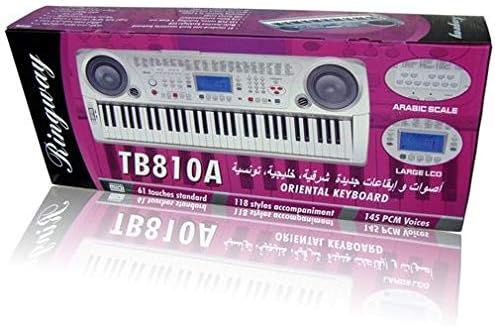
Малюнак 1: Спераду view of the Ringway TB810A Electronic Keyboard, showcasing the 61 keys, built-in speakers, and control panel.

Малюнак 2: Пад вуглом view of the Ringway TB810A Electronic Keyboard, including the detachable music rest.
Настройка
- Распакаванне: Асцярожна дастаньце клавіятуру і ўсе аксэсуары з упакоўкі.
- Падключэнне сілкавання:
- Адаптар пераменнага току: Connect the AC adapter to the DC 12V input jack on the rear panel of the keyboard, then plug it into a standard wall outlet.
- батарэі: If using batteries, open the battery compartment on the underside of the keyboard and insert the required batteries (not included), ensuring correct polarity.
- Музычны адпачынак: Устаўце пюпітр у прызначаныя для гэтага пазы на верхняй панэлі клавіятуры.
- Выхад для навушнікаў/аўдыё: For private practice, connect 3.5mm headphones to the headphone jack. To connect to an external amplifier or sound system, use the Line Out jack.
- Педаль: Connect an optional sustain pedal to the Pedal jack for enhanced expression.
Інструкцыя па эксплуатацыі
1. Уключэнне/выключэнне харчавання і гучнасць
- Націсніце УЛАДА кнопка для ўключэння або выключэння клавіятуры.
- Адрэгулюйце агульную гучнасць з дапамогай ГАЛОЎНЫ ОБ'ём ручка.
2. Дысплей і панэль кіравання
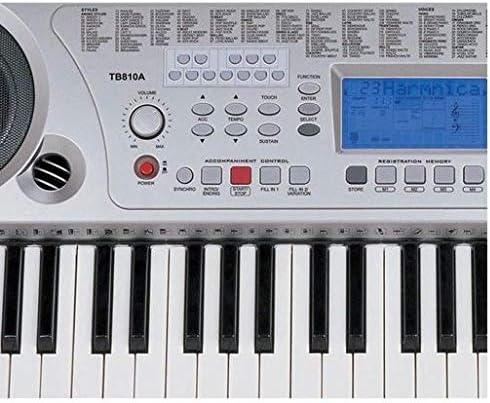
Малюнак 3: Буйны план view of the control panel, showing the LCD screen, power button, volume knob, and various function buttons.
- The multi-function LCD screen displays current settings, voice numbers, rhythm numbers, and other operational information. It is backlit for visibility.
- Use the numeric keypad and +/- buttons to select voices, rhythms, and other parameters.
3. Voices (Tones)
- The keyboard features 141 PCM voices.
- To select a voice, press the ГОЛАС button, then use the numeric keypad or +/- кнопкі, каб увесці патрэбны нумар голасу.
- паліфанія: The keyboard supports 64-note polyphony, allowing multiple notes to sound simultaneously.
4. Accompaniment Styles (Rhythms)
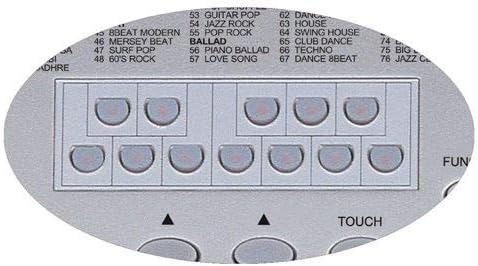
Figure 4: Detail of the rhythm selection buttons, showing various style categories.
- The keyboard includes 118 auto accompaniment styles, including 3 Arabic rhythm groups.
- To select a style, press the СТЫЛЬ button, then use the numeric keypad or +/- кнопкі.
- Кіраванне акампанементам: Выкарыстоўвайце такія кнопкі, як СІНХР, ПУСК/СТОП, УСТУПІННЕ/КАНЕЦЦЕ, ЗАПОЎНІЦЬ 1, і FILL 2/VARIATION to control the accompaniment.
5. Key Modes
- Нармальны: Standard playing mode.
- адзіночны: Single-finger chord recognition for accompaniment.
- Fingered: Full-finger chord recognition for accompaniment.
- Разбіць: Падзяляе клавіятуру на дзве часткі, што дазваляе іграць розныя галасы на кожнай з іх.
6. Lesson Function (3 Steps)
The keyboard offers a 3-step lesson function to help users learn songs.
- Lesson 1 (One-Key Play): Practice timing by pressing any key to advance the melody.
- Lesson 2 (Follow Me): The keyboard waits for you to play the correct note before proceeding.
- Lesson 3 (Ensemble): Play along with the accompaniment, focusing on rhythm and melody.
- The keyboard includes 50 lesson songs (numbered 51 to 100).
7. Дэма-песні
The keyboard has 100 demo songs (numbered 01 to 100) for listening pleasure and demonstration of instrument capabilities.
8. Запіс
- The multi-track recording feature allows you to record and play back your performances.
- Refer to the specific recording section in the full manual for detailed instructions on how to record and playback.
9. Рэгістрацыйная памяць
Store and recall up to 4 panel settings (voices, rhythms, tempo, etc.) using the registration memory function.
10. Іншыя функцыі
- Транспанаваць: Adjust the pitch of the keyboard in semitone steps.
- мелодыя: Fine-tune the overall pitch.
- Націсніце: Enable or disable touch sensitivity for the keys.
- актава: Shift the keyboard's pitch up or down by octaves.
- Сустэйн: Apply a sustain effect to notes.
- Прыпеў: Add a chorus effect to the sound.
- Разбіць: Divide the keyboard into two sections with different voices.
- Гармонія: Add harmony notes to your melody.
- Уваход/выхад MIDI: Connect the keyboard to other MIDI devices or a computer using the MIDI USB port for advanced control and recording.
Тэхнічнае абслугоўванне
- Уборка: Wipe the keyboard surface with a soft, dry, lint-free cloth. For stubborn dirt, slightly dampen the cloth with water and mild soap, then wipe dry immediately.
- захоўванне: When not in use for extended periods, store the keyboard in a dry, dust-free environment, away from direct sunlight and extreme temperatures.
- Замена батарэі: If using batteries, replace them when the power indicator dims or the keyboard functions become unstable. Always replace all batteries at once with new ones of the same type.
Ліквідацыю непаладак
| праблема | Магчымая прычына | Рашэнне |
|---|---|---|
| Няма ўлады | Power adapter not connected, batteries depleted/incorrectly inserted | Check AC adapter connection; replace batteries ensuring correct polarity. |
| Няма гуку | Volume too low, headphones connected, external device connected to Line Out | Increase Master Volume; disconnect headphones; check external audio connections. |
| Клавішы не адказваюць | Keyboard in a specific mode (e.g., Lesson mode waiting for input) | Exit lesson mode or reset the keyboard (refer to full manual for reset procedure). |
| Скажоны гук | Volume too high, faulty connection | Lower volume; check all cable connections. |
Тэхнічныя характарыстыкі
| Асаблівасць | Апісанне |
|---|---|
| Ключы | 61 standard touch-sensitive keys |
| Дысплей | Multi-function LCD with backlight |
| Поліфанія | 64 нот |
| Галасы | 141 PCM voices |
| Стылі акампанементу | 118 styles (including 3 Arabic rhythm groups) |
| Lesson Function | 3-step (One-Key Play, Follow Me, Ensemble) |
| Lesson Songs | 50 songs (51-100) |
| Дэманстрацыйныя песні | 100 songs (01-100) |
| Запіс | Multi-track recording and playback |
| Памяць рэгістрацыі | 4 panel settings |
| Сувязь | MIDI In/Out (USB), Pedal, Line Out, Aux In (Mobile), DC 12V |
| Раз'ём для навушнікаў | 3.5 мм |
| Крыніца харчавання | AC Adapter (DC 12V) or Batteries |
| Памеры (Д х Ш х У) | 950 мм × 350 мм × 130 мм |
| Тып аздаблення | Глянцавы |
| Узровень майстэрства | Усе |
| стыль | Сучасны |
Гарантыя і падтрымка
For warranty information and technical support, please refer to the warranty card included with your product or contact your local Ringway distributor. Keep your purchase receipt as proof of purchase for any warranty claims.