
1. Уводзіны
The Magewell Ultra Encode SDI (Model 53050) is a versatile live stream encoder designed for professional AV applications. It supports high-quality H.264, H.265 (HEVC), and NDI|HX encoding, along with multiple streaming protocols. This manual provides detailed instructions for setting up, operating, maintaining, and troubleshooting your Ultra Encode SDI device.
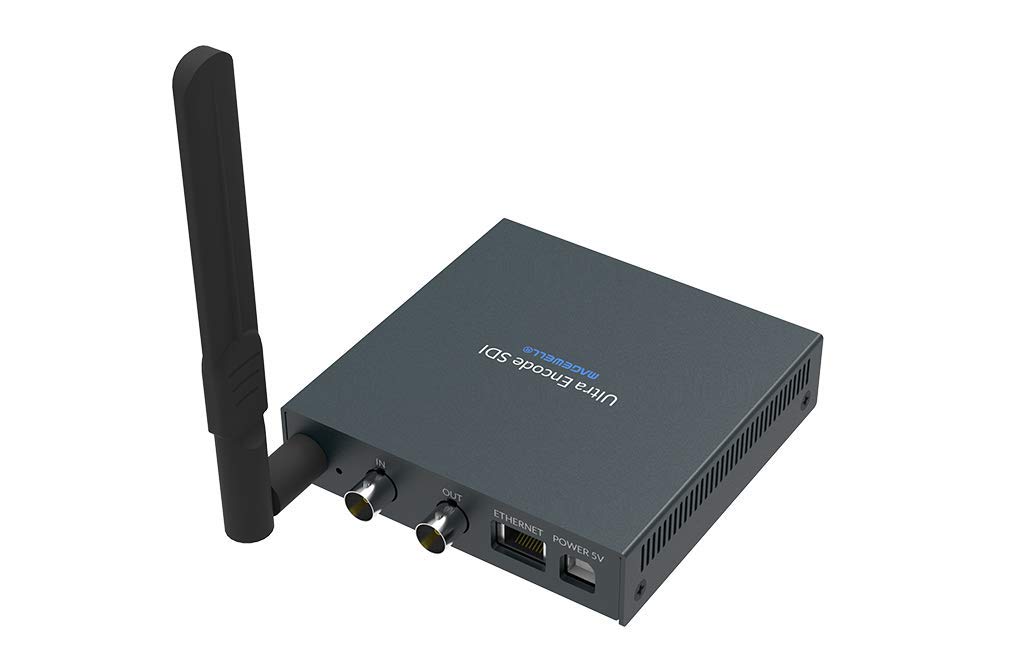
Figure 1.1: Magewell Ultra Encode SDI (Model 53050) device.
2. Змесціва ўпакоўкі
Please verify that all items listed below are included in your package. If any items are missing or damaged, contact your vendor or Magewell support.
- Magewell Ultra Encode SDI (Model 53050) Unit
- Power Adapter (with regional plugs)
- USB 2.0 Type B cable
- Антэна Wi-Fi
- T-bracket
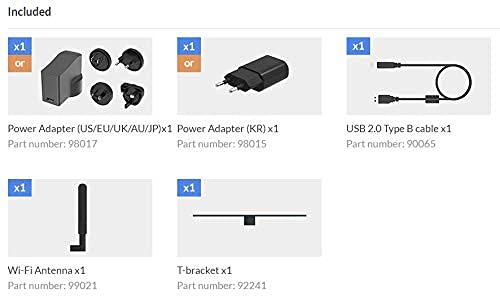
Figure 2.1: Included accessories with the Ultra Encode SDI.
3. Прадукт скончыўсяview
The Ultra Encode SDI features various ports and indicators for connectivity and status monitoring. Familiarize yourself with these components before setup.
3.1 Front/Side Panel

Figure 3.1: Front/Side panel with audio ports, status LEDs, and USB port.
- ЛІНЕЙНЫ ВЫХАД: 3.5 мм аўдыявыхад.
- РАДКА Ў: 3.5 мм гукавы ўваход.
- Святлодыёд PWR: Індыкатар магутнасці.
- У святлодыёдзе: Input signal status.
- Жывы святлодыёд: Streaming status.
- Святлодыёд ETH: Ethernet connection status.
- Святлодыёд Wi-Fi: Стан злучэння Wi-Fi.
- ВАРЫЯНТ: USB port for optional accessories or configuration.
3.2 Задняя панэль

Figure 3.2: Rear panel with video, network, and power connections.
- IN (SDI): SDI/3G video input.
- OUT (SDI): SDI/3G loop-through output.
- ETHERNET: Порт RJ45 для падлучэння да правадной сеткі.
- ХАРЧАВАННЕ 5 В: Порт ўводу харчавання.
3.3 Схема порта

Figure 3.3: Comprehensive port and indicator diagram.
4. Настройка
Follow these steps to set up your Magewell Ultra Encode SDI device.
4.1 Фізічныя злучэнні
- Падключыце харчаванне: Падключыце адаптар сілкавання, які ўваходзіць у камплект, да сілкаванне 5V port on the rear panel and then into a power outlet. The PWR LED on the front panel should illuminate.
- Connect Video Input: Connect your SDI/3G video source to the IN (SDI) port on the rear panel. If you need to loop the signal through, connect a cable from the OUT (SDI) port to your monitoring device.
- Падключыць аўдыё (дадаткова): If using analog audio, connect your audio source to the ЛІНІЙНЫ ЎХОД port and your audio monitoring device to the ЛІНЕЙНЫ ВЫХАД порт.
- Падключыць сетку:
- Wired: Connect an Ethernet cable from your network router or switch to the Ethernet port on the rear panel. The ETH LED should illuminate.
- Бесправадная сувязь: Screw the provided Wi-Fi antenna onto the antenna socket. You will configure the Wi-Fi connection via the web інтэрфейс. The Wi-Fi LED will indicate connection status.
4.2 Пачатковая канфігурацыя (Web Інтэрфейс)
The Ultra Encode SDI is configured via a webінтэрфейс на аснове . Каб атрымаць да яго доступ:
- Ensure your computer is on the same network as the Ultra Encode SDI.
- Use a network scanning tool or check your router's connected devices list to find the IP address of the Ultra Encode SDI. Alternatively, some devices may have a default IP or a discovery tool.
- Адкрыйце a web браўзер і ўвядзіце IP-адрас прылады ў адрасны радок.
- Log in using the default credentials (refer to the device's quick start guide or Magewell documentation for default username and password).
- Ад ст web interface, you can configure network settings (including Wi-Fi), video/audio input parameters, encoding settings, and streaming destinations.
5. Інструкцыя па эксплуатацыі
The Ultra Encode SDI offers flexible encoding and streaming capabilities.
5.1 Налады кадавання
- The device supports H.264 and H.265 (HEVC) video encoding. Select the desired codec and adjust parameters such as bitrate (up to 16Mbps), resolution, and frame rate via the web інтэрфейс.
- Audio encoding options are also available for optimal quality and compatibility.
5.2 Streaming Protocols
The Ultra Encode SDI supports various streaming protocols:
- RTMP/RTMPS: Commonly used for live streaming to platforms like YouTube, Facebook, and Twitch. Configure the server URL and stream key in the web інтэрфейс.
- HLS: HTTP Live Streaming for adaptive bitrate delivery.
- SRT: Secure Reliable Transport protocol for low-latency, high-quality video transport over unreliable networks.
- NDI|HX: NewTek's NDI|HX encoding for IP production workflows. Enable and configure NDI|HX output in the web інтэрфейс.
5.3 Configurable Presets
The device includes configurable presets for easy streaming to popular platforms:
- Access the presets section in the web інтэрфейс.
- Select a platform (e.g., Facebook, Twitch, YouTube) and enter your stream key or login details as prompted.
- Activate the preset to begin streaming.
6. Тэхнічнае абслугоўванне
Proper maintenance ensures the longevity and optimal performance of your Ultra Encode SDI.
- Уборка: Для чысткі вонкавага боку прылады выкарыстоўвайце мяккую сухую тканіну. Пазбягайце выкарыстання вадкіх ачышчальнікаў або абразіўных матэрыялаў.
- Вентыляцыя: Пераканайцеся, што прылада знаходзіцца ў добра вентыляваным месцы, каб пазбегнуць перагрэву. Не блакуйце вентыляцыйныя адтуліны.
- Абнаўленні прашыўкі: Periodically check the Magewell official website for firmware updates. Updating the firmware can provide new features, performance improvements, and bug fixes. Follow the instructions provided by Magewell for safe firmware updates.
- захоўванне: Калі прылада не выкарыстоўваецца працяглы час, захоўвайце яе ў прахалодным, сухім месцы, удалечыні ад прамых сонечных прамянёў і экстрэмальных тэмператур.
7. Выпраўленне непаладак
У гэтым раздзеле разглядаюцца распаўсюджаныя праблемы, з якімі вы можаце сутыкнуцца.
- Няма харчавання:
- Пераканайцеся, што адаптар сілкавання надзейна падключаны да прылады і да спраўнай разеткі.
- Verify the power adapter is the correct one supplied with the device.
- Няма відэаўваходу:
- Check the SDI cable connection between the source and the device's IN (SDI) порт.
- Confirm the video source is active and outputting a compatible SDI signal.
- Праверце IN Статус святлодыёда.
- Няма падключэння да сеткі:
- For wired connection, ensure the Ethernet cable is properly connected and the ETH LED is active.
- For Wi-Fi, ensure the antenna is attached, and Wi-Fi settings are correctly configured in the web interface. Check the Wi-Fi LED.
- Verify your network router is functioning correctly.
- Немагчыма атрымаць доступ Web інтэрфейс:
- Ensure your computer is on the same network as the encoder.
- Verify the IP address of the encoder.
- Паспрабуйце ачысціць кэш браўзера або скарыстацца іншым браўзерам.
- Streaming Issues (Buffering, Disconnections):
- Праверце хуткасць і стабільнасць вашага інтэрнэт-злучэння.
- Reduce the encoding bitrate in the web interface if your network bandwidth is limited.
- Verify streaming server URL and stream key are correct.
- Праверце ЖЫВАЯ Статус святлодыёда.
For further assistance, refer to the Magewell support webабо звярніцеся ў службу тэхнічнай падтрымкі.
8. Тэхнічныя характарыстыкі
| Асаблівасць | Спецыфікацыя |
|---|---|
| Марка | Мэджвелл |
| мадэль | 53050 |
| Памеры прадукту | 10.5 х 10.6 х 2.5 см |
| Вага прадмета | 596 г (0.6 кілаграма) |
| Відэа ўваход | SDI/3G Input |
| Відэавыхад | SDI/3G Loop |
| Аўдыё ўваход | Line-In (3.5mm) |
| Аўдыёвыхад | Line-Out (3.5mm) |
| Фарматы кадавання | H.264, H.265 (HEVC), NDI|HX |
| Максімальны бітрэйт | Да 16 Мбіт/с |
| Пратаколы струменевай перадачы | RTMP, RTMPS, HLS, SRT |
| Падключэнне да сеткі | Ethernet (RJ45), Wi-Fi (802.11ac) |
| Электразабеспячэнне | 12 В (пастаянны ток) |
| Сумяшчальныя прылады | Laptop (for configuration) |
| Асаблівасці | Wireless connectivity, Configurable presets for streaming platforms |
9. Гарантыя і падтрымка
For information regarding product warranty, technical support, and service, please refer to the official Magewell website or contact your authorized Magewell dealer. Keep your purchase receipt as proof of purchase for warranty claims.
Magewell Official Webсайт: www.magewell.com