
Yunteng yt-1288
Yunteng YT-1288 Extendable Selfie Stick Monopod User Manual
Model: YT-1288 | Brand: Yunteng
Прадукт скончаныview
The Yunteng YT-1288 is an extendable handheld monopod designed for capturing photos and videos with smartphones and cameras. It features a detachable Bluetooth remote control for convenient operation and an adjustable ball head for versatile shooting angles.

Figure 1: Yunteng YT-1288 Extendable Selfie Stick Monopod with its detachable Bluetooth remote control.
This monopod is constructed from durable aluminum alloy and ABS plastic, ensuring both lightweight portability and robust performance. It extends up to 125 cm (49.2 inches) and collapses to a compact 42.5 cm (16.7 inches) for easy transport.
Кіраўніцтва па ўстаноўцы
1. Падключэнне прылады
- Prepare the Phone Adapter: The monopod comes with an adjustable phone adapter. Ensure it is securely attached to the 1/4 inch screw on the monopod's ball head.
- Усталюйце свой смартфон: Gently expand the phone adapter clamp and insert your smartphone. Ensure the phone is held firmly and centrally to maintain balance.
- Mount a Camera (Optional): If using a camera, ensure it has a 1/4 inch screw mount. Securely attach the camera directly to the monopod's 1/4 inch screw.

Малюнак 2: Буйны план views illustrating the adjustable phone holder, ball head, extension locking mechanisms, and the slot for the remote control.
2. Спалучэнне пульта дыстанцыйнага кіравання Bluetooth
- Уключыце пульт: Locate the power switch on the side of the detachable Bluetooth remote control and slide it to the "ON" position. The indicator light will begin to flash, indicating it is in pairing mode.
- Уключыце Bluetooth на вашай прыладзе: On your smartphone or camera, go to the Bluetooth settings menu.
- Connect to "Yunteng": Пошук available devices. You should see "Yunteng" or a similar name appear in the list. Select it to pair. The indicator light on the remote will stop flashing and remain solid once successfully paired.
- Тэставае злучэнне: Open your device's camera application and press the shutter button on the remote to confirm the connection.
Заўвага: The remote control can be stored in the designated slot on the monopod handle when not in use, or detached for remote operation.
Інструкцыя па эксплуатацыі
1. Extending and Retracting the Monopod
- Каб падоўжыць: Unlock the segment clamps by flipping them open. Gently pull each section outwards to extend the monopod to your desired length. Once extended, firmly close the clamps to lock each segment in place.
- Каб адклікаць: Open the segment clamps and push each section inwards until the monopod is fully collapsed. Close the clamps, каб замацаваць яго.
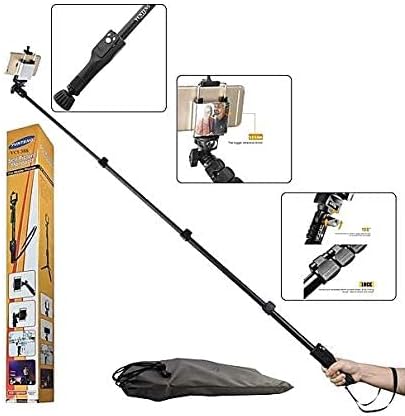
Figure 3: The Yunteng YT-1288 monopod shown in its fully extended state, alongside its packaging.
2. Рэгуляванне вуглоў здымкі
- Рэгуляванне шарыкавай галоўкі: Loosen the thumb screw on the ball head located near the phone adapter. Adjust the angle of your device as needed (up to 180 degrees). Tighten the thumb screw to secure the desired position.
- Built-in Mirror: Utilize the small mirror located on the phone adapter for better framing when using your device's rear camera for selfies.
3. Using the Shutter Remote
- Once paired, simply press the appropriate button on the Bluetooth remote control to capture photos or start/stop video recording.
- The remote allows for convenient hands-free operation, especially when the monopod is fully extended or used from a distance.
Video 1: A demonstration of the Yunteng YT-1288 selfie stick's extendable feature, 180-degree adjustable head, and detachable remote control functionality. The video also highlights its maximum extension length of 125 cm.
Тэхнічнае абслугоўванне
- Уборка: Wipe the monopod with a soft, dry cloth after each use to remove dust and dirt. For stubborn marks, a slightly damp можна выкарыстоўваць тканіну, а затым неадкладна высушыць. Пазбягайце выкарыстання агрэсіўных хімікатаў або абразіўных ачышчальнікаў.
- захоўванне: Store the monopod in a cool, dry place away from direct sunlight and extreme temperatures. Ensure it is fully retracted before storage to protect the extending segments.
- Батарэя дыстанцыйнага кіравання: If the Bluetooth remote control stops responding, the battery may need replacement. Refer to the remote's specific instructions for battery type and replacement procedure.
Ліквідацыю непаладак
| праблема | Магчымая прычына | Рашэнне |
|---|---|---|
| Пульт дыстанцыйнага кіравання Bluetooth не спалучаецца. | Remote is off, battery is low, or device Bluetooth is off. | Ensure remote is on and charged. Turn device Bluetooth off and on. Forget device and re-pair. |
| Remote not triggering shutter. | Not paired, camera app settings, or incompatible device. | Verify pairing. Check camera app settings (e.g., volume button for shutter). Some older devices may not be fully compatible. |
| Тэлефон не трымаецца надзейна. | Phone adapter not tightened or phone too large/small. | Ensure phone adapter is securely tightened. Verify phone dimensions are within the adapter's range. |
| Monopod segments not locking. | Clamps not fully closed or debris in mechanism. | Пераканайцеся, што ўсе клamps are firmly closed. Check for any obstructions and clean if necessary. |
Тэхнічныя характарыстыкі
- мадэль: YT-1288
- матэрыял: Aluminum Alloy and ABS
- колер: Чорны
- Інтэрфейс камеры: Universal 1/4 Screw
- сегменты: 3
- Павялічаная даўжыня: 125 см (49.2 цалі)
- Закрытая даўжыня: 42.5 см (16.7 цалі)
- Вага прадмета: 0.35 кілаграма
- Максімальны вага Рэкамендацыя: 10 кілаграма
- Сумяшчальныя прылады: Cellphone, Camera
Гарантыя і падтрымка
For warranty information or technical support, please refer to the product packaging or contact the manufacturer directly. Keep your purchase receipt for any warranty claims.
For further assistance, you may also visit the official Yunteng webсайт або звярніцеся ў іх аддзел абслугоўвання кліентаў.
Ask a question about this manual
Ask about setup, troubleshooting, compatibility, parts, safety, or missing instructions. Manuals+ will review the question and use this page’s manual context to help answer it.