
1. Уводзіны
The Energizer Connect Smart WiFi Plug allows you to control your electronic devices remotely using a mobile application or voice commands. This smart plug connects directly to your home's 2.4GHz Wi-Fi network, eliminating the need for a separate hub. It is compatible with Amazon Alexa, Google Assistant, and Siri for convenient voice control. This manual provides detailed instructions for setting up, operating, maintaining, and troubleshooting your smart plug.
2. Інфармацыя па бяспецы
Калі ласка, прачытайце і зразумейце ўсе інструкцыі па тэхніцы бяспекі перад выкарыстаннем гэтага прадукта. Невыкананне гэтых інструкцый можа прывесці да паражэння электрычным токам, пажару або пашкоджання маёмасці.
- Толькі для выкарыстання ў памяшканнях.
- Не перавышайце максімальную нагрузку 15 Amps (120 Volts).
- Do not immerse the plug in water or expose it to moisture.
- Не спрабуйце разабраць або мадыфікаваць прыладу.
- Захоўваць у месцах, недаступных дзецям.
- Пераканайцеся, што вілка цалкам устаўлена ў разетку.
- Перад чысткай адключыце прыладу ад разеткі.
3. Змесціва ўпакоўкі
- 1 x Energizer Connect Smart WiFi Plug
- 1 х Кіраўніцтва карыстальніка (гэты дакумент)
4. Прадукт скончыўсяview
The Energizer Connect Smart WiFi Plug features a compact design that allows access to the second outlet. It includes a power button and an LED indicator for status.

Малюнак 4.1: The Energizer Connect Smart WiFi Plug shown with its retail packaging, highlighting key features like 15 Amps of power, grouping, voice control, and Wi-Fi connectivity. The plug itself is white and compact.

Малюнак 4.2: Крупны план фронту view of the Energizer Connect Smart WiFi Plug, showing the standard Type B electrical outlet configuration (two vertical slots and a round ground hole).

Малюнак 4.3: This image displays the compact dimensions of the Energizer Connect Smart WiFi Plug. The side view shows a depth of 1.0625 inches, and the front view indicates a diameter of 1.125 inches, illustrating its mini size.
4.1. Кампаненты
- Кнопка харчавання: Press to manually turn the connected device on or off. Press and hold for 5 seconds to initiate pairing mode (LED will blink rapidly).
- Святлодыёдны індыкатар:
- Суцэльны сіні: Прылада ўключана.
- Выключана: Прылада выключана.
- Rapidly Blinking Blue: Рэжым спалучэння.
- Павольна міргае сінім: Адключаны ад Wi-Fi.
5. Інструкцыі па ўсталёўцы
Follow these steps to set up your Energizer Connect Smart WiFi Plug.
5.1. Сістэмныя патрабаванні
- A stable 2.4GHz Wi-Fi network (5GHz networks are not supported).
- A smartphone or tablet running iOS 10.0 or higher, or Android 6.0 or higher.
- Access to the Apple App Store or Google Play Store.
5.2. Загрузка і ўстаноўка праграмы
- Спампаваць Energizer Connect App з Apple App Store або Google Play Store. Пошук "Energizer Connect".
- Адкрыйце праграму і выконвайце інструкцыі на экране, каб стварыць уліковы запіс або ўвайсці.

Малюнак 5.1: A smartphone displaying the Energizer Connect App interface, showing the smart plug in an "ON" state. The image also includes the physical smart plug and icons for downloading the app from the App Store and Google Play.
5.3. Pairing the Smart Plug
- Plug the Energizer Connect Smart WiFi Plug into a standard 120V wall outlet.
- The LED indicator on the plug should begin blinking rapidly, indicating it is in pairing mode. If not, press and hold the power button on the side of the plug for 5 seconds until it blinks rapidly.
- Open the Energizer Connect App.
- Tap the "+" icon (or "Add Device") to add a new device.
- Выберыце «Электрычная разетка» або «Разумная разетка» са спісу прылад.
- Пераканайцеся, што індыкатар у дадатку хутка міргае.
- Enter your 2.4GHz Wi-Fi network name and password. Ensure your phone is connected to the same 2.4GHz network.
- The app will attempt to connect to the smart plug. This may take a few moments.
- Once successfully paired, the LED indicator on the plug will turn solid blue, and the app will confirm the connection.
- You can then rename your smart plug within the app for easier identification (e.g., "Living Room Lamp"", "Кававарка").

Малюнак 5.2: A visual guide showing the three easy steps for setting up the Energizer Connect Smart WiFi Plug: download the app, install the device, and set up and control via the app or voice assistants. The image also features the Energizer bunny mascot.
6. Інструкцыя па эксплуатацыі
Control your smart plug using the Energizer Connect App or compatible voice assistants.
6.1. Ручное кіраванне
Press the power button on the side of the smart plug to manually turn the connected device on or off.
6.2. Кіраванне праграмамі
- Укл/Выкл: Open the Energizer Connect App, select your smart plug, and tap the power icon to toggle its state.
- Планаванне: Set custom schedules for your plug to turn on or off automatically at specific times or days. This is useful for lights, coffee makers, or other appliances.
- Таймеры: Set countdown timers for the plug to turn off after a set duration.
- Аддалены доступ: Control your smart plug from anywhere with an internet connection, even when you are away from home.
- Групоўка: Group multiple Energizer Connect smart plugs together to control them simultaneously with a single command.
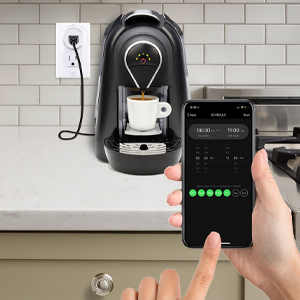
Малюнак 6.1: A hand holding a smartphone displaying the Energizer Connect App's scheduling interface, set to turn on a coffee maker at a specific time. The smart plug is visible in the background, connected to the coffee machine.

Малюнак 6.2: A person using a smartphone to remotely control a smart plug, demonstrating the ability to turn devices on or off from any location. The image shows a split view of the person and a living room with a lamp connected to a smart plug.
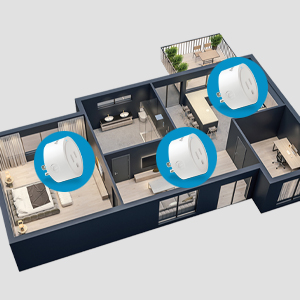
Малюнак 6.3: An overhead diagram of a home showing multiple Energizer Connect Smart WiFi Plugs placed in different rooms, illustrating the concept of grouping and controlling several devices simultaneously.
6.3. Галасавое кіраванне
The Energizer Connect Smart WiFi Plug is compatible with Amazon Alexa, Google Assistant, and Siri. To enable voice control:
- Ensure your smart plug is successfully paired with the Energizer Connect App.
- Open your Amazon Alexa, Google Home, or Apple Home app.
- Follow the app's instructions to link the "Energizer Connect" skill or service. You will need to log in with your Energizer Connect account credentials.
- Пасля падключэння вы можаце выкарыстоўваць галасавыя каманды, такія як:
- "Alexa, turn on [Plug Name]."
- "Hey Google, turn off [Plug Name]."
- "Hey Siri, turn on [Plug Name]." (Requires setting up Siri Shortcuts in the Energizer Connect App)

Малюнак 6.4: A living room scene demonstrating voice control capabilities. The image shows a smart plug connected to a fan, with icons for Google Assistant, Alexa, and Siri Shortcuts, indicating compatibility with these voice assistants.
7. Тэхнічнае абслугоўванне
Каб забяспечыць аптымальную прадукцыйнасць і даўгавечнасць вашай разумнай разеткі:
- Уборка: Disconnect the smart plug from the power outlet before cleaning. Use a soft, dry cloth to wipe the surface. Do not use liquid cleaners or aerosols.
- захоўванне: When not in use, store the smart plug in a cool, dry place away from direct sunlight and moisture.
- Умовы навакольнага асяроддзя: Avoid exposing the plug to extreme temperatures or humidity.
8. Выпраўленне непаладак
If you encounter issues with your Energizer Connect Smart WiFi Plug, refer to the following solutions:
| праблема | Магчымая прычына | Рашэнне |
|---|---|---|
| Plug not connecting to Wi-Fi / LED blinking slowly | Incorrect Wi-Fi password, 5GHz network selected, plug too far from router, network interference. |
|
| App cannot find the plug during pairing | Plug not in pairing mode, incorrect app used, network issues. |
|
| Не працуе галасавое кіраванне | Voice assistant not linked, incorrect device name, internet connectivity issues. |
|
| Plug unresponsive | Магутнасцьtagе, няспраўнасць прылады. |
|
9. Тэхнічныя характарыстыкі
| Асаблівасць | Дэталь |
|---|---|
| Нумар мадэлі | B0929DFGZY |
| UPC | 805106871352 |
| Уваходны кнtage | 120 вольт |
| Максімальны ток нагрузкі | 15 Amps |
| Частата Wi-Fi | 2.4GHz (IEEE 802.11 b/g/n) |
| Сумяшчальнасць | Amazon Alexa, Google Assistant, Siri (via Shortcuts) |
| Сертыфікаты | FCC Certified, ETL Certified |
| Матэрыял | Пластык, гума |
| Колер | Белы |
| Вага прадмета | 2.89 унцыі |
| Dimensions (Approx. Plug Body) | 1.125" (Diameter) x 1.0625" (Depth from outlet face) |
10. Гарантыя і падтрымка
For warranty information and technical support, please contact the manufacturer or seller directly. The manufacturer of this product is Jem Accessories, and the brand is Energizer Connect (distributed by XTREME DIGITAL LIFESTYLE ACCESSORIES).
Калі ласка, захавайце доказы пакупкі для прэтэнзій па гарантыі.
For further assistance, visit the Energizer Connect webсайт або звярніцеся да кантактнай інфармацыі, размешчанай на ўпакоўцы прадукту.