
SIMOLIO SM-824D1
Кіраўніцтва карыстальніка для бесправадных лічбавых тэлевізійных навушнікаў SIMOLIO SM824D1
Model: SM-824D1
Уводзіны
This manual provides detailed instructions for the setup, operation, and maintenance of your SIMOLIO SM824D1 Digital Wireless TV Headphones. Please read this manual thoroughly before using the product to ensure proper functionality and to maximize your listening experience.
The SIMOLIO SM824D1 system includes a wireless headset and a transmitter. It is designed to provide clear audio from your TV or other audio sources directly to your ears, featuring balance and tone controls for personalized sound, and a long-range 2.4GHz wireless connection.
Змест пакета
Калі ласка, пераканайцеся, што ўсе прадметы прысутнічаюць у вашай упакоўцы:
- SIMOLIO SM824D1 Wireless Headset
- SIMOLIO SM824D1 Transmitter
- Audio Cables (Optical, RCA, 3.5mm)
- Адаптар сілкавання
- USB-кабель для зарадкі
- Extra Soft Ear Tips
- Decompression Hanger Loops
- Кіраўніцтва карыстальніка на англійскай мове (гэты дакумент)
- Spare Lithium-Ion Battery

Image: Contents of the SIMOLIO SM824D1 package, showing the headset, transmitter, audio cables, power adapter, USB cable, extra ear tips, and hanger loops.
Настройка
1. Уключэнне перадатчыка
- Connect the power adapter to the transmitter's 'Power In' port.
- Падключыце адаптар сілкавання да насценнай разеткі.
2. Connecting to Your TV/Audio Source
The SIMOLIO SM824D1 supports Digital Optical, RCA, and 3.5mm audio outputs. Choose the appropriate cable based on your TV or audio source's available ports.

Image: Compatibility chart for TV audio outputs (Digital Optical, 3.5mm, RCA) with SIMOLIO models.
- Лічбавае аптычнае злучэнне: Use the optical cable. Connect one end to your TV's 'Digital Optical Audio Out' port and the other end to the 'OPTICAL IN' port on the transmitter. Важна: For optical connections, you MUST set your TV's audio output format to PCM. Refer to your TV's settings menu.
- Злучэнне RCA: Use the RCA audio cable (red and white plugs). Connect the red plug to the TV's 'Audio Out R' and the white plug to 'Audio Out L'. Connect the other end to the 'AUDIO IN' port on the transmitter.
- 3.5 мм аўдыёзлучэнне: Use the 3.5mm audio cable. Connect one end to your TV's headphone jack or 'Audio Out' port and the other end to the 'AUDIO IN' port on the transmitter.
Only one audio cable connection is required. For TVs with only coaxial or HDMI ARC ports, an additional audio converter/extractor may be needed (not included).

Выява: Задняя частка view of the transmitter, highlighting the input ports and audio mode switches.
3. Зарадка гарнітуры
The headset uses a rechargeable Lithium-Ion battery. A spare battery is also included and can be charged in the transmitter.
- Пераканайцеся, што перадатчык уключаны.
- To charge the headset, place it into the charging slots on the transmitter. Ensure the front of the headset faces the front of the transmitter.
- To charge the spare battery, open the charging compartment on the transmitter and insert the battery.
- Charging typically takes about 3 hours. The indicator light on the headset will show charging status.

Image: Instructions for charging the headset and spare battery using the transmitter.
Інструкцыя па эксплуатацыі
Элементы кіравання гарнітурай
Выява: Зверхуview of the headset's controls and features.
- Уключэнне/выключэнне харчавання: Slide the switch to turn the headset on or off.
- Рэгулятар гучнасці: Use the 'VOL' dial to adjust the listening volume.
- Кантроль балансу: Use the 'BAL' dial to adjust the volume balance between the left and right ears. This is useful for individuals with different hearing sensitivities in each ear.
- Асабісты гук Amplifier Button: Press this button to activate the ambient sound listener function, allowing you to hear nearby conversations without removing the headset. The indicator light will turn red when active.
Элементы кіравання перадатчыкам
- OFF/MONO/STEREO Switch: Select 'STEREO' for Hi-Fi sound quality or 'MONO' for clearer TV dialogue, especially beneficial for speech clarity.
- TONE Selector (TREBLE/NORMAL/BASS): Adjust the audio tone to your preference. 'TREBLE' enhances high frequencies, 'BASS' enhances low frequencies, and 'NORMAL' provides a balanced sound.
Нашэнне гарнітуры
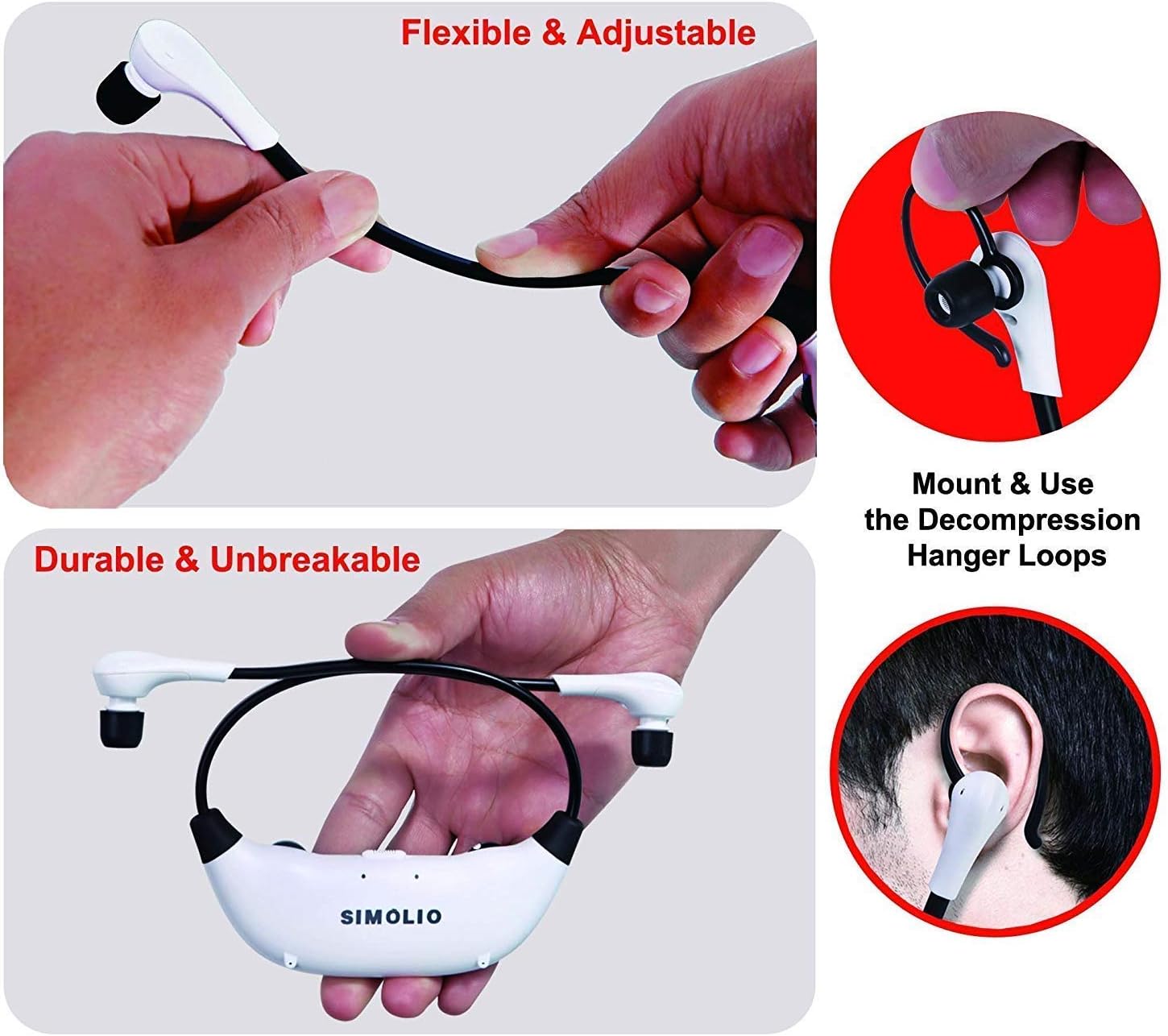
The headset features flexible and adjustable arms with memory stainless steel strips for a comfortable fit. Super-soft memory foam eartips and decompression hanger loops are included for enhanced comfort.

Image: Visual guide on adjusting the headset for comfort and using the hanger loops.
Тэхнічнае абслугоўванне
Сыход за батарэяй
- Always fully charge the battery before first use.
- When not in use, store the headset on the transmitter to keep it charged.
- The included spare battery can be swapped out for continuous use.
Уборка
- Wipe the headset and transmitter with a soft, dry cloth.
- The ear-tips feature an anti-dust mesh. Clean gently if dust accumulates.
- Пазбягайце выкарыстання агрэсіўных хімікатаў або абразіўных ачышчальнікаў.
Захоўванне
- Захоўвайце прыладу ў прахалодным, сухім месцы, удалечыні ад прамых сонечных прамянёў і экстрэмальных тэмператур.
Ліквідацыю непаладак
| праблема | Магчымая прычына | Рашэнне |
|---|---|---|
| Няма гуку альбо малая гучнасць |
|
|
| Скажэнне або статыка гуку |
|
|
| Гарнітура не зараджаецца |
|
|

Image: Recommended TV audio settings for optimal performance.

Image: Guidance on optimizing audio signal strength from TV and cable box.
Тэхнічныя характарыстыкі
- Назва мадэлі: СМ-824Д1
- Тэхналогія падключэння: Бесправадная сувязь (РЧ)
- Тэхналогія бесправадной сувязі: ВЧ (2.4 ГГц)
- Раз'ём для навушнікаў: 3.5 mm Jack (for input to transmitter)
- Сумяшчальныя прылады: TVs with Digital Optical, RCA, or 3.5mm Audio Outputs
- Тып кіравання: Button Control, Push Button, Dial
- Час зарадкі: Прыкладна 3 гадзін
- Тэрмін службы батарэі: Да 6 гадзін (у залежнасці ад выкарыстання)
- Вага прадмета: 0.54 Kilograms (headset and transmitter)
- матэрыял: Пластыкавыя
- Функцыі кантролю шуму: Шумапрыглушэнне
- асаблівасць: Microphone Included (for ambient sound ampліфікацыя)
- вытворца: Сімоліо
Інфармацыя па бяспецы
Папярэджанне:
- These RF products are not recommended for individuals with pacemakers. Please consult your physician before use if you have a pacemaker.
- Пазбягайце працяглага праслухоўвання на высокай гучнасці, каб пазбегнуць пашкоджання слыху.
Гарантыя і падтрымка
For warranty information or technical assistance, please refer to the warranty card included with your product or visit the official SIMOLIO website. You may also contact SIMOLIO customer support directly via the contact information provided on their webсайце або ў дакументацыі да вашага прадукту.
For connectivity questions, you can send a picture of your TV's jack panel to support@simolio.com for confirmation.