
1. Важная інфармацыя па бяспецы
Калі ласка, уважліва прачытайце ўсе інструкцыі перад зборкай і выкарыстаннем. Захоўвайце гэтую інструкцыю для далейшага выкарыстання.
- ПАПЯРЭДЖАННЕ: Always assemble the desk according to the provided instructions to ensure stability.
- Не перавышайце максімальную грузападымальнасць 177 кг (80 фунтаў).
- Be cautious when using the height adjustment feature to avoid injury from moving parts.
- Keep hands and fingers away from the moving parts during operation.
- Ensure the power cord is not pinched or damaged during assembly or operation.
- Гэты прадукт прызначаны толькі для выкарыстання ў памяшканнях.
2. Прадукт скончыўсяview
The FLEXISPOT E1L is a dual-motor, L-shaped electric standing desk designed for home and office use. It features adjustable height, a quiet operation, and a customizable control panel.

Image 2.1: The FLEXISPOT E1L desk frame demonstrating its adjustable height capabilities.

Image 2.2: The FLEXISPOT E1L desk in a typical office setup, showcasing its L-shape and functionality.
3. Налада і зборка
Assembly of the FLEXISPOT E1L desk is designed to be straightforward, typically taking less than 30 minutes. All necessary tools are included.
3.1 Распакоўка і праверка кампанентаў
Carefully unpack all components and verify against the packing list. Ensure all parts are present and undamaged before proceeding.
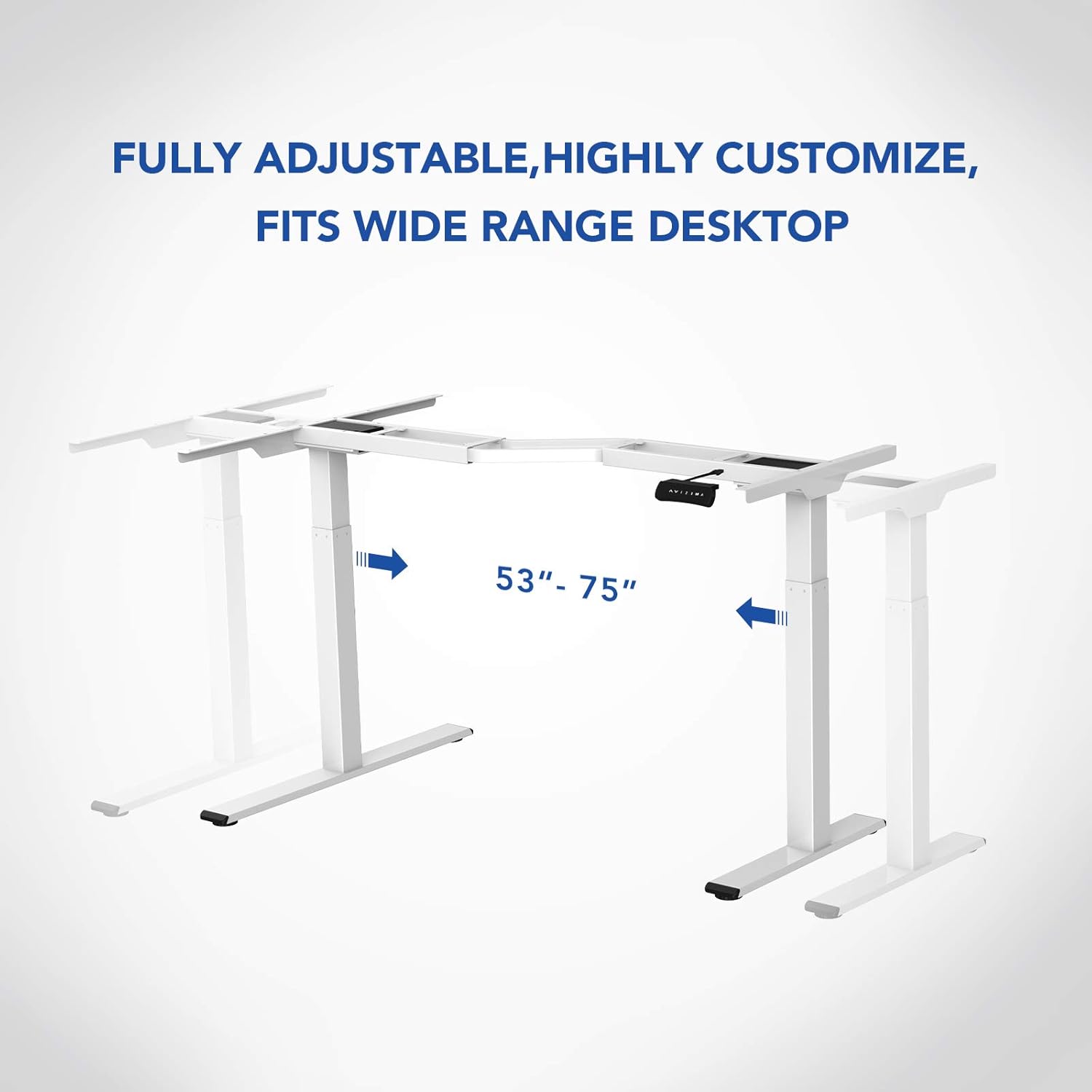
Выява 3.1: Канецview of the FLEXISPOT E1L desk frame components prior to assembly.
3.2 Этапы зборкі
- Attach the lifting columns to the desktop frame.
- Замацуеце ножкі да ніжняй часткі пад'ёмных калон.
- Connect the control box and motor cables as per the detailed diagram in the included assembly guide.
- Mount the control panel to the desired location on the desk.
- Place the desktop surface onto the assembled frame and secure it.
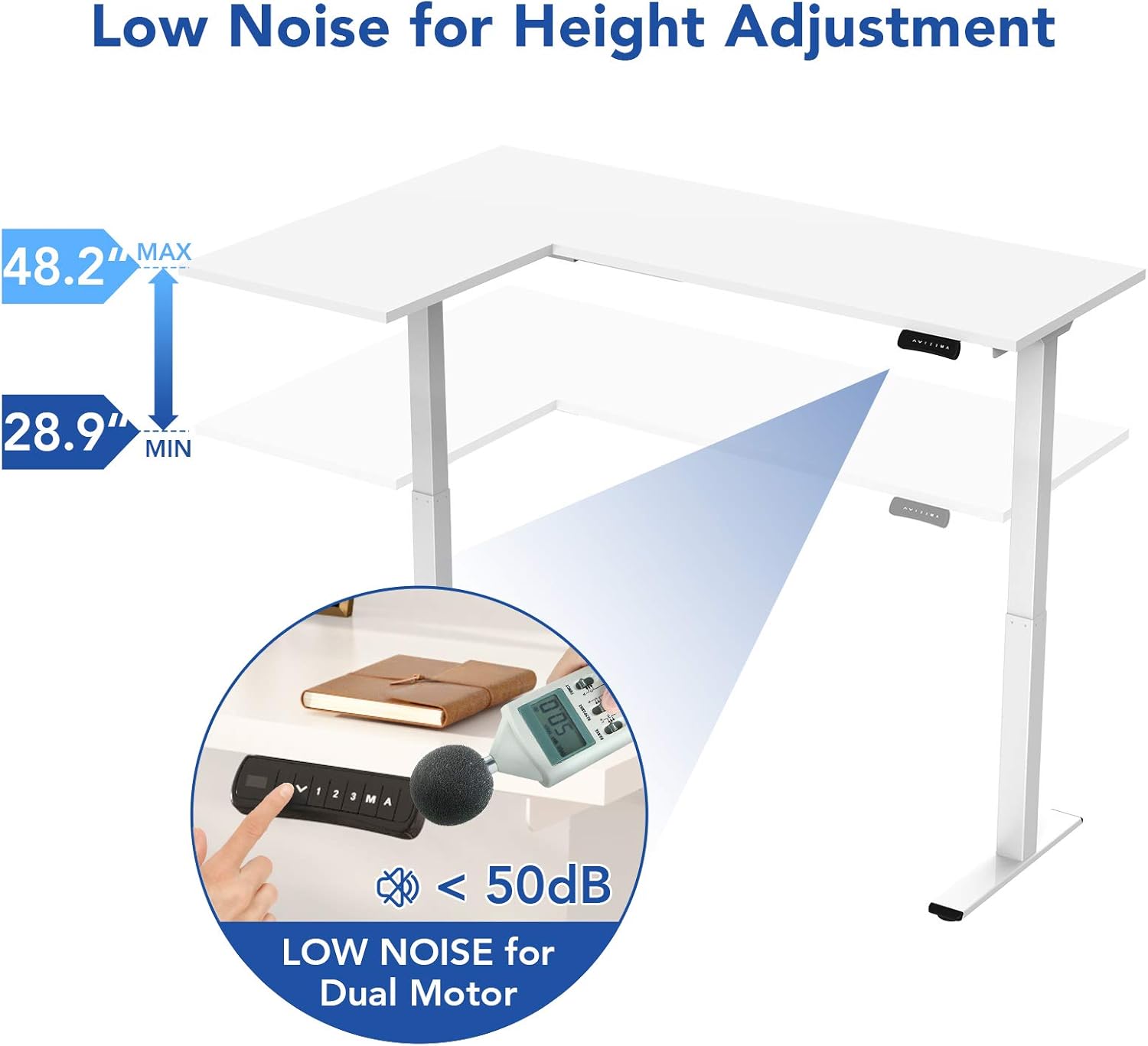
Image 3.2: An assembly step illustrating the connection of the L-shaped desk frame components.

Image 3.3: The desk frame nearing completion, with the control panel attached.
3.3 Reversible L-Shape Configuration
The L-shaped configuration of the desk is reversible, allowing you to set up the longer side on either the left or right, depending on your preference and workspace layout. This flexibility is determined during the assembly process.

Image 3.4: Visual representation of the desk's reversible L-shape, allowing for left or right-hand configurations.
4. Інструкцыя па эксплуатацыі
4.1 Рэгуляванне вышыні
The desk features a dual-motor lift mechanism for smooth and quiet height adjustments. The height can be adjusted from 27.9 inches (70.9 cm) to 47.2 inches (120 cm).
- Выкарыстоўвайце Up (▲) і Уніз (▼) buttons on the control panel to manually adjust the desk height.
- The desk operates at a speed of 1 inch per second and maintains a noise level under 50 dB during movement.

Image 4.1: Illustration highlighting the low noise operation (under 50 dB) of the desk's dual motor system.
4.2 Функцыі панэлі кіравання
The built-in LED control panel allows for easy customization and programming of desk height settings.

Image 4.2: Close-up of the control panel, detailing its buttons and functions.
- Up/Down Buttons (▲, ▼): Manually adjust the desk height.
- Папярэднія налады памяці (1, 2, 3): Store and recall up to three preferred height settings. To save a height, adjust the desk to the desired position, then press the 'M' button followed by the desired number (1, 2, or 3).
- Кнопка памяці (M): Used to save height presets.
- Sit-Stand Reminder (A): Activate a programmable timer to remind you to switch between sitting and standing postures. Refer to the full assembly guide for detailed programming instructions.
4.3 Сістэма прадухілення сутыкненняў
The desk is equipped with a built-in anti-collision system. If the desk encounters an obstruction during height adjustment, it will automatically stop and reverse slightly to prevent damage or injury.

Image 4.3: Visual explanation of the anti-collision system, showing the desk reversing upon contact with an obstacle.
5. Тэхнічнае абслугоўванне
Regular maintenance ensures the longevity and optimal performance of your FLEXISPOT E1L desk.
- Уборка: Працярыце паверхню стала і раму мяккай губкайamp тканінай. Пазбягайце абразіўных ачышчальнікаў або растваральнікаў, якія могуць пашкодзіць пакрыццё.
- Кабельнае кіраванне: Periodically check all cables to ensure they are securely connected and not pinched or frayed. Use the included cable management tray to keep wires organized.
- Зашпількі: Перыядычна правярайце ўсе шрубы і балты, каб пераканацца ў іх зацягнутасці. Пры неабходнасці падцягвайце.
- Праверка рухавіка: Listen for any unusual noises during operation. If you notice any, discontinue use and consult the troubleshooting section or contact customer support.
6. Выпраўленне непаладак
Калі ў вас узніклі праблемы са сталом, звярніцеся да наступных распаўсюджаных крокаў па ліквідацыі непаладак:
| праблема | Магчымая прычына | Рашэнне |
|---|---|---|
| Стол не рухаецца. | Power cable disconnected; control box error; overload. | Check power connections. Unplug and replug the power cord. Reduce weight on the desk. |
| Стол рухаецца няроўна. | Uneven load; motor synchronization issue. | Distribute weight evenly. Perform a reset (refer to the full manual for specific reset procedures). |
| Адлюстраваны код памылкі. | Канкрэтная сістэмная памылка. | Refer to the detailed error code list in the complete user manual or contact customer support. Often, a power cycle (unplugging for 10 seconds and replugging) can resolve temporary errors. |
| Сістэма прадухілення сутыкненняў спрацоўвае занадта лёгка. | Занадта высокая налада адчувальнасці. | Adjust the anti-collision sensitivity setting via the control panel (refer to the full manual for instructions). |
If these steps do not resolve the issue, please contact FLEXISPOT customer support.
7. Тэхнічныя характарыстыкі
| Асаблівасць | Спецыфікацыя |
|---|---|
| Марка | ФЛЕКСІСПОТ |
| Нумар мадэлі | E1L |
| Дызайн працоўнага стала | Г-вобразны камп'ютэрны стол |
| Матэрыял каркаса | Industrial-grade Steel |
| Пад'ёмны механізм | Двайны электрарухавік |
| Дыяпазон рэгулявання вышыні | ад 27.9 да 47.2 цаляў (ад 70.9 да 120 см) |
| Хуткасць пад'ёму | 1 цалі/секунду |
| Узровень шуму | Менш за 50 дБ |
| Максімальная грузападымальнасць | 177 фунтаў (80 кг) |
| Панэль кіравання | LED with 3 Memory Presets & Sit-Stand Reminder |
| Асаблівасці | Anti-Collision System, Corded Operation, Reversible L-Shape |
| Патрабуецца зборка | Так (у камплекце ўсе інструменты для зборкі) |
| Рэкамендаваныя людзі для зборкі | 1 |
8. Гарантыя і падтрымка
8.1 Інфармацыя аб гарантыі
The FLEXISPOT E1L desk comes with a Limited Warranty. Please refer to the warranty card included with your product or visit the official FLEXISPOT website for detailed terms and conditions regarding parts and labor coverage.
8.2 Падтрымка кліентаў
For technical assistance, warranty claims, or any questions regarding your FLEXISPOT E1L desk, please contact FLEXISPOT customer support through their official webсайт або кантактную інфармацыю, указаную на ўпакоўцы прадукту.
Вы таксама можаце наведаць в FLEXISPOT Store on Amazon каб атрымаць дадатковую інфармацыю пра прадукт і рэсурсы падтрымкі.