
1. Прадукт скончыўсяview
The BESTTEN USOT-D-3A-L is a heavy-duty digital programmable timer designed for outdoor use. It features a 7-day programming cycle, a built-in clock, and three grounded outlets, allowing for automated control of outdoor lighting, decorations, and appliances. Its weatherproof construction ensures reliable operation in various outdoor conditions.
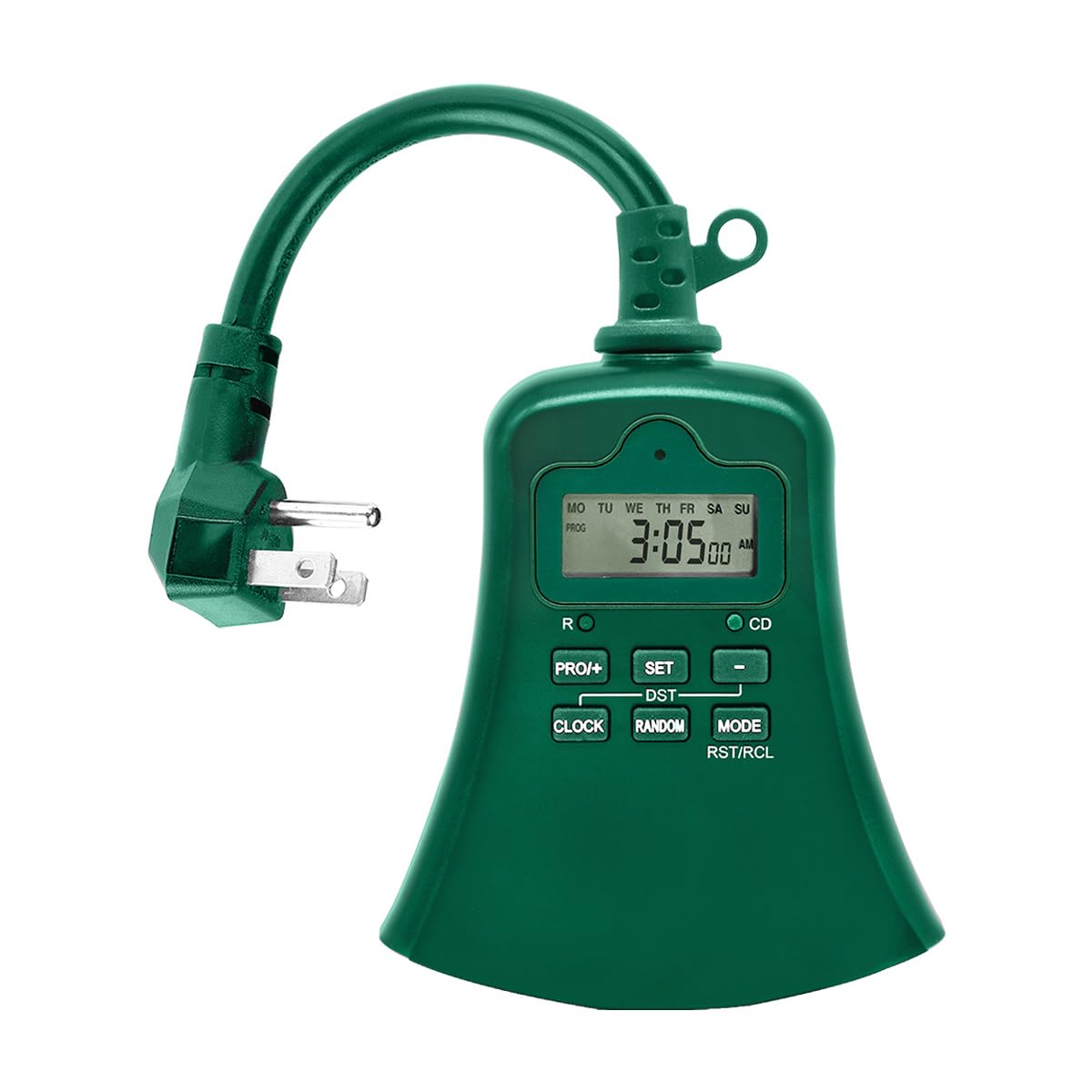
Выява 1.1: Спераду view of the BESTTEN USOT-D-3A-L Outdoor Digital Programmable Timer, showing the display, control buttons, and three grounded outlets.
2. Важныя інструкцыі па бяспецы
Калі ласка, прачытайце і зразумейце ўсе інструкцыі па тэхніцы бяспекі перад выкарыстаннем гэтага прадукта. Невыкананне гэтых інструкцый можа прывесці да пажару, паражэння электрычным токам або траўмы.
- Толькі для вонкавага выкарыстання: This timer is designed for outdoor use. Ensure it is installed in a location protected from direct water spray, though its weatherproof design offers protection against rain.
- Зазямленне: Заўсёды падключайце таймер да зазямленай трохкантактнай разеткі. Не здымайце зазямляльны кантакт.
- Рэйтынг электрычнасці: Не перавышайце электрычныя характарыстыкі таймера. Глядзіце раздзел спецыфікацый для атрымання падрабязнай інфармацыі.
- Апусканне ў ваду: Не апускайце таймер у ваду.
- дзеці: Захоўваць у месцах, недаступных дзецям.
- Тэхнічнае абслугоўванне: Do not attempt to open or repair the timer. Refer all servicing to qualified personnel.
- Падаўжальнікі: If using an extension cord, ensure it is rated for outdoor use and can handle the total amperage of the connected devices.
3. Асаблівасці прадукту
- 7-Day Digital Programming: Set up to 20 ON/OFF programs per day for individual days or groups of days.
- 3 заземленых разетак: Control multiple devices simultaneously.
- Ўстойлівы да надвор'я дызайн: Трывалая канструкцыя, прыдатная для выкарыстання на адкрытым паветры.
- Функцыя таймера зваротнага адліку: Set a specific duration for devices to remain ON.
- Ручное перавызначэнне: Easily switch between ON, OFF, and AUTO modes.
- Убудаваная рэзервовая батарэя: Retains programming during power outagэс.
- У спісе ETL: Сертыфікавана па стандартах бяспекі і якасці.
4. Змесціва ўпакоўкі
Пасля адкрыцця ўпакоўкі пераканайцеся, што ўсе прадметы наяўныя:
- BESTTEN USOT-D-3A-L Outdoor Digital Programmable Timer
- Кіраўніцтва па эксплуатацыі
5. Ўстаноўка
- Выберыце месца: Select a suitable outdoor location for the timer. Ensure it is near a grounded 3-prong electrical outlet and where the connected devices will reach. While weatherproof, avoid locations where it might be submerged or exposed to direct, high-pressure water spray.
- Мантаж (дадаткова): The timer can be hung using the integrated keyhole slot on the back. Use a screw (not included) appropriate for your mounting surface.
- Падключыце таймер: Insert the timer's plug into a grounded 3-prong outdoor electrical outlet. The display should illuminate.
- Падключыце прылады: Plug your outdoor lights or appliances into the three grounded outlets on the bottom of the timer. Ensure the total load does not exceed the timer's maximum rating.
Image 5.1: Illustration of the timer plugged into an outdoor GFCI outlet, with three devices connected to its outlets.
6. Налада і праграмаванне
Before programming, familiarize yourself with the control buttons:
- ГАДЗІННІК: Used to set the current time and day.
- ПРОГРАМА: Used to enter and exit programming mode for ON/OFF times.
- ON/OFF/AUTO: Cycles through ON, OFF, and AUTO modes.
- ДЗЕНЬ: Adjusts the day of the week during time setting or program setting.
- ГАДЗІНА: Adjusts the hour during time setting or program setting.
- МІН.: Adjusts the minute during time setting or program setting.
- RST/RCL: Resets the timer or recalls program settings.
6.1. Пачатковы скід
It is recommended to perform a full reset before first use or after a prolonged period of inactivity.
- Знайдзіце маленькі RST/RCL кнопка.
- Using a pointed object (e.g., a pen tip), press the RST/RCL button. The display will clear, and the timer will reset to default settings.
6.2. Устаноўка бягучага часу і дня
- Націсніце і ўтрымлівайце ГАДЗІННІК кнопку. На дысплеі будзе паказаны бягучы час.
- Пакуль трымае ГАДЗІННІК, націсніце ДЗЕНЬ некалькі разоў націскайце кнопку , пакуль не адлюструецца патрэбны дзень тыдня (MO, TU, WE, TH, PT, SA, SU).
- Пакуль трымае ГАДЗІННІК, націсніце ГАДЗІНА button repeatedly to set the correct hour (12-hour format with AM/PM).
- Пакуль трымае ГАДЗІННІК, націсніце МІН некалькі разоў націсніце кнопку, каб усталяваць патрэбную хвіліну.
- Адпусціце ГАДЗІННІК кнопка. Цяпер бягучы час і дзень усталяваны.
6.3. Праграмаванне часу ўключэння/выключэння
Таймер дазваляе задаць да 20 праграм уключэння/выключэння. Кожная праграма складаецца з часу ўключэння і часу выключэння.
- Націсніце ПРОГ button once. The display will show "1 ON" and the time will flash. This is for the first ON program.
- Прэса ДЗЕНЬ repeatedly to select the desired day(s) for this program. Options include: specific day (MO, TU, etc.), all weekdays (MO TU WE TH FR), all weekend days (SA SU), all 7 days (MO TU WE TH FR SA SU), or various combinations.
- Прэса ГАДЗІНА to set the desired ON hour.
- Прэса МІН to set the desired ON minute.
- Прэса ПРОГ again. The display will show "1 OFF" and the time will flash. This is for the first OFF program.
- Repeat steps 2-4 to set the desired OFF time for the first program. The day selection will automatically match the ON program.
- Прэса ПРОГ again to move to the next program ("2 ON"). Repeat the process for up to 20 programs.
- To exit programming mode at any time, press the ГАДЗІННІК кнопка.
To clear a program: Пакуль viewing the specific ON or OFF program you wish to clear, press the RST/RCL button. The program will be replaced with "--:--".
6.4. Countdown Timer Function
The countdown function allows you to turn on or off a device for a specific duration.
- Пераканайцеся, што таймер уключаны АЎТА рэжым.
- Націсніце і ўтрымлівайце ВКЛ/ВЫКЛ/АЎТА button for approximately 3 seconds. The display will show "CD" (Countdown).
- Выкарыстоўвайце ГАДЗІНА і МІН кнопкі, каб усталяваць патрэбны час адліку часу.
- Прэса ВКЛ/ВЫКЛ/АЎТА again to start the countdown. The connected device will turn ON (if currently OFF) or OFF (if currently ON) for the set duration.
- Каб адмяніць адлік часу, націсніце ВКЛ/ВЫКЛ/АЎТА яшчэ раз.
7. Рэжымы працы
Націсніце ВКЛ/ВЫКЛ/АЎТА button repeatedly to cycle through the operating modes:
- АЎТА: The timer operates according to the programmed ON/OFF times. This is the standard operating mode for automated control.
- ВКЛ: The connected devices will remain continuously ON, overriding any programmed settings. The display will show "ON".
- OFF: The connected devices will remain continuously OFF, overriding any programmed settings. The display will show "OFF".
Always ensure the timer is in АЎТА mode for programmed schedules to function.
8. Тэхнічнае абслугоўванне
- Уборка: Disconnect the timer from the power outlet before cleaning. Wipe the exterior with a soft, damp тканіна. Не выкарыстоўвайце агрэсіўныя хімікаты або абразіўныя ачышчальнікі.
- захоўванне: Калі таймер захоўваецца працяглы час, адключыце яго ад сеткі і захоўвайце ў прахалодным, сухім месцы.
- акумулятар: The internal battery is designed to retain settings during power outages. If the display is consistently blank or settings are lost frequently, the internal battery may need servicing by a qualified technician.
9. Выпраўленне непаладак
| праблема | Магчымая прычына | Рашэнне |
|---|---|---|
| Дысплей таймера пусты. | No power to the timer; internal battery depleted. | Ensure the timer is securely plugged into a live outlet. If the problem persists, the internal battery may need charging (leave plugged in for 24 hours) or replacement. |
| Devices are not turning ON/OFF at programmed times. | Timer is not in AUTO mode; incorrect program settings; devices not properly connected. | Прэса ВКЛ/ВЫКЛ/АЎТА пакуль не з'явіцца надпіс "AUTO". Паўторнаview your program settings (Section 6.3) for accuracy. Ensure devices are securely plugged into the timer. |
| Timer is ON/OFF continuously, ignoring programs. | Timer is in ON or OFF mode. | Прэса ВКЛ/ВЫКЛ/АЎТА until "AUTO" is displayed. |
| Складанасці праграмавання. | Incorrect button sequence; unfamiliarity with controls. | Refer to Section 6.3 for detailed programming steps. Perform an initial reset (Section 6.1) and try again. |
10. Тэхнічныя характарыстыкі
| Нумар мадэлі | USOT-D-3A-L |
| Электрычны рэйтынг | 125V AC, 60Hz, 15A Resistive, 1875W |
| Колькасць гандлёвых кропак | 3 заземленых разетак |
| Цыклы праграмавання | 7-дзённы, да 20 праграм уключэння/выключэння |
| Матэрыял | Полікарбанат |
| Вага прадмета | 8.5 унцыі (0.53 фунта) |
| Сертыфікаты | ETL уключаны ў спіс |
11. Гарантыя і падтрымка кліентаў
BESTTEN products are designed and manufactured to the highest quality standards. For warranty information, technical support, or customer service inquiries, please contact BESTTEN directly through their official webсайт або прадаўца, дзе быў набыты тавар.
Please have your model number (USOT-D-3A-L) and purchase information ready when contacting support.