
PIX-LINK LV-AC28
Кіраўніцтва карыстальніка пашыральніка Wi-Fi PIX-LINK
Model: LV-AC28
Уводзіны
The PIX-LINK WiFi Extender is designed to expand the coverage of your existing wireless network, eliminating Wi-Fi dead zones and providing a stable internet connection throughout your home or office. With a 300Mbps wireless expansion rate, it enhances signal strength and ensures seamless connectivity for multiple devices.

Фронт view of the PIX-LINK WiFi Extender, a compact white device with a WPS button and LED indicators on top, showing wireless signals emanating from it.
Змест пакета
Калі ласка, праверце ўпакоўку на наяўнасць наступных прадметаў:
- PIX-LINK WiFi Extender Unit
- Кіраўніцтва па хуткай ўстаноўцы
Кіраўніцтва па ўстаноўцы
The PIX-LINK WiFi Extender can be easily configured using a web browser on your smartphone, tablet, or computer. Follow these steps for a quick and simple installation:
- Connect to the Extender's Wi-Fi: Plug in the WiFi Extender. On your device, search for available Wi-Fi networks and connect to the network named "PIX-LINK-2.4G".
- Access the Setup Page: Адкрыйце a web browser (e.g., Chrome, Safari) and enter the default IP address
http://192.168.7.234in the address bar. You will be prompted to log in. The default password is "admin". - Выберыце рэжым паўтаральніка: Once logged in, navigate to the setup wizard and select "Repeater Mode" to extend your existing Wi-Fi network.
- Выберыце сетку: The extender will scan for available Wi-Fi networks. Select your target network's SSID (your home Wi-Fi name) from the list and enter its security key (Wi-Fi password).
- Поўная ўстаноўка: Confirm your settings. The extender will then apply the configuration and restart.
- Connect to the New SSID: After the extender restarts, connect your devices to the new extended Wi-Fi network. The new network name will typically be your original network name followed by "_EXT" or similar.
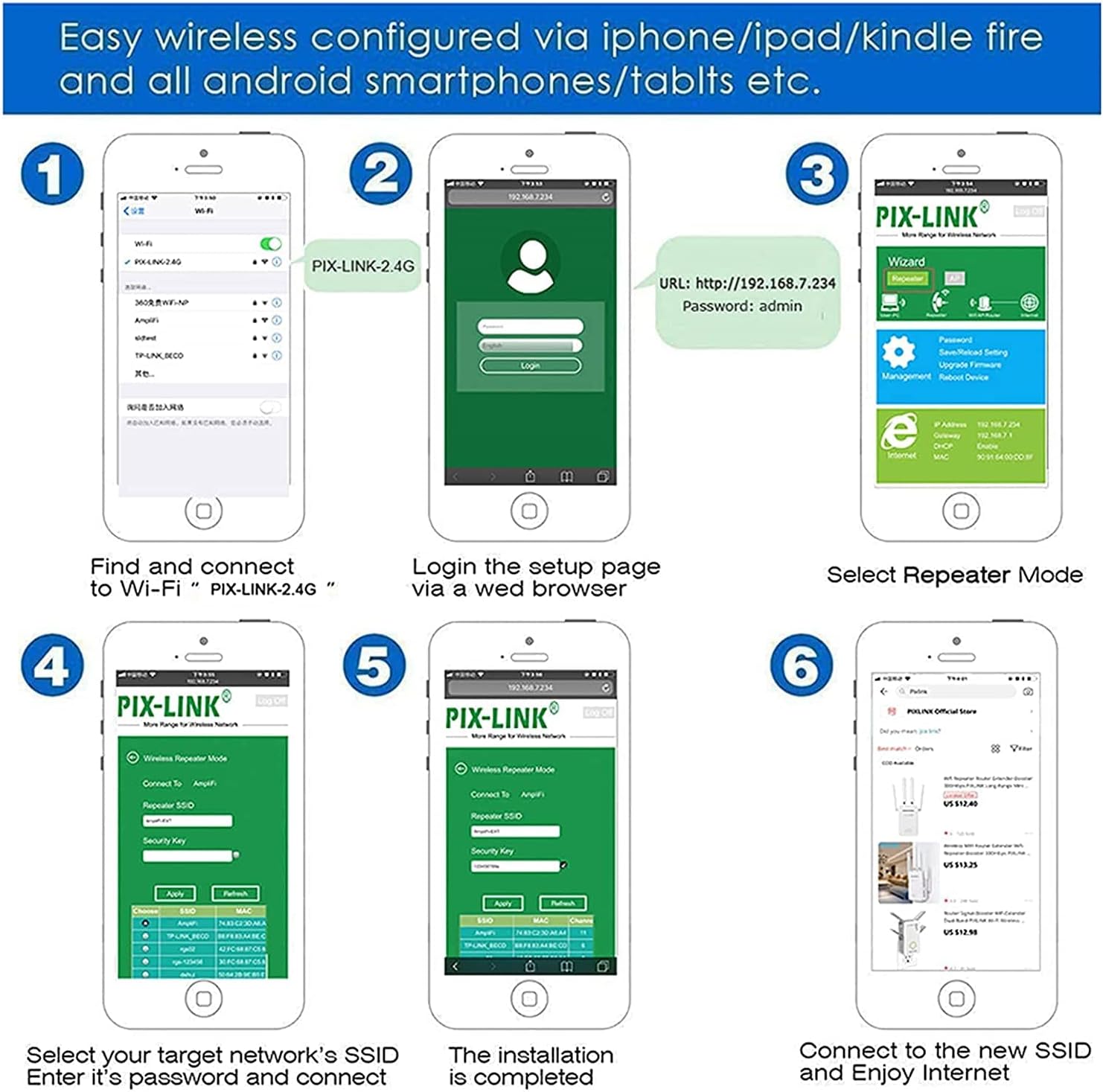
A series of six smartphone screens illustrating the step-by-step process of setting up the PIX-LINK WiFi Extender via a web browser, from connecting to its default network to selecting the repeater mode and entering the main Wi-Fi password.
Рэжымы працы і асаблівасці
The PIX-LINK WiFi Extender offers robust features to enhance your wireless experience:
- Рэжым бесправаднога рэтранслятара: Extends the range of your existing Wi-Fi network, eliminating dead zones.
- Хуткае шыфраванне: One-touch wireless security encryption using the WPS button for quick and secure connections.
- Інтуітыўна зразумелы Web карыстацкі інтэрфейс: Зручны web interface for hassle-free setup and management.
- Універсальная сумяшчальнасць: Works seamlessly with most standard Wi-Fi routers.
- Высакахуткасная перадача дадзеных: Supports up to 300 Megabits Per Second for smooth streaming and browsing.
- Ethernet порт: Includes an RJ45 port to connect wired devices, acting as a wireless adapter.

Three panels illustrating key features: a person using a smartphone with 'Intuitive Web UI' text, two people looking at a laptop with 'Ultimate Wireless Speed' text, and a person using a laptop with 'Reliable Connection' text.

Diagram showing the PIX-LINK WiFi Extender boosting Wi-Fi signals to various devices including smartphones, gaming consoles, laptops, and smart TVs, illustrating its multi-device support.
Святлодыёдныя індыкатары
The LED lights on your PIX-LINK WiFi Extender provide important status information:
| Індыкатар | Статус | Апісанне |
|---|---|---|
| Індыкатар харчавання | On | Прылада ўключана. |
| Святлодыёд Wi-Fi | On | Wi-Fi signal is active. |
| Святлодыёд LAN | Уключана/Міргае | Ethernet port is connected/active. |
| WPS/Repeater LED | On | Repeater function is successfully established. |
| WPS/Repeater LED | Міргае | Repeater function failed or WPS pairing in progress. |

A combined image showing a floor plan illustrating how the wireless repeater extends Wi-Fi signal coverage from a router to previously weak areas, alongside a close-up of the extender's LEDs explaining 'Repeater Mode' status (On: Relay Successful, Blinking: Relay Failure).
Ліквідацыю непаладак
If you encounter issues with your WiFi Extender, consider the following common solutions:
- Няма харчавання: Ensure the extender is properly plugged into a working power outlet.
- Немагчыма атрымаць доступ да старонкі налад: Double-check that you are connected to the extender's Wi-Fi network (e.g., "PIX-LINK-2.4G") and that you have entered the correct IP address (
http://192.168.7.234) and password ("admin"). Try clearing your browser's cache or using a different browser. - Weak Signal After Setup: Try repositioning the extender closer to your main router but still within the range of a strong signal. Obstacles like thick walls can interfere with the signal.
- Repeater Mode Failure (Blinking WPS/Repeater LED): This often indicates an incorrect Wi-Fi password for your main router or an issue connecting to it. Re-enter the password carefully during setup.
- Няма доступу ў Інтэрнэт: Verify that your main router has an active internet connection. Restart both your main router and the extender.
- Скід да заводскіх налад: If problems persist, you may need to perform a factory reset. Locate the Reset/WPS button (often a small pinhole) and press and hold it for about 5-10 seconds until the LEDs flash. This will revert the extender to its default settings, and you will need to set it up again.
Тэхнічныя характарыстыкі
Detailed technical specifications for the PIX-LINK WiFi Extender (Model LV-AC28):
| Катэгорыя | Спецыфікацыя |
|---|---|
| Нумар мадэлі | LV-AC28 |
| Марка | PIX-СПЫЛКА |
| бесправадной стандарт | 802.11bgn |
| Хуткасць перадачы даных | 300 Мбіт/с |
| Дыяпазон частот | Аднадыяпазонны (2.4 ГГц) |
| Порт Ethernet | 1x 10/100Mbps RJ45 Port |
| Антэна | 2 унутраных антэн |
| Гузікі | Кнопка WPS / RESET |
| Памеры (Д х Ш х У) | 80 x 70 x 77 мм (прыбл. 3.15 x 2.76 x 3.03 цалі) |
| Вага прадмета | 4.1 унцыі |
| ASIN | B092YS82J1 |
| Першы даступны | 9 мая 2021 г |

An image displaying detailed specifications of the PIX-LINK WiFi Extender, categorized into Hardware, Wireless, and Others, including Ethernet port type, button details, antenna type, dimensions, wireless standards, signal rate, frequency, transmit power, reception sensitivity, wireless security protocols, and package contents.
Гарантыя і падтрымка
PIX-LINK offers a Гарантыя 1 год covering any defects caused during product production and delivery. If you are not satisfied with your purchase, you may return or replace it without any problem.
For customer service and technical support, PIX-LINK provides 7*24 dedicated customer service to assist you with any issues or questions you may have regarding your WiFi Extender.
Please refer to the contact information provided in your product packaging or on the official PIX-LINK webсайт для непасрэднай падтрымкі.
Ask a question about this manual
Ask about setup, troubleshooting, compatibility, parts, safety, or missing instructions. Manuals+ will review the question and use this page’s manual context to help answer it.