
1. Уводзіны
This manual provides detailed instructions for the installation, operation, and maintenance of your MACHSWON DCR1080P4LCD Dash Cam. This device is designed to record driving footage in 1080P Full HD, offering a 170-degree wide-angle view, G-Sensor for emergency locking, Wide Dynamic Range (WDR) for improved low-light performance, parking monitor, loop recording, and motion detection capabilities. Please read this manual thoroughly before use to ensure proper functionality and safety.
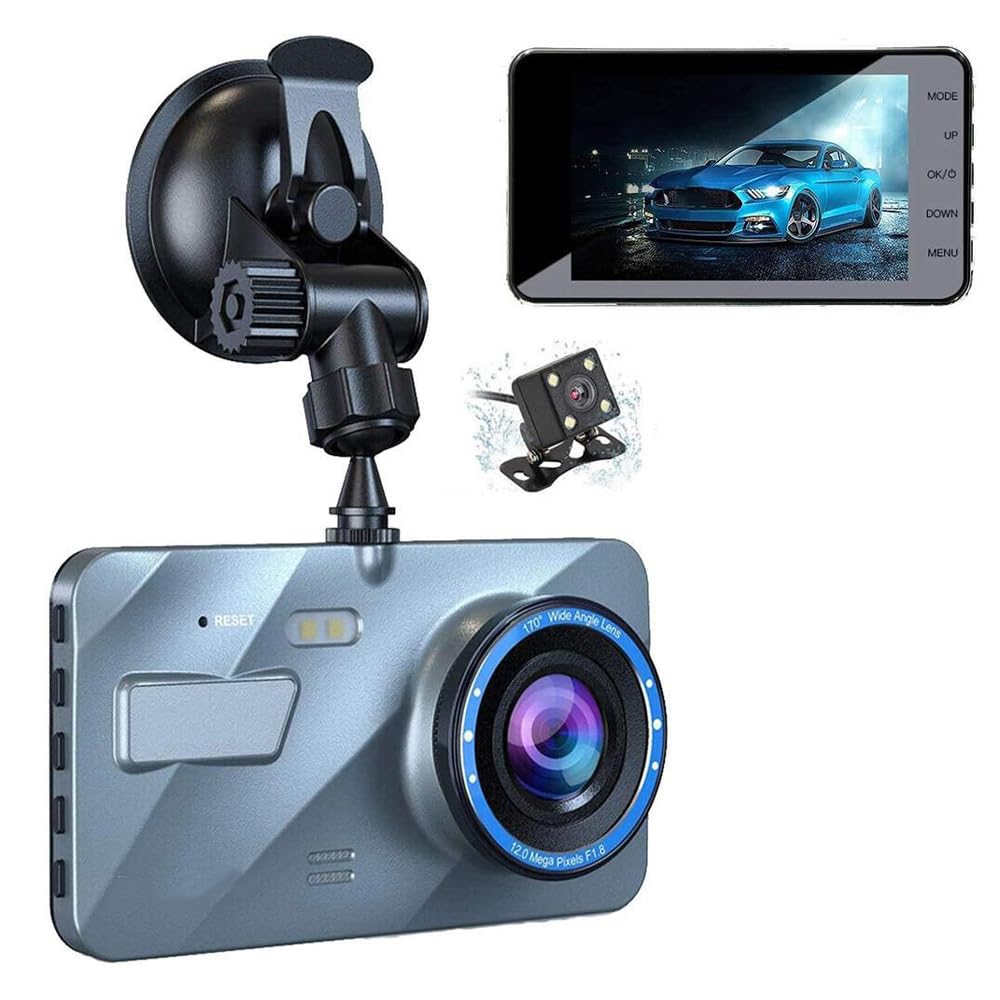
Image 1.1: The MACHSWON DCR1080P4LCD Dash Cam, showing the main unit, suction mount, and power cables.
2. Змесціва ўпакоўкі
Праверце, ці ўсе пералічаныя ніжэй прадметы прысутнічаюць у вашай упакоўцы. Калі якія-небудзь прадметы адсутнічаюць або пашкоджаныя, звярніцеся ў службу падтрымкі кліентаў.
- 1 x MACHSWON DCR1080P4LCD Dash Cam
- 1 х аўтамабільная зарадная прылада
- 1 х прысоска
- 1 х USB-кабель
- 1 х Кіраўніцтва карыстальніка (гэты дакумент)
- 1 x Memory Card (Micro SD card)

Image 2.1: Contents of the package, including the dash cam, car charger, suction mount, USB cable, and rear camera (if applicable).
3. Прадукт скончыўсяview
The MACHSWON DCR1080P4LCD Dash Cam is equipped with advanced features to enhance your driving safety and record important events. Key features include:
- 1080P FHD Recording: Захоплівае выразнае відэаtage of your journey.
- 4-цалевы ВК-экран: Provides a live view and playback of recorded videos.
- Шырокавугольны аб'ектыў 170°: Offers extensive road coverage, minimizing blind spots.
- G-сэнсар: Аўтаматычна выяўляе раптоўныя ўдары або сутыкненні і блакуе бягучае відэа file каб прадухіліць перазапіс.
- WDR (шырокі дынамічны дыяпазон): Improves video quality in varying light conditions, especially at night or in tunnels.
- Манітор паркоўкі: Records events when the vehicle is parked and detects motion or impact.
- цыклічны запіс: Бесперапынна запісвае, перазапісваючы найстарэйшыя files, калі карта памяці поўная.
- Выяўленне руху: Starts recording automatically when motion is detected in front of the camera.

Image 3.1: The dash cam displaying its 1080P recording capability and wide-angle lens, alongside an optional rear camera.

Image 3.2: MACHSWON brand image, representing automotive accessories.
4. Настройка
Follow these steps to properly install your dash cam in your vehicle.
4.1. Устаўка карты памяці
- Пераканайцеся, што відэарэгістратар выключаны.
- Знайдзіце слот для карты Micro SD на бакавой частцы відэарэгістратара.
- Insert the Micro SD card with the gold contacts facing the back of the camera until it clicks into place.
- To remove, gently push the card in until it clicks, then release. The card will eject.
4.2. Мантаж Dash Cam
- Ачысціце лабавое шкло, дзе вы плануеце ўсталяваць відэарэгістратар. Пераканайцеся, што на ім няма пылу і тлушчу.
- Прымацуеце прысоску да відэарэгістратара.
- Моцна прыцісніце прысоску да лабавога шкла і павярніце рычаг, каб зафіксаваць яе. Размясціце камеру так, каб забяспечыць выразны view of the road without obstructing your driving vision.

Image 4.1: The dash cam attached to the windshield using the suction mount, ready for power connection.
4.3. Падключэнне сілкавання
- Падключыце аўтамабільную зарадную прыладу да ўваходнага порта харчавання відэарэгістратара.
- Падключыце другі канец аўтамабільнай зараднай прылады да разеткі 12 В вашага аўтамабіля (гняздо прыпальвальніка).
- Route the power cable neatly along the windshield trim to avoid obstructing your view або перашкаджаюць кіраванню аўтамабілем.
5. Інструкцыя па эксплуатацыі
5.1. Уключэнне / выключэнне харчавання
- Аўтаматычна: The dash cam will automatically power on and begin recording when your vehicle's ignition is turned on (and the 12V outlet receives power). It will power off automatically when the ignition is turned off.
- Кіраўніцтва: Press and hold the Power button (usually labeled 'OK' or 'Power') to manually turn the device on or off.
5.2. Рэжымы запісу
- цыклічны запіс: Відэарэгістратар запісвае відэа ў бесперапынных цыклах (напрыклад, сегменты па 1, 3 або 5 хвіліны). Калі карта памяці запоўнена, самая старая разблакіраваная files перазапісваюцца.
- G-сенсор (экстраны запіс): In the event of a sudden impact or collision, the built-in G-Sensor will automatically detect the event and lock the current video segment, preventing it from being overwritten by loop recording.
- Манітор паркоўкі: When enabled, the dash cam will automatically start recording if it detects motion or an impact while the vehicle is parked and the ignition is off. This feature typically requires a continuous power supply or a hardwire kit (not included).
- Выяўленне руху: When enabled, the camera will start recording when it detects movement in its field of view. This is often used in parking mode.
5.3. Навігацыя па меню
Use the physical buttons on the dash cam (e.g., MODE, UP, DOWN, OK/Power, MENU) to navigate through settings and modes. Refer to the on-screen icons for guidance.
- Кнопка MODE: Switches between video recording, photo, and playback modes.
- Кнопка МЕНЮ: Accesses the settings menu for the current mode. Press again to exit.
- Кнопкі УВЕРХ/УНІЗ: Navigate through menu options or zoom in/out in photo mode.
- OK/Power Button: Confirms selections in the menu, starts/stops recording, or takes a photo.
6. Тэхнічнае абслугоўванне
Правільнае абслугоўванне забяспечвае даўгавечнасць і аптымальную працу вашага відэарэгістратара.
- Ачыстка аб'ектыва: Use a soft, lint-free cloth to gently wipe the camera lens. Avoid abrasive materials or chemical cleaners that could scratch the lens.
- Ачыстка экрана: Use a microfiber cloth to clean the LCD screen.
- Фарматаванне карты памяці: It is recommended to format the Micro SD card every 2-4 weeks to prevent data corruption and ensure smooth recording. This can usually be done through the dash cam's menu settings. Formatting will erase all data on the card, so back up any important files першы.
- тэмпература: Avoid exposing the dash cam to extreme temperatures for extended periods. High temperatures can damage the internal components and battery.
- Абнаўленні прашыўкі: Праверце вытворцы website periodically for firmware updates. Updates can improve performance and add new features.
7. Выпраўленне непаладак
If you encounter issues with your dash cam, refer to the following common problems and solutions.
| праблема | Магчымая прычына | Рашэнне |
|---|---|---|
| Відэарэгістратар не ўключаецца. | No power from car charger; faulty charger/cable; dash cam malfunction. | Check car charger connection and vehicle's 12V outlet. Try a different charger/cable. If still no power, contact support. |
| Запіс нечакана спыняецца. | Memory card full or corrupted; low battery; G-Sensor sensitivity too high. | Format the memory card. Reduce G-Sensor sensitivity in settings. Ensure continuous power supply. |
| Відэа фуtagе размытае або невыразнае. | Protective film on lens; dirty lens; windshield obstruction. | Remove any protective film. Clean the lens and windshield. |
| Відэарэгістратар завісае або выходзіць з ладу. | Memory card issue; firmware issue; power fluctuation. | Format the memory card. Perform a factory reset (if available in settings). Update firmware. |
| Не працуе манітор паркоўкі. | Feature not enabled; insufficient power supply; G-Sensor/motion detection not triggered. | Ensure parking monitor is enabled in settings. Verify continuous power supply (e.g., hardwire kit). Adjust G-Sensor/motion detection sensitivity. |
If the problem persists after trying these solutions, please contact MACHSWON customer support for further assistance.
8. Тэхнічныя характарыстыкі
Below are the technical specifications for the MACHSWON DCR1080P4LCD Dash Cam:
- Назва прадукту: Car Driving Recorder
- Нумар мадэлі: DCR1080P4LCD
- матэрыял: Пластыкавыя
- Памер экрана: 4 цалі LCD
- Дазвол відэазахопу: 1080p Full HD
- Шырокавугольны: 170°
- Тэхналогія падключэння: USB
- Тып флэш-памяці: TF (карта Micro SD)
- Тып мацавання: Мацаванне ўсмоктвання
- Вага прадмета: 14 унцыі (прыблізна 397 грамаў)
- Памеры ўпакоўкі: 9.25 х 6.69 х 2.83 цалі
- Асаблівасці: G-Sensor, WDR, Parking Monitor, Loop Recording, Motion Detection
- Тып абслугоўвання аўтамабіля: Car (Compatible with various sedans, SUVs, minivans, taxis, and trucks)
- Батарэі ў камплекце: No (Internal capacitor for emergency power-off, not for sustained operation)

Image 8.1: Diagram showing the approximate dimensions of the dash cam unit.
9. Гарантыя і падтрымка
For warranty information and customer support, please refer to the contact details provided with your purchase or visit the official MACHSWON webсайт. Захоўвайце пацвярджэнне пакупкі для прэтэнзій па гарантыі.
Заўвага: Please check on your car model details to confirm if this item is fitted for your specific vehicle before installation.