
Уводзіны
Thank you for choosing the Newskill Manticore Gaming PC Case. This manual provides essential information for the proper installation, operation, and maintenance of your new PC chassis. Please read these instructions carefully before beginning the assembly process to ensure optimal performance and longevity of your components.
Прадукт скончаныview
The Newskill Manticore is an ATX mid-tower gaming PC case designed for high-performance builds. It features a mesh front panel for superior airflow, a tempered glass side panel to showcase your components, and four pre-installed 120mm ARGB fans for effective cooling and customizable aesthetics.
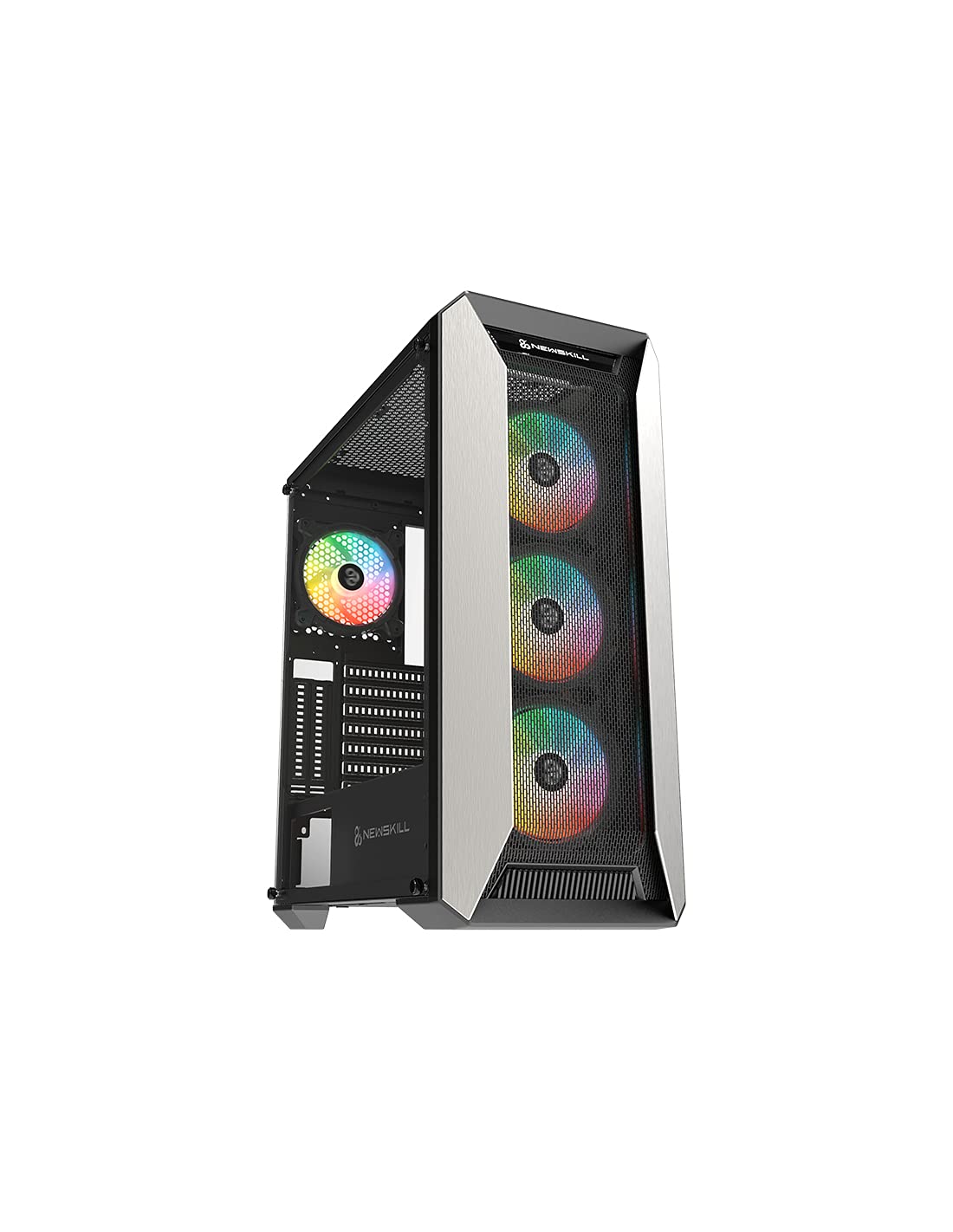
Малюнак 1: Спераду view of the Newskill Manticore Gaming PC Case, highlighting the mesh front and tempered glass side panel.
Асноўныя характарыстыкі:
- ATX Mid-Tower compatibility
- Mesh front panel for optimized airflow
- Бакавая панэль з загартаванага шкла
- Four pre-installed 120mm ARGB fans
- Two removable dust filters
- USB 3.0 connectivity on the front panel
Настройка і ўстаноўка
1. Распакаванне
Carefully remove the PC case from its packaging. Inspect for any damage that may have occurred during shipping. Retain the packaging for future transport or warranty claims.
2. Ідэнтыфікацыя кампанентаў
Before installation, familiarize yourself with the case components and included accessories:
- Newskill Manticore PC Case
- Accessory box (screws, cable ties, standoffs)
- Кіраўніцтва карыстальніка (гэты дакумент)
3. Устаноўка мацярынскай платы
- Remove the tempered glass side panel by unscrewing the thumb screws.
- Install the necessary motherboard standoffs into the motherboard tray.
- Carefully place your ATX motherboard onto the standoffs, aligning the screw holes.
- Замацуйце матчыну плату з дапамогай прадастаўленых шруб.
4. Усталёўка блока сілкавання (БС)
- Знайдзіце месца для мацавання блока харчавання ў ніжняй задняй частцы корпуса.
- Slide your PSU into position from the rear of the case.
- Secure the PSU with screws from the exterior rear of the case.
5. Усталёўка назапашвальніка
The case supports various storage configurations. Refer to your specific drive type for mounting instructions (e.g., 2.5" SSDs, 3.5" HDDs).
6. Усталёўка відэакарты і платы пашырэння
Remove the necessary PCIe slot covers and install your graphics card or other expansion cards, securing them with screws.
7. Падключэнні пярэдняй панэлі
Connect the front panel cables (USB 3.0, HD Audio, Power Switch, Reset Switch, Power LED, HDD LED) to the corresponding headers on your motherboard. Consult your motherboard manual for exact pin layouts.
8. Кіраванне кабелем
Выкарыстоўвайце адтуліны для пракладкі кабеляў і кропкі мацавання за паддонам матчынай платы для іх арганізацыі. Гэта паляпшае цыркуляцыю паветра і эстэтыку.
Інструкцыя па эксплуатацыі
Уключэнне/выключэнне
Press the power button located on the top panel of the case to turn on your system. To shut down, use the operating system's power-off function or press and hold the power button for several seconds for a forced shutdown (not recommended for regular use).
Кіраванне асвятленнем ARGB
The pre-installed ARGB fans can be controlled via your motherboard's ARGB software (if compatible) or a dedicated ARGB controller (if included or purchased separately). Refer to your motherboard or controller manual for specific instructions on changing lighting effects and colors.
Тэхнічнае абслугоўванне
Ачыстка пылавога фільтра
The Newskill Manticore includes two removable dust filters (typically located on the top and bottom/front). Regularly clean these filters to maintain optimal airflow and prevent dust buildup inside your PC. Gently slide them out, clean with water and mild soap, or use a vacuum cleaner, and ensure they are completely dry before re-inserting.
Знешняя ўборка
Працярыце вонкавыя паверхні мяккай, damp cloth. Avoid abrasive cleaners or solvents that could damage the finish or tempered glass.
Ліквідацыю непаладак
Няма сілы
- Ensure the PSU is properly connected to the wall outlet and switched on.
- Verify all power cables from the PSU are correctly connected to the motherboard and components.
- Праверце падключэнне выключальніка харчавання на пярэдняй панэлі да матчынай платы.
Вентылятары не круцяцца / ARGB не загараецца
- Confirm fan power cables are securely connected to the motherboard or fan controller.
- Check ARGB connections to the motherboard's ARGB header or dedicated controller.
- Ensure ARGB software or controller settings are correctly configured.
Слабы паток паветра / перагрэў
- Рэгулярна чысціце пылавыя фільтры.
- Ensure no obstructions are blocking air intake or exhaust vents.
- Verify all fans are spinning correctly and oriented for optimal airflow.
For further assistance, please contact Newskill support.
Тэхнічныя характарыстыкі
| Асаблівасць | Дэталь |
|---|---|
| Назва мадэлі | Мантыкора |
| Нумар мадэлі | 1102 |
| Тып корпуса | Сярэдняя вежа |
| Сумяшчальнасць матчыных поплаткаў | ATX |
| Памеры (Д х Ш х У) | 60 х 60 х 85 см |
| Вага | 1 кг |
| Матэрыял | Загартаванае шкло, метал |
| Спосаб астуджэння | Air (4x 120mm ARGB fans included) |
| Пярэднія парты I / O | USB 3.0, Audio Jacks, Power, Reset |
| Пылавыя фільтры | 2 (removable) |
| Рэкамендуемае выкарыстанне | Гульнявая |
Інфармацыя аб гарантыі
The Newskill Manticore PC Case comes with a 2-гадовая гарантыя вытворцы. This warranty covers defects in materials and workmanship under normal use. It does not cover damage caused by misuse, accident, modification, or unauthorized repair. Please retain your proof of purchase for warranty claims.
Падтрымка і кантакт
For technical support, troubleshooting assistance, or warranty inquiries, please visit the official Newskill website or contact their customer service department. You can find contact information on the Newskill webсайт: www.newskillgaming.com