
Уводзіны
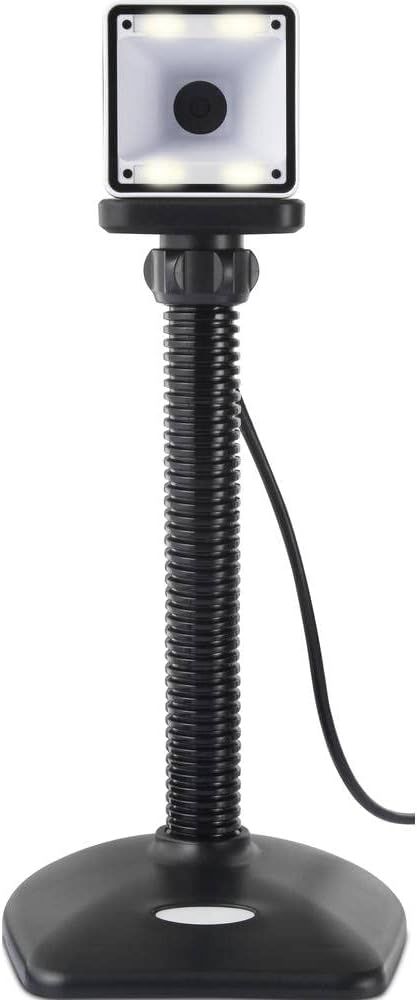
Thank you for choosing the Renkforce RF-SBS-500 2D Wired Barcode Scanner. This device is designed for efficient and reliable scanning of both 1D and 2D barcodes from various surfaces, including paper and smartphone screens. Its omnidirectional scanning capability and hands-free operation make it suitable for a wide range of applications. This manual provides essential information for the proper setup, operation, and maintenance of your scanner.
Інструкцыі па тэхніцы бяспекі
- Do not expose the scanner to extreme temperatures, humidity, or direct sunlight.
- Пазбягайце падзення сканера і моцных удараў.
- Не спрабуйце разбіраць або мадыфікаваць сканер. Гэта прывядзе да анулявання гарантыі.
- Keep the scanning window clean to ensure optimal performance. Use a soft, dry cloth.
- Ensure the USB cable is connected securely to prevent accidental disconnection.
Змест пакета
- Renkforce RF-SBS-500 2D Wired Barcode Scanner
- Integrated USB-A Cable
- Кіраўніцтва карыстальніка (гэты дакумент)
Настройка
Follow these steps to set up your Renkforce RF-SBS-500 barcode scanner:
- Распакуйце сканер: Асцярожна дастаньце сканер з упакоўкі.
- Падключыцеся да кампутара: Plug the integrated USB-A cable from the scanner into an available USB port on your desktop or laptop computer.
- Ўстаноўка драйвера: The scanner is typically plug-and-play. Your operating system (Windows, macOS, Linux) should automatically detect and install the necessary drivers. Wait for the installation to complete.
- Размяшчэнне: Place the scanner on a stable, flat surface. The flexible neck allows for adjustment of the scanning head angle for optimal positioning.

Эксплуатацыя сканера
The Renkforce RF-SBS-500 is designed for ease of use with its omnidirectional and hands-free capabilities.
- Уключэнне: Once connected via USB, the scanner will power on automatically. The LED indicators on the scanner head may illuminate briefly.
- Сканіраванне штрых-кода: Position the barcode within the scanning area of the scanner head. The scanner will automatically detect and read the barcode.
- Візуальная і гукавая зваротная сувязь: Upon successful scanning, the integrated buzzer will emit a short beep, and the LED display on the scanner will flash or change color, indicating a successful read.
- Omnidirectional Reading: The scanner can read barcodes regardless of their orientation, eliminating the need to align the barcode precisely.
- Hands-Free Mode (Presentation Mode): The scanner operates continuously in a presentation mode, allowing you to simply pass items with barcodes in front of the scanning window without pressing any buttons. This saves time and improves workflow efficiency.
- Падтрымліваюцца штрых-коды: The scanner supports both 1D (e.g., EAN, UPC, Code 39) and 2D (e.g., QR Code, Data Matrix, PDF417) barcode types.
Тэхнічнае абслугоўванне
Правільнае абслугоўванне забяспечвае даўгавечнасць і аптымальную прадукцыйнасць вашага сканера.
- Ачыстка акна сканавання: Рэгулярна чысціце акно сканавання мяккай тканінай без ворса. Для выдалення ўстойлівага бруду злёгкуampen the cloth with water or a mild, non-abrasive cleaner. Do not spray cleaner directly onto the scanner.
- Генеральная ўборка: Wipe the exterior of the scanner with a dry or slightly damp тканіна. Пазбягайце выкарыстання агрэсіўных хімікатаў або абразіўных матэрыялаў.
- захоўванне: When not in use, store the scanner in a clean, dry environment away from direct sunlight and extreme temperatures.
Ліквідацыю непаладак
Калі ў вас узніклі праблемы са сканерам, звярніцеся да наступных распаўсюджаных праблем і іх рашэнняў:
| праблема | Магчымая прычына | Рашэнне |
|---|---|---|
| Сканер не ўключаецца. | USB cable not connected properly or faulty USB port. | Ensure the USB cable is firmly connected to both the scanner and the computer. Try a different USB port. |
| Сканер не счытвае штрых-коды. | Barcode damaged, scanning window dirty, or incorrect barcode type. | Check the barcode for damage. Clean the scanning window. Ensure the barcode type is supported (1D/2D). Adjust the distance and angle of the barcode to the scanner. |
| No beep or LED feedback after scanning. | Barcode not read successfully. | Refer to the "Scanner does not read barcodes" solution. If the issue persists, contact support. |
| Адсканаваныя дадзеныя адлюстроўваюцца няправільна. | Keyboard layout mismatch or software issue. | Ensure your computer's keyboard layout matches the expected output. Test with a simple text editor. |
If the problem persists after trying these solutions, please contact Renkforce customer support.
Тэхнічныя характарыстыкі
| Асаблівасць | Спецыфікацыя |
|---|---|
| Нумар мадэлі | RF-4679568 |
| Магчымасць сканавання | 1D і 2D штрых-коды |
| Тэхналогія падлучэння | USB-A (правадны) |
| Хуткасць сканавання | 60 малюнкаў у секунду |
| Рэжым сканавання | Omnidirectional, Hands-free (Presentation Mode) |
| Зваротная сувязь | Integrated Buzzer, LED Display |
| Сумяшчальныя прылады | Desktop Computer, Laptop, Smartphone (via appropriate adapter if needed) |
| Памеры (Д х Ш х У) | 150 х 5.2 х 5.2 см |
| Вага прадмета | 102 грам |
| Крыніца харчавання | USB харчаванне |
| Краіна паходжання | Нямеччына |
Гарантыя і падтрымка
Renkforce products are manufactured to high-quality standards and come with a standard warranty. Please refer to your purchase documentation or the Renkforce official webна сайце, каб даведацца пра канкрэтныя гарантыйныя ўмовы, якія дзейнічаюць у вашым рэгіёне.
For technical support, troubleshooting assistance, or warranty claims, please contact Renkforce customer service. Contact details can typically be found on the Renkforce webсайце або на ўпакоўцы вашага прадукту.