
1. Уводзіны
Thank you for choosing the MEDION X64060 Party Speaker. This manual provides essential information for the safe and efficient use of your device. Please read it thoroughly before operating the speaker and keep it for future reference.
The MEDION X64060 is a versatile party speaker designed for various entertainment needs, featuring powerful audio output, integrated DJ and karaoke functions, and dynamic light effects.
2. Інструкцыі па тэхніцы бяспекі
- Перад выкарыстаннем уважліва прачытайце ўсе інструкцыі.
- Трымайце дынамік далей ад вады, вільгаці і экстрэмальных тэмператур.
- Не перакрывайце вентыляцыйныя адтуліны.
- Выкарыстоўвайце толькі шнур харчавання, які пастаўляецца з прыладай.
- Не спрабуйце рамантаваць прыладу самастойна. Звяртайцеся да кваліфікаванага персаналу па любыя паслугі па абслугоўванні.
- Ensure the speaker is placed on a stable, level surface to prevent tipping.
- Пазбягайце працяглага ўздзеяння высокай гучнасці, каб прадухіліць пашкоджанне слыху.
3. Змесціва ўпакоўкі
Калі ласка, праверце ўпакоўку на наяўнасць наступных прадметаў:
- MEDION X64060 Party Speaker
- 1 х мікрафон
- Шнур харчавання
- Кіраўніцтва карыстальніка (гэты дакумент)
4. Прадукт скончыўсяview
Familiarize yourself with the main components and controls of your MEDION X64060 Party Speaker.

Выява: Панэль кіравання зверхуview
This image displays a close-up of the speaker's top control panel, showing various knobs and buttons for audio adjustments, DJ functions, and input selections.

Image: Speaker Dimensions and Connections
This image illustrates the overall dimensions of the speaker (980mm height, 350mm width, 340mm depth) and highlights the available connection ports: 1x USB, 2x Microphone (6.3 mm), 1x Guitar (6.3 mm), 1x Audio Input (3.5 mm), and 1x Audio Input (RCA).
4.1 Пярэдняя панэль
- Дакладчыкі: Two main speakers with integrated LED lighting.
- Светлавыя эфекты: Dynamic LED lights that synchronize with music.
4.2 Верхняя панэль кіравання
- Кнопка харчавання: To turn the speaker on/off.
- Рэгулятары гучнасці: Main volume, microphone volume (MIC1 VOL, MIC2 VOL), guitar volume (GUITAR VOL), and echo volume (ECHO VOL).
- Эквалайзер (эквалайзер): 5-band equalizer for sound adjustment.
- Селектары ўводу: Buttons for Bluetooth, USB, AUX.
- DJ Functions: Cross-fader, scratch wheel, drum pads (HI-HAT, SNARE, BASS DRUM, CYMBAL, TOM1, TOM2), and record function.
- Порт USB: For USB playback.
- Мікрафонныя ўходы: Two 6.3 mm jack inputs.
- Гітарны ўваход: One 6.3 mm jack input.
- Уваход AUX: 3.5 mm jack input.
4.3 Задняя панэль
- Спажываная магутнасць: Для падлучэння шнура харчавання.
- Аўдыёўваход RCA: Additional audio input.
4.4 Mobility Features
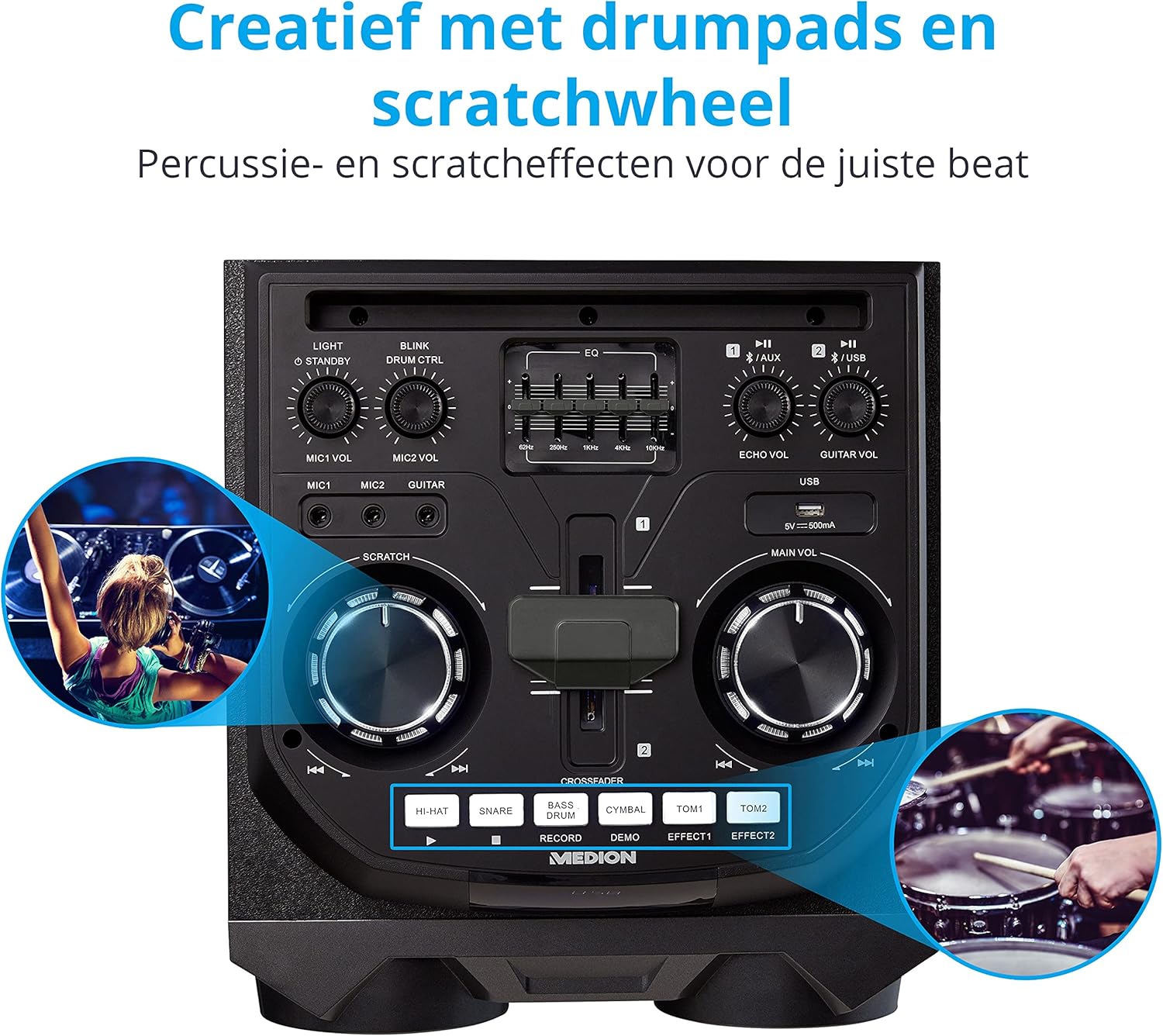
Image: Integrated Wheels for Portability
This image shows the back of the speaker, highlighting the integrated wheels at the bottom, designed for easy transport.
- Інтэграваныя колы: For easy transportation of the speaker.
- Ручкі: Ergonomic handles for lifting and moving.
5. Настройка
5.1 Пачатковае размяшчэнне
Размясціце дынамік на ўстойлівай, роўнай паверхні. Забяспечце належную вентыляцыю вакол прылады. Пазбягайце размяшчэння яго побач з крыніцамі цяпла або пад прамымі сонечнымі прамянямі.
5.2 Падключэнне харчавання
- Connect the supplied power cord to the power input on the rear of the speaker.
- Падключыце другі канец шнура харчавання да адпаведнай разеткі.
- Press the power button on the top control panel to turn on the speaker. The LED lights will illuminate.
5.3 Connecting a Microphone or Guitar
For karaoke or live instrument performance:
- Plug your microphone(s) into the MIC1 or MIC2 6.3 mm jack inputs on the top panel.
- Plug your guitar into the GUITAR 6.3 mm jack input on the top panel.
- Adjust the respective volume knobs (MIC1 VOL, MIC2 VOL, GUITAR VOL) and ECHO VOL to your preference.
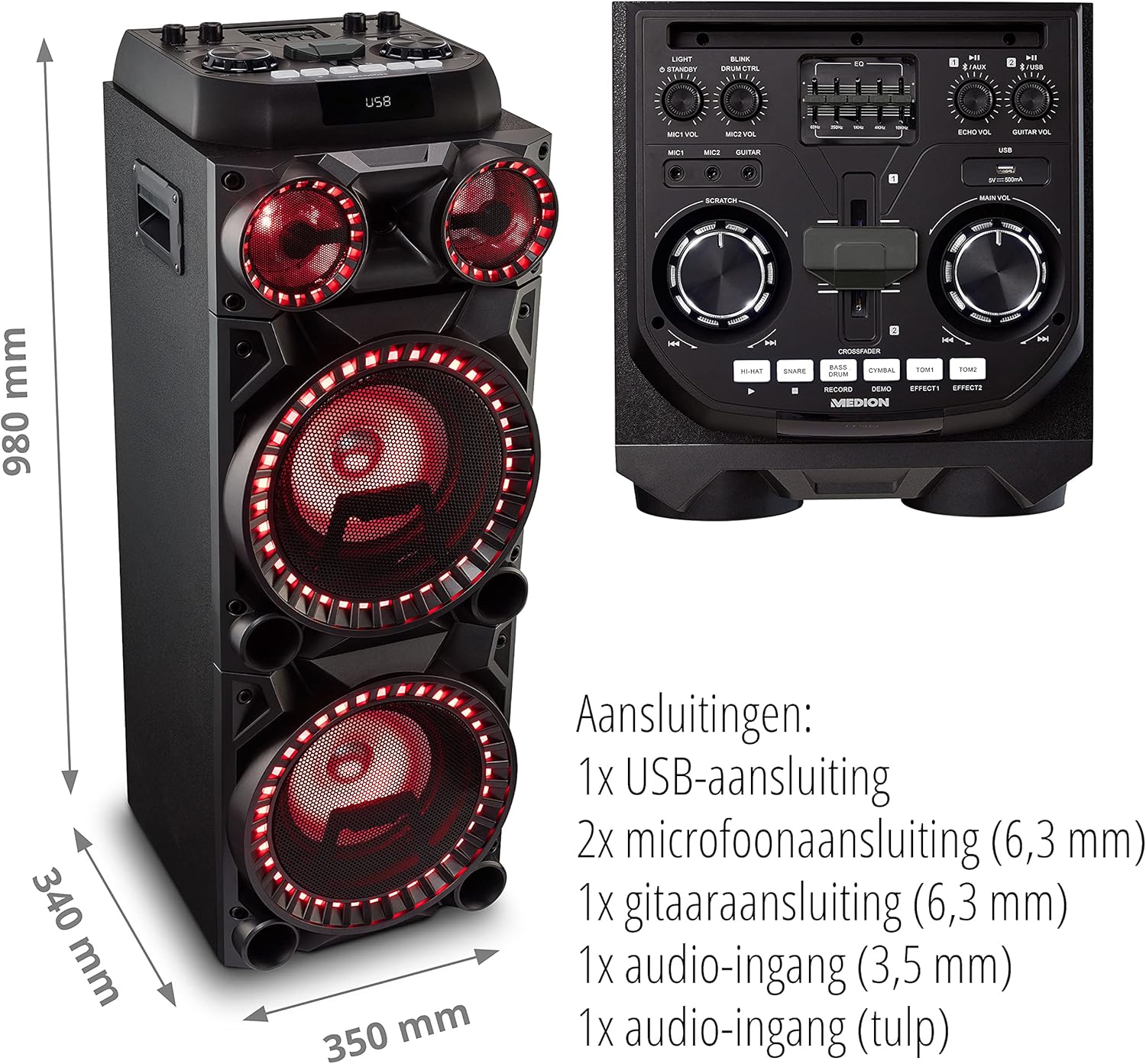
Image: Microphone and Guitar Connection for Karaoke
This image shows individuals enjoying karaoke, demonstrating the use of a microphone connected to the speaker for singing.
6. Інструкцыя па эксплуатацыі
6.1 Злучэнне Bluetooth
- Націсніце Bluetooth button on the control panel. The Bluetooth indicator will blink.
- Уключыце Bluetooth на вашым смартфоне, планшэце або іншай аўдыёпрыладзе.
- Пошук "MEDION X64060" in your device's Bluetooth settings and select it to pair.
- Once connected, the Bluetooth indicator will stop blinking and remain solid. You can now play music wirelessly.

Image: Bluetooth Music Playback
This image shows a smartphone displaying a music application, indicating a wireless Bluetooth connection to the speaker for audio streaming.
6.2 Прайграванне з USB
- Устаўце USB-назапашвальнік з аўдыя files into the USB port on the top panel.
- Націсніце USB кнопка для выбару рэжыму USB.
- The speaker will automatically detect and begin playing audio files from the USB drive. Use the playback controls (play/pause, skip track) on the control panel.
6.3 AUX ўваход
- Connect an external audio device (e.g., MP3 player, laptop) to the 3.5 mm AUX input or the RCA audio input on the rear panel using an appropriate audio cable (not included).
- Націсніце ДАП кнопку, каб выбраць рэжым AUX.
- Прайграйце аўдыё з падлучанай прылады. Гук будзе выводзіцца праз дынамік.
6.4 DJ Functions
The MEDION X64060 includes various DJ features for creative sound mixing.

Image: DJ Function Controls
Гэта выява дае падрабязную інфармацыю view of the DJ control section, including the cross-fader, scratch wheel, and various drum pads.
- Cross-fader: Use the cross-fader to smoothly transition between different audio sources or effects.
- Scratch Wheel: Manipulate the scratch wheel for classic DJ scratch effects.
- Барабанныя калодкі: Націсніце ХАЙ-ХЭТ, ПАЎКА, БАС-БАРАБАН, ЦЫМБАЛЫ, ТОМ1, і ТОМ2 pads to add drum sound effects to your music.
- Функцыя запісу: Выкарыстоўвайце ЗАПІС button to record your drum pad sequences.
6.5 Функцыя караоке
Connect a microphone as described in section 5.3. Play your chosen karaoke track via Bluetooth, USB, or AUX. Adjust the microphone and echo volumes for the desired effect.
6.6 светлавыя эфекты
The speaker features dynamic LED light effects that respond to the music. These lights automatically activate when the speaker is on. There may be a dedicated button (e.g., "LIGHT" or "BLINK") to control or cycle through different light modes, refer to the control panel for specific options.

Image: Dynamic Blue Light Effects
This image showcases the speaker with its blue LED lights illuminated, demonstrating the atmospheric light effects.

Image: Dynamic Red Light Effects
This image shows the speaker with its red LED lights illuminated, highlighting another color option for the atmospheric light effects.
7. Тэхнічнае абслугоўванне
7.1 Ачыстка
- Заўсёды адключайце дынамік ад разеткі перад чысткай.
- Выкарыстоўвайце мяккую, сухую тканіну для працірання вонкавых паверхняў.
- Не выкарыстоўвайце вадкія ачышчальнікі, аэразолі або абразіўныя матэрыялы, бо яны могуць пашкодзіць пакрыццё або ўнутраныя кампаненты.
7.2 Захоўванне
When not in use for extended periods, store the speaker in a cool, dry place, away from direct sunlight and extreme temperatures. Cover the unit to protect it from dust.
8. Выпраўленне непаладак
| праблема | Магчымая прычына | Рашэнне |
|---|---|---|
| Няма ўлады | Power cord not connected properly; Power outlet not working. | Ensure the power cord is securely plugged into both the speaker and a working wall outlet. Test the outlet with another device. |
| Няма гуку | Volume too low; Incorrect input selected; Device not paired (Bluetooth); Cable not connected (AUX/Guitar/Mic). | Increase the main volume and individual input volumes. Select the correct input source (Bluetooth, USB, AUX). Re-pair Bluetooth device. Check all cable connections. |
| Збой злучэння Bluetooth | Дынамік не ў рэжыме спалучэння; прылада занадта далёка; перашкоды. | Ensure the speaker is in Bluetooth pairing mode (blinking indicator). Move your device closer to the speaker. Avoid obstacles and other wireless devices. |
| Мікрафон/гітара не працуе | Volume too low; Cable faulty; Incorrect input. | Increase MIC/GUITAR VOL. Check microphone/guitar cable. Ensure the instrument is properly connected. |
9. Тэхнічныя характарыстыкі
| Марка | MEDION |
| Нумар мадэлі | X64060 | MD44060 |
| Выходная магутнасць | 2 x 100 W RMS (2 x 1000 W max. music output power) |
| Тэхналогія падлучэння | Bluetooth 5.0, USB, AUX (3.5mm, RCA) |
| аўдыё ўваходы | 2 x Microphone (6.3 mm), 1 x Guitar (6.3 mm), 1 x AUX (3.5 mm), 1 x RCA |
| Эквалайзер | 5-палосны |
| Колер | Чорны |
| Матэрыял | Пластыкавыя |
| Памеры прадукту (Д х Ш х У) | 38.8 х 35 х 101 см |
| Вага прадмета | 15 кг |
| Тып мацавання | падлогавы |
| Крыніца харчавання | Правадная электрычная |
| Сумяшчальныя прылады | Ноўтбук, смартфон |
10. Гарантыя і падтрымка
For warranty information and technical support, please refer to the warranty card included with your product or visit the official MEDION webсайт. Захоўвайце пацвярджэнне пакупкі для любых гарантыйных прэтэнзій.
Абслугоўванне кліентаў MEDION: For assistance, please contact MEDION customer support through their official channels. Contact details can typically be found on the MEDION webсайце або ва ўпакоўцы прадукту.