
1. Уводзіны
Дзякуй за пакупкуasing the Soundsation MIOMIX 404FXM 6-Channel Mixer. This versatile mixer is designed for a wide range of audio applications, including home recording, live performances, and podcasting. It combines professional audio quality with portability, featuring low-noise preamplifiers, digital effects, a USB media player/recorder, and Bluetooth connectivity. This manual provides essential information for safe operation, setup, and optimal use of your MIOMIX 404FXM mixer.
2. Інструкцыі па тэхніцы бяспекі
УВАГА: Каб знізіць рызыку пажару або паражэння электрычным токам, не падвяргайце гэта абсталяванне ўздзеянню дажджу або вільгаці.
- Перад эксплуатацыяй прылады ўважліва прачытайце гэтыя інструкцыі.
- Захоўвайце гэта кіраўніцтва для выкарыстання ў будучыні.
- Звярніце ўвагу на ўсе папярэджанні і выконвайце ўсе інструкцыі.
- Не выкарыстоўвайце гэты прыбор паблізу вады.
- Чысціце толькі сухой анучай.
- Не блакуйце вентыляцыйныя адтуліны. Усталюйце ў адпаведнасці з інструкцыямі вытворцы.
- Не ўстанаўлівайце побач з крыніцамі цяпла, такімі як радыятары, абагравальнікі, пліты або іншыя прылады (у тым ліку ampLifiers), якія вырабляюць цяпло.
- Не пагаршайце мэты бяспекі палярызаванай або зазямляльнай вілкі. Палярызаваная відэлец мае два леза, адзін шырэйшы за другі. Вілка з зазямленнем мае два ножы і трэці зазямляльны штырь. Шырокае лязо або трэці зубец прызначаны для вашай бяспекі. Калі вілка з камплекта не падыходзіць да вашай разеткі, звярніцеся да электрыка для замены састарэлай разеткі.
- Абараняйце сеткавы шнур ад наступання або заціскання, асабліва ў месцах вілкі, разеткі і месца выхаду з прылады.
- Выкарыстоўвайце толькі насадкі/аксэсуары, указаныя вытворцам.
- Адключайце гэты прыбор ад сеткі падчас навальніцы або калі ён не выкарыстоўваецца на працягу доўгага часу.
- Звяртайцеся да кваліфікаванага абслугоўваючага персаналу. Тэхнічнае абслугоўванне патрабуецца, калі прылада была пашкоджана якім-небудзь чынам, напрыклад, пашкоджаны шнур сілкавання або вілка, была праліта вадкасць або ў прыладу ўпалі прадметы, прылада падвяргалася ўздзеянню дажджу або вільгаці, не працуе належным чынам , або быў адкінуты.
3. Змесціва ўпакоўкі
Калі ласка, праверце, ці ўсе пералічаныя ніжэй прадметы ўваходзяць у камплект:
- Soundsation MIOMIX 404FXM Mixer
- Адаптар сілкавання
- Кіраўніцтва карыстальніка
4. Асаблівасці прадукту
- 6-channel mixer with digital multi-effect processor.
- Integrated USB player/recorder supporting WAV, MP3, WMA, and FLAC formats.
- Wireless Bluetooth audio streaming.
- 4 Mic/Line channels with low-noise preamps and Combo connectors.
- Selectable Hi-Z inputs for guitars and other high-impedance instruments.
- Фантомнае харчаванне +48 В для кандэнсатарных мікрафонаў.
- Peak indicators on input channels.
- 1 stereo line channel with 6.3mm jacks and +4/-10 dB pad adapter.
- 2-band EQ on channels 1-4.
- 24-bit/48 kHz digital effects processor with 16 presets (Reverb, Delay, Echo, Chorus, etc.) and TAP-Tempo function.
- USB player level control.
- Выхад на навушнікі з рэгулятарам ўзроўню.
- XLR main outputs with volume control.
- Stereo VU Meter with 2 x 6 LED bars.
5. Элементы кіравання і функцыі
5.1 Пярэдняя панэльview

Image: Front panel of the Soundsation MIOMIX 404FXM mixer, showing all input channels, EQ controls, effect section, USB/Bluetooth media player, and main output controls.
Input Channels (MIC/INST 1-4)
- MIC/INST Input (Combo Jack): Connect XLR microphones or 1/4" instrument/line cables.
- +48 В фантомнага харчавання: Activates phantom power for condenser microphones. Use with caution.
- Перамыкач Hi-Z: Engages high impedance input for direct connection of guitars or basses.
- Ручка GAIN: Adjusts the input sensitivity for the connected microphone or instrument.
- Ручка HIGH: Adjusts the high-frequency equalization (treble).
- Ручка LOW: Adjusts the low-frequency equalization (bass).
- Ручка FX: Controls the amount of signal sent to the internal digital effects processor.
- Ручка PAN: Adjusts the stereo position (left/right) of the channel.
- Ручка VOL: Adjusts the output volume of the individual channel.
- PK (Peak) LED: Загараецца, калі ўваходны сігнал занадта высокі, што сведчыць аб патэнцыйным зрэзе сігналу.
Stereo Line Input (CH 5-6)
- L/Mono, R Inputs (1/4" Jacks): Connect stereo line-level devices (keyboards, CD players, DJ consoles, etc.). The L/Mono input can be used alone for a mono signal.
- +4/-10dB Switch: Adjusts input sensitivity for different line-level devices.
- Ручка PAN: Рэгулюе стэрэагучванне канала.
- Ручка VOL: Adjusts the output volume of the stereo channel.
- PK (Peak) LED: Illuminates when the input signal is too high.
USB & Bluetooth Media Player
- Порт USB: Connect a USB drive for playing audio fileабо запіс.
- Экран дысплея: Паказвае бягучы рэжым, інфармацыю пра трэк і налады.
- Up/Rewind Button: Navigates up in menus or rewinds current track.
- Down/Forward Button: Navigates down in menus or fast-forwards current track.
- Play/Pause/Enter Button: Plays/pauses audio or confirms menu selections.
- Кнопка МЕНЮ: Accesses media player menu options (BT streaming, music player, audio recorder, selection).
- MP3 PLAYER LVL Knob: Controls the output level of the USB/Bluetooth media player.
Digital Effects Processor (24-bit/48 kHz)
- Дысплей эфектаў: Shows the selected effect number and parameter values.
- Ручка ПРАГРАМЫ: Rotates to select one of the 16 built-in digital effects. Press to confirm selection.
- Кнопка TAP TEMPO: Tap multiple times to set the tempo for time-based effects (e.g., Delay).
- Ручка LEVEL: Adjusts the overall wet/dry mix of the effects.
Output & Monitoring Section
- PHONES Jack (1/4"): Падключыце навушнікі для маніторынгу.
- PHONES LVL Knob: Рэгулюе гучнасць выхаднога гуку для навушнікаў.
- MAIN OUT L/R (XLR): Balanced XLR outputs for connecting to powered speakers, ampліфікатары, або прылады запісу.
- MAIN OUT Knob: Рэгулюе агульную гучнасць выходнага гуку асноўнага мікса.
- VU Meter (LED): Displays the stereo output level of the main mix.
5.2 Задняя панэльview
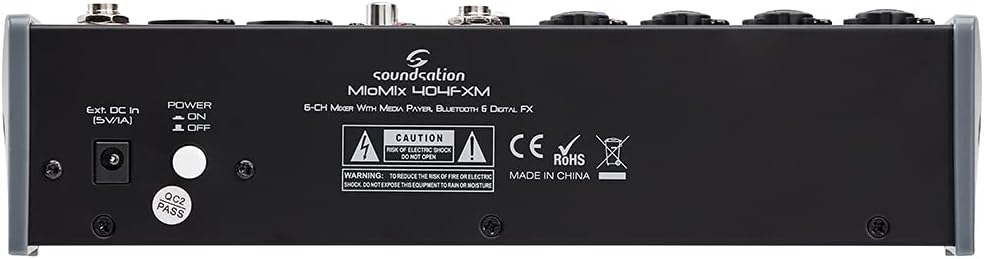
Image: Rear panel of the Soundsation MIOMIX 404FXM mixer, showing the power input, power switch, and main output connections.
- Ext. DC In (5V/1A): Power input for connecting the provided external power adapter.
- Перамыкач УКЛ./ВЫКЛ.: Turns the mixer's power on or off.
- REC OUT L/R (RCA): Unbalanced RCA outputs for connecting to recording devices.
6. Настройка
- Распакуйце міксер: Carefully remove the MIOMIX 404FXM from its packaging.
- Размяшчэнне: Place the mixer on a stable, flat surface, ensuring adequate ventilation around the unit.
- Падключэнне сілкавання: Ensure the mixer's POWER switch is in the OFF position. Connect the provided power adapter to the "Ext. DC In (5V/1A)" port on the rear panel, then plug the adapter into a suitable power outlet.
- Першапачатковае ўключэнне: Flip the POWER switch to the ON position. The mixer's indicators should light up, and the display should activate.
- Падключэнне выхадаў: Connect the MAIN OUT XLR outputs to your powered speakers, amplifier, or audio interface. Connect headphones to the PHONES jack for monitoring.
- Падключэнне ўваходаў: Connect your microphones, instruments, and line-level devices to the appropriate input channels.
7. Інструкцыя па эксплуатацыі
7.1 Падключэнне аўдыёкрыніц
- Мікрафоны: Connect dynamic microphones via XLR cables to the MIC/INST Combo jacks. For condenser microphones, connect via XLR and activate the +48V Phantom Power switch for the respective channel.
- Instruments (Guitars/Basses): Connect directly using a 1/4" TS cable to the MIC/INST Combo jack and engage the Hi-Z switch for that channel.
- Line-Level Devices (Keyboards, CD Players): Connect using 1/4" TS cables to the MIC/INST Combo jacks (for mono) or to the CH 5-6 L/Mono and R inputs (for stereo). Adjust the +4/-10dB switch on CH 5-6 as needed.
7.2 Adjusting Channel Levels and EQ
- Set all GAIN, VOL, and MAIN OUT knobs to their minimum positions before starting.
- Speak into the microphone or play your instrument. Slowly increase the GAIN knob for the respective channel until the PK LED flashes only occasionally during the loudest parts.
- Adjust the HIGH and LOW EQ knobs to shape the tone of your sound.
- Use the PAN knob to position the sound in the stereo field.
- Slowly increase the channel's VOL knob to blend it into the overall mix.
7.3 Using the USB Media Player/Recorder
- Прайграванне: Insert a USB drive containing WAV, MP3, WMA, or FLAC files into the USB port. The display will show the file list. Use the Up/Down buttons to navigate and Play/Pause/Enter to select and play. Adjust the MP3 PLAYER LVL knob to control its volume in the mix.
- Запіс: In the media player menu (accessed via MENU button), select the 'Audio Recorder' function. Ensure your USB drive has enough free space. Press Play/Pause/Enter to start and stop recording. The mixer records the main stereo mix.
7.4 Злучэнне Bluetooth
- Press the MENU button on the media player and select 'BT Streaming'. The display will show 'Bluetooth' and indicate it's searching.
- On your smartphone or Bluetooth device, search for available devices and select 'MIOMIX 404FXM'.
- Once paired, you can stream audio from your device to the mixer. Control the volume using your device and the MP3 PLAYER LVL knob on the mixer.
7.5 Applying Digital Effects
- Turn the FX knob on the desired input channel to send signal to the effects processor.
- Rotate the PROGRAM knob to browse through the 16 available effects. Press the PROGRAM knob to select an effect.
- Adjust the LEVEL knob in the FX section to control the overall amount of effect applied to the mix.
- For time-based effects, use the TAP TEMPO button to synchronize the effect to your music.
7.6 Monitoring and Main Output
- Навушнікі: Connect headphones to the PHONES jack and adjust the PHONES LVL knob for comfortable monitoring.
- Асноўны выхад: Slowly increase the MAIN OUT knob to send the mixed audio to your connected speakers or amplifier. Monitor the VU Meter to ensure levels are not clipping (avoiding red LEDs).
8. Тэхнічнае абслугоўванне
- Уборка: Выкарыстоўвайце мяккую сухую тканіну для чысткі паверхні міксера. Не выкарыстоўвайце вадкія ачышчальнікі або растваральнікі.
- захоўванне: Калі міксер не выкарыстоўваецца працяглы час, захоўвайце яго ў прахалодным, сухім месцы, удалечыні ад прамых сонечных прамянёў і экстрэмальных тэмператур.
- Вентыляцыя: Пераканайцеся, што вентыляцыйныя адтуліны не заблакіраваны, каб прадухіліць перагрэў.
9. Выпраўленне непаладак
- Няма выхаду гуку:
- Праверце ўсе падключэнні харчавання і пераканайцеся, што міксер уключаны.
- Verify that all channel VOL knobs, MAIN OUT knob, and PHONES LVL knob are turned up.
- Ensure your speakers/amplifier are powered on and connected correctly.
- Check input source connections and ensure GAIN knobs are set appropriately.
- Скажоны гук:
- Паменшыце GAIN для ўваходнага канала.
- Check if the PK LED is constantly lit; if so, reduce the input level.
- Lower the MAIN OUT volume if the VU Meter is consistently in the red.
- Фантомнае харчаванне не працуе:
- Ensure the +48V switch is engaged for the specific channel.
- Verify that you are using an XLR cable, as phantom power is only supplied via XLR.
- Bluetooth не падключаецца:
- Ensure the mixer's media player is in 'BT Streaming' mode.
- Make sure your device's Bluetooth is enabled and it's searching for devices.
- Паспрабуйце адлучыць прыладу і зноў падлучыць яе.
- Праблемы з прайграваннем/запісам на USB:
- Ensure the USB drive is formatted correctly (FAT32 is generally recommended).
- Праверце аўдыё files are in a supported format (WAV, MP3, WMA, FLAC).
- Для запісу пераканайцеся, што на USB-назапашвальніку дастаткова вольнага месца.
10. Тэхнічныя характарыстыкі
| Асаблівасць | Спецыфікацыя |
|---|---|
| Вытворца | Гучанне |
| Нумар мадэлі | E923E |
| Колькасць каналаў | 6 |
| Вага прадмета | 1900 грам |
| Тэхналогія падлучэння | USB, Bluetooth |
| Крыніца харчавання | Электрычны кабель |
| Тып выхаднога раздыма | XLR |
| Аўдыё ўваход | XLR, раз'ём 1/4" |
| тtage | 48 вольт (фантомнае харчаванне) |
| Лічбавыя эфекты | 16 Presets, 24-bit/48 kHz |
| Падтрымліваюцца аўдыёфарматы USB | WAV, MP3, WMA, FLAC |
11. Гарантыя і падтрымка
Soundsation products are designed and manufactured to the highest quality standards. For information regarding warranty coverage, service, or technical support, please refer to the warranty card included with your product or visit the official Soundsation webсайт. Захоўвайце чэк аб куплі як пацвярджэнне пакупкі ў выпадку любых гарантыйных прэтэнзій.