
1. Уводзіны і большview
The Poly Savi 8210 UC is a professional-grade wireless DECT single-ear headset designed for secure and clear communication across multiple devices. It offers robust security features, including military-grade 256-bit AES encryption, making it suitable for environments requiring high privacy. The headset features Poly Acoustic Fence technology for noise cancellation and provides extensive wireless range and talk time.

Image: Poly Savi 8210 UC Monaural Headset. This image displays the single-ear headset with its microphone boom, designed for comfortable and clear audio communication.
2. Што ў скрынцы
Праверце наяўнасць усіх прадметаў у камплекце:
- Poly Savi 8210 UC Bluetooth Wireless DECT Headset
- Падстава гарнітуры
- Global Teck Microfiber Cloth

Image: Contents of the box. This image shows the Poly Savi 8210 UC headset, its charging base, and a Global Teck microfiber cleaning cloth, indicating the complete product package.
3. Настройка
3.1 Connecting the Base
The Savi 8210 UC base connects to your desk phone, PC/Mac via USB-A, and can also pair with mobile phones via Bluetooth. Ensure the base is placed near your communication devices.
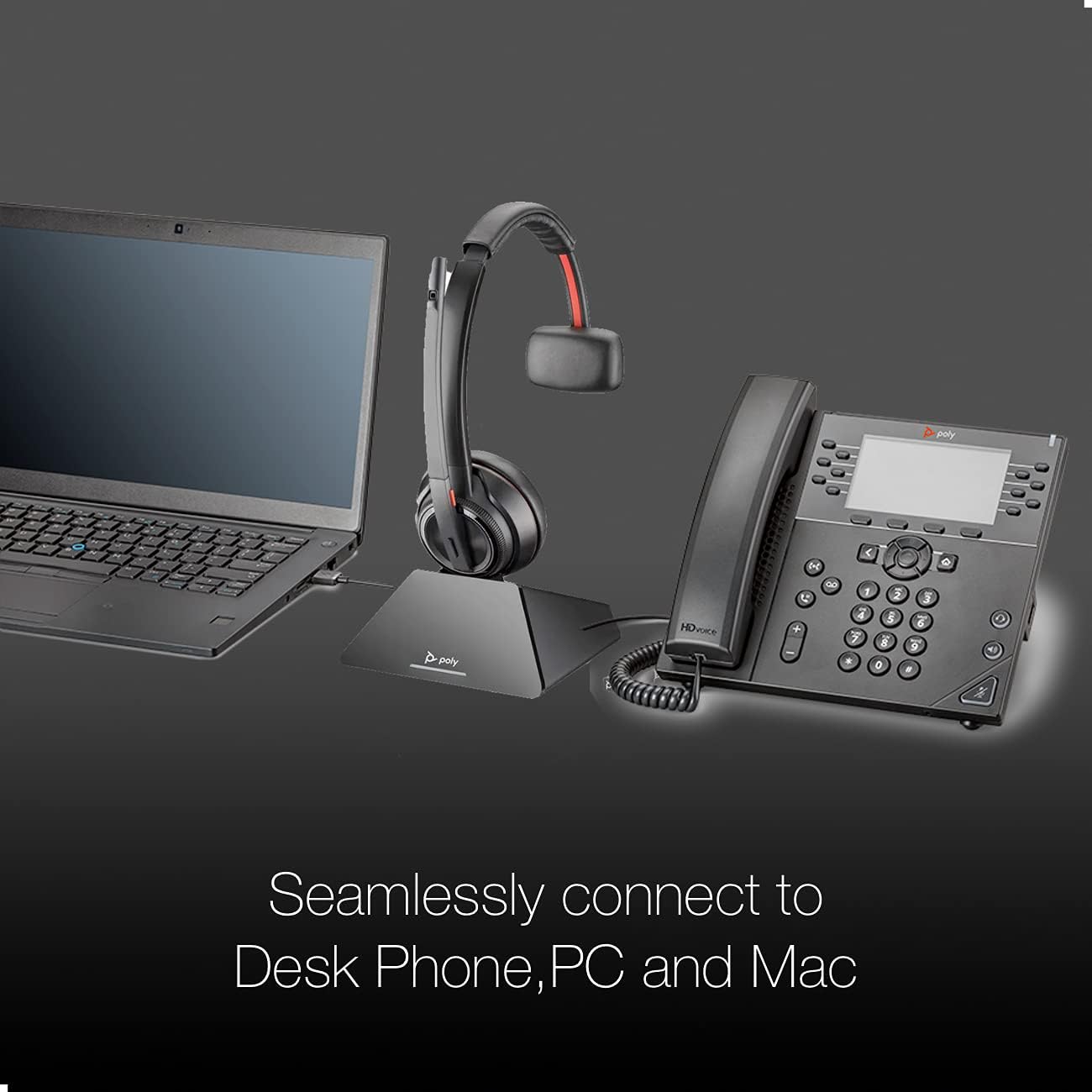
Image: Seamless connectivity. This image illustrates the Poly Savi 8210 UC headset base connected to both a laptop (PC/Mac) via USB and a desk phone, demonstrating its multi-device compatibility.
3.2 Base Controls and Indicators
Familiarize yourself with the buttons and LED indicators on the headset base:

Image: Headset base controls. This image highlights various buttons and indicators on the headset base, including the computer button, mobile phone button, desk phone button, incoming call ringer, Bluetooth pairing button/LED, subscription button/LED, and charging LED.
- Computer Button: Selects the PC/Mac as the audio source.
- Mobile Phone Button: Selects a paired mobile phone as the audio source.
- Desk Phone Button: Selects the desk phone as the audio source.
- Incoming Call Ringer: Indicates an incoming call.
- Bluetooth Pairing Button/LED: Initiates Bluetooth pairing mode and indicates connection status.
- Subscription Button/LED: Used for subscribing the headset to the base and indicates subscription status.
- Святлодыёд зарадкі: Indicates the charging status of the headset.
3.3 Першапачатковая зарадка
Before first use, place the headset on the base to charge. A full charge takes approximately three hours. The charging LED on the base will indicate charging status.
4. Інструкцыя па эксплуатацыі
4.1 Powering On/Off and Talk Time
The headset automatically powers on when removed from the base and powers off when placed back on the base. The headset provides up to 13 hours of talk time on a full charge.

Image: Talk Time: 13 Hours. This image highlights the impressive 13-hour talk time capability of the Poly Savi 8210 UC headset, ensuring extended use.
4.2 Кіраванне выклікамі
- Адказ / завяршэнне званка: Press the Call Control button on the headset or the active device button on the base.
- Рэгуляванне гучнасці: Use the volume up/down buttons on the headset.
- Адключэнне гуку: Націсніце кнопку адключэння гуку на гарнітуры, каб адключыць або ўключыць мікрафон.
4.3 Сумяшчальнасць
The Poly Savi 8210 UC is designed for broad compatibility with various communication platforms and VoIP softphones, including:

Image: Compatible Platforms. This image displays logos of various communication platforms such as Skype, Lync, Mitel, RingCentral, Avaya, GoToMeeting, Google Meet, Amazon Chime, Unify, Cisco, Zoom, Vonage, Microsoft Teams, Fuze, 8x8, and BlueJeans, indicating broad software compatibility for the headset.
- маштабаванне
- RingCentral
- 8x8
- Вонадж
- Каманды Microsoft
- Skype
- Google Meet
- GoToMeeting
- Уніфікаваць
- Cisco
- And more business applications.
5. Тэхнічнае абслугоўванне
5.1 Ачыстка
Regularly clean the headset and base with a soft, dry cloth. For the ear cushion, use the provided Global Teck Microfiber Cloth. Avoid using harsh chemicals or abrasive materials.
5.2 Захоўванне
When not in use, store the headset on its charging base to ensure it is always ready. Store in a cool, dry place away from extreme temperatures.
6. Выпраўленне непаладак
6.1 Няма гуку/нізкая якасць гуку
- Ensure the headset is charged and properly seated on the base.
- Verify the correct audio source (PC, mobile, or desk phone) is selected on the base.
- Праверце ўзровень гучнасці як на гарнітуры, так і на падлучанай прыладзе.
- Confirm the headset is subscribed to the base. If not, re-subscribe using the subscription button.
6.2 Headset Not Connecting
- For PC/Mac: Ensure the USB-A cable is securely connected.
- For Mobile: Ensure Bluetooth is enabled on your mobile device and the headset is in pairing mode (press and hold the Bluetooth pairing button on the base).
- Restart the base by unplugging and re-plugging the power adapter.
6.3 Праблемы з мікрафонам
- Ensure the microphone boom is positioned correctly near your mouth.
- Праверце, ці не адключаны мікрафон.
- Verify microphone settings in your computer's sound preferences or communication software.
7. Тэхнічныя характарыстыкі
| Назва мадэлі | Саві 8210 UC |
| Марка | Poly (Global Teck Worldwide) |
| Тэхналогія падлучэння | Wireless (DECT, Bluetooth) |
| Бесправадныя тэхналогіі | Bluetooth |
| Размяшчэнне вушэй | На вуха |
| Формаў-фактар | На вуха |
| Кантроль шуму | Актыўнае падаўленне шуму |
| Мікрафон | Included, Noise Cancellation (Poly Acoustic Fence) |
| Час размовы | Да 13 гадзін |
| Час зарадкі | 3 гадзіны (поўная зарадка) |
| Далёкасць бесправадной сувязі | Up to 590 ft / 180 m (line-of-sight) |
| Бяспека | Крок бяспекі DECT C, 256-бітнае шыфраванне AES |
| Сумяшчальныя прылады | Laptop, Tablets, Cellphone, Computer, Macbook, PC, Android, iOS |
| Вага прадмета | 0.5 кілаграма |
| Матэрыял | Скура (амбушюры) |
8. Гарантыя
The Poly Savi 8210 UC headset comes with a Poly/Plantronics warranty against any manufacturing defects. Please refer to the official Poly website or your purchase documentation for specific warranty terms and duration.
9. Падтрымка
For technical assistance, troubleshooting, or warranty claims, please contact Global Teck Worldwide, the seller/distributor of this product. You can find their contact information on your purchase receipt or by visiting their official webсайт.
For additional product information and resources, visit the official Poly webсайт.