
Уводзіны
This manual provides essential instructions for the safe and efficient operation of your Miroir M600 1080p Battery-Powered Projector. Please read this manual thoroughly before using the device and retain it for future reference.
Што ў скрынцы
Праверце, ці ўсе пералічаныя ніжэй прадметы ўваходзяць у вашу ўпакоўку:
- Miroir M600 Projector
- Кабель HDMI
- Адаптар пераменнага току і зарадная прылада

Image: Contents of the Miroir M600 Projector package.
Прадукт скончаныview
The Miroir M600 is a compact, portable 1080p projector designed for various projection needs. Familiarize yourself with its components:
Фронт View

Выява: спераду view of the Miroir M600 Projector, showing the projection lens and ventilation grille.
Тыл View і парты

Выява: Задняя частка view of the Miroir M600 Projector, highlighting the various input/output ports.
- Аўдыёвыхад 3.5 мм: Для падлучэння знешніх дынамікаў або навушнікаў.
- USB-C Video Port: For video input from compatible USB-C devices.
- Порт HDMI: For video input from HDMI-enabled devices.
- USB -порт для зарадкі: Для зарадкі знешніх прылад.
- Уваход пастаяннага току: For connecting the AC adapter to power and charge the projector.
Настройка
1. Уключэнне і зарадка
- Connect the AC adapter to the DC Power Input port on the projector and then to a power outlet. The projector can operate while charging.
- Press and hold the power button (location not specified in data, assume standard placement) for a few seconds until the projector powers on.
- The internal battery provides portable operation. Ensure it is sufficiently charged for use without the AC adapter.
2. Размяшчэнне і праекцыя
Position the projector on a stable, flat surface or mount it on a compatible stand. Ensure the lens is unobstructed and pointed towards your desired projection surface (wall or screen).

Image: Miroir M600 Projector positioned on a stand for optimal projection.
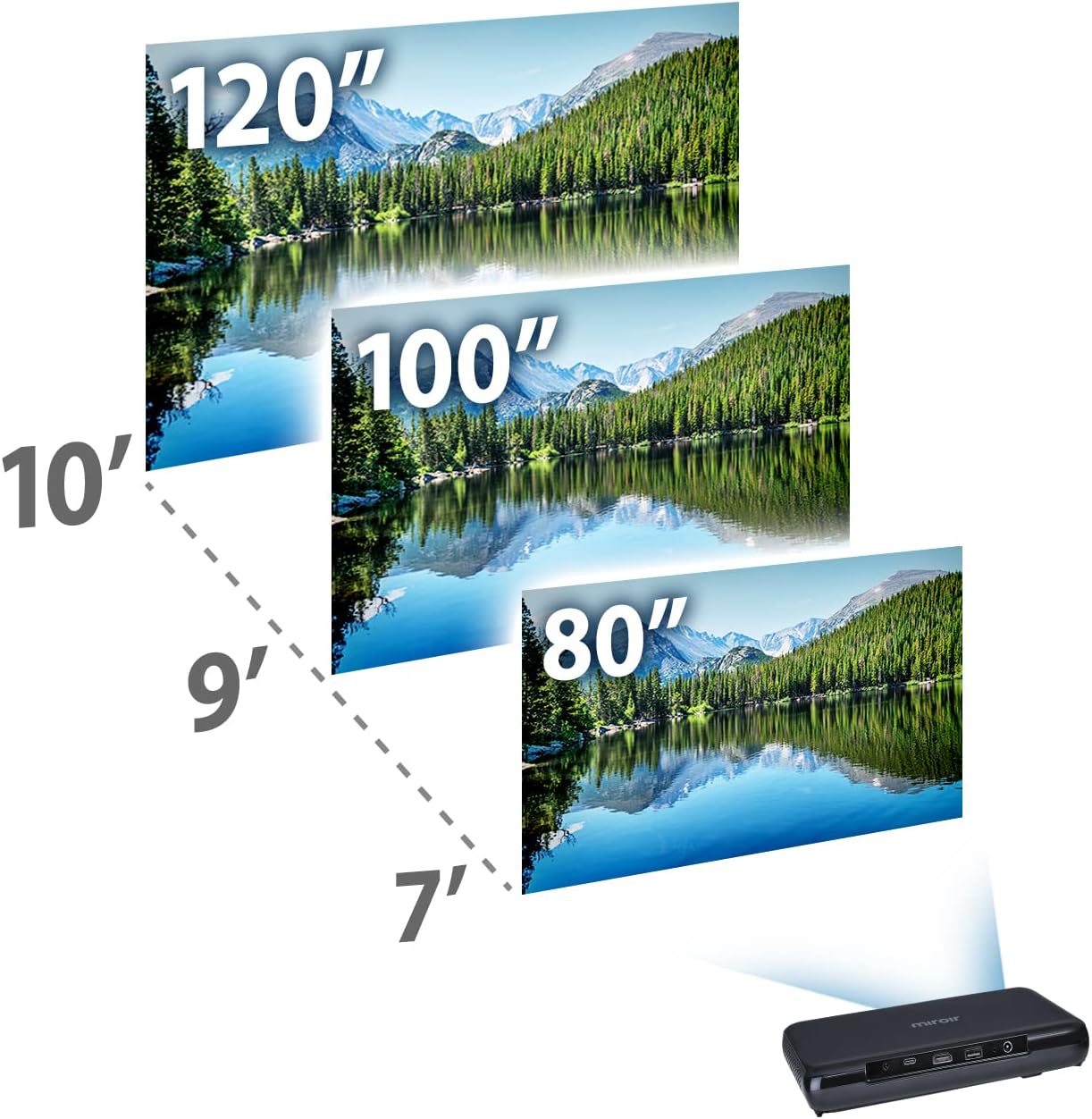
Image: Guide for projection distances to achieve various screen sizes (e.g., 7 feet for 80 inches, 10 feet for 120 inches).
Аперацыйная
1. Падключэнне прылад уводу
- HDMI: Connect an HDMI cable from your source device (laptop, streaming stick, game console) to the HDMI port on the projector.
- USB-C Video: For compatible devices, connect a USB-C cable from your source to the USB-C Video port on the projector.
2. Adjusting Image and Focus
The Miroir M600 features automatic keystone correction to adjust the image shape. For focus, manual adjustment may be required via a focus wheel (location not specified in data, assume standard placement near lens).
3. Аўдыёвыхад
The projector includes a built-in 5-watt speaker. For enhanced audio, connect external speakers or headphones to the 3.5mm Audio Out jack.
4. Лamp Рэжымы
Святлодыёд lamp offers two modes:
- Звычайны рэжым: Up to 20,000 hours of lamp жыцця.
- Рэжым ECO: Up to 30,000 hours of lamp life, providing extended usage and reduced power consumption.
Тэхнічнае абслугоўванне
1. Чыстка праектара
- Аб'ектыў: Выкарыстоўвайце мяккую тканіну без ворса, спецыяльна прызначаную для аптычных лінзаў. Не выкарыстоўвайце абразіўныя ачышчальнікі і не прыкладвайце празмерных намаганняў.
- Знешні выгляд: Працірайце знешнія паверхні праектара мяккай сухой тканінай. Пазбягайце выкарыстання вадкіх ачышчальнікаў непасрэдна на прыладзе.
- Вентыляцыя: Пераканайцеся, што вентыляцыйныя рашоткі чыстыя ад пылу і смецця, каб прадухіліць перагрэў.
2. Сыход за батарэяй
- Для аптымальнага тэрміну службы батарэі пазбягайце частай поўнай разрадкі батарэі.
- Захоўвайце праектар у прахалодным, сухім месцы, калі ён не выкарыстоўваецца працяглы час.
Ліквідацыю непаладак
If you encounter issues with your Miroir M600 projector, refer to the following common solutions:
- Няма выявы: Ensure the input source is correctly connected and selected. Check all cable connections.
- Размытая выява: Adjust the focus manually. Ensure the projection surface is flat and the projector is stable.
- Няма гуку: Verify that the volume is not muted on both the projector and the source device. If using external speakers, ensure they are properly connected and powered.
- Перагрэў: Забяспечце належную вентыляцыю вакол праектара. Не блакуйце вентыляцыйныя адтуліны.
For more detailed troubleshooting steps, please consult the full user manual available for download (see Support section).
Тэхнічныя характарыстыкі
| Асаблівасць | Дэталь |
|---|---|
| Памеры прадукту | 9 х 5 х 1 цалі |
| Вага прадмета | 1.6 фунта |
| Нумар мадэлі тавару | М600 |
| Батарэі | 1 літый-палімерная батарэя (у камплекце) |
| Вытворца | Люстэрка |
| Марка | Люстэрка |
| Рэкамендуемае выкарыстанне | Бізнес |
| Асаблівасць | Pico, Speakers |
| Тэхналогія падлучэння | USB, HDMI |
| Дазвол дысплея | 1920 x 1080 (1080p) |
| Lamp Life (Normal Mode) | Да 20,000 гадзін |
| Lamp Life (ECO Mode) | Да 30,000 гадзін |
| Убудаваны дынамік | 5-ватны |
| Бачная дыяганаль экрана | 120 цаляў / 305 см |
Інфармацыя аб гарантыі
Specific warranty details are not provided in this document. Please refer to the official Miroir website or the warranty card included with your product for comprehensive warranty terms and conditions.
Падтрымка і кантакт
For further assistance, detailed instructions, or to contact customer support:
- Поўнае кіраўніцтва карыстальніка: A comprehensive PDF user manual is available for download тут.
- Вытворца Webсайт: Visit the official Miroir webсайт для рэгістрацыі прадуктаў, часта задаваных пытанняў і рэсурсаў падтрымкі.


