
Stiflix 70BT
Stiflix Double Din CarPlay Multimedia System
Мадэль: 70BT
7 Inch Touchscreen Car Stereo Receiver
Уводзіны
This manual provides comprehensive instructions for the installation, operation, and maintenance of your Stiflix Double Din CarPlay Multimedia System. Please read this manual thoroughly before installation and use to ensure proper functionality and to maximize your experience with the device. This multimedia system is designed to enhance your in-car entertainment and connectivity, featuring Apple CarPlay, Android Auto, Bluetooth, and a rearview ўваход камеры.
Што ў скрынцы
- Double Din CarPlay Audio Receiver
- Backup Camera & 5m Camera Cable
- Бесправадны ВК-пульт
- Пульт дыстанцыйнага кіравання на рулі
- Жгут правадоў
- Мантажны кранштэйн рамы
Тэхнічныя характарыстыкі
| Асаблівасць | Дэталь |
|---|---|
| Нумар мадэлі | 70BT |
| Памер дысплея | 7-цалевы ёмістны сэнсарны экран |
| дазвол | 1024*600 |
| Аперацыйная Voltage | 12 В пастаяннага току |
| Максімальная выхадная магутнасць | 200 Вт |
| Версія Bluetooth | 5.3 |
| Памеры (Д х Ш х У) | 7 х 2.36 х 4 цалі |
| Вага | 2.68 фунта |
Настройка і ўстаноўка
Professional installation is recommended for this multimedia system. Ensure the vehicle's battery is disconnected before beginning any wiring or installation procedures. Refer to your vehicle's specific wiring diagram for accurate connections.
Агульная ўстаноўка
The unit is designed to fit a universal double din dash opening (7″ x 4″). Verify your dashboard opening size before installation. Secure the unit using the provided mounting brackets.

Малюнак 1: Standard Double Din Size and Wiring Diagram. This image illustrates the dimensions of the head unit and a comprehensive wiring schematic for connecting the stereo to your vehicle's electrical system, including power, speakers, and auxiliary inputs/outputs.
Электраправодныя злучэнні
Connect the harness wires according to the wiring diagram provided in Figure 1. Key connections include:
- Харчаванне (жоўты): Constant 12V (B+).
- Аксесуар (чырвоны): Switched 12V (ACC).
- Грунт (чорны): Vehicle chassis ground.
- Правады акустычных сістэм: Connect to corresponding vehicle speaker wires (Front Left, Front Right, Rear Left, Rear Right). Ensure correct polarity.
- Reverse Gear Signal (Brown): Connect to the vehicle's reverse light signal wire for automatic rearview актывацыя камеры.
- Steering Wheel Control (Key1/Key2): Connect to vehicle's steering wheel control wires if applicable.
- Антэна (сіняя): Падключыце да радыёантэны аўтамабіля.
Ўстаноўка рэзервовай камеры
The included backup camera provides a 170° wide viewing angle. Install the camera at the rear of your vehicle, typically near the license plate. Connect the camera's video output to the "R-CAM" input on the head unit and its power wire to the vehicle's reverse light power (12V) so it activates when the vehicle is in reverse.

Малюнак 2: Easy to Install HD Reverse Camera. This diagram illustrates the process of installing the backup camera, including routing the cable and connecting it to the head unit and the vehicle's reverse light circuit.
Інструкцыя па эксплуатацыі
CarPlay і Android Auto
Connect your iPhone or Android smartphone via USB to enable Apple CarPlay or Android Auto. This allows you to access navigation, music, calls, and messages directly from the stereo's touchscreen. Use voice commands (Siri or Google Assistant) for hands-free operation.

Малюнак 3: Apple CarPlay and Android Auto Interface. This image displays the user interface for both Apple CarPlay and Android Auto, highlighting the integration of smartphone features like navigation, music, and voice commands.
Bluetooth Hands-free and Audio Streaming
Pair your mobile device with the stereo via Bluetooth 5.3 for hands-free calling and wireless audio streaming. Navigate to the Bluetooth menu on the stereo, enable Bluetooth on your phone, and select "Stiflix 70BT" to pair. The built-in microphone and external mic jack ensure clear call quality.
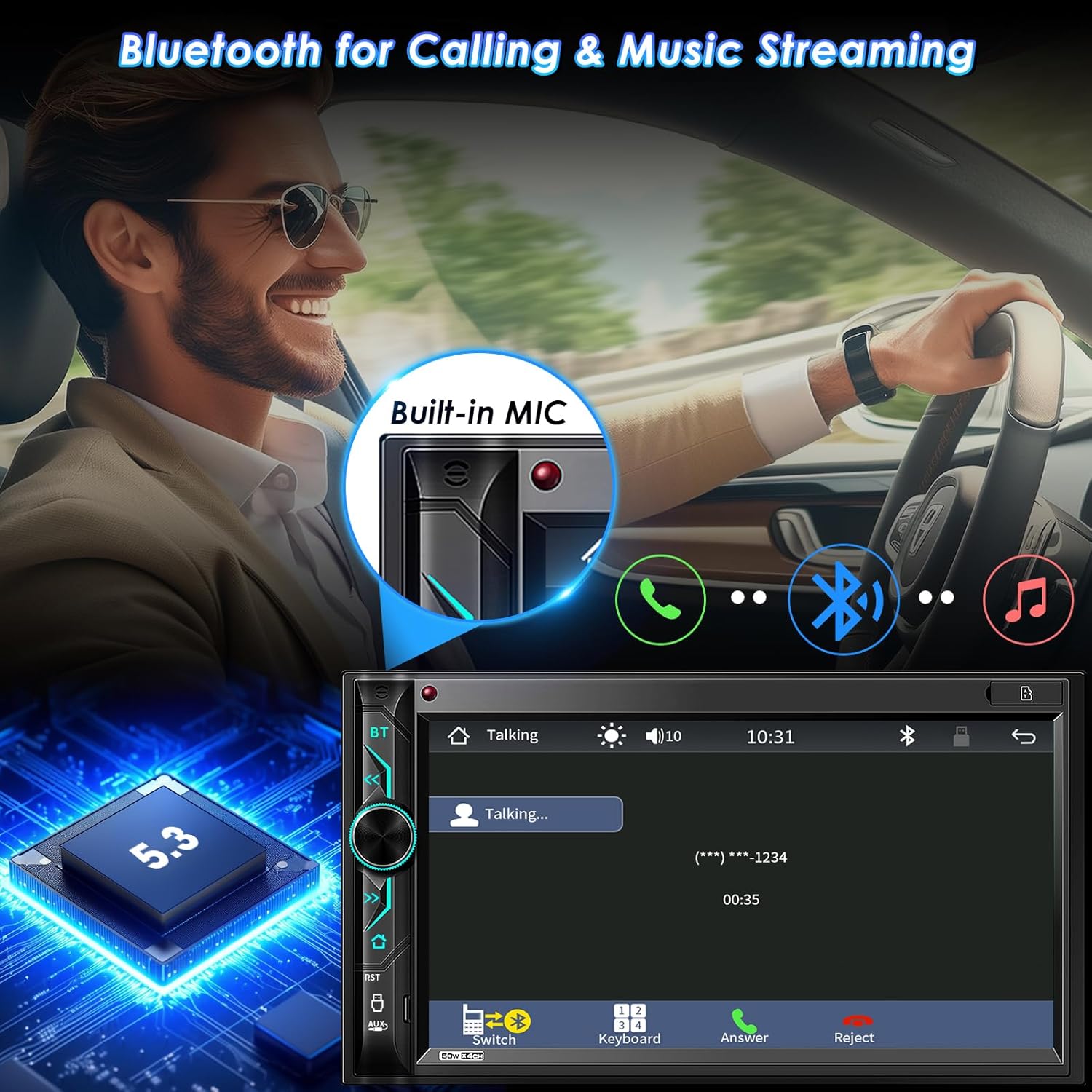
Малюнак 4: Bluetooth Connectivity. This image demonstrates the Bluetooth functionality for hands-free calls and streaming music, showing the integrated microphone and the Bluetooth 5.3 chip.
Зеркальная спасылка на тэлефон
The stereo supports Mirror Link for both iOS (Note: Not compatible with iOS 18.0 or above) and Android phones. Connect your phone via USB to mirror its screen onto the stereo display. This allows you to view and control your smartphone's content, such as videos and apps, on the larger screen. The unit also provides 1.5A charging during Mirror Link operation.

Малюнак 5: Phone Mirror Link and HD Touchscreen. This image highlights the mirror link feature, allowing smartphone content to be displayed on the 7-inch HD touchscreen, along with details about the screen's resolution and wide viewкут нахілу.
AM/FM-радыё
Access the built-in AM/FM radio tuner. Use the touchscreen to scan for stations, save presets, and switch between AM and FM bands. The unit supports RDS (Radio Data System) where available.
Multimedia Playback (USB/SD/AUX)
Прайграванне аўдыё і відэа files from various sources. Insert a USB drive into the USB port or an SD card into the SD slot. Connect external audio devices via the AUX-in port. The system supports 1080P video playback.
Малюнак 6: Car Multimedia Player. This image illustrates the various media input options available on the stereo, including SD card, USB drive, and auxiliary input for playing audio and video content.
Настройка аўдыё
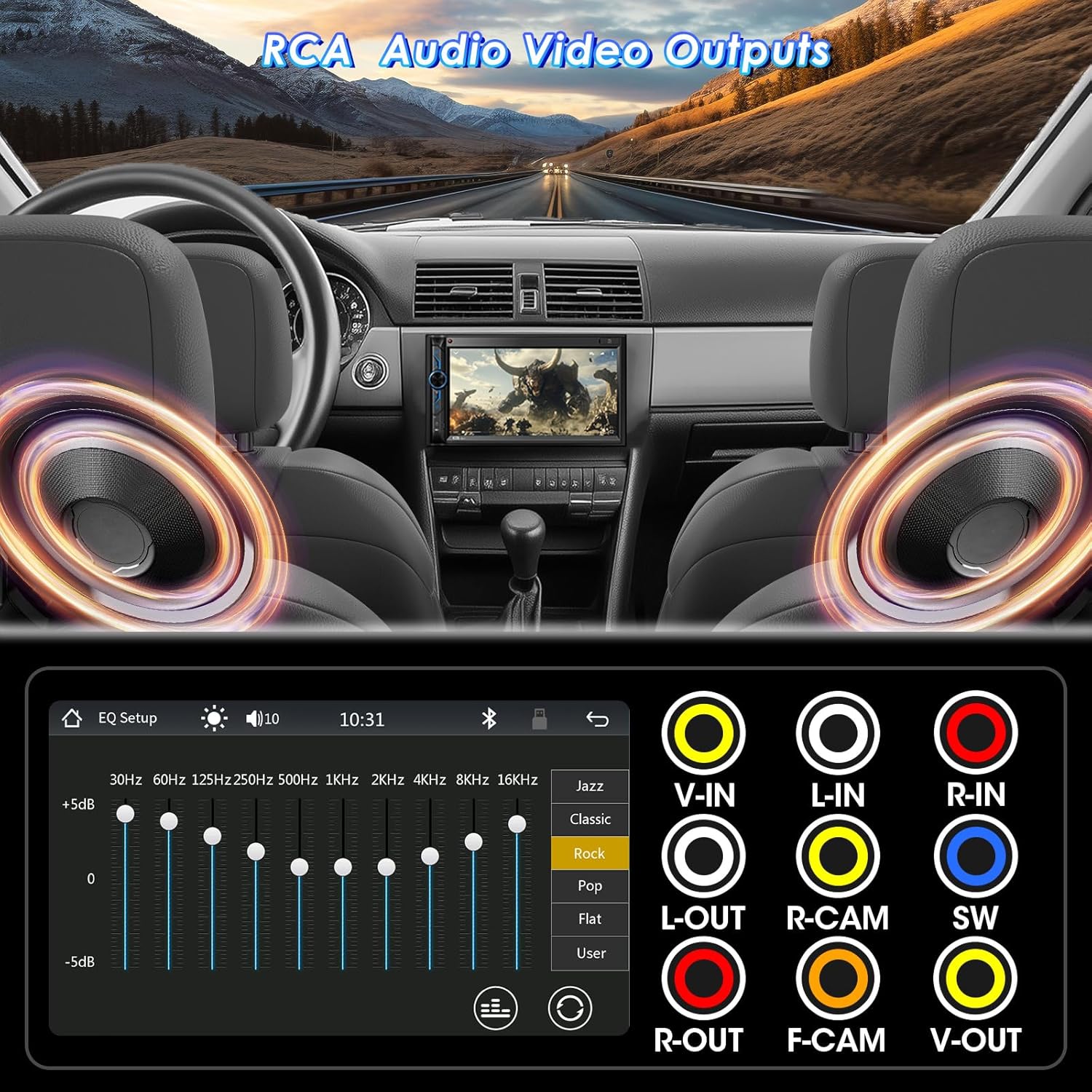
Utilize the 10-band EQ preset to customize sound settings according to your preference. The unit also features pre-amp and subwoofer audio outputs for connecting external ampліфэры і сабвуферы.

Малюнак 7: RCA Audio Output and EQ Settings. This image displays the various RCA output ports for connecting external audio components like amplifiers and subwoofers, as well as the graphical equalizer interface for fine-tuning audio output.
Элементы кіравання
The system can be controlled via the 7-inch capacitive touchscreen, physical buttons and rotary knob on the unit, the included IR wireless remote, or the steering wheel control remote (requires proper wiring and configuration).

Малюнак 8: Wireless Remote Controller. This image shows the included wireless remote, which provides convenient control over the stereo's functions from a distance.
Тэхнічнае абслугоўванне
To ensure the longevity and optimal performance of your Stiflix multimedia system, follow these maintenance guidelines:
- Ачыстка экрана: Выкарыстоўвайце мяккую тканіну без ворса, каб акуратна працерці сэнсарны экран. Для выдалення ўстойлівых плям злёгкуampПрацярыце тканіну вадой або сродкам для ачысткі экрана. Пазбягайце абразіўных матэрыялаў або агрэсіўных хімічных рэчываў.
- Генеральная ўборка: Трымайце прыладу чыстай ад пылу і смецця. Выкарыстоўвайце мяккую шчотку або сціснутае паветра для чысткі вакол кнопак і партоў.
- тэмпература: Пазбягайце працяглага ўздзеяння на прыладу экстрэмальных тэмператур, як высокіх, так і нізкіх.
- Сувязі: Перыядычна правярайце ўсе злучэнні правадоў, каб пераканацца ў іх надзейнасці і адсутнасці карозіі.
Ліквідацыю непаладак
If you encounter issues with your multimedia system, refer to the following common problems and solutions:
| праблема | Магчымая прычына | Рашэнне |
|---|---|---|
| Няма сілы | Няправільная праводка; перагарэлы засцерагальнік; праблема з акумулятарам аўтамабіля. | Check power and ground connections. Verify vehicle fuses and the unit's fuse. Ensure battery is charged. |
| Без гуку | Правады дынамікаў адключаны; гучнасць занадта нізкая; функцыя адключэння гуку ўключана; няправільная крыніца гуку. | Check speaker wiring. Increase volume. Disable mute. Select correct audio source. |
| Bluetooth не падключаецца | Bluetooth not enabled on phone/stereo; Incorrect pairing process; Interference. | Пераканайцеся, што Bluetooth уключаны на абедзвюх прыладах. Выдаліце папярэднія спалучэнні і зноў падключыце іх. Падыдзіце бліжэй да прылады. |
| Зеркальная спасылка не працуе | Incorrect USB cable; Phone not compatible (e.g., iOS 18.0+); App not installed/updated. | Use a high-quality USB cable. Check phone OS version. Ensure necessary apps are installed and updated. |
| Не адлюстроўваецца камера задняга віду | Camera power/video cable disconnected; Reverse trigger wire not connected. | Verify camera power and video connections. Ensure the reverse trigger wire is correctly connected to the vehicle's reverse light. |
Калі праблема не знікне пасля спробы гэтых рашэнняў, звярніцеся ў службу падтрымкі кліентаў.
Гарантыя і падтрымка
Stiflix products are manufactured with high-quality standards. For information regarding warranty coverage and terms, please refer to the warranty card included with your product or visit the official Stiflix website. For technical assistance or customer support, please use the contact information provided with your purchase or on the brand's official channels.
Note: Specific warranty details and contact information may vary. Always refer to the most current information provided by the manufacturer.