
Уводзіны
Thank you for choosing the Hbada Ergonomic Gaming Chair. This manual provides essential information for the safe and efficient assembly, operation, and maintenance of your new chair. Please read these instructions carefully before use and retain them for future reference.

Image: The Hbada Ergonomic Gaming Chair in a modern gaming environment, showcasinяго дызайн і прысутнасць.
Інфармацыя па бяспецы
- Перад зборкай пераканайцеся, што ўсе кампаненты наяўныя і не пашкоджаныя. Не выкарыстоўвайце, калі якія-небудзь дэталі адсутнічаюць або зламаныя.
- Follow the assembly instructions precisely. Incorrect assembly can lead to instability and injury.
- Не стойце на крэсле. Выкарыстоўвайце яго толькі для сядзення.
- Не перавышайце максімальную грузападымальнасць (гл. характарыстыкі).
- Трымайце дзяцей і хатніх жывёл далей ад крэсла падчас зборкі.
- Пазбягайце ўздзеяння прамых сонечных прамянёў або экстрэмальных тэмператур на крэсла, каб прадухіліць пашкоджанне матэрыялу.
Памеры прадукту
Understanding the dimensions of your chair is important for proper placement and comfortable use. Below are the key measurements:
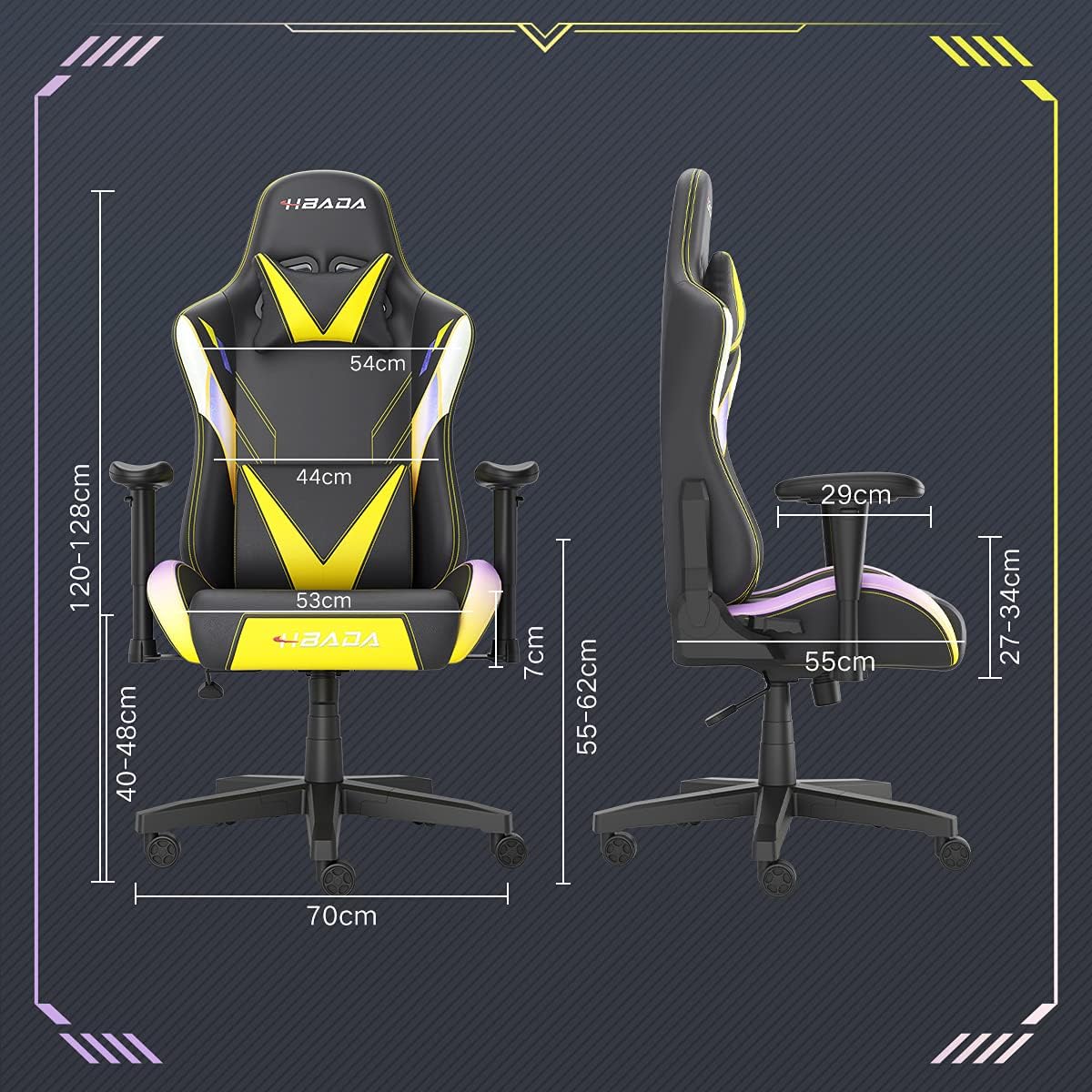
Image: A detailed diagram illustrating the various dimensions of the Hbada Gaming Chair, including height, width, and depth measurements.
- Агульная вышыня: 120-128 см (рэгулявана)
- Вышыня сядзення: 40-48 см (рэгулявана)
- Шырыня сядзення: 53 см
- Глыбіня сядзення: 55 см
- Шырыня спінкі: 54 cm (shoulder area), 44 cm (lumbar area)
- Вышыня падлакотніка (ад сядзення): 7 см (рэгуляваная вышыня)
- Дыяметр падставы: 70 см
Ўстаноўка і зборка
Please follow these steps carefully to assemble your Hbada Gaming Chair. It is recommended to have a clear, spacious area for assembly.
Этапы зборкі:
- Step 1: Assemble the Base and Wheels
Insert the five casters into the holes on the star base. Then, place the gas lift cylinder into the center hole of the base.

Image: Illustration of attaching the five casters to the chair's star-shaped base and inserting the gas lift cylinder.
- Step 2: Attach the Seat and Backrest
Connect the backrest to the seat using the provided screws and mounting plates. Ensure all screws are tightened securely.

Image: Diagram showing the process of securing the backrest to the seat cushion using screws and brackets.
- Крок 3: Усталюйце падлакотнікі
Attach the armrests to the sides of the seat using the designated screws. Make sure they are firmly attached.

Image: Visual guide for attaching the armrests to the chair's seat base.
- Step 4: Connect Seat to Base
Carefully place the assembled seat onto the gas lift cylinder, ensuring it is properly seated and stable.

Image: Depiction of lowering the assembled seat onto the gas lift cylinder, connecting the upper and lower parts of the chair.
- Step 5: Attach Headrest and Lumbar Pillow
Secure the detachable headrest and lumbar support pillow to the chair as desired for optimal comfort.

Image: Instructions for attaching the headrest and lumbar support pillows to the gaming chair.
Інструкцыя па эксплуатацыі
Your Hbada Gaming Chair is designed with several adjustable features to provide personalized comfort and support.
Key Adjustable Functions:
- Adjustable Sitting Height: Use the lever located under the seat on the right side to raise or lower the chair. Pull the lever up to adjust the height, then release it at your desired position. The seat has an 8 cm elevation range.
- Reclining Backrest (90° to 155°): The backrest can be reclined from 90 degrees (upright) to 155 degrees (nearly flat). Use the recline lever on the side of the chair to adjust the angle. Lean back to your preferred position and lock the lever.
- Рэгуляваныя падлакотнікі: The armrests can be adjusted in height by 7 cm. Locate the button or lever on the side of each armrest to unlock, adjust, and then lock them into your desired height.
- 360° Free Swivel: The chair features a full 360-degree swivel function, allowing for easy movement and access to your surroundings without needing to move the entire chair.
- Detachable Headrest and Lumbar Support: The chair includes a removable headrest pillow and lumbar support cushion for enhanced ergonomic comfort. Adjust their positions or remove them based on your preference.

Выява: Оверview of the chair's ergonomic systems, highlighting adjustable sitting height, armrests, 155° reclining, 360° swivel, cool racing casters, and durable base.

Image: The Hbada Gaming Chair demonstrated in its 155-degree reclined position, illustrating the recline controller.
Тэхнічнае абслугоўванне
Regular maintenance will help prolong the life and appearance of your Hbada Gaming Chair.
- Cleaning the PU Leather: Працірайце паверхні са штучнай скуры мяккай губкайamp тканінай. Для выдалення ўстойлівых плям выкарыстоўвайце мяккі мыльны раствор, а затым працярыце чыстай тканінайamp тканіна. Пазбягайце выкарыстання агрэсіўных хімічных рэчываў або абразіўных ачышчальнікаў, бо яны могуць пашкодзіць матэрыял.
- Сыход за кастэрамі: Periodically check the casters for accumulated dust or hair. Clean them with a brush or vacuum cleaner to ensure smooth movement and prevent damage to your flooring.
- Рама і кампаненты: Regularly inspect all screws and bolts to ensure they are tight. Re-tighten if necessary to maintain stability.
- Пазбягайце прамых сонечных прамянёў: Prolonged exposure to direct sunlight can cause the PU leather to fade and crack. Position your chair away from direct sunlight when possible.
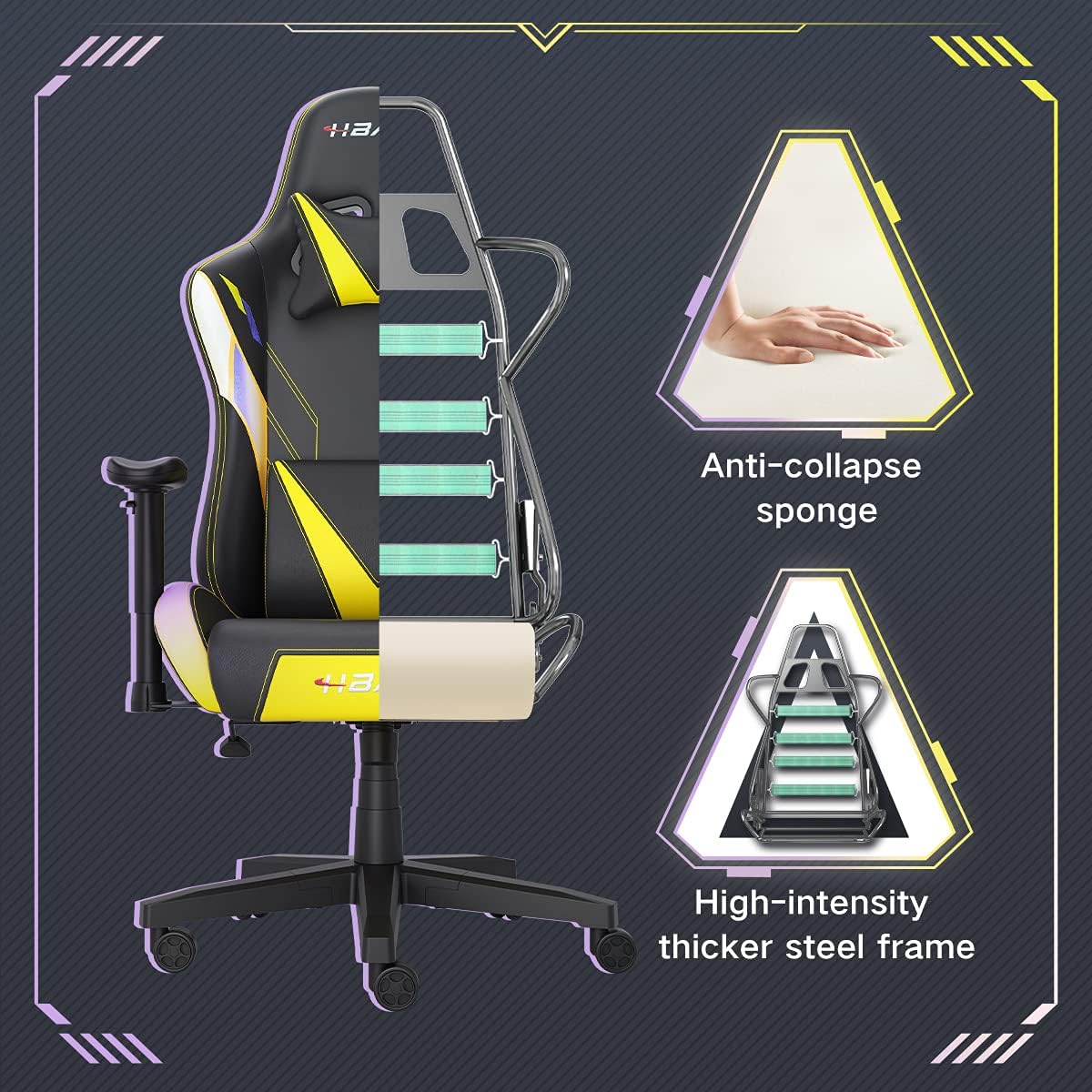
Выява: Разрэз view of the chair's internal structure, highlighting the anti-collapse sponge padding and the high-intensity thicker steel frame, indicating durable construction.
Ліквідацыю непаладак
If you encounter any issues with your Hbada Gaming Chair, refer to the following common problems and solutions:
| праблема | Магчымая прычына | Рашэнне |
|---|---|---|
| Крэсла не рэгулюецца па вышыні | Няспраўнасць газавага пад'ёмніка або не ўключаны рычаг. | Пераканайцеся, што рычаг рэгулявання вышыні цалкам зафіксаваны. Калі праблема не знікне, магчыма, патрабуецца замена газавага пад'ёмніка. Звярніцеся ў службу падтрымкі кліентаў. |
| Крэсла хістаецца або няўстойлівае | Аслабленыя шрубы або няправільная зборка. | Check all assembly screws and bolts, and tighten them securely. Refer to the assembly instructions. |
| Ролікі коцяцца не плаўна | Смецце (валасы, пыл) зачапілася за колы. | Перавярніце крэсла і выдаліце смецце з колаў. |
| Спінка не адкідваецца і не фіксуецца | Механізм адкідвання заклініў або рычаг не зафіксаваны. | Ensure the recline lever is fully engaged. Check for any obstructions around the mechanism. |
Тэхнічныя характарыстыкі
| Асаблівасць | Дэталь |
|---|---|
| Марка | Хбада |
| Нумар мадэлі | W203YMA/EU |
| ASIN | B095PSFLKX |
| Колер | Жоўты |
| Матэрыял | PU Leather, Metal Frame |
| Памеры прадукту | 70 x 70 x 128 см (даўжыня x шырыня x вышыня) |
| Вага прадукту | 22 кілаграма |
| Асаблівасці | Ergonomic, Swivel, Casters, Headrest Support, Adjustable Recline (90°-155°), Adjustable Seat Height (8cm range), Adjustable Armrests (7cm range) |
| Колькасць адзінак | 1.0 Граф |
Гарантыя і падтрымка
Your Hbada Gaming Chair comes with a адзін год гарантыі з даты пакупкі. Гэтая гарантыя распаўсюджваецца на вытворчыя дэфекты і дэфекты матэрыялаў пры нармальным выкарыстанні.
If you experience any issues during use, including problems with installation, damage, or missing parts, please do not hesitate to contact Hbada customer service. We are committed to providing reliable service and can offer free exchanges for covered issues.
For support, please visit the official Hbada webсайт або звярніцеся да прадаўца.