
Уводзіны
The Cellularline Clip Pro is a mono Bluetooth® earbud designed for convenience and portability. It features a unique charging base with an integrated clip, allowing you to easily attach it to clothing. The earbud itself is wireless and its capsule can be rotated for comfortable use in either the right or left ear. This manual provides detailed instructions for setting up, operating, and maintaining your Clip Pro earbud.

Image: The Cellularline Clip Pro earbud detached from its charging base, showcasing its compact design and the charging contacts.
Змест пакета
Калі ласка, праверце ўпакоўку на наяўнасць наступных прадметаў:
- Cellularline Clip Pro Mono Headset
- Зарадны кабель
- Зменныя амбушюры
- Інструкцыя па эксплуатацыі (гэты дакумент)
Прадукт скончаныview
Familiarize yourself with the components of your Cellularline Clip Pro:

Выява: Уверсе view of the Clip Pro charging base with the earbud securely docked. A blue indicator light is visible on the earbud.
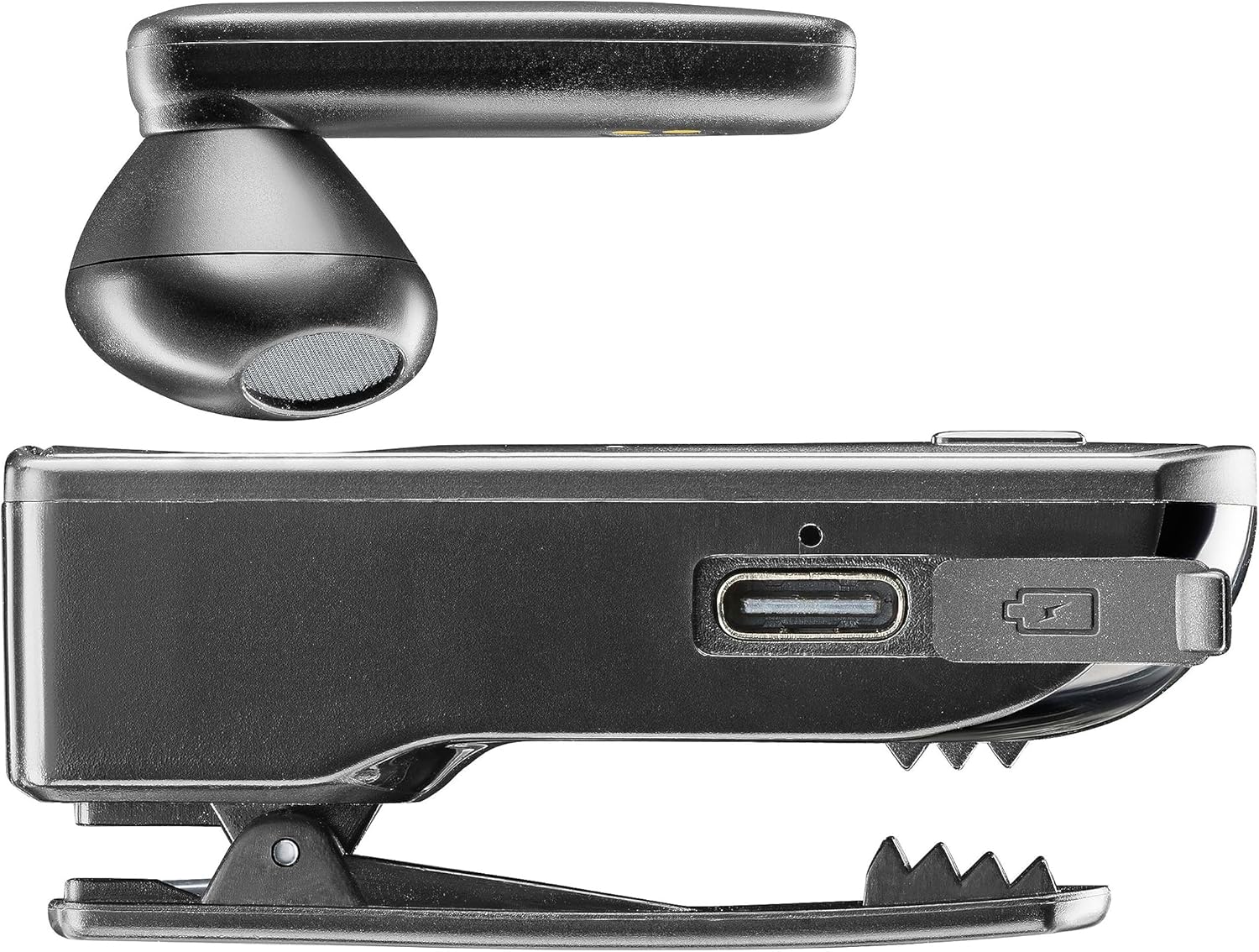
Выява: Збоку view of the Clip Pro charging base, highlighting the USB-C charging port and the integrated clip mechanism.

Выява: Падрабязная view of the earbud's inner surface, showing the two gold charging contacts and the speaker mesh.
Настройка
1. Зарадка прылады
Before first use, fully charge your Cellularline Clip Pro. The charging base provides additional power for the earbud.
- Connect the provided charging cable to the USB-C port on the charging base.
- Падключыце другі канец кабеля да сумяшчальнай крыніцы харчавання USB (напрыклад, адаптара для сеткі, USB-порта кампутара).
- Place the earbud into the charging base. Ensure the charging contacts align.
- The charging indicator light on the earbud will show charging status. A full charge takes approximately 1.5 hours.
2. Спалучэнне з прыладай Bluetooth
To use the earbud, you must first pair it with your smartphone or other Bluetooth-enabled device.
- Пераканайцеся, што навушнік зараджаны і выключаны.
- Remove the earbud from the charging base. It will automatically enter pairing mode (indicator light will flash).
- On your device (e.g., smartphone), go to the Bluetooth settings and enable Bluetooth.
- Пошук available devices. Select "Cellularline Clip Pro" from the list.
- Once connected, the earbud's indicator light will stop flashing and remain solid or turn off, depending on the model.
- The earbud is now ready for use. It will automatically reconnect to the last paired device when powered on and within range.
Інструкцыя па эксплуатацыі
Уключэнне/выключэнне харчавання
- Уключэнне: Remove the earbud from the charging base. It will automatically power on. Alternatively, press and hold the multifunction button on the earbud for a few seconds.
- Выключэнне: Place the earbud back into the charging base. It will automatically power off. Alternatively, press and hold the multifunction button on the earbud for a few seconds until the indicator light turns off.
Кіраванне званкамі
- Адказ/завяршэнне выкліку: Націсніце шматфункцыянальную кнопку адзін раз.
- Адхіліць выклік: Press and hold the multifunction button for approximately 2 seconds.
- Паўторны набор апошняга нумара: Двойчы націсніце шматфункцыянальную кнопку.
- Vibrator Feature: The charging base will vibrate when you receive an incoming call, even if the earbud is docked.
Рэгулятар гучнасці
The charging base features dedicated volume adjustment buttons.
- Павялічыць гучнасць: Press the '+' button on the charging base.
- Паменшыць гучнасць: Press the '-' button on the charging base.
Wearing the Earbud
The earbud capsule is rotatable, allowing for comfortable use in either the right or left ear.
- Gently rotate the earbud capsule to align with your preferred ear.
- Insert the earbud into your ear canal. Adjust for a secure and comfortable fit.

Image: A man wearing the Cellularline Clip Pro earbud, with the charging base clipped to his shirt collar, demonstrating its hands-free use.
Тэхнічнае абслугоўванне
To ensure the longevity and optimal performance of your Cellularline Clip Pro, follow these maintenance guidelines:
- Уборка: Use a soft, dry cloth to clean the earbud and charging base. Do not use abrasive cleaners or solvents.
- Вушныя наканечнікі: Regularly check and clean the eartips. Replace them if they become worn or damaged.
- захоўванне: When not in use, store the earbud in its charging base to protect it and keep it charged. Store in a cool, dry place away from direct sunlight and extreme temperatures.
- Воданепранікальнасць: This device is not waterproof. Avoid exposure to water, moisture, or excessive humidity.
Ліквідацыю непаладак
If you encounter issues with your Cellularline Clip Pro, try the following solutions:
| праблема | Магчымае рашэнне |
|---|---|
| Навушнікі не ўключаюцься. | Ensure the earbud is charged. Place it in the charging base for at least 15 minutes. |
| Немагчыма спалучыць прыладу. | Make sure Bluetooth is enabled on your device. Ensure the earbud is in pairing mode (flashing indicator light). Try forgetting the device in your phone's Bluetooth settings and re-pairing. |
| Няма гуку або нізкі ўзровень гучнасці. | Check the volume levels on both the earbud (using the charging base buttons) and your connected device. Ensure the earbud is properly seated in your ear. |
| Charging base not vibrating for calls. | Ensure the earbud is correctly docked in the charging base and the base itself has sufficient power. |
| Earbud disconnects frequently. | Ensure your device is within the Bluetooth range (typically 10 meters/33 feet) and there are no significant obstructions. Fully charge both the earbud and the charging base. |
Тэхнічныя характарыстыкі
- Назва мадэлі: BTCLIPPROK
- Марка: Сотавая лінія
- Тэхналогія падключэння: Бесправадны Bluetooth
- Формаў-фактар: Earbud (Capsule)
- Размяшчэнне вушэй: Укладышы
- колер: Чорны
- матэрыял: ПК + АБС-пластык
- Вага прадмета: 94 грам
- Час зарадкі: 1.5 гадзіны
- Склад батарэі: Літый-іённы (1 у камплекце)
- Акумулятарная батарэя: так
- Асаблівасці: Multifunction answer button, Volume adjustment buttons, Vibrating charging base
- Сумяшчальныя прылады: iPhone, Samsung, Huawei, Xiaomi, and all Bluetooth-enabled devices
- Тып кіравання: Media control, Volume control, Touch
Інфармацыя па бяспецы
Калі ласка, прачытайце і выконвайце гэтыя меры бяспекі, каб пазбегнуць пашкоджання прылады або траўмаў:
- Не падвяргайце прыладу ўздзеянню экстрэмальных тэмператур, прамых сонечных прамянёў або высокай вільготнасці.
- Не кідайце прыладу і не падвяргайце яе моцным ударам.
- Не спрабуйце разбіраць, рамантаваць або мадыфікаваць прыладу самастойна. Звярніцеся па дапамогу да аўтарызаванага абслугоўваючага персаналу.
- Захоўвайце прыладу далей ад дзяцей і хатніх жывёл.
- Утылізуйце прыладу і яе акумулятар адказна ў адпаведнасці з мясцовымі правіламі.
- Do not use the earbud at excessively high volumes for prolonged periods, as this may cause hearing damage.
Гарантыя і падтрымка
For warranty information and customer support, please refer to the official Cellularline webсайт або звярніцеся да прадаўца. Захоўвайце пацвярджэнне пакупкі для прэтэнзій па гарантыі.