
cellularline BTHUSHTWSK
Cellularline HUSH Bluetooth In-Ear Earbuds User Manual
Model: BTHUSHTWSK
1. Уводзіны
This manual provides detailed instructions for the Cellularline HUSH Bluetooth In-Ear Earbuds. These earbuds feature an interactive touch display, Active Noise Cancelling (ANC), Noise-Free Calls technology, and customizable sound with 5 EQ modes. Please read this manual carefully to ensure proper use and optimal performance of your device.
2. Што ў скрынцы
- Cellularline HUSH Earbuds
- Чахол для зарадкі
- Кіраўніцтва карыстальніка
3. Прадукт скончыўсяview
The Cellularline HUSH earbuds are designed for an advanced and personalized audio experience. The compact charging case features an interactive touch display for easy control.

Image 1: Cellularline HUSH Earbuds in their charging case, showcasing the sleek design and in-ear fit.
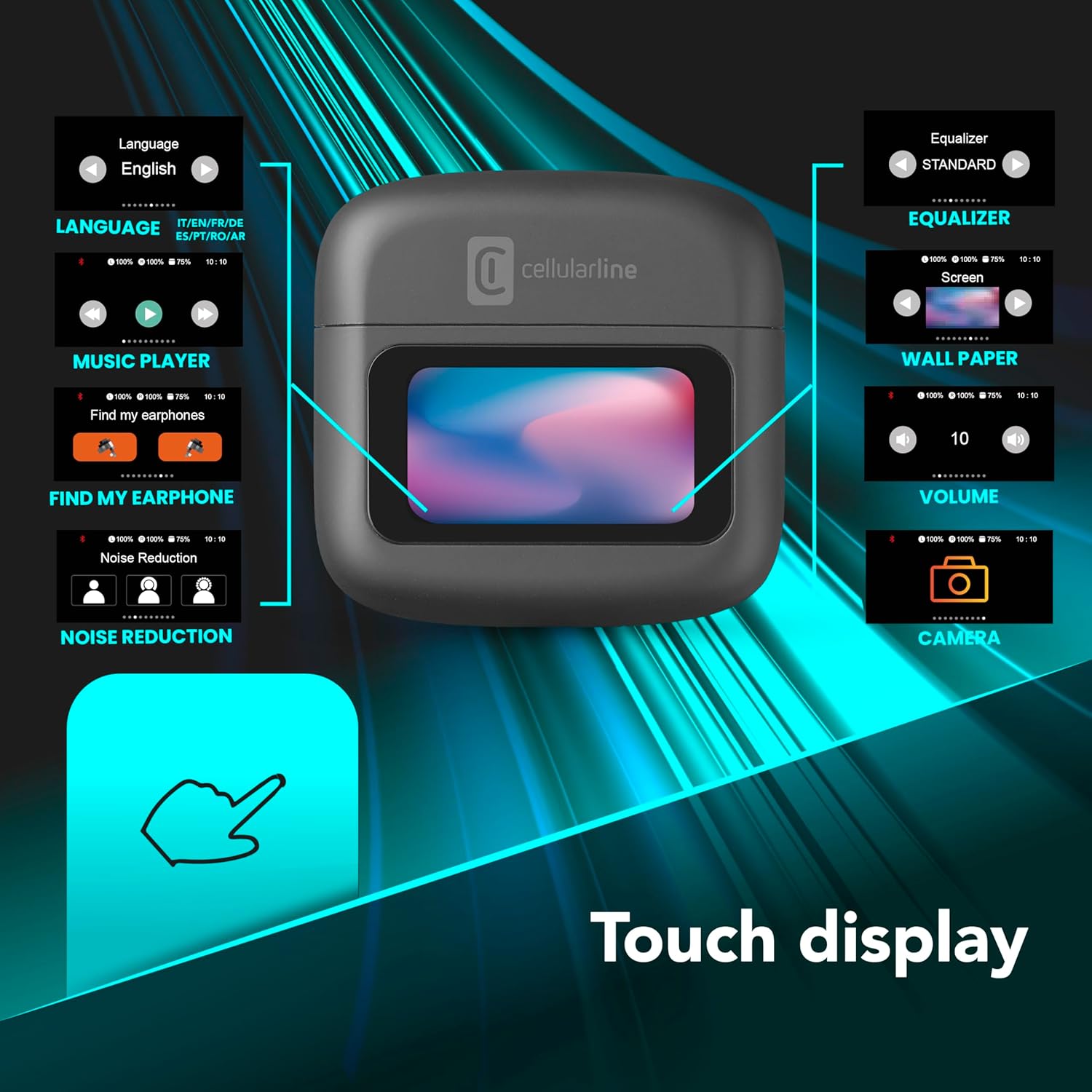
Image 2: An illustration highlighting the various functions accessible via the touch display on the charging case, including language, music player, 'Find My Earphone', noise reduction, equalizer, wallpaper, volume, and camera control.
4. Настройка
4.1 Зарадка
Before first use, fully charge the earbuds and the charging case. Place the earbuds into the charging case. The magnetic closure ensures proper placement for charging. The case and earbuds offer up to 42 hours of total play time.

Image 3: Graphic indicating 42 hours of total play time and 6 hours of charger time for the Cellularline HUSH earbuds.
4.2 Спалучэнне
The earbuds feature an Autopairing function. When removed from the charging case, they will automatically enter pairing mode or reconnect to the last paired device. To pair with a new device, ensure Bluetooth is enabled on your device and select 'Cellularline HUSH' from the list of available devices.
5. Інструкцыя па эксплуатацыі
5.1 Touch Display Controls
The interactive touch display on the charging case allows for easy management of various functions. You can control music playback, manage calls, adjust noise reduction modes, and select EQ settings directly from the display.
5.2 Актыўнае шумапрыглушэнне (ANC)
Activate Active Noise Cancelling to reduce ambient low-frequency noise, providing an immersive listening experience. This feature can be controlled via the touch display.
5.3 Noise-Free Calls
The integrated microphones utilize Noise-Free Calls technology to eliminate background noise, ensuring clear and crisp voice transmission during calls.

Image 4: The charging case display showing an incoming call with options to answer or decline, next to a smartphone displaying a similar call interface.
5.4 Equalizer (EQ) Modes
Customize your audio experience by selecting one of the 5 available EQ modes through the touch display. This allows you to tailor the sound profile у адпаведнасці з вашымі перавагамі.
5.5 Рэжымы падаўлення шуму
Switch between different noise reduction modes, including Active Noise Cancelling, Normal Mode, and Transparency Mode, to suit your environment. These modes are accessible via the touch display.

Image 5: The charging case display showing options for Noise Reduction, including Active Noise Cancelling, Normal Mode, and Transparency Mode.
6. Тэхнічнае абслугоўванне
To ensure the longevity and optimal performance of your Cellularline HUSH earbuds:
- Трымайце навушнікі і зарадны футляр чыстымі і сухімі.
- Не падвяргайце прыладу ўздзеянню экстрэмальных тэмператур або вільготнасці.
- Clean the ear tips regularly with a soft, dry cloth.
- Захоўвайце навушнікі ў зарадным чахле, калі яны не выкарыстоўваюцца.
7. Выпраўленне непаладак
If you encounter issues with your Cellularline HUSH earbuds, refer to the following common solutions:
- Няма гуку:
- Пераканайцеся, што навушнікі зараджаныя.
- Праверце падключэнне Bluetooth да вашай прылады.
- Адрэгулюйце гучнасць на абодвух навушніках і падлучанай прыладзе.
- Немагчыма спалучыць:
- Ensure earbuds are in pairing mode (usually indicated by a flashing light).
- Выключыце і ўключыце Bluetooth на вашай прыладзе.
- Выдаліце прыладу з налад Bluetooth тэлефона і паспрабуйце падключыць яе зноў.
- ANC не працуе:
- Ensure ANC is activated via the touch display.
- Check for proper fit of the earbuds in your ears.
- Праблемы з зарадкай:
- Пераканайцеся, што зарадны кабель надзейна падключаны.
- Пераканайцеся, што зарадны чахол мае сілкаванне.
- Ачысціце кантакты зарадкі на навушніках і ў чахле.
8. Тэхнічныя характарыстыкі
| Асаблівасць | Дэталь |
|---|---|
| Марка | клеткавая лінія |
| мадэль | BTHUSHTWSK |
| Сумяшчальныя прылады | Прылады Bluetooth |
| Метад кантролю | Дакранацца |
| Дадатковыя магчымасці | Active Noise Cancellation and Noise-Free Calls |
| Сярэдні тэрмін службы батарэі | 42 гадзін |
| Вага прадмета | 126 г |
| Колер | Нерон |
| Размяшчэнне вушэй | Укладышы |
| Формаў-фактар | Укладышы |
| Кантроль шуму | Актыўнае падаўленне шуму |
| Раз'ём для навушнікаў | Jack-less |
| Тэхналогія падлучэння | Бесправадная сувязь |
| Тэхналогія бесправадной сувязі | Bluetooth |
9. Гарантыя і падтрымка
For warranty information and customer support, please refer to the documentation included with your product or visit the official Cellularline webсайт. Захоўвайце пацвярджэнне пакупкі для прэтэнзій па гарантыі.