
C-LOGIC 580
C-LOGIC 580 Smart Digital Multimeter User Manual
Мадэль: 580
1. Уводзіны
This manual provides comprehensive instructions for the safe and effective use of the C-LOGIC 580 Smart Digital Multimeter. Please read this manual thoroughly before operation and retain it for future reference.
The C-LOGIC 580 is a smart digital multimeter designed for accurate and efficient electrical measurements. Its smart technology allows for automatic recognition of measurement parameters, reducing potential errors for amateur users and saving time for professionals.
2. Інфармацыя па бяспецы
Always observe safety precautions when using electrical testing equipment. Failure to do so may result in injury or damage to the device.
- Не перавышайце максімальныя ўваходныя значэнні, указаныя для кожнай функцыі.
- Ensure the test leads are properly connected and the function switch is in the correct position before making any measurements.
- Будзьце асабліва асцярожныя пры працы з ланцугамі пад напругай.
- Не выкарыстоўвайце мультыметр, калі ён выглядае пашкоджаным або калі вымяральныя правады пашкоджаны.
- Refer to the CAT III 600V and MAX 600V markings on the device for voltagе межы.
3. Асаблівасці прадукту
- Разумная тэхналогія: Automatic recognition of measurement parameters.
- Error Reduction: Designed to minimize errors for amateur users.
- Эканомія часу: Streamlines measurement processes for professional users.
- Лічбавай дысплей: Clear and easy-to-read digital readout.
- Некалькі функцый: Capable of measuring various electrical parameters.
4. Змесціва ўпакоўкі
Пераканайцеся, што ўсе прадметы ёсць у наяўнасці і не пашкоджаны, пасля адкрыцця ўпакоўкі.
- C-LOGIC 580 Smart Digital Multimeter
- Вымяральныя дроты (чырвоны і чорны)
- Кіраўніцтва карыстальніка
5. Настройка
5.1 Устаноўка батарэі
The C-LOGIC 580 is battery powered. Ensure batteries are correctly installed before first use.
- Знайдзіце вечка батарэйнага адсека на задняй панэлі мультыметра.
- Выкарыстоўвайце адвёртку, каб адкрыць батарэйны адсек.
- Insert the required batteries, observing the correct polarity (+ and -).
- Заменіце крышку батарэйнага адсека і замацуеце яе.
5.2 Падключэнне вымяральных правадоў
Правільнае падключэнне вымяральных правадоў мае вырашальнае значэнне для дакладных і бяспечных вымярэнняў.
- Устаўце чорны вымяральны шнур у ўваходны раз'ём "COM" (Common).
- Insert the red test lead into the "VHz%" input jack for voltage, frequency, and duty cycle measurements.
- Ensure connections are firm and secure.
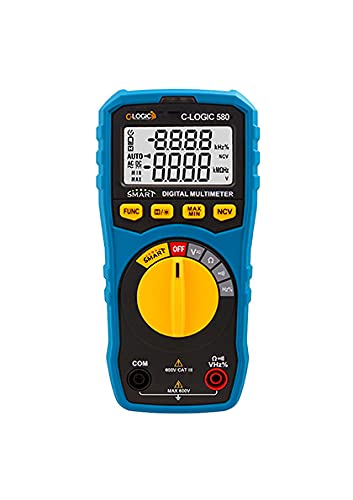
Малюнак 1: Спераду view of the C-LOGIC 580 Smart Digital Multimeter, showing the display, rotary switch, function buttons, and input jacks (COM and VHz%). The display shows "-8.8.8.8" and "0.0.0.0" with indicators for AUTO, AC/DC, kHz%, NCV, MAX, MIN, and V. The rotary switch is set to OFF. The input jacks are labeled "COM" and "VHz%".
6. Інструкцыя па эксплуатацыі
6.1 Уключэнне/выключэнне
To power on the multimeter, rotate the central yellow dial from the "OFF" position to any desired measurement function. To power off, rotate the dial back to "OFF".
6.2 Smart Measurement Mode
The C-LOGIC 580 features a smart mode that automatically identifies the type of measurement (e.g., AC voltage, DC абtage, resistance) when the leads are connected to a circuit. This simplifies operation by eliminating the need to manually select the measurement type.
6.3 Функцыянальныя кнопкі
The multimeter includes several function buttons below the display:
- ФУНКЦЫЯ: Used to cycle through different measurement modes within a single rotary switch setting (e.g., AC/DC voltage, resistance/continuity).
- (Diode/Continuity): Activates diode test or continuity check.
- MAX / MIN: Toggles between maximum and minimum value hold during a measurement.
- NCV: Актывуе бескантактавы рэжым гучнасціtagэлектроннае выяўленне.
6.4 Асноўныя вымярэнні
тtagВымярэнне (пераменны/пастаянны ток):
- Set the rotary switch to the 'V' position.
- Connect the black test lead to the 'COM' jack and the red test lead to the 'VHz%' jack.
- Падключыце вымяральныя шпулькі паралельна да ланцуга або кампанента, які трэба вымераць.
- The multimeter will automatically detect AC or DC voltage. Use the FUNC button if manual selection is needed.
Вымярэнне супраціву:
- Set the rotary switch to the 'Ω' position.
- Connect the black test lead to the 'COM' jack and the red test lead to the 'VHz%' jack.
- Перад вымярэннем супраціўлення пераканайцеся, што ланцуг абясточаны.
- Падключыце вымяральныя дроты да кампанента, які трэба вымераць.
Тэст бесперапыннасці:
- Set the rotary switch to the 'Ω' position.
- Націсніце (Diode/Continuity) button to select continuity mode.
- Connect the test leads across the circuit or component. A beep indicates continuity.
Бескантактавы выпtagвыяўленне e (NCV):
- Set the rotary switch to the 'NCV' position.
- Move the top part of the multimeter near a live conductor. The device will indicate the presence of AC voltage без прамога кантакту.
7. Тэхнічнае абслугоўванне
7.1 Ачыстка
Працярыце мультыметр casing з аб'явайamp cloth and mild detergent. Do not use abrasives or solvents. Ensure the device is dry before storage or use.
7.2 Замена батарэі
When the low battery indicator appears on the display, replace the batteries promptly to ensure accurate readings. Follow the battery installation steps in Section 5.1.
7.3 Захоўванне
Захоўвайце мультыметр у прахалодным, сухім месцы, удалечыні ад прамых сонечных прамянёў і экстрэмальных тэмператур. Пры працяглым захоўванні выміце батарэйкі, каб прадухіліць уцечку.
8. Выпраўленне непаладак
| праблема | Магчымая прычына | Рашэнне |
|---|---|---|
| Мультыметр не ўключаецца. | Разраджаныя або няправільна ўсталяваныя батарэйкі. | Праверце палярнасць батарэек або заменіце батарэйкі. |
| Няправільныя паказанні. | Incorrect function selected; poor test lead connection; low battery. | Ensure correct function is selected (if not in smart mode); check test lead connections; replace batteries. |
| Няма гукавога сігналу бесперапыннасці. | Circuit is open; continuity mode not selected. | Verify circuit integrity; press FUNC button to select continuity mode. |
9. Тэхнічныя характарыстыкі
| Параметр | Дэталь |
|---|---|
| Марка | C-LOGIC |
| мадэль | 580 |
| Крыніца харчавання | Харчаванне ад батарэі |
| Тып вымярэння | Мультыметр |
| Вытворца | C-LOGIC |
| ASIN | B0967VMK1W |
| UPC | 810053671603 |
| Дата першай даступнасці | 31 мая 2021 г |
10. Гарантыя і падтрымка
For warranty information or technical support regarding your C-LOGIC 580 Smart Digital Multimeter, please contact C-LOGIC customer service. Refer to the product packaging or the official C-LOGIC webсайт для кантактных дадзеных.
Note: Specific warranty terms may vary by region and retailer. Please retain your proof of purchase.
Ask a question about this manual
Ask about setup, troubleshooting, compatibility, parts, safety, or missing instructions. Manuals+ will review the question and use this page’s manual context to help answer it.