
EGLOO S4
EGLOO S4 Smart Home Security Camera User Manual
Model: S4 (TSC-221P)
Уводзіны
The EGLOO S4 is a versatile 1080P Wi-Fi smart camera designed for comprehensive home monitoring. It functions as a security camera, baby monitor, and pet camera, offering advanced features such as integrated temperature and humidity monitoring, remote appliance control, motion and sound detection with real-time alerts, clear IR night vision, and two-way audio communication. Its wide field of view and digital zoom capabilities provide comprehensive coverage for various indoor environments.
Інфармацыя па бяспецы
- Ensure the camera is placed on a stable, flat surface to prevent falling.
- Трымайце прыладу далей ад вады, вільгаці і экстрэмальных тэмператур.
- Не спрабуйце разбіраць або рамантаваць прыладу самастойна. Звярніцеся да кваліфікаванага абслугоўваючага персаналу.
- Каб пазбегнуць пашкоджанняў, выкарыстоўвайце толькі прадастаўлены адаптар сілкавання.
- Keep out of reach of children and pets to avoid accidental damage or injury.
- Пазбягайце размяшчэння камеры пад прамымі сонечнымі прамянямі або побач з крыніцамі цяпла.
Змест пакета
Калі ласка, пераканайцеся, што ўсе прадметы прысутнічаюць у вашай упакоўцы:
- EGLOO S4 Smart Home Security Camera
- Адаптар сілкавання
- Кіраўніцтва карыстальніка (гэты дакумент)
- Mounting Accessories (if applicable, not specified but common)
Прадукт скончаныview

Фронт view of the EGLOO S4 camera, showcasing its compact dome design with a black camera head and a light-colored base.

The EGLOO S4 camera held in a hand, illustrating its small and portable size.
Асноўныя характарыстыкі:
- Відэа ў фармаце Full HD 1080P: Provides clear and detailed video monitoring.
- Датчык тэмпературы і вільготнасці: Real-time environmental monitoring.
- Выяўленне руху і гуку: Receive instant alerts on your mobile device.
- Motion Tracking (AI Supported): Automatically follows detected movement.
- Remote Appliance Control: Control compatible appliances from anywhere.
- Clear IR Night Vision: Забяспечвае бачнасць ва ўмовах нізкай асветленасці.
- Шырокавугольны аб'ектыў 140°: Прапануе шырокае поле view.
- 8x лічбавы зум: Zoom in for closer details.
- Двухбаковы аўдыё: Communicate with individuals or pets through the camera.
- 4-Channel Simultaneous Screen: Monitor multiple cameras or views адразу.
- Лёгкая ўстаноўка: Designed for quick and straightforward installation.

Diagram illustrating the key features of the EGLOO S4 camera, including temperature/humidity, motion/sound alerts, motion tracking, 1080P video, and easy setup.

A smartphone screen displaying a 4-channel simultaneous view from the EGLOO S4 camera, highlighting features like night vision, wide angle, digital zoom, and two-way audio.
Кіраўніцтва па ўстаноўцы
1. Download the EGLOO App:
Пошук "EGLOO" in your mobile device's app store (App Store for iOS or Google Play Store for Android) and download the official application. Alternatively, scan the QR code below:

Scan this QR code to quickly download the EGLOO application.
Для атрымання дадатковай інфармацыі наведайце: http://m.site.naver.com/0ZStX
2. Уключыце камеру:
Connect the provided power adapter to the camera's power port and plug it into a wall outlet. The camera will power on automatically.
3. Add Device in App:
- Open the EGLOO app and create an account or log in.
- Follow the in-app instructions to add a new device. This typically involves selecting your camera model and connecting it to your Wi-Fi network (2.4GHz Wi-Fi is supported).
- Ensure your mobile device is connected to the same Wi-Fi network during the setup process.

A hand holding a smartphone displaying the EGLOO application logo, indicating readiness for setup.
Інструкцыя па эксплуатацыі
жыць View і элементы кіравання:
Once connected, you can access the live video feed from your camera through the EGLOO app. Use the on-screen controls to pan, tilt, and zoom the camera, activate two-way audio, or take snapshots/record video.
Маніторынг тэмпературы і вільготнасці:
The EGLOO S4 continuously monitors the ambient temperature and humidity. View real-time data directly within the app to ensure optimal environmental conditions, especially for baby or pet monitoring.
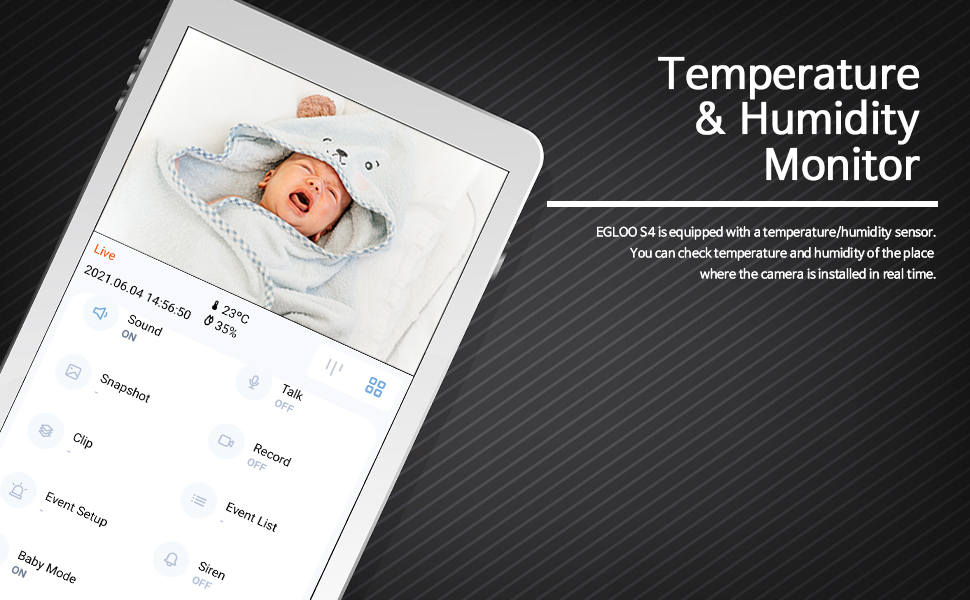
The EGLOO app interface displaying real-time temperature and humidity readings alongside the live camera feed, useful for monitoring a baby's room.
Выяўленне руху і гуку:
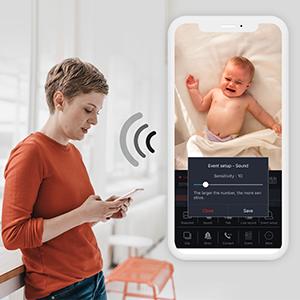
Configure motion and sound detection settings in the app to receive instant push notifications when activity is detected. Adjust sensitivity levels to minimize false alerts.

A woman checking her smartphone, which displays notification alerts from the EGLOO S4 camera for motion and sound detection.
Remote Appliance Control:
The EGLOO S4 can act as a smart remote control for various home appliances. Follow the in-app guide to pair your appliances with the camera for remote operation.

An illustration showing the EGLOO S4 camera positioned in a living room, with lines indicating its ability to connect and control various home appliances remotely.

A smartphone screen displaying controls for an air conditioner, demonstrating the remote appliance control feature of the EGLOO S4 camera.
Начное бачанне:
The camera automatically switches to infrared (IR) night vision in low-light conditions, providing clear black-and-white video. The "Night Color" technology enhances visibility.
A split image demonstrating the difference between normal lighting and the clear infrared night vision capability of the camera in a room setting.
Двухбаковы аўдыё:
Utilize the two-way audio feature to speak through the camera and hear responses. This is ideal for comforting a baby, communicating with a pet, or interacting with family members.

An image of a puppy with a speech bubble saying "Hi, puppy!", illustrating the two-way audio communication feature of the camera for interacting with pets.
Тэхнічнае абслугоўванне
- Уборка: Акуратна працярыце аб'ектыў і корпус камеры мяккай сухой тканінай. Не выкарыстоўвайце агрэсіўныя хімікаты або абразіўныя ачышчальнікі.
- захоўванне: If storing the camera for an extended period, disconnect it from power and keep it in a cool, dry place.
- Абнаўленні праграмнага забеспячэння: Regularly check the EGLOO app for firmware updates to ensure optimal performance and security.
Ліквідацыю непаладак
| праблема | Магчымая прычына | Рашэнне |
|---|---|---|
| Камера не падключаецца да Wi-Fi. | Няправільны пароль Wi-Fi; камера занадта далёка ад маршрутызатара; сетка Wi-Fi 5 ГГц. | Verify Wi-Fi password. Move camera closer to router. Ensure you are connecting to a 2.4GHz Wi-Fi network. Restart camera and router. |
| Апавяшчэнняў не атрымана. | App notification settings disabled; phone notification settings disabled; incorrect detection sensitivity. | Check notification settings within the EGLOO app. Verify phone's system notification settings for the EGLOO app. Adjust motion/sound detection sensitivity. |
| Дрэнная якасць відэа. | Weak Wi-Fi signal; insufficient bandwidth. | Ensure strong Wi-Fi signal. Reduce other network activity. Consider moving camera closer to router or upgrading internet plan. |
| Камера не рэагуе. | Праблема з харчаваннем; праграмны збой. | Unplug the power adapter, wait 10 seconds, then plug it back in to restart the camera. If the issue persists, contact customer support. |
Тэхнічныя характарыстыкі
| Асаблівасць | Дэталь |
|---|---|
| Назва мадэлі | S4 |
| Нумар мадэлі тавару | ТСЦ-221П |
| Тэхналогія падлучэння | Бесправадная сувязь (Wi-Fi) |
| Дазвол відэазахопу | 1080p |
| Максімум WebКамера дазвол выявы | 200 МП |
| Поле View | 360 градусаў |
| Тып маштабавання | Лічбавы зум |
| Тэхналогія нізкай асветленасці | Начны колер |
| Тып абвесткі | Аўдыё і рух |
| Памеры прадмета (Д х Ш х У) | 4.34 х 3.1 х 4.34 цалі |
| Вага прадмета | 0.44 фунта (7 унцыі) |
| Крыніца харчавання | AC Adapter (Batteries Not Required) |
| Міжнародны рэйтынг абароны | IP65 |
| Вытворца | ТРУЭН |
Гарантыя і падтрымка
For warranty information and technical support, please refer to the official EGLOO website or contact the manufacturer directly. The installation manual is available as a PDF document for further reference.
вытворца: ТРУЭН
Кіраўніцтва па ўсталёўцы (PDF): Спампаваць PDF
Ask a question about this manual
Ask about setup, troubleshooting, compatibility, parts, safety, or missing instructions. Manuals+ will review the question and use this page’s manual context to help answer it.