
1. Уводзіны
Дзякуй за пакупкуasing the Ledwood Drop 400 Wireless LED Speaker. This manual provides essential information for setting up, operating, and maintaining your speaker. Please read it carefully before use to ensure proper functionality and to maximize your listening experience.
2. Інфармацыя па бяспецы
- Не падвяргайце дынамік уздзеянню вады, вільгаці або экстрэмальных тэмператур.
- Пазбягайце падзення дынаміка і не падвяргайце яго моцным ударам.
- Не спрабуйце разбіраць або рамантаваць дынамік самастойна. Звярніцеся да кваліфікаванага абслугоўваючага персаналу.
- Трымайце дынамік далей ад крыніц цяпла і прамых сонечных прамянёў.
- Выкарыстоўвайце для зарадкі толькі прадастаўлены адаптар сілкавання.
- Працірайце дынамік мяккай сухой тканінай. Не выкарыстоўвайце абразіўныя ачышчальнікі.
3. Змесціва ўпакоўкі
Калі ласка, праверце наяўнасць усіх прадметаў у камплекце:
- 1 x Ledwood Drop 400 Wireless LED Speaker
- 1 х адаптар сілкавання
- 1 x 3.5mm AUX Input Cable
- 1 х пульт дыстанцыйнага кіравання
- 1 х правадной мікрафон
- 1 х Кіраўніцтва карыстальніка (гэты дакумент)
4. Прадукт скончыўсяview
The Ledwood Drop 400 is a powerful wireless speaker featuring dynamic LED lighting and multiple connectivity options.
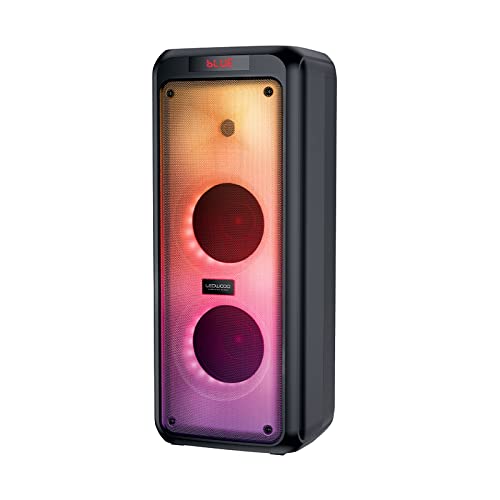
Малюнак 4.1: Спераду view of the Ledwood Drop 400 speaker, showcasing its LED light panel.
Панэль кіравання і парты

Figure 4.2: Top control panel with input ports and function buttons.
The top panel includes controls for power, volume, mode selection, playback, and inputs for USB, SD card, AUX, and two microphones. A digital display indicates the current mode or status.
5. Настройка
5.1 Зарадка дынаміка
- Connect the provided power adapter to the DC IN port on the speaker.
- Падключыце адаптар да стандартнай разеткі.
- The charging indicator will illuminate. The speaker is fully charged when the indicator changes color or turns off (refer to the speaker's display for specific indications).
- Поўная зарадка забяспечвае прыблізна 6 гадзін прайгравання.
5.2 Уключэнне/выключэнне
- To power on, press and hold the Power button on the control panel or remote control.
- Каб выключыць прыладу, зноў націсніце і ўтрымлівайце кнопку харчавання.
6. Інструкцыя па эксплуатацыі
6.1 Спалучэнне па Bluetooth
- Power on the Ledwood Drop 400 speaker. It will automatically enter Bluetooth pairing mode, indicated by a flashing 'BLUE' on the display and an audible prompt.
- Уключыце Bluetooth на вашым смартфоне, планшэце або іншай прыладзе з падтрымкай Bluetooth.
- Пошук available devices and select "Ledwood Drop 400" from the list.
- Once connected, the speaker will provide an audible confirmation, and 'BLUE' on the display will stop flashing.
- Цяпер вы можаце прайграваць аўдыё з прылады праз дынамік.
6.2 Прайграванне з USB/SD-карты
- Insert a USB flash drive or an SD card (pre-loaded with MP3 audio files) у адпаведны порт на панэлі кіравання дынамікам.
- The speaker will automatically switch to USB or SD card mode and begin playing the audio files.
- Для кіравання прайграваннем выкарыстоўвайце кнопкі «Прайграванне/Паўза», «Наступны трэк» і «Папярэдні трэк» на дынаміку або пульце дыстанцыйнага кіравання.
6.3 AUX ўваход
- Падключыце адзін канец пастаўлянага 3.5-мм AUX-кабеля да порта AUX IN на дынаміку.
- Connect the other end to the headphone jack or audio output of your external audio device.
- Press the Mode button on the speaker or remote control until 'AUX' is displayed.
- Прайгравайце аўдыё з знешняй прылады. Гучнасць можна рэгуляваць як праз дынамік, так і праз знешнюю прыладу.
6.4 FM -радыё
- Press the Mode button on the speaker or remote control until 'FM' is displayed.
- To auto-scan and save available FM stations, press and hold the Play/Pause button. The speaker will scan and store stations automatically.
- Use the Next Track and Previous Track buttons to navigate through the saved stations.
6.5 Выкарыстанне мікрафона
- Connect the wired microphone (or another compatible microphone) to one of the MIC IN ports on the speaker.
- Adjust the microphone volume using the dedicated MIC VOL knob on the control panel.
- The microphone can be used in any audio mode (Bluetooth, USB, SD, AUX, FM).
6.6 святлодыёдных рэжымаў святла
The Ledwood Drop 400 features dynamic LED lighting with 4 different modes.
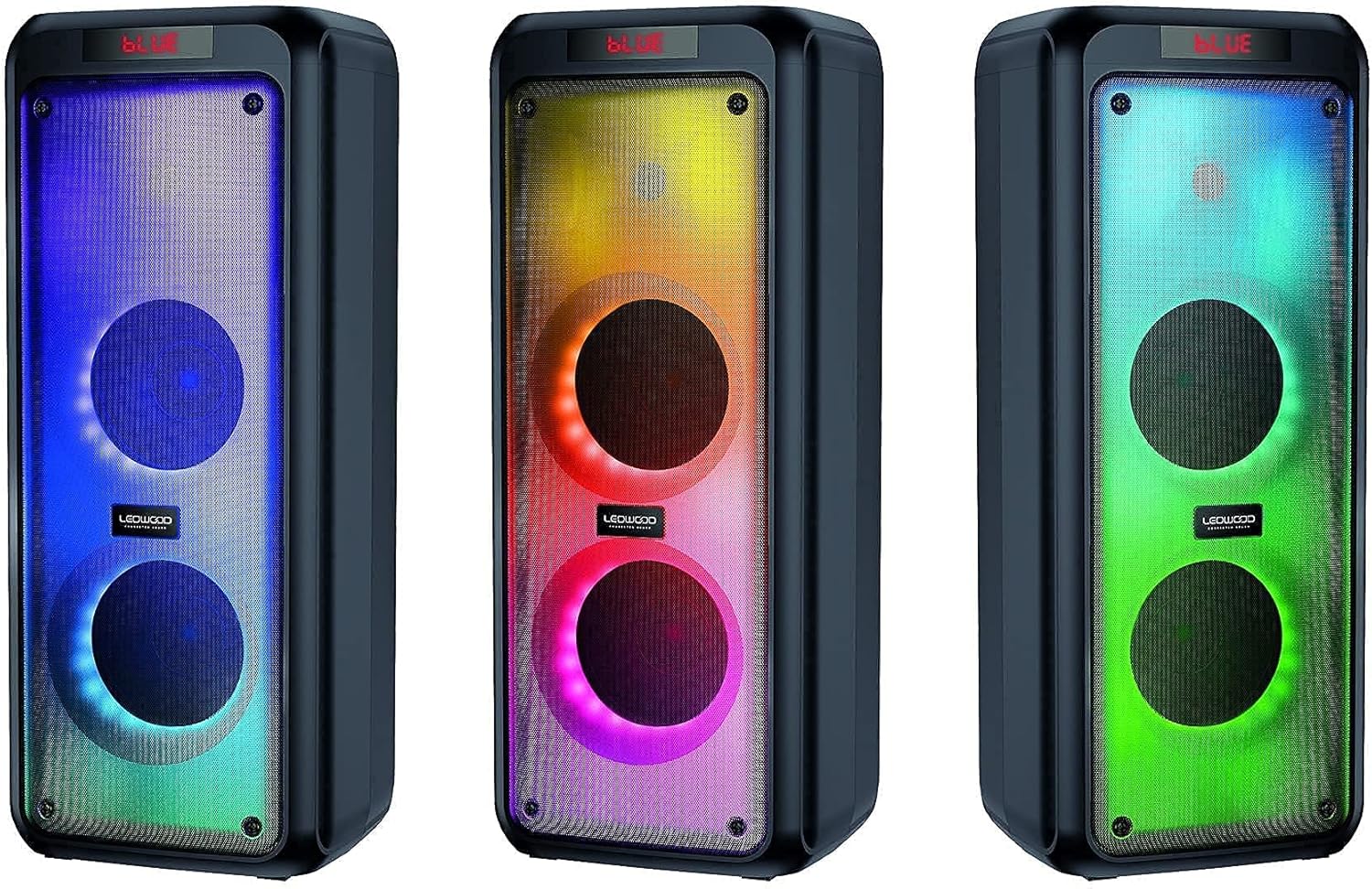
Малюнак 6.1: Выпamples of the speaker's LED light modes.
- Press the LED button on the control panel or remote control to cycle through the available light modes.
- Press the LED button again to turn off the lights.
6.7 Функцыя сапраўднага бесправаднога стэрэа (TWS)
The TWS function allows you to pair two Ledwood Drop 400 speakers together for a stereo sound experience.
- Ensure both Ledwood Drop 400 speakers are powered on and in Bluetooth mode, but not connected to any device.
- On one of the speakers (this will be the primary speaker), press and hold the TWS button (if available) or a designated pairing button (refer to specific button labels on your speaker).
- The primary speaker will search for the secondary speaker. Once connected, both speakers will emit an audible confirmation.
- Цяпер падключыце прыладу Bluetooth да асноўнага дынаміка, як апісана ў раздзеле 6.1. Гук будзе прайгравацца ў стэрэагуку праз абодва дынамікі.
7. Тэхнічнае абслугоўванне
7.1 Ачыстка
- Заўсёды выключайце дынамік і адключайце яго ад сеткі перад чысткай.
- Выкарыстоўвайце мяккую, сухую тканіну без ворса для працірання вонкавых паверхняў.
- Не выкарыстоўвайце вадкія ачышчальнікі, аэразолі або растваральнікі.
7.2 Захоўванне
- Захоўвайце дынамік у прахалодным, сухім месцы, удалечыні ад прамых сонечных прамянёў і экстрэмальных тэмператур.
- Калі вы захоўваеце акумулятар працяглы час, перыядычна зараджайце яго (напрыклад, кожныя 3 месяцы), каб падтрымліваць яго ў працоўным стане.
8. Выпраўленне непаладак
| праблема | Магчымая прычына | Рашэнне |
|---|---|---|
| Дынамік не ўключаецца. | Battery is depleted. Power adapter not connected. | Charge the speaker using the provided power adapter. Ensure the adapter is securely connected to both the speaker and a working power outlet. |
| Няма гуку з дынаміка. | Volume too low. Incorrect mode selected. Device not connected. | Increase speaker volume and source device volume. Ensure the correct input mode (Bluetooth, AUX, USB, SD, FM) is selected. Re-pair Bluetooth device or check cable connections. |
| Прылада Bluetooth не можа падключыцца. | Дынамік не ў рэжыме спалучэння. Прылада занадта далёка. Перашкоды. | Ensure speaker is in Bluetooth pairing mode (flashing 'BLUE'). Move device closer to the speaker. Turn off other Bluetooth devices to reduce interference. Try restarting both devices. |
| Прыём FM-радыё дрэнны. | Weak signal. Speaker position. | Reposition the speaker to improve reception. Extend any external antenna if available. |
| Не працуе мікрафон. | Microphone not connected properly. MIC VOL too low. | Ensure microphone is fully inserted into the MIC IN port. Increase the MIC VOL knob. |
9. Тэхнічныя характарыстыкі
- Марка: Ледвуд
- мадэль: Адкіньце 400
- Тэхналогія падключэння: Bluetooth, USB
- Асаблівасці: FM Radio, LED Light Effects
- Рэкамендуемае выкарыстанне: For computer, For smartphone or tablet
- Сумяшчальныя прылады: Ноўтбук, смартфон
- колер: Чорны
- Метад кантролю: Пульт дыстанцыйнага кіравання
- Крыніца харчавання: Электрычны кабель
- Сярэдні тэрмін службы батарэі: 6 гадзіны
- Выходная магутнасць: 400 Вт (40 Вт RMS)
- Памеры: 24 х 25 х 64 см (прыблізна)
- ASIN: B0972SSC4J
10. Гарантыя і падтрымка
For warranty information or technical support, please refer to the warranty card included with your product or contact Ledwood customer service directly. Contact details can typically be found on the official Ledwood webсайце або на ўпакоўцы прадукту.