
NC M10
NC TWS Bluetooth 5.1 Earphones User Manual
Мадэль: M10
Важная інфармацыя па бяспецы
Please read this manual carefully before using the product and retain it for future reference. Improper use may result in product damage or personal injury.
- Do not expose the device to extreme temperatures, humidity, or corrosive environments.
- Пазбягайце падзення, удараў або разборкі прылады.
- Захоўвайце прыладу далей ад дзяцей і хатніх жывёл.
- Use only the provided or certified charging cable and power adapter.
- Не выкарыстоўвайце навушнікі-ўкладышы на занадта высокай гучнасці працяглы час, каб пазбегнуць пашкоджання слыху.
- Exercise caution when using the earbuds in situations requiring awareness of surroundings, such as driving or walking in traffic.
Прадукт скончаныview
The NC TWS Bluetooth 5.1 Earphones are designed for high-fidelity audio and convenient wireless use. They feature a portable charging case that also functions as a power bank.
Змест пакета
- 2 Bluetooth-навушнікі (левы і правы)
- 1 х чахол для зарадкі
- 1 х USB-кабель для зарадкі
- 1 х Кіраўніцтва карыстальніка (гэты дакумент)
- 2 x Pairs of Earphone Cups (L, M Size)
Кампаненты

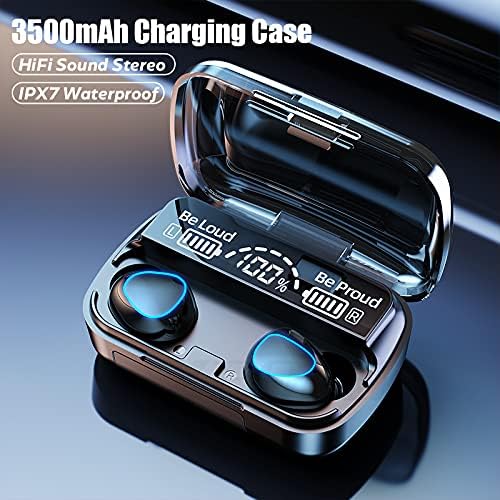


Настройка
Зарадка навушнікаў і чахла
Перад першым выкарыстаннем цалкам зарадзіце навушнікі і зарадны футляр.
- Place both earbuds into the charging case. Ensure they are properly seated; the earbuds will light up to indicate charging.
- Connect the USB charging cable to the charging case's port and the other end to a compatible USB power source (e.g., computer USB port, wall adapter).
- Лічбавы дысплей на зарадным чахле будзе паказваць працэнты зарада батарэіtage. A full charge for the case takes approximately 1.5 hours.
- When the earbuds are fully charged, the indicator lights on the earbuds will turn off. The charging case can fully charge the earbuds approximately 8 times.

Спалучэнне з прыладай
Навушнікі маюць зручнае спалучэнне ў адзін крок.
- Open the charging case and remove both earbuds. They will automatically power on and enter pairing mode, indicated by flashing lights.
- На прыладзе з падтрымкай Bluetooth (смартфоне, планшэце, ноўтбуку) перайдзіце ў налады Bluetooth.
- Пошук даступныя прылады і абярыце «M10» (ці падобную назву) са спісу.
- Пасля падключэння індыкатары навушнікаў перастануць міргаць, і вы пачуеце гукавое пацверджанне.
- After the initial pairing, the earbuds will automatically connect to the last-paired device when removed from the case.

Інструкцыя па эксплуатацыі
The earbuds feature touch controls for various functions.
| Дзеянне | Функцыя |
|---|---|
| Light touch (Left or Right earbud) once | Прайграванне/прыпыненне музыкі |
| Light touch (Left or Right earbud) once | Адказаць/павесіць тэлефонны званок |
| Long press (Left or Right earbud) for 1 second | Summon Siri / Voice Assistant |
| Touch (Left earbud) triple in a row | Памяншэнне аб'ёму |
| Touch (Right earbud) triple in a row | Павелічэнне гучнасці |
| Touch (Left earbud) for 2 seconds | Пераключыцца на папярэднюю песню |
| Touch (Right earbud) for 2 seconds | Пераключыцца на наступную песню |
| Long press (Left or Right earbud) for 5 seconds | Уключыць/Выключыць |
For optimal fit and sound quality, try the different sizes of earphone cups included in the package. A comfortable and stable fit is crucial for the best audio experience and during physical activity.

Тэхнічнае абслугоўванне
- Уборка: Regularly clean the earbuds and charging case with a soft, dry, lint-free cloth. Do not use abrasive cleaners or solvents. For earwax buildup, gently clean the earbud mesh with a small, soft brush.
- захоўванне: When not in use, store the earbuds in their charging case to protect them and keep them charged. Store the device in a cool, dry place away from direct sunlight.
- Воданепранікальнасць: The earbuds are IPX7 waterproof, meaning they can withstand submersion in up to 1 meter of water for 30 minutes. However, they are not designed for swimming or showering. Ensure the earbuds are dry before placing them back in the charging case to prevent damage.
Ліквідацыю непаладак
| праблема | Магчымая прычына | Рашэнне |
|---|---|---|
| Навушнікі не спалучаюцца з прыладай. | Earbuds not in pairing mode; Bluetooth off on device; previously paired with another device. | Ensure earbuds are removed from case and flashing. Turn Bluetooth off and on again on your device. Forget previous pairings on your device and re-pair. |
| Працуе толькі адзін навушнік. | Earbuds not properly connected to each other (TWS mode). | Place both earbuds back into the charging case, close the lid, wait a few seconds, then remove them simultaneously to re-establish TWS connection. |
| Навушнікі не зараджаюцца. | Poor contact with charging pins; charging cable or adapter faulty; case battery depleted. | Ensure earbuds are correctly seated in the case. Check charging cable and adapter. Charge the charging case. |
| Нізкая гучнасць або дрэнная якасць гуку. | Earbuds not properly seated in ear; earwax buildup; device volume too low. | Adjust earbud position or try different size ear tips. Clean earbud mesh. Increase volume on both earbuds and connected device. |
| Перарывістае злучэнне. | Занадта далёка ад прылады; перашкоды; нізкі зарад батарэі. | Stay within 15 meters of your device. Avoid strong electromagnetic interference. Charge earbuds and case. |
Тэхнічныя характарыстыкі
Below are the technical specifications for the NC TWS Bluetooth 5.1 Earphones (Model M10).
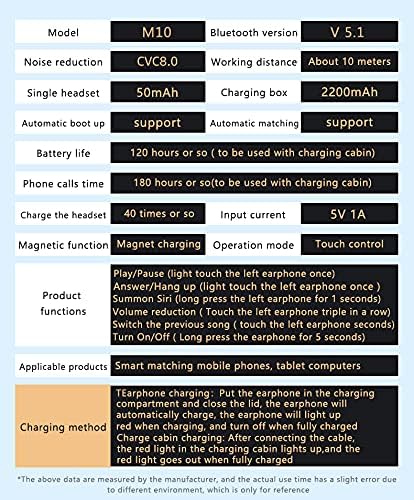
| Асаблівасць | Дэталь |
|---|---|
| мадэль | М10 |
| Версія Bluetooth | 5.1 |
| Далёкасць бесправадной сувязі | Да 15 метраў (49 футаў) |
| Шумапрыглушэнне | CVC 8.0 Noise Cancelling |
| Ёмістасць акумулятара для навушнікаў | 50 мАг (кожны навушнік) |
| Ёмістасць батарэі зараднага кейса | 3500 мАг |
| Час прайгравання навушнікаў | 5-6 гадзіны на адной зарадцы |
| Агульны час прайгравання (з зарадным чахлом) | Да 180 гадзін |
| Час зарадкі чахла | Прыблізна 1.5 гадзіны (USB-C) |
| Рэйтынг воданепранікальнасці | IPX7 |
| Метад кантролю | Сэнсарнае кіраванне |
| Сумяшчальныя прылады | Смартфоны, ноўтбукі, планшэты, разумныя калонкі |
Гарантыя і падтрымка
For warranty information and technical support, please refer to the official NC product webсайт або звярніцеся непасрэдна ў службу падтрымкі кліентаў. Захоўвайце чэк аб куплі як пацвярджэнне пакупкі для гарантыйных прэтэнзій.
Інтэрнэт-падтрымка: Наведайце ст NC Store on Amazon для атрымання інфармацыі аб прадуктах і абнаўленняў.