
1. Уводзіны
This manual provides comprehensive instructions for the assembly, operation, and maintenance of your FLEXISPOT EN2 Electric Height Adjustable Standing Desk. Please read this manual thoroughly before assembly and use to ensure safe and efficient operation.
The FLEXISPOT EN2 desk features a spacious one-piece desktop, an electric height adjustment system with memory presets, and a removable clamp power strip for convenient device charging and cable management. It is designed to support a dynamic work environment, allowing seamless transitions between sitting and standing positions.
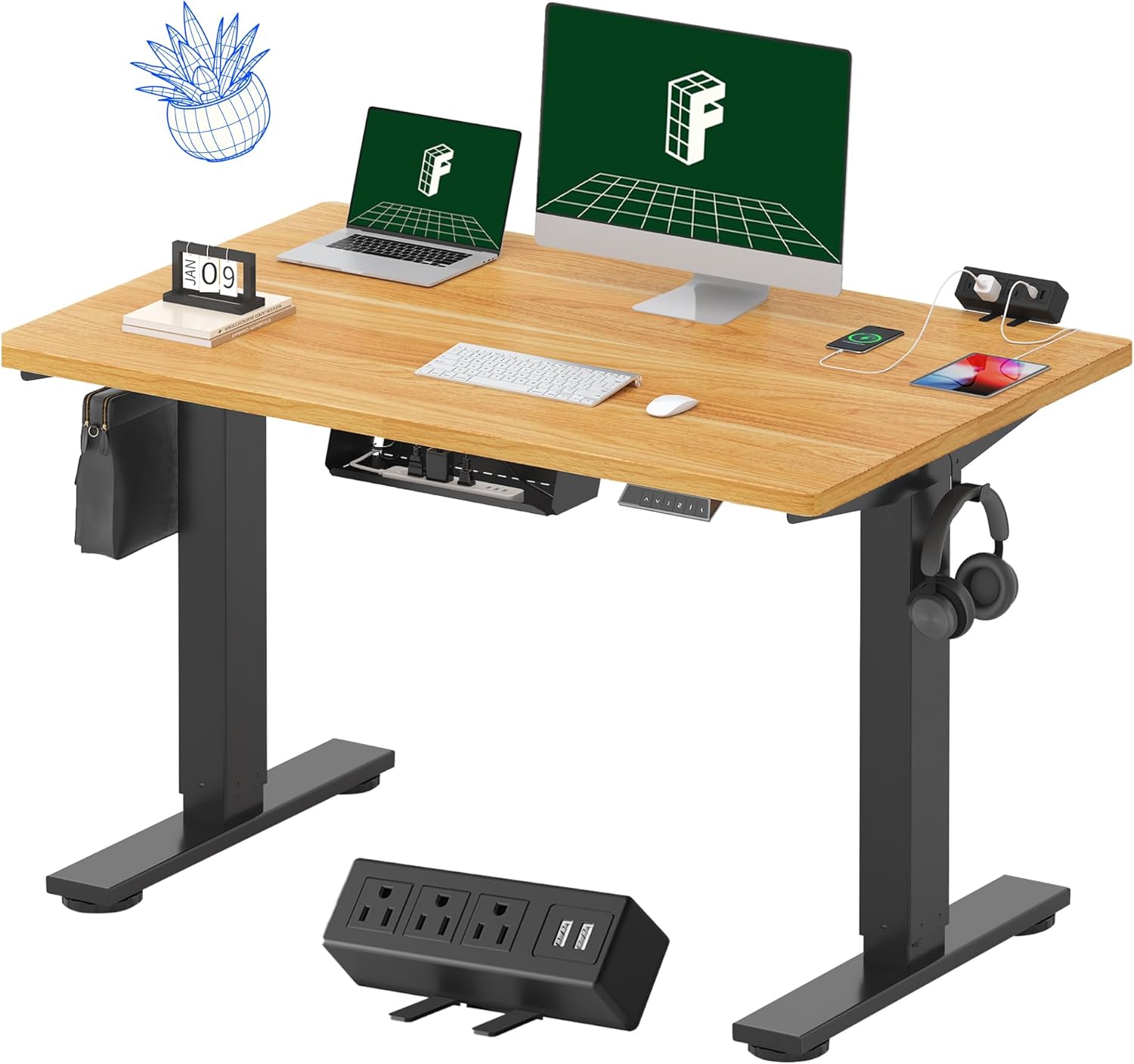
Image 1.1: FLEXISPOT EN2 Standing Desk with Maple Top and Black Frame, showcasing a typical setup with monitors, a laptop, and a clamp разраднік.
2. Інфармацыя па бяспецы
УВАГА: Невыкананне гэтых інструкцый па бяспецы можа прывесці да траўмаў або пашкоджання вырабу.
- Заўсёды ўважліва выконвайце інструкцыі па зборцы.
- An electric drill (not included) may be required for assembly.
- Ensure the desk is properly anchored to prevent tipping.
- Не перавышайце максімальную рэкамендаваную вагу ў 176 фунтаў (80 кг).
- Keep the work surface clear of items that could fall and cause injury during height adjustments.
- Always unplug the desk before performing any maintenance or making adjustments to the frame or electrical components.
- Трымайце дзяцей і хатніх жывёл далей ад стала падчас працы.
3. Змесціва ўпакоўкі
Your FLEXISPOT EN2 Standing Desk will arrive in two separate packages, which may be shipped separately. Please ensure you have received both packages and all components before beginning assembly.

Image 3.1: Illustration showing the desk components arriving in two separate packages: one for the desktop and one for the desk frame.
Уключаныя кампаненты:
- One-piece desktop (48" x 30" Maple Top)
- Electric height-adjustable frame (Black)
- 6-button digital controller with 4 memory presets
- Removable clamp power strip (3 AC outlets, 2 USB charging ports)
- Cable management device
- Assembly hardware and tools (excluding electric drill)
4. Налада і зборка
Assembly typically requires two people and an electric drill (not included). Follow the detailed instructions provided in the separate assembly guide included with your product. The process involves attaching the legs to the desktop and connecting the control panel and motor.
Парады па зборцы:
- Раскладзеце ўсе кампаненты на мяккай, чыстай паверхні, каб пазбегнуць драпін.
- Пераканайцеся, што ўсе шрубы надзейна зацягнуты, але не перацягвайце.
- Properly route all cables using the provided cable management solutions to avoid interference with desk movement.
Video 4.1: Official FLEXISPOT Standing Desk Frame Installation Guide. This video demonstrates the step-by-step process of assembling the desk frame and attaching it to the desktop.
5. Інструкцыя па эксплуатацыі
5.1 Лічбавая панэль кіравання
The desk is operated using a 6-button digital controller, typically mounted on the underside of the desktop. It features up/down arrows, an LED display for height, and four programmable memory presets.

Image 5.1: Digital control panel with LED display showing current height, up/down arrows, and four numbered memory preset buttons.
5.2 Рэгуляванне вышыні
- Націсніце і ўтрымлівайце Up Arrow (^) кнопка, каб падняць стол.
- Націсніце і ўтрымлівайце Down Arrow (v) кнопка, каб апусціць стол.
- The desk adjusts smoothly from 28.1 inches (71.4 cm) to 45.7 inches (116.1 cm).
- The motor operates quietly at less than 50 dB.
5.3 Налада папярэдніх налад памяці
The controller allows you to save up to four preferred height settings for quick adjustments.
- Адрэгулюйце вышыню стала на патрэбную вам вышыню з дапамогай стрэлак уверх/уніз.
- Націсніце Памяць (М) button. The LED display will flash.
- На працягу 3 секунд націсніце адну з пранумараваных кнопак прадусталяваных налад (1, 2, 3 або 4), каб захаваць бягучую вышыню ў гэтым прэсеце.
- Каб выклікаць захаваную вышыню, проста націсніце адпаведную кнопку з нумарам загадзя ўсталяванай вышыні. Стол аўтаматычна перамясціцца ў захаванае становішча.
Video 5.2: FlexiSpot Brand Store video demonstrating the desk's height adjustment and memory preset functions.
6. Асаблівасці
6.1 One-Piece Desktop
The desk features a spacious, single-piece desktop made of FSC-Certified wood. This design provides a smooth, seamless work surface, enhancing stability and aesthetics compared to multi-piece desktops.

Image 6.1: Visual comparison highlighting the smooth surface of a single-piece desktop against the visible seams of a two-piece desktop.
6.2 Removable Clamp Сілавая сетка
A desktop-mounted power strip is included, featuring 3 AC outlets (125V/12A) and 2 USB charging ports (5V/2A). This allows for convenient charging of electronic devices directly from your desk. The power strip can be clipped to the back or side of your desk.

Image 6.2: Close-up of the removable clamp power strip, detailing its 3 AC outlets and 2 USB-A ports, and how it attaches to the desk edge.
6.3 Арганізацыя кабеляў
The desk includes a cable management device to help organize and tidy up your workspace, preventing cables from dangling and interfering with desk movement.

Image 6.3: Illustration demonstrating effective cable management with an under-desk tray, showing a tidy setup compared to unmanaged cables.
7. Тэхнічнае абслугоўванне
- Regularly inspect all screws and connections to ensure they are tight.
- Працірайце паверхню працоўнага стала мяккай губкайamp тканіна. Пазбягайце абразіўных сродкаў, якія могуць пашкодзіць аздабленне.
- Трымайце рухавік і электрычныя кампаненты чысцінёй ад пылу і вільгаці.
- Do not place hot items directly on the desktop without protective coasters.
8. Выпраўленне непаладак
8.1 Desk Not Moving or Displaying Error Code (e.g., "r5t")
If your desk is not responding or the LED display shows an error code like "r5t", a system reset may be required.
- Unplug the desk from the power outlet.
- Wait for at least 10-15 seconds.
- Plug the desk back into the power outlet.
- Press and hold the "Down Arrow (v)" button until the desk reaches its lowest position and then slightly rises. This indicates a successful reset.
- Калі праблема не знікне, звярніцеся ў службу падтрымкі.
8.2 Desk Wobbling at Higher Heights
While the desk is designed for stability, minor wobbling can occur at maximum heights. Ensure the adjustable feet on the leg bases are properly leveled to compensate for uneven flooring.
9. Тэхнічныя характарыстыкі
| Асаблівасць | Спецыфікацыя |
|---|---|
| Марка | ФЛЕКСІСПОТ |
| мадэль | EN2 |
| Матэрыял для працоўнага стала | FSC-Certified Maple Wood |
| Памеры працоўнага стала | 48 см (Ш) х 30 см (Г) |
| Таўшчыня працоўнага стала | 1 цалі |
| Матэрыял каркаса | Industrial-grade Alloy Steel (Black) |
| Дыяпазон рэгулявання вышыні | ад 28.1 да 45.7 цаляў (ад 71.4 да 116.1 см) |
| Узровень шуму рухавіка | < 50 дБ |
| Ёмістасць вагі | 176 фунтаў (80 кг) |
| Панэль кіравання | 6-button digital controller with 4 memory presets |
| Разетка | 3 AC outlets (125V/12A), 2 USB charging ports (5V/2A) |
| Патрабуецца зборка | Yes (electric drill recommended) |
10. Гарантыя і падтрымка
10.1 Інфармацыя аб гарантыі
- 5-гадовая гарантыя: Covers frames, motors, and other mechanical devices.
- 2-гадовая гарантыя: Covers controllers, switches, and electronics.
Калі ласка, захавайце пацвярджэнне пакупкі для прэтэнзій па гарантыі. Гарантыя распаўсюджваецца на дэфекты матэрыялаў і вырабу пры нармальным выкарыстанні.
10.2 Падтрымка кліентаў
For any questions, troubleshooting assistance, or warranty claims, please contact FLEXISPOT customer support through their official webсайт або краму, дзе вы набылі тавар.