
Уводзіны
Thank you for choosing the seenda MMO Gaming Mouse Vanguard S. This high-performance gaming mouse is designed to enhance your gaming experience with its customizable features and ergonomic design. It offers a smooth and precise gaming experience with up to 10000 DPI, programmable macros, and interchangeable side plates to suit various gaming styles.
Please read this manual carefully to ensure proper setup, operation, and maintenance of your new gaming mouse.
Змест пакета
- Гульнявая мыш RGB x 1
- Side Plates Packet x 1 (includes various side plates)
- Кіраўніцтва карыстальніка x 1
- Ўпаковачная скрынка x 1

Figure 1: Package Contents of the seenda Vanguard S Gaming Mouse.
Настройка
1. Падключэнне мышы
- Unpack the seenda MMO Gaming Mouse Vanguard S from its packaging.
- Падключыце USB-кабель мышы да даступнага USB-порта на вашым кампутары.
- The mouse should be automatically recognized by your operating system (Windows 7, XP, Vista, or newer).
2. Ўстаноўка праграмнага забеспячэння
To unlock the full customization potential of your Vanguard S mouse, including programmable macros, DPI settings, and RGB lighting, you need to install the official seenda software.
- Visit the official seenda website to download the latest software for the Vanguard S gaming mouse.
- Выконвайце інструкцыі на экране, каб завяршыць усталёўку.
- Пасля ўсталёўкі запусціце праграму, каб наладзіць параметры мышы.
Інструкцыя па эксплуатацыі
1. Асноўныя функцыі мышы
- Пстрычка левай кнопкай мышы: Першаснае дзеянне.
- Пстрыкніце правай кнопкай мышы: Дадатковае дзеянне/кантэкстнае меню.
- Кола пракруткі: Пракрутка ўверх/уніз, клік сярэдняй кнопкай мышы.
- DPI +/- Buttons: Adjust DPI sensitivity on the fly.
2. Interchangeable Side Plates
The Vanguard S mouse comes with multiple interchangeable side plates, allowing you to customize the mouse's grip and button layout for different game types (MMO, MOBA, FPS) or personal preference. The side plates attach magnetically for easy swapping.
- Gently pull the currently attached side plate away from the mouse body to detach it.
- Select your desired side plate from the packet.
- Align the new side plate with the magnetic connectors on the mouse body and gently push until it snaps into place.

Figure 2: Swapping Interchangeable Side Plates.
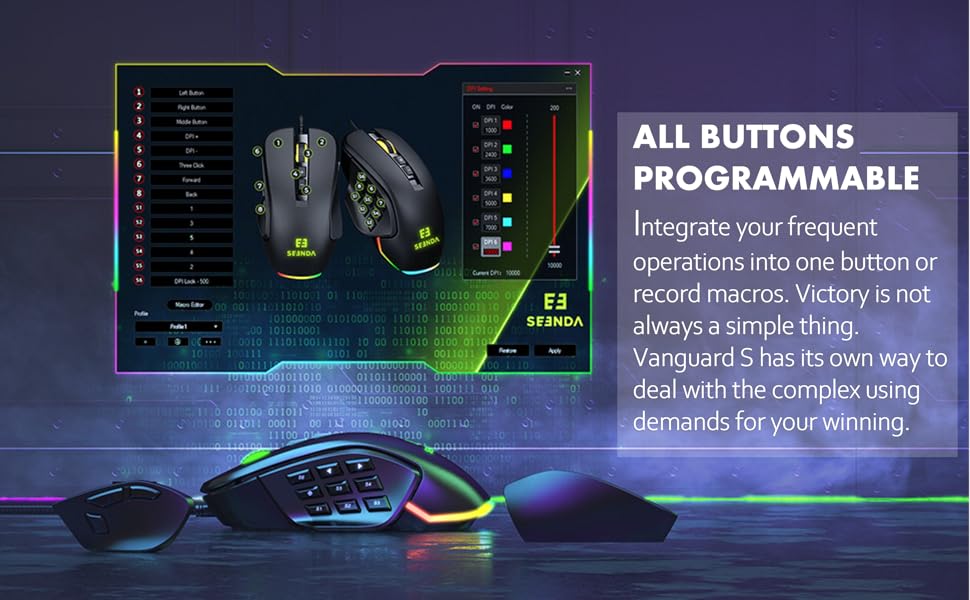
Figure 3: Different Side Plate Configurations.
3. Рэгуляванне DPI
The mouse features a high-precision optical sensor with up to 10000 DPI. You can adjust the DPI sensitivity using the dedicated DPI +/- buttons located on the top of the mouse. Each DPI level can be associated with a specific RGB lighting color for quick visual identification.
- Націсніце DPI+ button to increase sensitivity.
- Націсніце DPI- button to decrease sensitivity.
- Default DPI steps and their corresponding colors are typically: 1000 (Red), 2400 (Green), 3600 (Blue), 5000 (Yellow), 7000 (Cyan), 10000 (Pink). These can be customized via software.
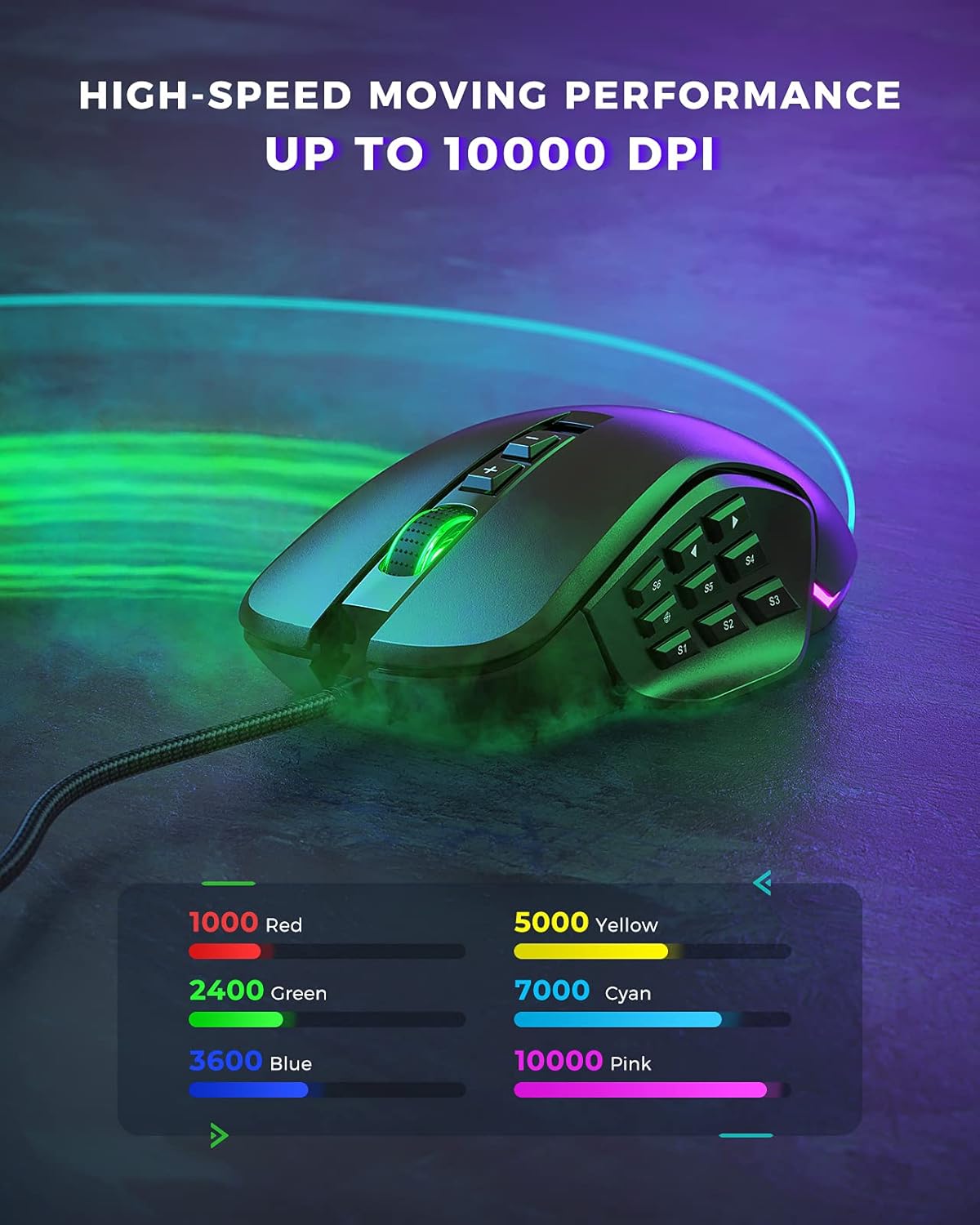
Figure 4: DPI Levels and Corresponding RGB Colors.
Налада
The seenda Vanguard S offers extensive customization options through its dedicated software. This allows you to tailor the mouse to your specific gaming and productivity needs.
1. Programmable Buttons and Macros
The mouse features multiple programmable buttons, including side buttons, which can be assigned to various functions, key presses, or complex macros. This is particularly useful for MMO and MOBA games.
- Launch the seenda gaming software.
- Navigate to the "Button Settings" or "Macro Editor" section.
- Выберыце кнопку, якую вы хочаце запраграмаваць.
- Choose from predefined functions, assign a single key, or record a macro sequence.
- Save your changes to the mouse profile.

Figure 5: Software Interface for Button Programming.
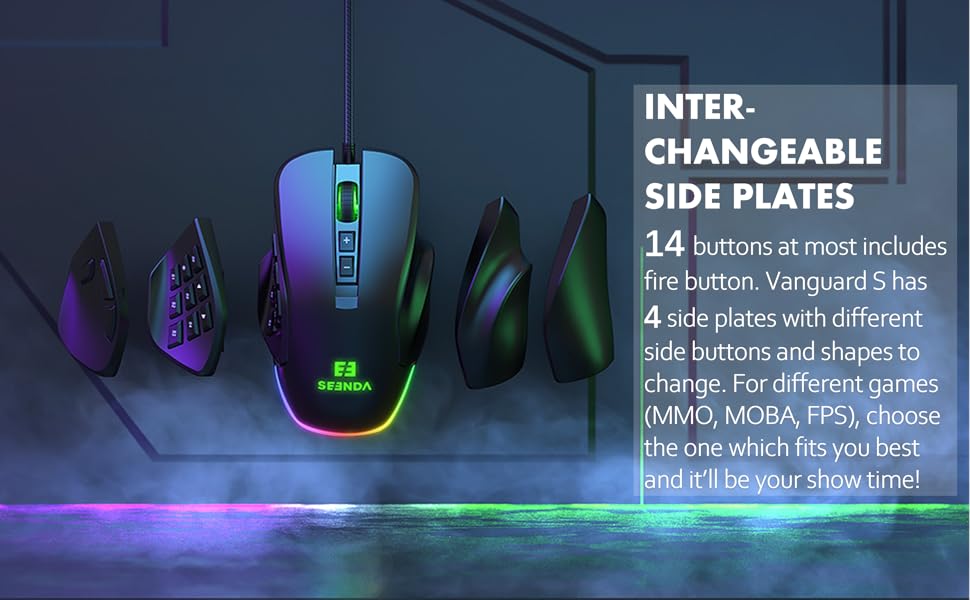
Figure 6: Macro and Button Assignment in Software.
2. Налада падсветкі RGB
Personalize your gaming setup with customizable RGB backlighting. The software allows you to choose from various lighting effects, colors, and brightness levels for different DPI steps.
- In the seenda gaming software, navigate to the "RGB Settings" or "Lighting" section.
- Select your preferred lighting mode (e.g., Colorful Streaming, Steady, Breathing, Neon).
- Adjust colors for each DPI level or choose a dynamic effect.
- Apply the settings to your mouse.

Figure 7: RGB Lighting Customization Options.

Figure 8: Various RGB Backlight Styles.
Тэхнічнае абслугоўванне
1. Чыстка мышы
- Адключыце мыш ад кампутара перад чысткай.
- Выкарыстоўвайце мяккую безворсовую тканіну, злёгку dampпрамыйце паверхню мышы вадой або мяккім ачышчальным растворам.
- Пазбягайце выкарыстання агрэсіўных хімікатаў, абразіўных ачышчальнікаў або растваральнікаў.
- Use a soft brush or compressed air to clean dust and debris from around the buttons and scroll wheel.
- Перад тым, як падключыць мыш да кампутара, пераканайцеся, што яна цалкам высахла.
2. Агульны догляд
- Avoid dropping the mouse, especially when side plates are attached, as they may detach.
- Не падвяргайце мыш уздзеянню экстрэмальных тэмператур або вільготнасці.
- Keep the mouse away from liquids.
Ліквідацыю непаладак
| праблема | Магчымая прычына | Рашэнне |
|---|---|---|
| Мышка не рэагуе | Слабае падключэнне USB, няспраўны порт USB, праблема з драйверам. |
|
| Buttons not working/incorrectly mapped | Software configuration error, software not installed. |
|
| DPI не змяняецца | Канфлікт праграмнага забеспячэння, няспраўнасць кнопак. |
|
| Не працуе RGB-асвятленне | Software setting, power issue. |
|
Тэхнічныя характарыстыкі
| Асаблівасць | Дэталь |
|---|---|
| Нумар мадэлі | YC-YJ101 |
| DPI | Да 10000 DPI |
| Праграмуемыя кнопкі | Up to 5 programmable buttons (customizable via software) |
| Бакавыя пласціны | Interchangeable (3 included) |
| Дызайн | Ergonomic, Ambidextrous (with appropriate side plates) |
| Сувязь | Правадной USB |
| Выяўленне руху | Аптычны |
| Сумяшчальная АС | Windows 7, Windows XP, Windows Vista, and newer USB-compatible systems |
| Вага прадмета | 3.97 унцыі |
| Памеры ўпакоўкі | 5.59 х 4.57 х 2.13 цалі |
Гарантыя і падтрымка
Інфармацыя аб гарантыі
seenda products undergo rigorous testing. If you encounter any issues with your Vanguard S gaming mouse, please do not hesitate to contact seenda customer support. We are committed to ensuring a positive experience with our products.
Падтрымка кліентаў
For technical assistance, troubleshooting, or warranty claims, please visit the official seenda website for contact information or support resources. You can also find the latest software and firmware updates there.