
1. Уводзіны
Thank you for choosing the CHONCHOW US801 Gaming Keyboard and Mouse Combo. This manual provides detailed instructions for setting up, operating, and maintaining your new peripheral set. Please read this manual carefully before use to ensure optimal performance and longevity of your product.

Image: The CHONCHOW US801 Gaming Keyboard and Mouse Combo, showcasing its full-size layout and ergonomic design.
2. Змесціва ўпакоўкі
The CHONCHOW US801 Gaming Keyboard and Mouse Combo package includes:
- 1 x CHONCHOW US801 Wired Gaming Keyboard
- 1 x CHONCHOW US801 Wired Gaming Mouse
- 1 х Кіраўніцтва карыстальніка (гэты дакумент)
3. Інструкцыі па ўсталёўцы
The CHONCHOW US801 Gaming Keyboard and Mouse Combo is a plug-and-play device. No additional drivers or software are typically required for basic functionality.
- Падключэнне клавіятуры: Locate an available USB 2.0 port on your computer, laptop, or gaming console. Insert the USB connector of the keyboard into the port.
- Падключыце мыш: Locate another available USB 2.0 port. Insert the USB connector of the mouse into the port.
- Распазнаванне сістэмы: Your operating system (Windows, Mac OS, Xbox, PS4) should automatically detect and install the necessary drivers. This process may take a few moments. A notification typically appears once the device is ready for use.
- Initial Functionality Test: After installation, test the keyboard by typing and the mouse by moving the cursor and clicking buttons to ensure they are working correctly.
Note on Initial Connection:
In rare cases, after connecting the USB cable, the keyboard backlight may not illuminate fully or correctly. This can occur due to static electricity or repeated disconnections/reconnections causing signal issues with the operating system. If this happens, please wait patiently for approximately 20 seconds for the keyboard's light control chip to restart. If the issue persists, ensure your computer is connected to the internet, then reconnect the keyboard and wait for the "driver installation is complete" notification. If problems continue, refer to the Troubleshooting section or contact customer support.
4. Keyboard Features and Operation
4.1. Кіраванне падсветкай
The keyboard features adjustable RGB backlighting with multiple modes and brightness levels.
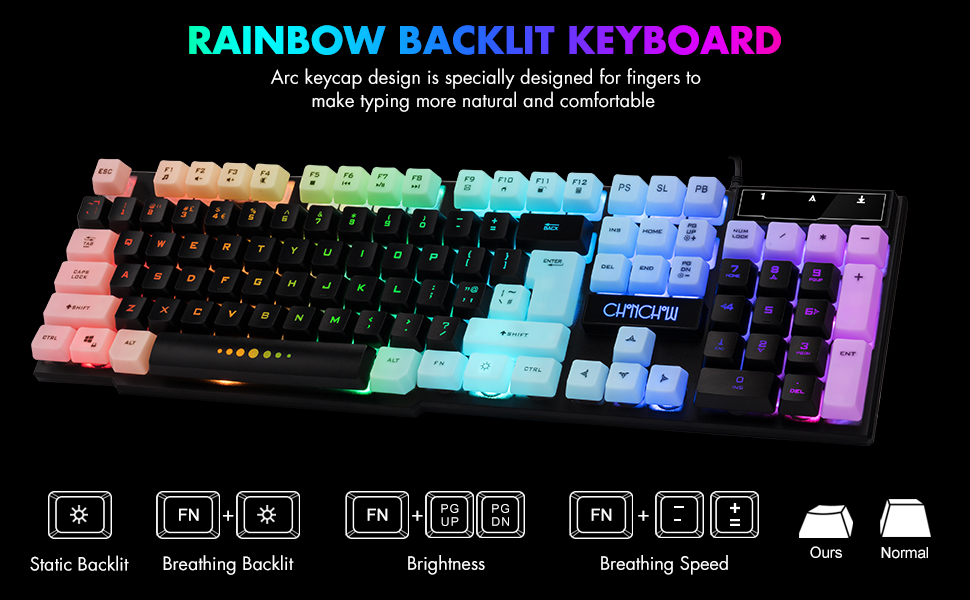
Image: Visual guide for controlling keyboard backlighting, showing key combinations for various effects.
- Уключэнне/выключэнне падсвятлення: Націсніце Электрычная лямпачка key (usually located near the right Ctrl key).
- Switch Backlight Mode (Breathing/Static): Прэса FN + Электрычная лямпачка ключ.
- Наладзіць яркасць: Прэса FN + PG UP to increase brightness, or FN + PG DN каб паменшыць яркасць.
- Adjust Breathing Speed: Прэса FN + + to increase breathing speed, or FN + - to decrease breathing speed.
4.2. Мультымедыйныя клавішы
The keyboard includes 12 multimedia function shortcut keys for quick access to common functions.

Image: Layout of the keyboard highlighting the 12 multimedia function keys and their corresponding FN key combinations.
| Камбінацыя клавіш | Функцыя |
|---|---|
| FN + F1 | Музычны прайгравальнік |
| FN + F2 | Памяншэнне гучнасці |
| FN + F3 | Павялічыць гучнасць |
| FN + F4 | Адключыць гук |
| FN + F5 | Прайграць/Стоп |
| FN + F6 | Папярэдні трэк |
| FN + F7 | Прайграванне/Паўза |
| FN + F8 | Наступны трэк |
| FN + F9 | Электронная пошта |
| FN + F10 | Web дадому |
| FN + F11 | Экран блакіроўкі |
| FN + F12 | Калькулятар |
4.3. Anti-Ghosting Keys
The keyboard features 19 anti-ghosting keys, ensuring that multiple key presses are registered simultaneously, which is crucial for gaming.

Image: The keyboard layout with 19 anti-ghosting keys visually indicated.
4.4. WIN Key Lock
The Windows key can be disabled to prevent accidental presses during gaming sessions.

Image: Close-up of the Windows key with an overlay indicating its lock function.
- Disable/Enable WIN Key: Прэса FN + ПЕРАМОГА ключ.
5. Mouse Features and Operation
The gaming mouse features 7-color breathing LED lighting and adjustable DPI settings.

Image: The CHONCHOW gaming mouse displaying its 7-color LED breathing light effect.
5.1. Рэгуляванне DPI
The mouse offers four levels of DPI sensitivity to suit different tasks and preferences.
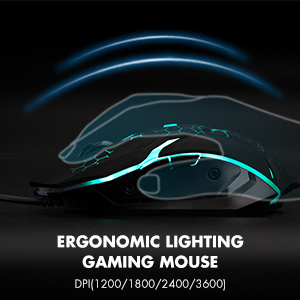
Image: The ergonomic design of the gaming mouse, highlighting its lighting and DPI settings.
- Узроўні DPI: 1200 / 1800 / 2400 / 3600 DPI.
- Наладзьце DPI: Націсніце Кнопка DPI (usually located behind the scroll wheel) to cycle through the available DPI settings.
5.2. Mouse Buttons
The mouse is equipped with 6 buttons for enhanced control:
- Кнопка левай кнопкі
- Пстрыкніце правай кнопкай мышы
- Кола пракруткі (клікальнае)
- Кнопка DPI
- Кнопка "Наперад".
- Кнопка "Назад".
6. Сумяшчальнасць
The CHONCHOW US801 Gaming Keyboard and Mouse Combo offers wide compatibility with various operating systems and devices.
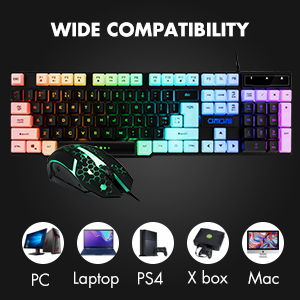
Image: Icons representing various compatible devices including PC, Laptop, PS4, Xbox, and Mac.
- Аперацыйныя сістэмы: Windows 2000 / 2003 / XP / Vista / Win7 / Win8 / Win10
- прылады: PC, Computer, Laptop, PS4, Xbox, Mac
7. Тэхнічнае абслугоўванне
Proper maintenance ensures the longevity and optimal performance of your keyboard and mouse.
- Уборка: Use a soft, dry cloth to wipe down the surfaces of the keyboard and mouse. For deeper cleaning, especially for dust under keycaps, the keycaps are removable. Gently pull them off for cleaning and press them back into place. Avoid using harsh chemicals or abrasive materials.
- Разлівы: The keyboard features drainage holes to help mitigate damage from minor spills. In case of a liquid spill, immediately disconnect the keyboard from your device, turn it upside down to drain, and allow it to dry completely before reconnecting.
- захоўванне: Захоўвайце клавіятуру і мыш у прахалодным, сухім месцы, удалечыні ад прамых сонечных прамянёў і экстрэмальных тэмператур.
8. Выпраўленне непаладак
If you encounter issues with your CHONCHOW US801 Gaming Keyboard and Mouse Combo, please refer to the following common solutions:
- Клавіятура/мыш не рэагуе:
- Ensure both USB cables are securely plugged into your device's USB ports.
- Try connecting the keyboard and mouse to different USB ports.
- Перазагрузіце кампутар або гульнявую кансоль.
- Test the devices on another computer to rule out system-specific issues.
- Backlight Issues (Not Bright / Partially Lit):
- Wait approximately 20 seconds after connecting; the keyboard's light control chip may be restarting due to static electricity or repeated connections.
- Ensure your computer is connected to the internet, then reconnect the keyboard. Wait for the "driver installation is complete" notification.
- Адрэгулюйце яркасць з дапамогай FN + PG UP / PG DN.
- Клавішы не рэгіструюцца / не рэгіструюцца:
- Пераканайцеся, што клавіятура чыстая і без смецця пад клавішамі.
- Verify that the WIN key lock is not accidentally engaged if you are experiencing issues with the Windows key.
- Курсор мышы скача або працуе нераўнамерна:
- Ачысціце аптычны датчык у ніжняй частцы мышы.
- Пераканайцеся, што вы карыстаецеся мышшу на адпаведнай паверхні (напрыклад, кілімку для мышы).
- Знізіце значэнне DPI, калі курсор занадта адчувальны.
If the problem persists after attempting these steps, please contact CHONCHOW customer support for further assistance.
9. Тэхнічныя характарыстыкі
| Асаблівасць | Дэталь |
|---|---|
| Марка | ЧОНЧОУ |
| Нумар мадэлі | ЗША801 |
| Тэхналогія падлучэння | Правадной USB |
| Раскладка клавіятуры | 104-Keys Full Size |
| Падсвятленне клавіятуры | RGB (вясёлкавая падсветка) |
| Keyboard Special Features | 19 Anti-Ghosting Keys, 12 Multimedia Keys, WIN Key Lock, Ergonomic, Removable Keycaps |
| Узроўні DPI мышы | 1200 / 1800 / 2400 / 3600 DPI |
| Кнопкі мышкі | 6 Buttons (Left, Right, Forward, Backward, DPI, Scroll Wheel) |
| Падсветка мышы | 7-каляровы дыхаючы святлодыёд |
| Памеры прадукту (клавіятура) | 17 х 5.1 х 1.3 цалі |
| Вага прадмета | 1.94 фунта |
| Матэрыял | Пластыкавыя |
10. Гарантыя і падтрымка
CHONCHOW stands behind the quality of its products. Your CHONCHOW US801 Gaming Keyboard and Mouse Combo is covered by the following:
- Вяртанне грошай або замена на працягу 30 дзён: For any issues within 30 days of purchase.
- 12-Month After-Sales Service: For quality-related problems within 12 months of purchase.
For friendly and easy-to-reach support, please contact our customer service team. Refer to your purchase documentation or the CHONCHOW official webсайт для кантактных дадзеных.