
1. Прадукт скончыўсяview
The Olimpia Splendid Aura Care Air Purifier is designed to improve indoor air quality by filtering out pollutants and sterilizing the air. It features a multi-stage filtration system including a HEPA 13 filter, activated carbon filter, and a pre-filter, capable of capturing 99.97% of particles down to 0.3 microns. Additionally, it incorporates a UV-C lamp to destroy microorganisms and an ionizer to release negative ions, further enhancing air purification.
This compact and portable unit is equipped with integrated Wi-Fi, allowing control via a dedicated app or common voice assistants. Its intuitive design includes a top handle for easy relocation and a clear control panel for manual adjustments.

Малюнак 1: Спераду view of the Olimpia Splendid Aura Care Air Purifier, showcasinг яго элегантны дызайн.
2. Інструкцыі па ўсталёўцы
2.1 Распакоўка і ўстаноўка фільтра
- Асцярожна дастаньце ачышчальнік паветра з упакоўкі.
- Open the filter compartment, typically located at the bottom or side of the unit.
- Remove the plastic packaging from the HEPA 13 and activated carbon filter assembly.
- Insert the filter assembly back into the unit, ensuring it is securely seated.
- Зачыніце вечка адсека фільтра.
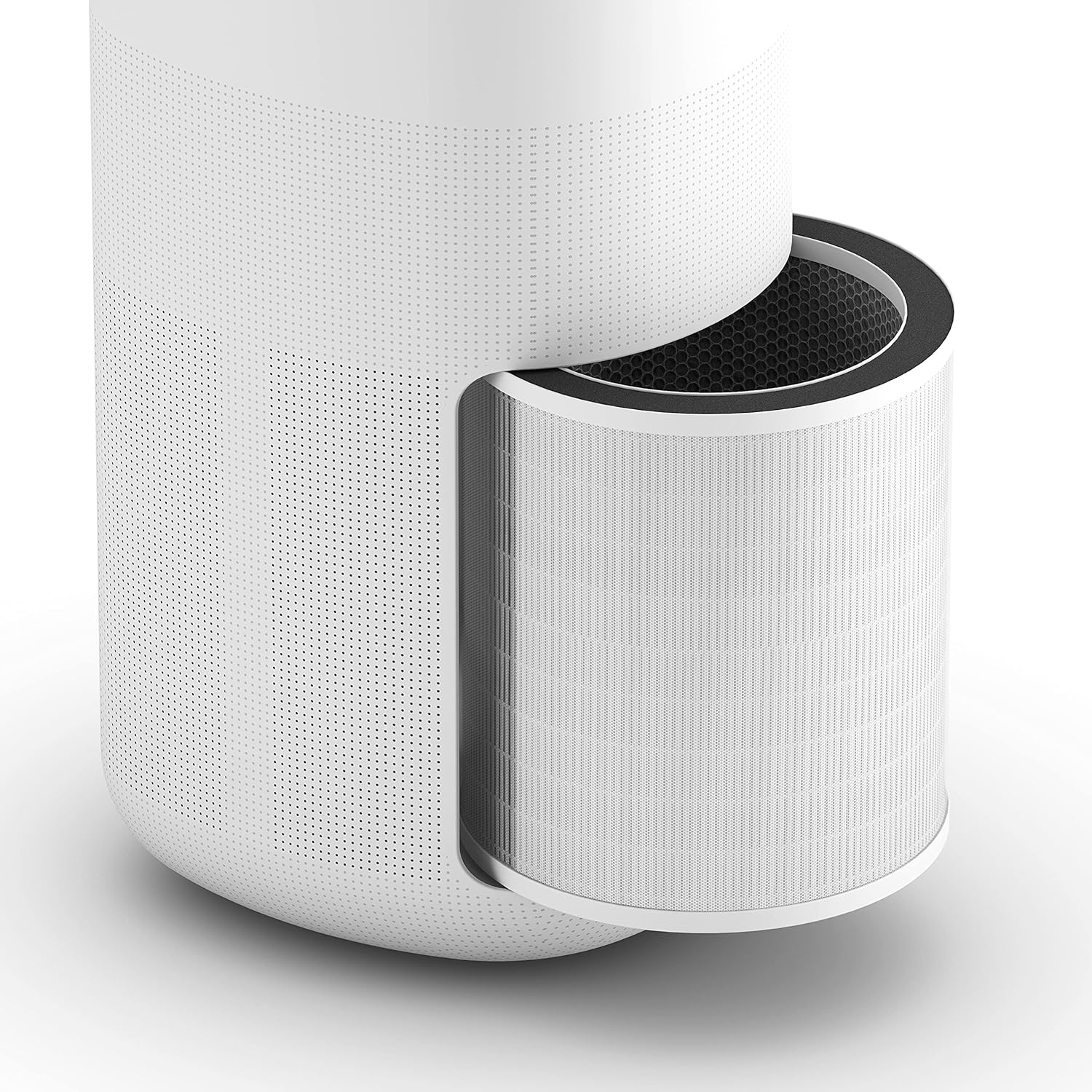
Малюнак 2: View of the air purifier with its multi-layer filter assembly exposed, ready for installation or replacement.
2.2 Размяшчэнне
Place the air purifier on a flat, stable surface. Ensure there is adequate space (at least 20 cm) around the air inlet and outlet for optimal air circulation. Avoid placing it near heat sources, direct sunlight, or in areas with high humidity.

Figure 3: The air purifier positioned in a room, demonstrating its compact design and portability with the top handle.
2.3 Падключэнне харчавання
Connect the power cord to the air purifier and then plug it into a standard electrical outlet (100-240V, 50/60Hz).
2.4 Wi-Fi Setup (Optional)
For remote control and smart features, download the dedicated app (e.g., Smart Life or Tuya app) on your smartphone. Follow the in-app instructions to connect the air purifier to your 2.4 GHz Wi-Fi network. This enables control via the app and compatibility with voice assistants like Alexa or Google Home.
3. Інструкцыя па эксплуатацыі
3.1 Панэль кіравання скончанаview
The control panel is located on the top of the unit and features touch-sensitive buttons and a digital display. Refer to the image below for button identification.

Малюнак 4: Буйны план view of the top control panel with digital display, showing various mode indicators and touch buttons.
- Кнопка харчавання: Уключае або выключае прыладу.
- Кнопка рэжыму: Cycles through fan speeds (Low, Medium, High) and operating modes (Auto, Night).
- Кнопка таймера: Sets the operating time (e.g., 2H, 4H, 8H).
- UV/Ionizer Button: Уключае або дэактывуе УФ-С лamp and ionizer functions.
- Індыкатар Wi-Fi: Паказвае стан падключэння Wi-Fi.
- Індыкатар якасці паветра: Changes color based on detected air quality (e.g., Blue for optimal, Yellow for medium, Red for low).
Рэжымы працы 3.2
- Аўтаматычны рэжым: The unit automatically adjusts fan speed based on the detected air quality.
- Начны рэжым: Operates at the lowest fan speed with reduced display brightness for quiet operation during sleep.
- Ручная хуткасць вентылятара: Select Low, Medium, or High fan speed manually.
3.3 Wi-Fi and App Control
Once connected to Wi-Fi, you can control all functions of the air purifier through the dedicated smartphone app. This includes power, mode selection, timer settings, UV/ionizer activation, and monitoring air quality remotely. The app also allows integration with compatible voice control systems.
4. Тэхнічнае абслугоўванне
4.1 Замена фільтра
The multi-layer filter (HEPA 13 and activated carbon) has an estimated lifespan of 2000 hours. The unit will typically indicate when a filter replacement is due. Replace the filter promptly to maintain optimal performance.
- Адключыце ачышчальнік паветра ад разеткі.
- Адкрыйце адсек фільтра.
- Зніміце стары фільтруючы вузел.
- Утылізуйце стары фільтр адказна.
- Insert a new, genuine Olimpia Splendid filter assembly, ensuring it is correctly oriented and seated.
- Зачыніце вечка адсека фільтра.
- Plug in the unit and reset the filter life indicator (refer to your specific model's instructions for reset procedure, usually by pressing and holding a button).
4.2 Ачыстка папярэдняга фільтра
The pre-filter, which captures larger particles, can be cleaned periodically to extend the life of the HEPA filter. It is typically integrated into the main filter assembly or accessible separately.
- Адключыце прыладу ад сеткі.
- Remove the filter assembly as described above.
- Gently vacuum or brush off accumulated dust from the pre-filter. If washable, rinse with water and ensure it is completely dry before reinstallation.
- Reinstall the filter assembly and close the compartment.
4.3 Знешняя ўборка
Wipe the exterior of the air purifier with a soft, dry cloth. Do not use abrasive cleaners, solvents, or immerse the unit in water.
5. Выпраўленне непаладак
| праблема | Магчымая прычына | Рашэнне |
|---|---|---|
| Прылада не ўключаецца. | No power supply; power cord not connected; unit damaged. | Check power connection and outlet. Ensure power cord is securely plugged in. If still not working, contact support. |
| Слабая эфектыўнасць ачысткі паветра. | Filters are dirty or expired; air inlets/outlets blocked; unit too small for room. | Clean or replace filters. Ensure no obstructions around the unit. Verify room size is within recommended limits (up to 45 m²). |
| Памылка падключэння да Wi-Fi. | Incorrect Wi-Fi password; unit out of range; router issues; only 5GHz Wi-Fi available. | Ensure correct 2.4 GHz Wi-Fi network and password. Move unit closer to router. Restart router. |
| Незвычайны шум падчас працы. | Foreign object inside; fan obstruction; unit not on a stable surface. | Unplug and check for obstructions. Ensure unit is on a stable, level surface. If noise persists, contact support. |
| Індыкатар якасці паветра заўсёды чырвоны/жоўты. | High level of pollutants; sensor dirty; unit not operating long enough. | Allow unit to operate for an extended period. Ensure filters are clean. Clean the air quality sensor if accessible (refer to specific model instructions). |
6. Тэхнічныя характарыстыкі
| Асаблівасць | Спецыфікацыя |
|---|---|
| Нумар мадэлі | 99277 |
| Power Absorption | 50 Вт |
| Хуткасці вентылятара | 3 |
| Sound Pressure Level (min-max) | 30 - 56 дБ(А) |
| Рэкамендаваны памер пакоя | Да 45 м² |
| CADR (хуткасць падачы чыстага паветра) | 400 м³/г |
| Вытворчасць азону | <0.05 праміле |
| Электразабеспячэнне | 100/240V, 1-phase, 50/60Hz |
| Тып фільтра | HEPA 13, Activated Carbon, Pre-filter |
| УФ Лamp | так |
| Іянізатар | так |
| Сувязь | Integrated Wi-Fi (2.4 GHz) |
| Памеры (Д х Ш х У) | 30.3 х 27.3 х 53.4 см |
| Вага | 5 кг |
7. Гарантыя і падтрымка
Olimpia Splendid products are manufactured to high-quality standards. For specific warranty terms and conditions, please refer to the warranty card included with your product or visit the official Olimpia Splendid webсайт. Захоўвайце пацвярджэнне пакупкі для прэтэнзій па гарантыі.
For technical assistance, troubleshooting beyond this manual, or to purchase replacement parts and filters, please contact Olimpia Splendid customer support. Contact information can typically be found on their official webсайце або ва ўпакоўцы прадукту.
Важна: Do not attempt to repair the unit yourself. Unauthorized repairs may void your warranty and pose safety risks.