
Уводзіны
This manual provides comprehensive instructions for the operation and maintenance of your Timex DGTL 40mm Digital Watch, Model TW5M419009J. Designed for active wear, this watch features a digital display, alarm, stopwatch, timer, and INDIGLO® backlight. Please read this manual carefully to ensure proper use and to maximize the lifespan of your watch.
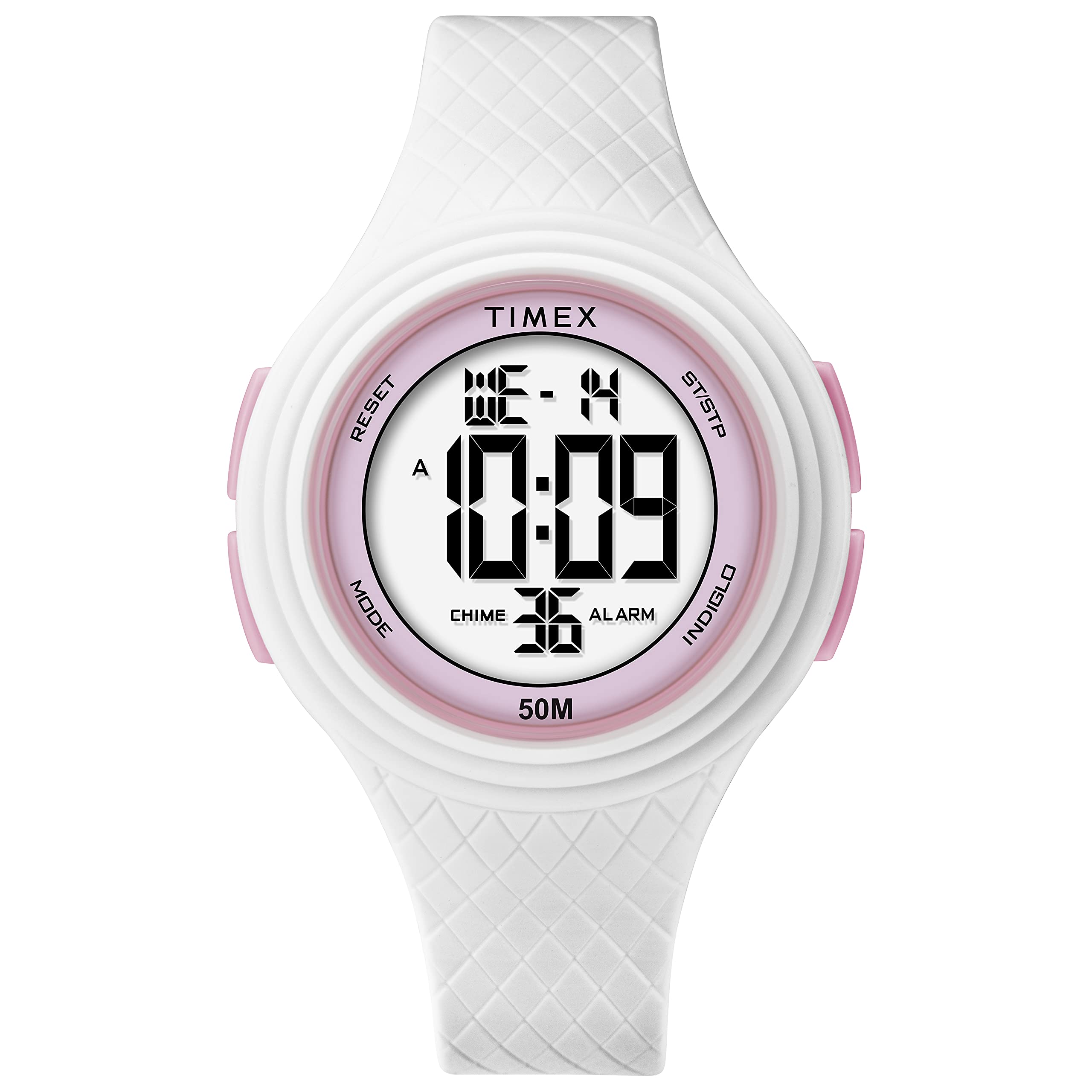
Малюнак 1: Спераду view of the Timex DGTL 40mm Digital Watch.
Асноўныя характарыстыкі
- 40 mm Matte White Resin Case with pink accents.
- Digital display with time, date, and day of week.
- Функцыя сігналізацыі.
- Sports Stopwatch.
- Two Time Zones capability.
- INDIGLO® light-up watch dial for low-light conditions.
- Воданепранікальнасць да 50 метраў (164 футаў).
- White Resin Strap, adjustable for wrist circumferences 135 - 190mm (5.3 - 7.5in).
Налада і пачатковая канфігурацыя
Your Timex DGTL watch comes with a pre-installed lithium metal battery. Before first use, you may need to remove a plastic tab from the crown or button area if present, which prevents battery drain during shipping.
Identifying Watch Buttons
Your watch typically features multiple buttons for navigation and setting. While specific labels may vary, common functions include:
- Кнопка рэжыму: Used to cycle through different display modes (Time, Alarm, Stopwatch, Timer, Second Time Zone).
- Set/Adjust Button: Used to enter and exit setting modes, or confirm selections.
- Кнопка Пуск/Стоп: Used to start and stop functions (e.g., stopwatch, timer) or increment values during setting.
- Светлавая кнопка: Activates the INDIGLO® backlight or may be used to reset values.

Малюнак 2: бок view of the watch, illustrating button placement. Refer to your watch for specific button labels.
Ўстаноўка часу і даты
- З звычайнага дысплея часу націсніце кнопку Кнопка рэжыму repeatedly until the time setting mode is indicated (often by flashing digits).
- Націсніце Set/Adjust Button to select the digit or segment you wish to change (e.g., hours, minutes, 12/24-hour format, year, month, day). The selected segment will flash.
- Выкарыстоўвайце Кнопка Пуск/Стоп to increment the flashing value. Hold the button to advance rapidly.
- Працягвайце націскаць на Set/Adjust Button to move to the next segment (minutes, AM/PM, year, month, day) and adjust using the Кнопка Пуск/Стоп.
- Пасля таго, як усе налады правільныя, націсніце кнопку Кнопка рэжыму or Set/Adjust Button (depending on model) to exit the setting mode and return to the normal time display.
Setting Second Time Zone (T2)
- З звычайнага дысплея часу націсніце кнопку Кнопка рэжыму repeatedly until "T2" or "Second Time Zone" is displayed.
- Націсніце Set/Adjust Button to enter the T2 setting mode. The hour digits will flash.
- Выкарыстоўвайце Кнопка Пуск/Стоп каб наладзіць гадзіны.
- Націсніце Set/Adjust Button to move to minutes and adjust using the Кнопка Пуск/Стоп.
- Націсніце Set/Adjust Button again to save and exit T2 setting.
Інструкцыя па эксплуатацыі
Using the INDIGLO® Backlight
Каб падсвятліць цыферблат гадзінніка ва ўмовах нізкай асветленасці, націсніце Светлавая кнопка. The INDIGLO® backlight will activate for a few seconds.
Выкарыстанне секундамера
- Націсніце Кнопка рэжыму repeatedly until the stopwatch display appears (usually indicated by "STP" or "CHRO").
- Націсніце Кнопка Пуск/Стоп каб пачаць адлік часу.
- Націсніце Кнопка Пуск/Стоп зноў, каб прыпыніць адлік часу.
- Каб аднавіць, націсніце кнопку Кнопка Пуск/Стоп.
- To reset the stopwatch to zero, while paused, press the Светлавая кнопка or a dedicated Reset Button.
Настройка і выкарыстанне сігналізацыі
- Націсніце Кнопка рэжыму repeatedly until the alarm display appears (usually indicated by "ALM").
- Націсніце Set/Adjust Button каб увайсці ў рэжым налады будзільніка. Лічбы гадзін будуць міргаць.
- Выкарыстоўвайце Кнопка Пуск/Стоп каб наладзіць гадзіну будзільніка.
- Націсніце Set/Adjust Button to move to minutes and adjust using the Кнопка Пуск/Стоп.
- Націсніце Set/Adjust Button again to save the alarm time.
- To activate or deactivate the alarm, typically press the Кнопка Пуск/Стоп у рэжыме адлюстравання сігналізацыі. Пры актыўнасці з'явіцца значок сігналізацыі.
- Калі гучыць будзільнік, націсніце любую кнопку, каб адключыць яго.
Тэхнічнае абслугоўванне
Чыстка гадзінніка
Каб пачысціць гадзіннік, працярыце яго мяккай тканінайamp cloth. Avoid using harsh chemicals or abrasive cleaners, as these can damage the resin case and strap. For the resin strap, mild soap and water can be used, followed by thorough rinsing and drying.
Воданепранікальнасць
Your Timex DGTL watch is water resistant to 50 meters (164 feet). This means it is suitable for light swimming and showering. However, it is не suitable for diving or prolonged submersion. To maintain water resistance, не націскайце кнопкі пад вадой.

Figure 3: Timex Water Resistance Guidelines. Your watch is rated for 50 meters.
Watches labeled water-resistant without a depth indicated can withstand splashes and rain, but should not be submerged. To maintain water resistance, do not press any buttons under water unless your watch is indicated as 200 meter water resistant.
Замена батарэі
The watch uses one Lithium Metal battery. When the display dims or functions become erratic, it may be time to replace the battery. Battery replacement should ideally be performed by a qualified watch technician to ensure proper sealing and maintain water resistance. Attempting to replace the battery yourself may void the warranty and compromise the watch's water resistance.

Малюнак 4: Назад view of the watch, showing the case back where the battery is accessed.
Ліквідацыю непаладак
| праблема | Магчымая прычына | Рашэнне |
|---|---|---|
| Дысплей гадзінніка пусты або цьмяны. | Нізкі або разраджаны акумулятар. | Replace the battery. Refer to the "Battery Replacement" section. |
| Немагчыма ўсталяваць час/дату. | Incorrect button sequence; watch in wrong mode. | Ensure you are in the correct setting mode. Follow the "Setting Time and Date" instructions carefully. Press buttons firmly. |
| Кнопкі не рэагуюць. | Watch may be in a locked mode; internal malfunction; water ingress. | Try pressing all buttons to see if any respond. If unresponsive after a battery change, contact Timex support. Avoid pressing buttons underwater. |
| INDIGLO® backlight not working. | Low battery; malfunction. | Replace the battery. If the issue persists, contact Timex support. |
| Сігналізацыя не гучыць. | Alarm is not activated; alarm volume too low (if adjustable); malfunction. | Ensure the alarm is set and activated (check for alarm icon on display). Re-set the alarm time. |
Тэхнічныя характарыстыкі
- Нумар мадэлі: TW5M419009J
- Дыяметр корпуса: 40 мм
- Матэрыял корпуса: Matte White Resin
- Матэрыял папружкі: Белая смала
- Акружнасць запясця: 135 - 190mm (5.3 - 7.5in)
- Воданепранікальнасць: 50 метраў (164 фута)
- Тып дысплея: Лічбавы
- Падсвятленне: INDIGLO®
- Тып батарэі: 1 літый-металічная батарэя (у камплекце)
- Вага прадмета: 38.56 г
- вытворца: Timex
- аддзел: Унісекс-дарослы
Гарантыя і падтрымка
Your Timex watch is covered by a manufacturer's warranty. For detailed information regarding warranty terms, conditions, and duration, please refer to the warranty card included with your purchase or visit the official Timex webсайт.
For customer support, service, or to find authorized service centers, please visit the Timex official support page: Падтрымка Timex.