
1. Уводзіны
This manual provides detailed instructions for the setup, operation, and maintenance of your WISE TIGER LED Digital Alarm Clock (Model CK-LED1302). Please read this manual thoroughly before use to ensure proper functionality and to maximize your product experience.

Image 1.1: WISE TIGER LED Digital Alarm Clock and its remote control.
2. Змесціва ўпакоўкі
Калі ласка, пераканайцеся, што ўсе прадметы прысутнічаюць у вашай упакоўцы:
- WISE TIGER LED Digital Alarm Clock (Model CK-LED1302)
- Пульт дыстанцыйнага кіравання
- USB кабель харчавання
- Кіраўніцтва карыстальніка (гэты дакумент)
- Fixed Bracket (for desk placement)
3. Прадукт скончыўсяview
The WISE TIGER LED Digital Alarm Clock features a modern 3D design, offering clear time display and multiple functions for various environments.
3.1 Асноўныя магчымасці
- Дысплей часу: 12-hour or 24-hour format.
- Дысплей календара: Shows date.
- Будзільнік: With snooze function.
- Дысплей тэмпературы: Паказвае тэмпературу навакольнага асяроддзя.
- Рэгуляваная яркасць: Automatic brightness sensor and manual adjustment via remote control.
- Функцыя начнога святла: Забяспечвае мяккае асвятленне.
- Функцыя памяці: Built-in battery retains time settings for 4-8 hours during power disconnection.
- Універсальнае размяшчэнне: Suitable for desk or wall mounting.

Image 3.1: Visual representation of the clock's main functions.
3.2 Кампаненты
Глядзіце дыяграму ніжэй для больш падрабязнай інфармацыіview of the clock's components and connection points.
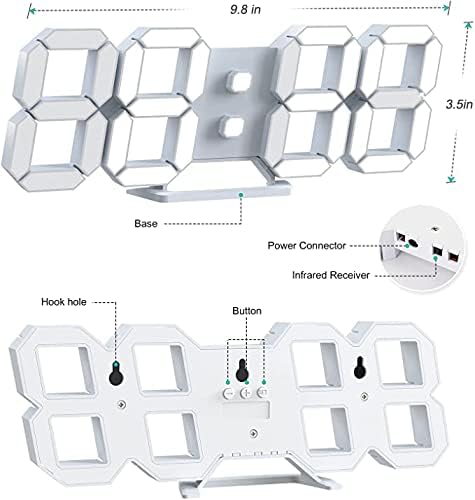
Малюнак 3.2: Спіна view and dimensions of the clock, highlighting the power connector, infrared receiver, and mounting options.
- Дысплей: Large 3D LED digits for time, date, and temperature.
- База: Removable stand for desk placement.
- Раз'ём харчавання: USB port for power input.
- Інфрачырвоны прыёмнік: Для сігналаў дыстанцыйнага кіравання.
- Hook Holes: Для насценнага мантажу.
- Кнопкі кіравання: Located on the back for basic settings (Power, Up, Down, Set).
4. Настройка
4.1 Падключэнне харчавання
- Connect the provided USB power cable to the power connector on the back of the clock.
- Падключыце другі канец USB-кабеля да стандартнага USB-адаптара харчавання (не ўваходзіць у камплект) або USB-порта кампутара.
- The clock will power on and display the time.
The clock is powered by the USB cable only. A built-in battery serves to record time settings when power is disconnected, ensuring settings are retained for 4-8 hours.

Image 4.1: Explanation of the clock's power and memory function.
4.2 Варыянты размяшчэння
The clock can be used as a desk clock or a wall clock.
- Размяшчэнне на стале: Attach the fixed bracket to the bottom of the clock. The angle of the bracket can be adjusted for optimal viewінж.
- Насценны мантаж: Remove the fixed bracket if attached. Use the installation slots (hook holes) on the back of the clock to hang it securely on a wall using appropriate fasteners (not included).

Image 4.2: The clock configured for wall mounting and desk placement.
5. Інструкцыя па эксплуатацыі
The clock's functions are primarily controlled using the included remote control. Basic settings can also be adjusted via the buttons on the back of the clock.
5.1 Устаноўка часу і даты
- Націсніце ЧАС button on the remote control to enter time setting mode.
- Выкарыстоўвайце UP і УНІЗ стрэлкі, каб наладзіць гадзіну.
- Прэса ЧАС again to move to minute setting, then use UP і УНІЗ наладжваць.
- Працягвайце націскаць ЧАС каб пераключацца паміж наладамі года, месяца і дня, карэктуючы кожную з іх UP і УНІЗ.
- Прэса ЧАС апошні раз або пачакайце некалькі секунд, пакуль налады захаваюцца аўтаматычна.
5.2 12/24-гадзінны фармат
Каб пераключыцца паміж 12-гадзінным і 24-гадзінным фарматамі часу, націсніце кнопку 12/24 гадзіны кнопку на пульце.

Малюнак 5.1: Прыкладample of 12-hour and 24-hour time display.
5.3 Налада будзільніка
- Націсніце ТРЫВОГА button on the remote control to enter alarm setting mode.
- Выкарыстоўвайце UP і УНІЗ arrows to set the desired alarm hour.
- Прэса ТРЫВОГА again to move to minute setting, then use UP і УНІЗ наладжваць.
- Прэса ТРЫВОГА апошні раз або пачакайце захавання налад.
- Каб уключыць/выключыць будзільнік, націсніце кнопку ТРЫВОГА button briefly outside of setting mode. An alarm icon will appear/disappear on the display.
5.4 Функцыя паўтору
Калі прагучыць сігнал трывогі, націсніце СНАОЗ button on the remote control to temporarily silence the alarm. The alarm will sound again after a set interval (typically 5-10 minutes).

Image 5.2: The snooze alarm function in use.
5.5 Рэгуляванне яркасці
The clock features both automatic and manual brightness control.
- Аўтаматычная яркасць: The built-in sensor automatically adjusts the display brightness based on ambient light conditions.
- Ручная яркасць: Націсніце ЯРКАЯ button on the remote control to cycle through different brightness levels (e.g., high, medium, low).

Image 5.3: Automatic brightness adjustment based on ambient light.

Image 5.4: Manual adjustment through three brightness levels.
5.6 Дысплей тэмпературы
The clock automatically displays the ambient temperature. No manual adjustment is typically required for this function.
6. Тэхнічнае абслугоўванне
To ensure the longevity and optimal performance of your WISE TIGER LED Digital Alarm Clock, follow these maintenance guidelines:
- Уборка: Use a soft, dry cloth to wipe the display and casing. Avoid abrasive cleaners, solvents, or spray cleaners directly on the clock.
- Магутнасць: Always use the provided USB cable for power. Ensure the power source is stable.
- Асяроддзе: Трымайце гадзіннік далей ад экстрэмальных тэмператур, прамых сонечных прамянёў і высокай вільготнасці.
- Пульт дыстанцыйнага кіравання: Store the remote control in a safe place to prevent loss or damage. Ensure batteries are replaced when needed (typically 2 Lithium Ion batteries, included).
7. Выпраўленне непаладак
Калі ў вас узніклі праблемы з гадзіннікам, звярніцеся да наступных распаўсюджаных праблем і іх рашэнняў:
| праблема | Магчымая прычына | Рашэнне |
|---|---|---|
| Гадзіннік не ўключаецца | Адсутнічае харчаванне або слабае злучэнне | Ensure USB cable is securely connected and power source is active. Try a different USB port or adapter. |
| Пульт дыстанцыйнага кіравання не працуе | Remote batteries are dead or remote is out of range/blocked | Replace remote control batteries. Ensure remote is pointed at the clock's infrared receiver (refer to Image 3.2) and within 8 meters. Remove any obstructions. |
| Час недакладны | Time was not set precisely | Reset the time carefully, ensuring you set it at the exact second of the desired time. |
| Дысплей занадта цьмяны або занадта яркі | Brightness setting needs adjustment | Націсніце ЯРКАЯ button on the remote to cycle through manual brightness levels. Check if automatic brightness is functioning correctly in different light conditions. |
| Будзільнік не гучыць | Alarm is not activated or set incorrectly | Ensure the alarm is set and activated (alarm icon visible). Verify the alarm time is correct. |
8. Тэхнічныя характарыстыкі
| Асаблівасць | Дэталь |
|---|---|
| Марка | МУДРЫ ТЫГР |
| Нумар мадэлі | CK-LED1302 |
| Тып дысплея | Лічбавы |
| Колер | Белы |
| Памеры прадукту | 9.7"Ш х 3.5"В |
| Крыніца харчавання | Правадная электрычная (USB) |
| Акумулятар памяці | 2 Lithium Ion batteries (included), retains settings for 4-8 hours |
| Тып мацавання | Wall Mount, Desk Mount |
| Асаблівасці | Adjustable Brightness, Alarm Clock, Temperature Display, Date Display, 12/24 Hour Format |
| Матэрыял | Акрыланітрыл бутадыен стырол |
| Вага прадмета | 0.317 унцыі (прыблізна 9 грамаў) |
| UPC | 728990655931 |
9. Гарантыя і падтрымка
For warranty information or technical support, please refer to the product packaging or contact the retailer where the product was purchased. Keep your purchase receipt as proof of purchase.