
Уводзіны
The Poly DA75 is a versatile USB-A/USB-C digital adapter designed to connect Poly Quick Disconnect (QD) headsets to computers. It ensures clear audio quality for call center environments, supporting both USB-A and USB-C connections for compatibility with various systems. This adapter is engineered to work seamlessly with platforms such as Avaya, Genesys, and Cisco, providing a reliable audio solution for professionals.
Асноўныя функцыі ўключаюць у сябе:
- Універсальная сувязь: Equipped with both USB-A and USB-C connectors on the cable for broad compatibility with new and legacy equipment.
- Intelligent Headset Recognition: Automatically adjusts audio performance to the specific Poly Quick Disconnect headset for optimized call quality.
- Acoustic Protection: Incorporates features to manage safe volume levels, protecting user hearing.
- Інтэграцыя платформы: Fully compatible with leading call center platforms including Avaya, Genesys, and Cisco.
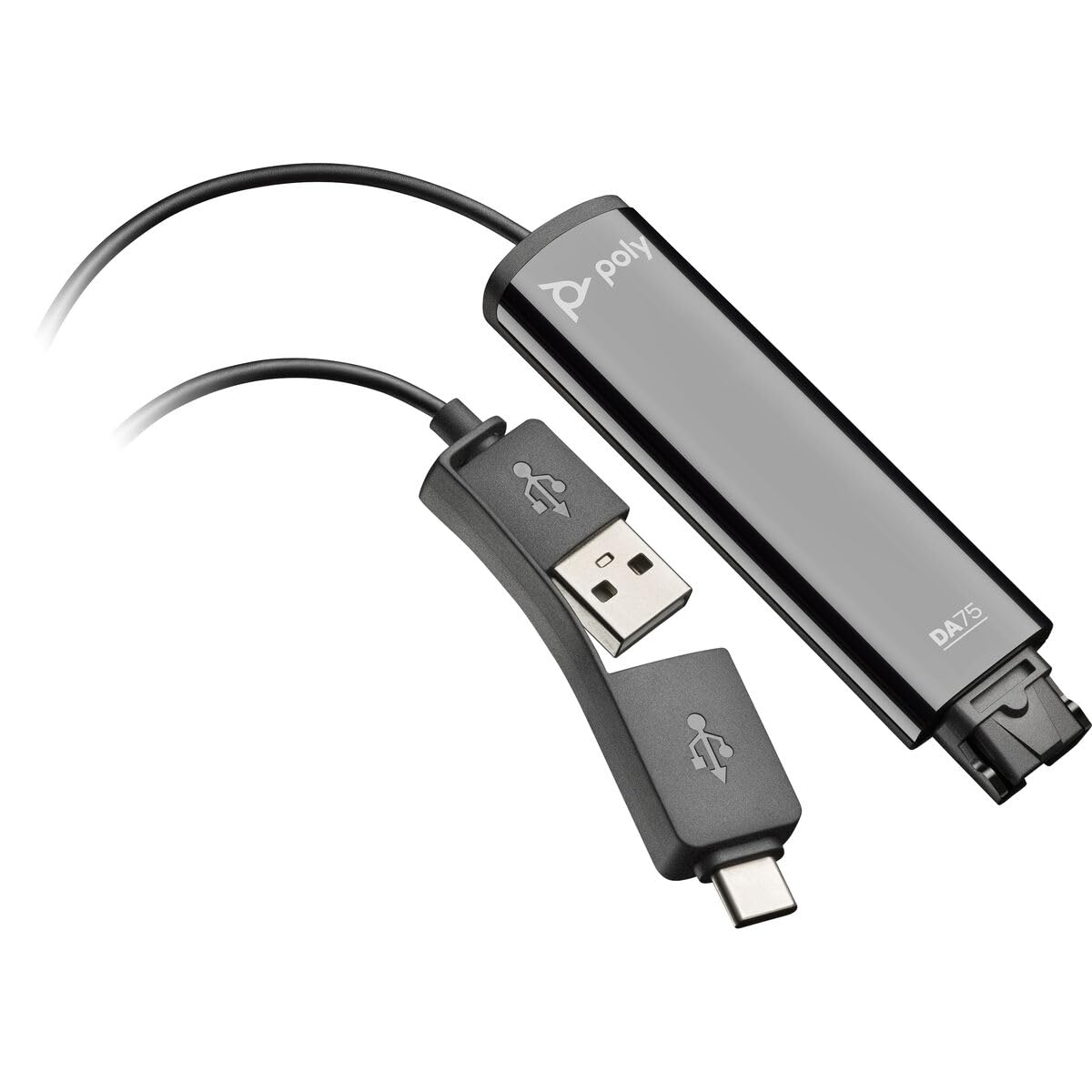
Image: The Poly DA75 USB-A/USB-C Digital Adapter, showing its dual USB-A and USB-C connectors and the Quick Disconnect port for headsets.
Што ў скрынцы
The Poly DA75 package typically includes the following items:
- Poly DA75 USB-A/USB-C Digital Adapter
- Дакументацыя (Кіраўніцтва па хуткім запуску, Інфармацыя аб бяспецы)
Note: Headsets are sold separately and are not included with the DA75 adapter.
Настройка
Follow these steps to set up your Poly DA75 Digital Adapter:
- Падключэнне гарнітуры: Connect your Poly Quick Disconnect (QD) headset to the QD port on the Poly DA75 adapter. Ensure the connection is secure.
- Падключыцеся да кампутара:
- If your computer has a USB-A port, use the USB-A connector on the DA75 cable.
- If your computer has a USB-C port, use the USB-C connector on the DA75 cable.
Plug the appropriate USB connector into an available USB port on your computer.
- Ўстаноўка драйвера: The DA75 is a plug-and-play device. Your operating system (Windows, macOS) should automatically detect the device and install the necessary drivers. This process may take a few moments.
- Праверка распазнавання прылады:
- Windows: Перайсці да Налады > Сістэма > Гук or Панэль кіравання > Гук. The Poly DA75 should appear as an audio input and output device.
- MacOS: Перайсці да System Settings > Sound. The Poly DA75 should appear as an input and output device.
Select the Poly DA75 as your default communication device for both playback and recording.
- Канфігурацыя праграмнага забеспячэння: If you are using communication software (e.g., Avaya, Genesys, Cisco, Microsoft Teams, Zoom), ensure that the Poly DA75 is selected as the audio device within the application's settings.
Інструкцыя па эксплуатацыі
The Poly DA75 adapter facilitates audio communication through your connected Poly QD headset. Its operation is primarily managed through your computer's operating system and communication software.
- Здзяйсненне/прыём званкоў: Use your communication software to initiate or answer calls. The audio will be routed through your connected Poly QD headset via the DA75 adapter.
- Рэгулятар гучнасці: Adjust the listening volume using your computer's system volume controls or the volume controls within your communication application.
- Адключэнне мікрафона: Mute and unmute your microphone using the controls provided by your communication software.
- Audio Optimization: The DA75 automatically optimizes audio for your specific Poly QD headset. No manual adjustments are typically required for audio profiles.
Тэхнічнае абслугоўванне
To ensure the longevity and optimal performance of your Poly DA75 Digital Adapter, follow these maintenance guidelines:
- Уборка: Gently wipe the adapter with a soft, dry, anti-static cloth. Do not use liquid cleaners or abrasive materials.
- захоўванне: Захоўвайце адаптар у прахалодным, сухім месцы, удалечыні ад прамых сонечных прамянёў і экстрэмальных тэмператур.
- Апрацоўка: Avoid bending or twisting the cable excessively, especially near the connectors, to prevent internal damage.
- Падключэнне: Ensure the Quick Disconnect (QD) connection and USB connections are clean and free of debris before connecting.
Ліквідацыю непаладак
If you encounter issues with your Poly DA75 Digital Adapter, refer to the following troubleshooting steps:
| праблема | Магчымая прычына | Рашэнне |
|---|---|---|
| Няма гуку з гарнітуры |
|
|
| Не працуе мікрафон |
|
|
| Adapter not recognized by computer |
|
|
Тэхнічныя характарыстыкі
| Асаблівасць | Дэталь |
|---|---|
| Нумар мадэлі | 218266-01 |
| Марка | ПОЛІ |
| Тып раздыма | USB-A, USB-C (dual connector) |
| Сумяшчальныя прылады | Poly Quick Disconnect (QD) Headsets |
| Канкрэтнае выкарыстанне | PC, Call Center Platforms (Avaya, Genesys, Cisco) |
| Колер | Чорны |
| Памеры прадмета (Д х Ш х У) | 0.98 х 0.39 х 2.95 цалі |
| Вага прадмета | 30 грам |
| Колькасць партоў | 2 (USB-A/USB-C to QD) |
| UPC | 197029650054, 017229175112 |
Гарантыя і падтрымка
Інфармацыя аб гарантыі: The Poly DA75 Digital Adapter comes with a Абмежаваная гарантыя вытворцы на 2 годГэтая гарантыя распаўсюджваецца на дэфекты матэрыялаў і вырабу пры нармальным выкарыстанні. Калі ласка, захавайце пацвярджэнне пакупкі для прэтэнзій па гарантыі.
Тэхнічная падтрымка: For technical assistance, product inquiries, or warranty service, please contact Poly customer support. Visit the official Poly website for the most up-to-date support contact information, FAQs, and additional resources.
Інтэрнэт-рэсурсы: Падтрымка Poly Webсайт