
1. Уводзіны
Thank you for choosing the AULA S606 Wired Gaming Headset. This manual provides detailed instructions for the proper setup, operation, maintenance, and troubleshooting of your new headset. Please read this manual thoroughly before using the product to ensure optimal performance and longevity.
2. Прадукт скончыўсяview
The AULA S606 is a wired over-ear gaming headset designed for clear audio communication and immersive sound. It features an omnidirectional microphone with active noise cancellation for clear voice pickup and reduced background noise.
2.1 Асноўныя магчымасці
- Wired Connectivity via 3.5mm Jack
- Усенакіраваны мікрафон
- Актыўнае падаўленне шуму
- Over-Ear Design for Comfort
- Integrated Volume Control
- Трывалая пластыкавая канструкцыя
2.2 Кампаненты
The package includes the AULA S606 Wired Gaming Headset with an integrated microphone and headband.
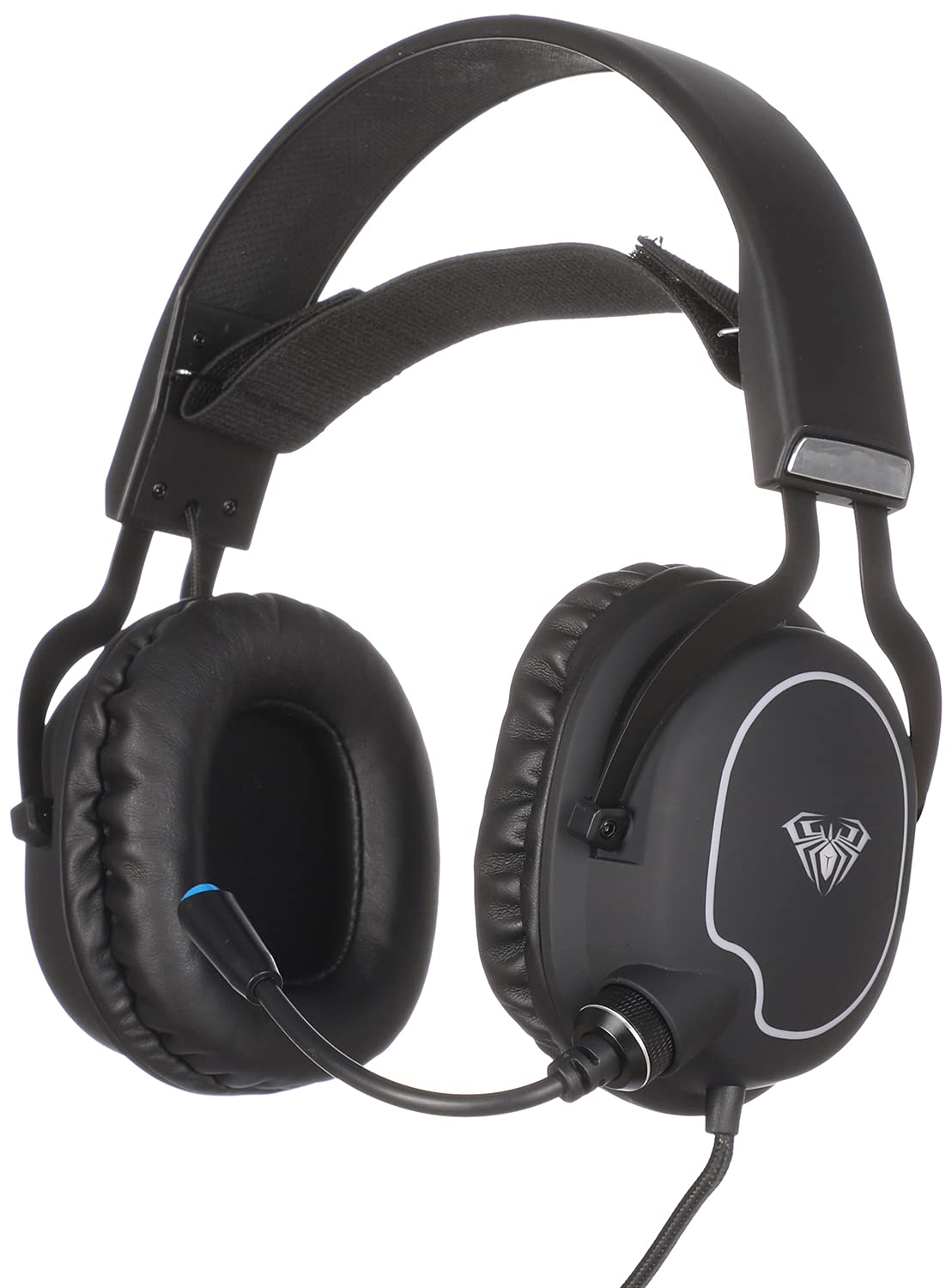
Малюнак 1: Спераду view of the AULA S606 Wired Gaming Headset.

Figure 2: Close-up of the AULA S606 headset's earcup and flexible microphone.

Малюнак 3: падрабязна view of the AULA S606 headset's earcup, highlighting the volume control dial.
3. Настройка
Follow these steps to set up your AULA S606 headset:
- Падключыце гарнітуру: Plug the 3.5mm jack of the headset cable into the corresponding audio port on your device (PC, gaming console controller, smartphone, etc.). Ensure the connection is secure.
- Адрэгулюйце павязку: Place the headset on your head and adjust the headband for a comfortable and secure fit. The earcups should fully cover your ears.
- Размясціце мікрафон: Adjust the flexible microphone boom to a position near your mouth, typically 2-3 centimeters away, for optimal voice clarity.
- Configure Audio Settings (if necessary): On your device, ensure the AULA S606 is selected as the default audio output and input device in your sound settings.
4. Інструкцыя па эксплуатацыі
4.1 Рэгулятар гучнасці
The AULA S606 headset features an integrated volume control dial located on one of the earcups (refer to Figure 3). Rotate the dial to increase or decrease the audio volume to your desired level.
4.2 Выкарыстанне мікрафона
The omnidirectional microphone captures sound from all directions, making it effective for voice communication. The active noise cancellation feature helps to reduce ambient background noise, ensuring your voice is heard clearly by others.
- Выключыць/уключыць гук: If your headset or device has a mute function, use it to temporarily disable the microphone.
- Аптымальнае размяшчэнне: For best results, keep the microphone positioned consistently near your mouth.
5. Тэхнічнае абслугоўванне
Правільны догляд падоўжыць тэрмін службы вашай гарнітуры:
- Уборка: Выкарыстоўвайце мяккую сухую тканіну, каб выцерці амбушуры і агалоўе. Для ўстойлівага бруду злёгкуamp можна выкарыстоўваць тканіну, але пераканайцеся, што вільгаць не трапляе на рашоткі дынаміка або мікрафон. Не выкарыстоўвайце агрэсіўныя хімікаты або абразіўныя ачышчальнікі.
- захоўванне: Store the headset in a clean, dry place away from extreme temperatures and direct sunlight. Avoid placing heavy objects on top of the headset.
- Сыход за кабелем: Avoid sharp bends, twists, or excessive pulling on the cable. Always grasp the plug, not the cable, when disconnecting from a device.
- Сыход за мікрафонам: Акуратна звяртайцеся з гнуткай штангай мікрафона. Пазбягайце празмернага згінання або прымусовага ўключэння яе ў крайнія палажэнні.
6. Выпраўленне непаладак
If you encounter issues with your AULA S606 headset, refer to the following common problems and solutions:
| праблема | Магчымая прычына | Рашэнне |
|---|---|---|
| Няма гуку з гарнітуры |
|
|
| Не працуе мікрафон |
|
|
| Скажэнне або статыка гуку |
|
|
7. Тэхнічныя характарыстыкі
| Марка | АЎЛА |
| Нумар мадэлі | S606 |
| Тэхналогія падлучэння | Правадная |
| Раз'ём для навушнікаў | Гняздо 3.5 мм |
| Формаў-фактар навушнікаў | Надвушная |
| Мікрафон | Integrated, Omnidirectional |
| Кантроль шуму | Актыўнае падаўленне шуму |
| Тып кіравання | Рэгулятар гучнасці |
| Сумяшчальныя прылады | All devices with a 3.5mm audio jack |
| Колер | Чорны |
| Матэрыял | Пластыкавыя |
| Уключаныя кампаненты | Павязка на галаву |
| Памеры дастаўкі | 24.6 х 21.2 х 13.2 см |
| Вага | 560 грамаў |
8. Гарантыя і падтрымка
Specific warranty information for the AULA S606 headset is not provided in this manual. For details regarding warranty coverage, technical support, or service inquiries, please refer to the documentation included with your purchase or contact your retailer or the manufacturer directly.