
1. Уводзіны
Thank you for choosing the SNDWAY SW-TG100 Laser Distance Meter. This device is designed for precise and rapid measurement of distances, areas, and volumes. It utilizes laser technology to provide accurate readings up to 100 meters, making it an essential tool for professionals and DIY enthusiasts in construction, interior design, and various other fields. Please read this manual carefully before using the device to ensure safe and optimal operation.
2. Інфармацыя па бяспецы
This device emits a Class 2 laser. Observe the following safety precautions:
- Do not stare into the laser beam directly. Direct exposure to the laser can cause eye damage.
- Не накіроўвайце лазерны прамень на людзей і жывёл.
- Не разбірайце і не мадыфікуйце прыладу. Unauthorized modifications can lead to hazardous laser radiation exposure.
- Захоўвайце прыладу ў месцах, недаступных дзецям.
- Выкарыстоўвайце прыладу толькі па прамым прызначэнні, як апісана ў гэтай інструкцыі.
- Пазбягайце выкарыстання прылады ў выбуханебяспечных асяроддзях або побач з лёгкаўзгаральнымі матэрыяламі.
3. Прадукт скончыўсяview
The SNDWAY SW-TG100 is a compact and ergonomic laser distance meter. Below is an image illustrating the device's general appearance.
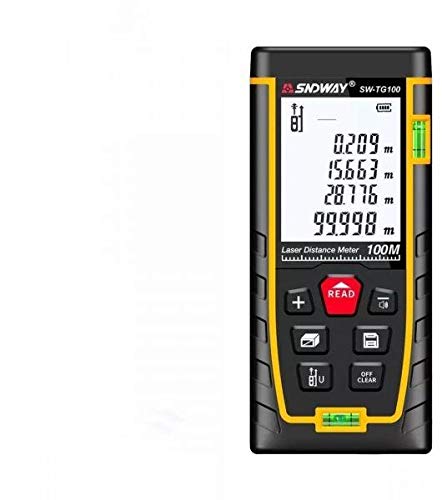
Малюнак 1: Спераду view of the SNDWAY SW-TG100 Laser Distance Meter. The image shows the device's display screen, measurement buttons, and the laser emission/reception lens.
Асноўныя кампаненты звычайна ўключаюць:
- ВК-дысплей: Shows measurement results, unit, battery status, and function indicators.
- Кнопка вымярэння: Initiates single or continuous measurements.
- Функцыянальныя кнопкі: For selecting measurement modes (distance, area, volume, Pythagorean, etc.), unit conversion, and saving data.
- Кнопка ачысткі/выключэння: Ачышчае апошняе вымярэнне або выключае прыладу.
- Лазерная дыяфрагма: Where the laser beam is emitted and received.
- Батарэйны адсек: (If applicable) For inserting or accessing batteries.
4. Настройка
4.1 Уключэнне/выключэнне
- Каб уключыць: Націсніце [MEAS] коратка націсніце кнопку. Дысплей падсвяціцца.
- Каб выключыць: Націсніце і ўтрымлівайце [CLEAR/OFF] button for a few seconds until the display turns off. The device will also automatically power off after a period of inactivity to conserve battery.
4.2 Battery Installation (if applicable)
While the product specifications indicate no batteries are required, this typically implies an internal rechargeable battery. If your model requires external batteries, open the battery compartment cover located on the back or bottom of the device. Insert the specified battery type (e.g., AAA batteries) according to the polarity indicators (+/-). Close the compartment cover securely.
4.3 Налада адзінак
To change the measurement unit (e.g., meters, feet, inches), press the [БЛОК] некалькі разоў кнопку, пакуль не адлюструецца патрэбная адзінка вымярэння.
5. Інструкцыя па эксплуатацыі
5.1 Single Distance Measurement
- Уключыце прыладу.
- Накіруйце лазер на мэтавую паверхню.
- Націсніце [MEAS] адзін раз націсніце кнопку. Лазер актывуецца.
- Націсніце [MEAS] button again. The measurement will be taken, and the result will appear on the display.
5.2 Вымярэнне плошчы
- Націсніце [ФУНКЦЫЯ] button until the area measurement icon (usually a square or rectangle) appears on the display.
- Measure the first side (e.g., length) by pointing the laser and pressing [MEAS].
- Measure the second side (e.g., width) by pointing the laser and pressing [MEAS] зноў.
- Прылада аўтаматычна разлічыць і адлюструе плошчу.
5.3 Вымярэнне аб'ёму
- Націсніце [ФУНКЦЫЯ] button until the volume measurement icon (usually a cube) appears on the display.
- Measure the length by pointing the laser and pressing [MEAS].
- Measure the width by pointing the laser and pressing [MEAS].
- Measure the height by pointing the laser and pressing [MEAS].
- Прылада аўтаматычна разлічыць і адлюструе аб'ём.
5.4 Бесперапыннае вымярэнне (адсочванне)
This mode allows for dynamic measurement, displaying the distance in real-time as you move the device.
- Націсніце і ўтрымлівайце [MEAS] button (or press it twice quickly, depending on the model) to enter continuous measurement mode.
- Move the device slowly towards or away from the target. The display will update with the current distance.
- Прэса [MEAS] or [CLEAR/OFF] каб выйсці з рэжыму бесперапыннага вымярэння.
6. Тэхнічнае абслугоўванне
- Уборка: Выкарыстоўвайце мяккі, damp тканіна для чысткі прылады casing. Do not use abrasive cleaners or solvents. Clean the laser lens carefully with a soft, lint-free cloth, similar to cleaning camera lenses.
- захоўванне: Store the device in a cool, dry place, away from direct sunlight and extreme temperatures. If storing for an extended period, remove any external batteries (if applicable).
- Пазбягайце ўздзеяння: Protect the device from drops and strong impacts, which can affect its accuracy and functionality.
7. Выпраўленне непаладак
| праблема | Магчымая прычына | Рашэнне |
|---|---|---|
| Прылада не ўключаецца. | Нізкі або разраджаны акумулятар. | Charge the device or replace batteries (if applicable). |
| Недакладныя вымярэнні. | Dirty laser lens; unstable measurement surface; strong light interference. | Clean the laser lens; ensure a stable measurement point; measure in less bright conditions if possible. |
| На дысплеі з'яўляецца паведамленне «Памылка». | Measurement out of range; poor reflection from target. | Ensure target is within measurement range (0.05m-100m); use a reflective target plate if measuring against highly reflective or transparent surfaces. |
8. Тэхнічныя характарыстыкі
| Асаблівасць | Дэталь |
|---|---|
| Вытворца | СНДВЕЙ |
| мадэль | SW-TG100 |
| Дыяпазон вымярэнняў | Да 100 метраў |
| Дакладнасць вымярэнняў | Typically ±2mm (specific accuracy may vary based on conditions) |
| Адзінкі вымярэння | m / ft / in |
| Лазерны клас | 2 клас |
| Вага прадмета | 260 г |
| Памеры ўпакоўкі | 16 х 8.8 х 5.2 см |
| Патрабуюцца батарэі | No (implies internal rechargeable battery) |
| Дата першай даступнасці | 7 ліпеня 2021 г |
9. Гарантыя і падтрымка
SNDWAY products are manufactured to high-quality standards. For specific warranty information, please refer to the warranty card included with your product or contact the retailer from whom you purchased the device. For technical support, troubleshooting assistance beyond this manual, or service inquiries, please contact SNDWAY customer service through their official webсайт або кантактную інфармацыю, прадастаўленую пры пакупцы.
Калі ласка, захавайце доказы пакупкі для прэтэнзій па гарантыі.