
Altec Lansing IMW1300-RYB-STK-2
Altec Lansing HydraBlast Wireless Portable Bluetooth Speaker
Model: IMW1300-RYB-STK-2
Уводзіны
The Altec Lansing HydraBlast is a robust and versatile wireless portable Bluetooth speaker designed for various environments, from outdoor parties to everyday use. It features IP67 Everything Proof protection, ensuring it is waterproof, shockproof, snowproof, and dustproof. With a long-lasting battery, built-in phone charging capabilities, and dynamic LED lights, the HydraBlast delivers powerful audio and convenience wherever you go.

Малюнак 1: Спераду view of the Altec Lansing HydraBlast speaker in Royal Blue.
Што ў скрынцы
- Altec Lansing HydraBlast Bluetooth Speaker
- Зарадны кабель USB-C
- Кліп-карабін
- Кіраўніцтва карыстальніка (гэты дакумент)
Асаблівасці прадукту
- Bold Bass and Clear Audio: Experience HD audio with immersive bass for a rich listening experience.
- IP67 Everything Proof: Designed to be waterproof, shockproof, snowproof, and dustproof, making it suitable for any environment.

Figure 2: The HydraBlast speaker demonstrating its water resistance.
- 20 гадзін гульні: Атрымлівайце асалоду ад працяглага прайгравання музыкі на адной зарадцы.
- Built-in Phone Charger: Features both wireless (Qi) charging and wired USB-C output to charge your devices.

Figure 3: Wireless charging a smartphone on the speaker's top surface.
- Рэжымы святлодыёднага святла: Multiple LED light modes to enhance your listening experience and create a party atmosphere.

Figure 4: The speaker features 11 distinct LED light modes, including strobe effects.
- Партатыўны дызайн: Lightweight and includes a built-in carabiner hook for easy transport and attachment.

Figure 5: The included carabiner clip allows for easy portability, attaching to bags or gear.
- Bluetooth 5.0: Забяспечвае стабільнае бесправадное злучэнне на адлегласці да 100 футаў.
- Сапраўднае бесправадное спалучэнне: Connect two HydraBlast speakers for a stereo sound experience.
Кантроль надview

Figure 6: Top panel controls of the HydraBlast speaker.
- Кнопка ўключэння/выключэння: Націсніце і ўтрымлівайце, каб уключыць або выключыць дынамік.
- Кнопка спасылкі: Used for True Wireless Pairing with another HydraBlast speaker.
- Кнопка змены колеру: Цыклічна пераключае розныя рэжымы святлодыёднага асвятлення.
- Wireless Qi Charger: Integrated charging pad for compatible devices.
- Кнопка памяншэння гучнасці / папярэдняга трэка (-): Кароткае націсканне для памяншэння гучнасці, доўгае націсканне для папярэдняга трэка.
- Voice Assistant / Answer Calls Button: Актывуе галасавы памочнік або адказвае на выклікі/завяршае іх.
- Кнопка павелічэння гучнасці / наступнага трэка (+): Кароткае націсканне для павелічэння гучнасці, доўгае націсканне для наступнага трэка.
Настройка
1. Пачатковая зарадка
Before first use, fully charge your HydraBlast speaker. Locate the USB-C charging port on the side of the speaker (protected by a waterproof flap). Connect the provided USB-C cable to the speaker and the other end to a USB power adapter (not included) or a computer's USB port. The charging indicator light will show charging status.
2. Спарванне Bluetooth
- Пераканайцеся, што дынамік выключаны.
- Націсніце і ўтрымлівайце Уключэнне/выключэнне харчавання button until you hear an audible prompt and the Bluetooth indicator light begins to flash, indicating pairing mode.
- На смартфоне або прыладзе з падтрымкай Bluetooth перайдзіце ў налады Bluetooth.
- Select "Altec Lansing HydraBlast" from the list of available devices.
- Once connected, you will hear a confirmation tone, and the Bluetooth indicator light will become solid.
3. True Wireless Pairing (Pairing Two Speakers)
To achieve a stereo sound experience, you can pair two HydraBlast speakers together:
- Ensure both HydraBlast speakers are powered on and not connected to any other Bluetooth devices.
- On one speaker (this will be your primary speaker), press the Спасылка button. The speaker will enter True Wireless Pairing mode.
- На другім дынаміку таксама націсніце Спасылка кнопка.
- Два дынамікі аўтаматычна падключацца адзін да аднаго. Пасля падключэння вы пачуеце гукавое пацверджанне.
- Цяпер падключыце прыладу Bluetooth да асноўнага дынаміка, як апісана ў раздзеле «Спалучэнне Bluetooth» вышэй. Гук будзе прайгравацца праз абодва дынамікі ў стэрэафармаце.
Інструкцыя па эксплуатацыі
Прайграванне аўдыя
- After successful Bluetooth pairing, open your preferred music application on your device and begin playback.
- Выкарыстоўвайце Павелічэнне гучнасці (+) і Volume Down (-) buttons on the speaker to adjust the volume.
- Доўгі націск Павелічэнне гучнасці (+) button for the next track, and long press the Volume Down (-) кнопка для папярэдняга трэка.
Managing Calls
- Пры паступленні выкліку націсніце Voice Assistant / Answer Calls кнопку, каб адказаць.
- Каб завяршыць размову, націсніце тую ж кнопку яшчэ раз.
- Каб адхіліць уваходны выклік, націсніце і ўтрымлівайце Voice Assistant / Answer Calls кнопка.
Using LED Light Modes
Націсніце Змена колеру button to cycle through the available LED light modes. Continue pressing until you find your desired light pattern or turn the lights off.
Зарадка знешніх прылад
- Бесправадная зарадка: Place your Qi-compatible smartphone or device on the designated wireless charging area on top of the speaker. Ensure proper alignment for charging to begin.
- Правадная зарадка: Open the waterproof flap on the side of the speaker to access the USB-A output port. Connect your device's charging cable to this port to charge it.
Тэхнічнае абслугоўванне
- Уборка: Выкарыстоўвайце мяккі, damp тканінай для чысткі вонкавага боку дынаміка. Пазбягайце выкарыстання агрэсіўных хімічных рэчываў або абразіўных ачышчальнікаў.
- Воданепранікальнасць: While the speaker is IP67 rated, ensure the charging port flap is securely closed before exposing it to water or dust. Do not submerge the speaker for extended periods or at depths greater than 1 meter.
- захоўванне: Захоўвайце дынамік у прахалодным, сухім месцы, калі ён не выкарыстоўваецца. Пазбягайце экстрэмальных тэмператур.
- Сыход за батарэяй: For optimal battery life, avoid fully discharging the speaker frequently. Charge it regularly, even if not in constant use.
Ліквідацыю непаладак
| праблема | Магчымая прычына / рашэнне |
|---|---|
| Дынамік не ўключаецца. | Battery may be depleted. Connect to a power source using the USB-C cable and charge for at least 30 minutes before attempting to power on again. |
| Немагчыма падключыцца праз Bluetooth. |
|
| Няма гуку або нізкі ўзровень гучнасці. |
|
| Бесправадная зарадка не працуе. |
|
| Скажэнне гуку. |
|
Тэхнічныя характарыстыкі
| Асаблівасць | Дэталь |
|---|---|
| Марка | Альтэк Лансінг |
| Назва мадэлі | HydraBlast (IMW1300-RYB-STK-2) |
| Тэхналогія падлучэння | Bluetooth, USB |
| Тэхналогія бесправадной сувязі | Bluetooth 5.0 |
| Дыяпазон Bluetooth | 100 футаў |
| Тып дынаміка | На адкрытым паветры |
| Асаблівасць | Portable, Waterproof, Built-in Phone Charger, LED Lights |
| Узровень воданепранікальнасці | IP67 (Waterproof, Shockproof, Snowproof, Dustproof) |
| Тэрмін службы батарэі | Да 20 гадзін |
| Крыніца харчавання | Харчаванне ад батарэі |
| Порт для зарадкі | USB-C |
| Рэжым выхаду гуку | Стэрэа |
| Максімальная выхадная магутнасць дынаміка | 6 ват |
| Памеры прадукту | 8.7" Г x 4.4" Ш x 5.5" У |
| Вага прадмета | 1.9 фунта |
| Матэрыял | Durable Plastic / Rubberized Plastic |
| Уключаныя кампаненты | Bluetooth-дынамік |
| UPC | 021331023704 |
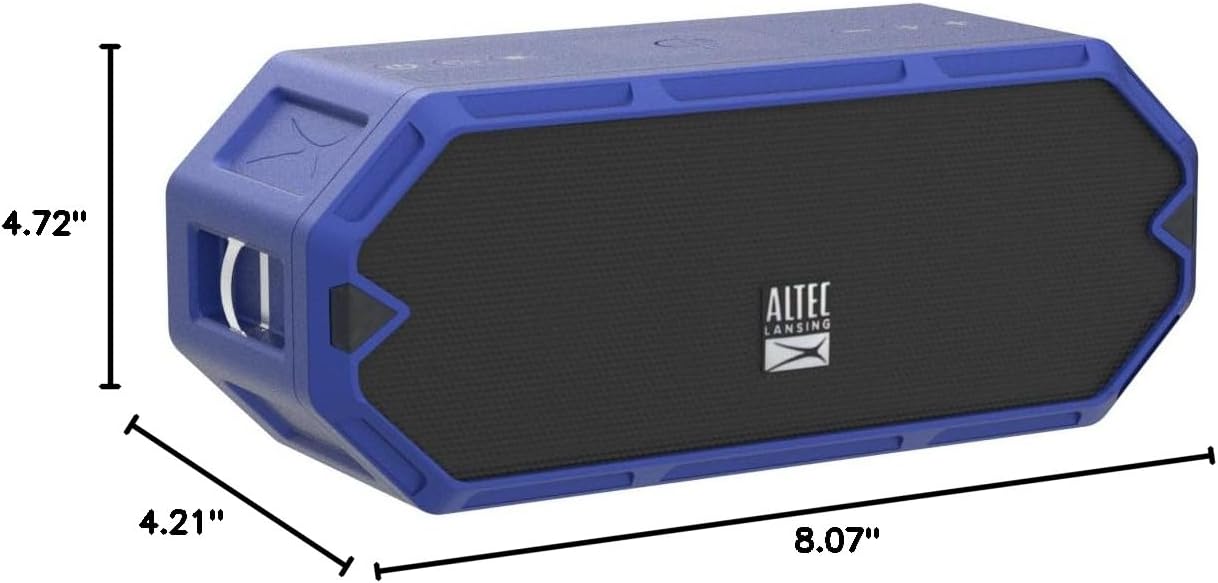
Figure 7: Dimensions of the HydraBlast speaker.
Гарантыя і падтрымка
The Altec Lansing HydraBlast speaker comes with a Limited Warranty. For specific warranty terms, conditions, and duration, please refer to the warranty card included with your product or visit the official Altec Lansing webсайт.
For technical support, troubleshooting assistance, or warranty claims, please contact Altec Lansing Customer Service:
- Webсайт: alteclansing.com/support
- тэлефон: Refer to the product packaging or webсайт рэгіянальных кантактных тэлефонаў.
Please have your product model number (IMW1300-RYB-STK-2) and proof of purchase ready when contacting support.
Ask a question about this manual
Ask about setup, troubleshooting, compatibility, parts, safety, or missing instructions. Manuals+ will review the question and use this page’s manual context to help answer it.