
Poly (Plantronics + Polycom) 2200-87090-001
Poly Studio E70 Intelligent Camera User Manual
Comprehensive guide for setup, operation, and maintenance of your Poly Studio E70 Intelligent Camera.
Прадукт скончаныview
The Poly Studio E70 is an intelligent camera designed for large conference rooms, offering exceptional video quality and advanced features for hybrid work environments. It incorporates dual 4K sensors and Poly DirectorAI technology to provide an immersive video experience, including speaker tracking and group framing capabilities. The camera is engineered to ensure participants appear clear and natural, enhancing remote collaboration.

Фронт view of the Poly Studio E70 Intelligent Camera, showcasing its dual lenses and sleek design.
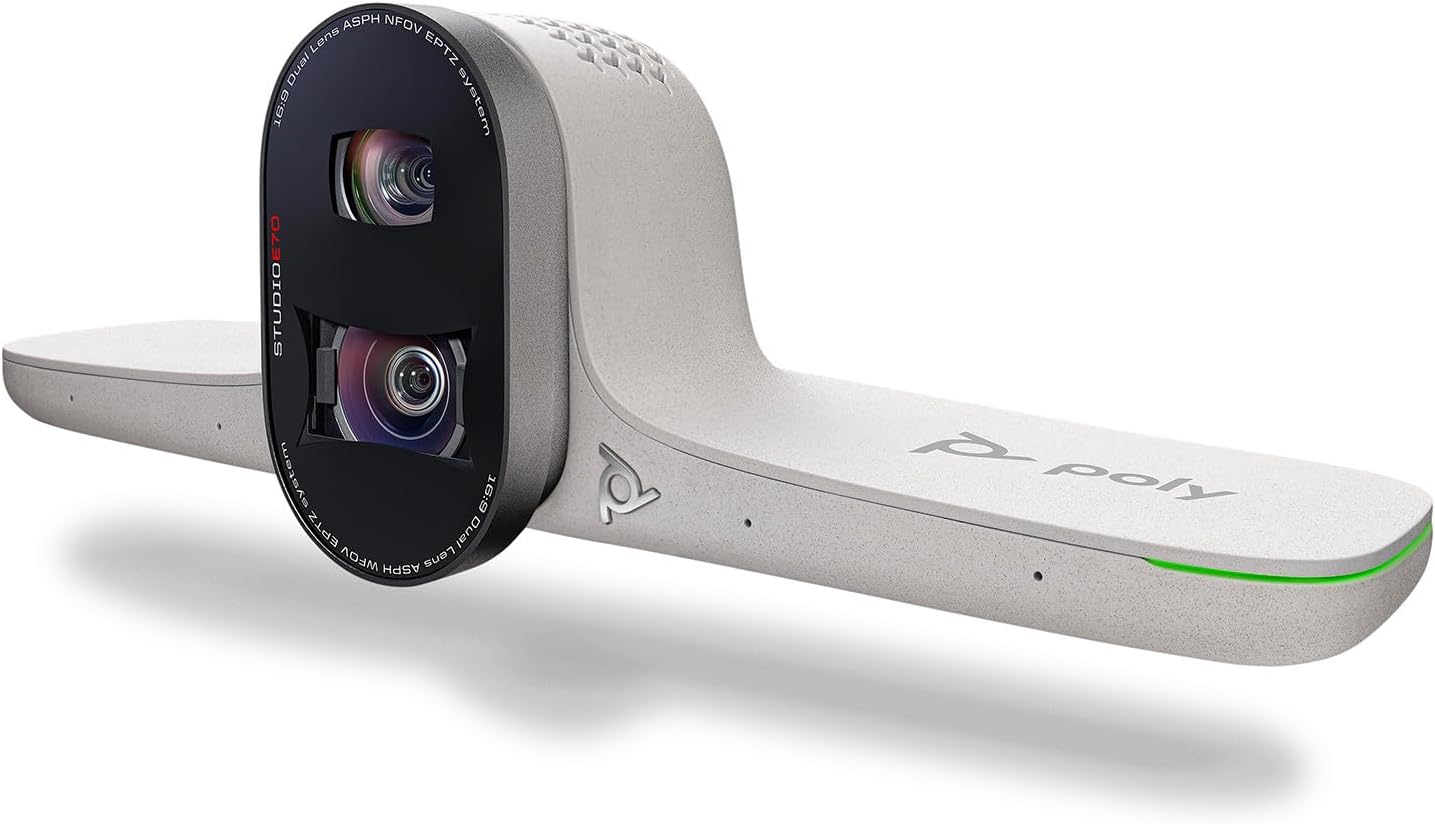
Вуглавы view of the Poly Studio E70 Intelligent Camera, highlighting its modern aesthetic and integrated design.
Што ў скрынцы
The Poly Studio E70 package includes the following components:
- Poly Studio E70 Intelligent Camera
- Кабель USB Type-C
- Кабель Ethernet
Настройка
Follow these steps to set up your Poly Studio E70 Intelligent Camera:
- Мантаж камеры: Position the Poly Studio E70 camera securely on top of your display or a suitable mounting surface in your conference room. Ensure it has a clear line of sight to all participants.
- Падключэнне электраэнергіі і сеткі: The Poly Studio E70 requires Power Over Ethernet (POE). Connect one end of the provided Ethernet cable to the POE-enabled network port on the camera and the other end to a POE-enabled network switch or injector.
- Падключэнне да сістэмы: The Poly Studio E70 works with Poly G7500 or Poly Microsoft Teams Room systems (sold separately). Connect the camera to your compatible system using the appropriate cables and follow the system's instructions for camera integration.
- Першапачатковая канфігурацыя: For initial setup and management, utilize Poly Lens Desktop for Windows or the cloud-based Poly Lens device management software. These tools allow for firmware updates, configuration adjustments, and monitoring.

The Poly Studio E70 camera mounted on a display in a conference room setting.

Тыл view of the Poly Studio E70, showing the connectivity ports including the Ethernet port for POE.
Кіраванне камерай
The Poly Studio E70 is designed for intelligent and automated video conferencing. Key operational features include:
- Dual 4K Lenses: The camera features two 4K lenses that capture high-resolution video, ensuring clear and detailed images of meeting participants.
- Poly DirectorAI Technology: This advanced AI technology powers features such as speaker tracking and group framing.
- Адсочванне дынамікаў: The camera automatically focuses on the active speaker, ensuring they are clearly visible to remote participants.
- Group Framing: The camera intelligently frames all participants in the room, adjusting the view as people enter or leave.
- Integrated Electronic Privacy Shutter: For enhanced security and privacy, the camera includes a motorized privacy shutter that can be activated when the camera is not in use.
- Management with Poly Lens: Use Poly Lens software for ongoing management, including adjusting camera settings, monitoring device status, and deploying firmware updates.

Падрабязны view of the Poly Studio E70's dual 4K lenses.
Тэхнічнае абслугоўванне
Proper maintenance ensures the longevity and optimal performance of your Poly Studio E70 camera:
- Уборка: Gently wipe the camera lenses and exterior with a soft, dry, lint-free cloth. Avoid using abrasive cleaners, solvents, or aerosol sprays directly on the device.
- Абнаўленні прашыўкі: Regularly check for and install firmware updates via Poly Lens. Updates often include performance improvements, new features, and security enhancements.
- Умовы навакольнага асяроддзя: Operate the camera within recommended temperature and humidity ranges to prevent damage. Avoid exposing the camera to extreme temperatures or direct sunlight.
Ліквідацыю непаладак
If you encounter issues with your Poly Studio E70, consider the following troubleshooting steps:
- Няма відэавыхаду:
- Ensure the Ethernet cable is securely connected and the network provides Power Over Ethernet (POE).
- Verify that the camera is properly connected to your Poly G7500 or Microsoft Teams Room system.
- Check the privacy shutter status; ensure it is open.
- Дрэнная якасць відэа:
- Clean the camera lenses with a soft, lint-free cloth.
- Ensure adequate lighting in the conference room.
- Check network bandwidth and stability.
- Speaker Tracking/Group Framing Issues:
- Ensure the camera is positioned correctly and has an unobstructed view пакоя.
- Verify that Poly DirectorAI features are enabled and configured correctly in Poly Lens.
- Праблемы з падключэннем:
- Restart the camera by disconnecting and reconnecting the POE cable.
- Check network settings and ensure the camera has a valid IP address.
For more detailed troubleshooting, refer to the Poly Lens application or the official Poly support webсайт.
Тэхнічныя характарыстыкі
| Асаблівасць | Дэталь |
|---|---|
| Марка | Poly (Plantronics + Polycom) |
| серыял | Poly Studio E70 |
| Нумар мадэлі | 2200-87090-001 |
| Вага прадмета | 4.4 фунта |
| Памеры прадукту | 14.4 х 5 х 11 цалі |
| Тэхналогія фотадатчыка | CMOS |
| Дазвол відэазахопу | 4K |
| Максімальная дыяфрагма | 20 ф |
| Тып флэш-памяці | Унутраная флэш-памяць |
| Фармат захопу відэа | MP4 |
| Падтрымоўваны аўдыяфармат | AAC, MP3, PCM |
| Тэхналогія падлучэння | Ethernet |
| Асаблівасць | Poly DirectorAI technology with speaker tracking, group framing, and privacy shutter |
Інфармацыя аб гарантыі
The Poly Studio E70 Intelligent Camera is covered by Poly's standard product warranty. For specific details regarding the warranty period, coverage, and terms and conditions, please refer to the warranty documentation included with your purchase or visit the official Poly website. Extended protection plans may also be available from your reseller.
Падтрымка
For further assistance, technical support, or to access additional resources for your Poly Studio E70 Intelligent Camera, please utilize the following options:
- Poly Lens Software: Use the Poly Lens desktop application or cloud service for device management, diagnostics, and firmware updates.
- Інтэрнэт-падтрымка: Visit the official Poly support website for comprehensive documentation, FAQs, and troubleshooting guides.
- Звязацца са службай падтрымкі: If you require direct assistance, contact Poly customer support through the channels provided on their webсайт.
For the latest information and support, always refer to the official Poly resources.
Звязаныя дакументы - 2200-87090-001
 |
Кіраўніцтва карыстальніка рэжыму Poly Partner 4.6.0: Поўнае кіраўніцтва па сістэмах відэаканферэнцый Гэта кіраўніцтва карыстальніка змяшчае інфармацыю па задачах для сістэм відэаканферэнцый Poly, якія працуюць у рэжыме партнёра, ахопліваючы наладу, функцыі, абсталяванне і ліквідацыю непаладак для такіх мадэляў, як Poly Studio G62, G7500 і серыі X. |
 |
Кіраўніцтва па сумяшчальнасці сістэм Poly G7500, Studio G62, Studio X для VideoOS 4.4.0 Поўнае кіраўніцтва па сумяшчальнасці сістэм відэаканферэнцый Poly G7500, Studio G62 і Studio X з Poly VideoOS 4.4.0. Падрабязная інфармацыя пра падтрымоўваныя камеры, аўдыёпрылады і кантролеры для Poly Video, Teams Rooms, Zoom Rooms і іншага. |
 |
Poly Camera Control App Release Notes 1.0.0 for Microsoft Teams Rooms on Windows Release notes for version 1.0.0 of the Poly Camera Control App, detailing its features, installation, usage, supported products, and troubleshooting for Poly Room Kits with Microsoft Teams Rooms on Windows. |
 |
Нататкі да выпуску Poly VideoOS 4.0.1 Заўвагі да выпуску Poly VideoOS версіі 4.0.1 з падрабязным апісаннем новых функцый, выпраўленняў, вядомых праблем і падтрымоўваных прадуктаў для сістэм Poly G7500, Studio X70, Studio X50 і Studio X30. |
 |
Кіраўніцтва адміністратара Poly TC10 6.0.0 Падрабязнае кіраўніцтва для адміністратараў па наладжванні, кіраванні і ліквідацыі непаладак прылады Poly TC10, у якім падрабязна апісаны яе функцыі, налада і інтэграцыя з рознымі платформамі для сумеснай працы, такімі як Zoom Rooms і Microsoft Teams Rooms. |
 |
Праграмнае забеспячэнне Poly Trio UC, нататкі да выпуску 7.2.0 Афіцыйныя заўвагі да выпуску праграмнага забеспячэння Poly Trio Unified Communications (UC) версіі 7.2.0. У гэтым дакуменце падрабязна апісаны новыя функцыі, падтрымоўваныя прадукты, працэдуры ўстаноўкі, вырашаныя праблемы і ўзаемадзеянне сістэм Poly Trio 8300, 8500 і 8800, у тым ліку абнаўленні. web аўтэнтыфікацыя праз проксі-сервер, STIR/SHAKEN і інтэграцыя з Microsoft Teams. |