
LAMA LX02 (A13-Nero)
LAMA Bluetooth Sport Headphones User Manual
Model: LX02 (A13-Nero)
Марка: LAMA
1. Уводзіны
Thank you for choosing LAMA Bluetooth Sport Headphones. This manual provides essential information for setting up, operating, and maintaining your new headphones. Please read it carefully before use to ensure optimal performance and longevity of the product.

Image 1.1: LAMA Bluetooth Sport Headphones (Model LX02, A13-Nero).
2. Змесціва ўпакоўкі
Калі ласка, праверце ўпакоўку на наяўнасць наступных прадметаў:
- LAMA Bluetooth Sport Headphones
- Зарадны кабель USB (тыпу C)
- Multiple pairs of interchangeable ear tips (S/M/L)
- Кіраўніцтва карыстальніка
3. Прадукт скончыўсяview
The LAMA Bluetooth Sport Headphones feature an ergonomic neckband design with in-ear earbuds, integrated controls, and a Type-C charging port.

Image 3.1: Control Panel Layout and Functions.
- Кнопка пераключэння: Уключэнне / выключэнне харчавання.
- 'C' Key: Game/Music Mode Switch, Sound Effect Switch, Voice Assistant activation.
- Функцыянальныя клавішы: Play/Pause, Answer/Hang Up Call, Redial, Reject Call.
- Ключы гучнасці: Volume Up/Down, Previous/Next Song.

Image 3.2: Magnetic Earbud Design for secure storage.
4. Настройка
4.1 Першапачатковая зарадка
Before first use, fully charge the headphones. Connect the provided USB Type-C charging cable to the charging port on the control panel and a suitable USB power source. The battery indicator lights will show the charging status.
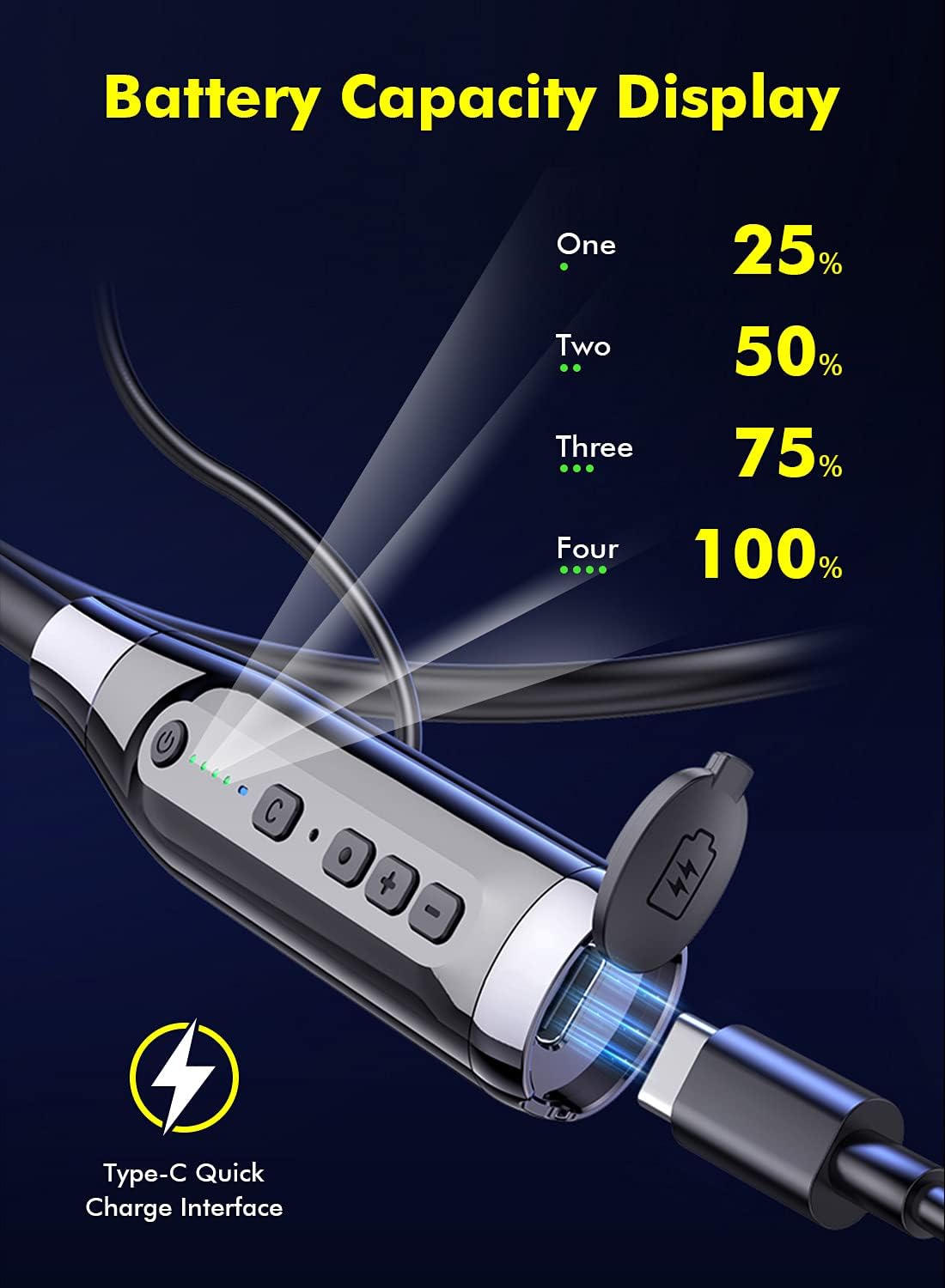
Image 4.1: Battery Capacity Display and Type-C Charging Port.
- Час зарадкі: прыблізна 2 гадзіны для поўнай зарадкі.
- Battery Life: Up to 100 hours of continuous play time on a full charge.
4.2 Уключэнне/выключэнне
- Уключэнне: Long press the Switch Button (1) for 2 seconds.
- Выключэнне: Long press the Switch Button (1) for 3 seconds.
4.3 Спалучэнне па Bluetooth
- Пераканайцеся, што навушнікі адключаны.
- Long press the Switch Button (1) for 2 seconds to power on. The LED indicator will flash, indicating pairing mode.
- На вашай прыладзе (смартфоне, планшэце і г.д.) уключыце Bluetooth і знайдзіце даступныя прылады.
- Select "LAMA LX02" (or similar name) from the list of found devices.
- Пасля падлучэння святлодыёдны індыкатар перастане міргаць і застанецца сінім.
5. Інструкцыя па эксплуатацыі
5.1 Прайграванне музыкі
- Прайграванне/Паўза: Single click the Function Key (3).
- Павялічыць гучнасць: Click the "+" Volume Key (4).
- Паменшыць гучнасць: Click the "-" Volume Key (4).
- Наступная песня: Long press the "-" Volume Key (4).
- Папярэдняя песня: Long press the "+" Volume Key (4).
5.2 Кіраванне выклікамі
- Адказ/завяршэнне выкліку: Single click the Function Key (3).
- Адхіліць выклік: Long press the Function Key (3) for 1 second.
- Паўторны набор апошняга нумара: Double click the Function Key (3).
5.3 Sound Effect and Mode Switching

Image 5.1: Three Sound Effect Switches (Bass, Voice, 3D Balance).
- Switch Sound Effect (Bass/Voice/3D Balance): Double click the 'C' Key (2).
- Пераключэнне рэжымаў гульні/музыкі: Single click the 'C' Key (2).

Image 5.2: Game/Music Mode with Low Latency Feature.
5.4 Галасавы памочнік
- Актывацыя галасавога памочніка (Siri, Google Assistant і г.д.): Long press the 'C' Key (2) for 1 second.
6. Тэхнічнае абслугоўванне
6.1 Ачыстка
- Працярыце навушнікі мяккай сухой тканінай.
- Не выкарыстоўвайце абразіўныя ачышчальнікі або растваральнікі.
- Regularly clean ear tips to prevent wax buildup, which can affect sound quality.
6.2 Захоўванне
- Захоўвайце навушнікі ў прахалодным, сухім месцы, удалечыні ад прамых сонечных прамянёў і экстрэмальных тэмператур.
- The magnetic earbuds help prevent tangling and secure the headphones when not in use.
6.3 Воданепранікальнасць (IPX5)
The headphones are rated IPX5 water-resistant, meaning they can withstand splashes and sweat. They are suitable for sports and outdoor activities.

Image 6.1: IPX5 Water Resistance for active use.
Важна: IPX5 rating does not mean the headphones are waterproof for submersion. Do not immerse them in water.
7. Выпраўленне непаладак
| праблема | Магчымая прычына | Рашэнне |
|---|---|---|
| Навушнікі не ўключаюцься. | Нізкі акумулятар. | Поўнасцю зарадзіце навушнікі. |
| Немагчыма спалучыць прыладу. | Bluetooth на прыладзе выключаны; навушнікі не ў рэжыме спалучэння; занадта далёка ад прылады. | Ensure Bluetooth is enabled on your device. Put headphones in pairing mode. Move closer to the device (within 10 meters). |
| Няма гуку або нізкі ўзровень гучнасці. | Volume too low; headphones not connected; ear tips blocked. | Adjust volume on headphones and device. Reconnect headphones. Clean ear tips. |
| Якасць гуку дрэнная. | Poor connection; incorrect sound effect mode. | Ensure stable Bluetooth connection. Try switching sound effect modes (Bass, Voice, 3D Balance). |
| Не працуе мікрафон. | Мікрафон заблакаваны; налады прылады. | Ensure microphone is not covered. Check device's audio input settings. |
8. Тэхнічныя характарыстыкі
- мадэль: LX02
- Марка: ЛАМА
- Падключэнне: Bluetooth 5.0
- Ёмістасць батарэі: 1000 мАг
- Час зарадкі: Прыкладна 2 гадзіны
- Час бесперапыннага прайгравання: Да 100 гадзін
- Порт для зарадкі: USB Type-C (supports QC 3.0, QC2.0, QC1.0 fast charging protocols)
- Воданепранікальнасць: IPX5
- Метад кантролю: Голас, кнопка
- Мікрафон: Integrated, Stereo technology
- матэрыял: Пластыкавыя
- Вага: 200 г
- Дадатковыя магчымасці: Noise Cancellation, Lightweight, Magnetic Design, Multiple Sound Effects (Bass, Voice, 3D Balance), Game/Music Low Latency Mode.
9. Інфармацыя па бяспецы
- Не разбірайце і не мадыфікуйце прадукт.
- Берагчы ад экстрэмальных тэмператур, вільготнасці і агрэсіўных рэчываў.
- Пазбягайце працяглага праслухоўвання на высокай гучнасці, каб пазбегнуць пашкоджання слыху.
- Do not use headphones while driving or in situations where you need to be aware of your surroundings.
- Утылізуйце батарэі і электронныя кампаненты адказна ў адпаведнасці з мясцовымі правіламі.
10. Гарантыя і падтрымка
LAMA products come with a standard manufacturer's warranty. For detailed warranty information, product support, or service inquiries, please refer to the warranty card included in your package or visit the official LAMA webсайт.
For customer service, please contact your retailer or the LAMA support team.
Ask a question about this manual
Ask about setup, troubleshooting, compatibility, parts, safety, or missing instructions. Manuals+ will review the question and use this page’s manual context to help answer it.