
Уводзіны
Дзякуй за пакупкуasing the Tzumi 7796 GO Theater Wi-Fi LED Cinema Projector. This manual provides essential information for setting up, operating, and maintaining your projector. Please read it thoroughly before use to ensure proper functionality and to maximize your viewing experience. This projector is designed for versatile use, including home entertainment, outdoor movie nights, and business presentations, offering a portable solution with Wi-Fi and multiple connectivity options.
Важная інфармацыя па бяспецы
- Не глядзіце непасрэдна ў аб'ектыў праектара, калі ён уключаны.amp уключаны.
- Забяспечце належную вентыляцыю вакол праектара, каб прадухіліць перагрэў. Не блакуйце вентыляцыйныя адтуліны.
- Трымайце праектар далей ад вады або іншых вадкасцей.
- Выкарыстоўвайце толькі адаптар сілкавання, які пастаўляецца з праектарам.
- Не спрабуйце рамантаваць праектар самастойна. Звяртайцеся па любыя паслугі па абслугоўванні да кваліфікаванага персаналу.
- Place the projector on a stable, level surface to prevent damage from falling.
- Адключайце праектар ад сеткі падчас навальніцы або калі ён не выкарыстоўваецца працяглы час.
Змест пакета
Калі ласка, праверце наяўнасць усіх прадметаў:
- Tzumi 7796 GO Theater Wi-Fi LED Cinema Projector
- Пульт дыстанцыйнага кіравання
- Адаптар сілкавання
- Кіраўніцтва карыстальніка (гэты дакумент)
- AV-кабель (калі ў камплекце)
Прадукт скончаныview
Фронт View

выява: Фронт view of the Tzumi 7796 projector. This image displays the main projection lens on the left side and ventilation grilles along the front and right side of the device. The overall casing is white.
Збоку View з партамі
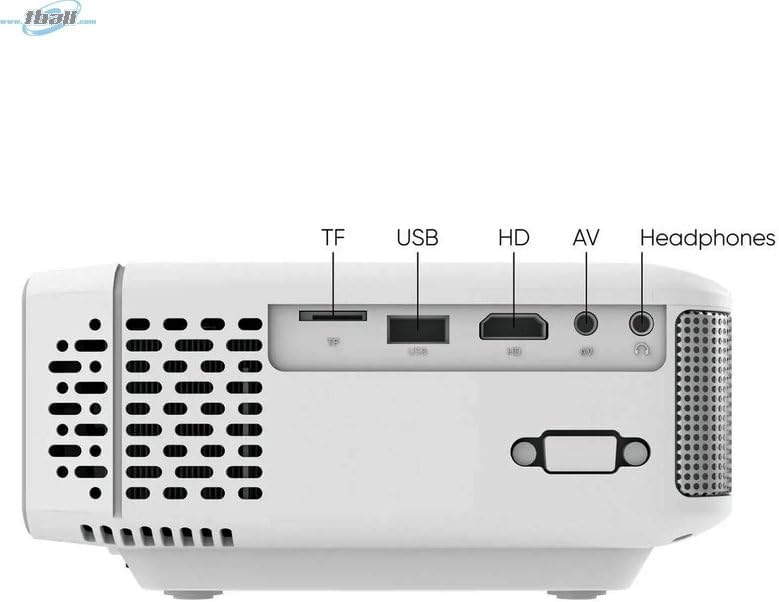
выява: Збоку view of the Tzumi 7796 projector highlighting its various input ports. From left to right, these include a TF card slot, a USB port, an HD (HDMI) port, an AV input, and a headphone jack. This side also features ventilation grilles.
Топ View з элементамі кіравання

выява: Топ view of the Tzumi 7796 projector. This image shows the manual focus and keystone correction dials located near the lens. The central control panel features directional buttons (Up, Down, Left, Right), Home, Option, Back, Power, and Enter buttons for navigation and control.
Тыл View with Power Input

выява: Тыл view of the Tzumi 7796 projector. This view primarily shows the power input socket on the left side and additional ventilation grilles on the right side.
Кіраўніцтва па ўстаноўцы
1. размяшчэнне
Размясціце праектар на ўстойлівай, роўнай паверхні. Для аптымальнага viewing, position the projector directly in front of your screen or wall. The ideal projection distance will vary based on the desired screen size. Ensure there is adequate space around the projector for ventilation.

выява: This image illustrates the versatility of the Tzumi 7796 projector, showing it being used in both an indoor home setting and an outdoor movie night environment. This highlights its suitability for various entertainment scenarios.
2. Падключэнне сілкавання
- Connect the power adapter to the projector's power input port (refer to "Rear View with Power Input" image).
- Падключыце іншы канец адаптара сілкавання да насценнай разеткі.
- Індыкатар харчавання на праектары павінен загарэцца.
3. Падключэнне прылад
Праектар падтрымлівае розныя крыніцы ўваходнага сігналу:
- HDMI: Connect your laptop, gaming console, or streaming device using an HDMI cable to the HD port.
- USB: Устаўце флэш-назапашвальнік USB у порт USB, каб прайграваць медыяфайлы files непасрэдна.
- АВ: Use the provided AV cable to connect older devices like DVD players to the AV port.
- TF карта: Insert a TF (MicroSD) card into the TF card slot to play media files.
- Wi-Fi: For wireless screen mirroring or streaming, connect the projector to your Wi-Fi network (see "Operating Instructions - Wi-Fi Connectivity").
4. Рэгуляванне фокусу і трапецыяпадобных скажэнняў
- Фокус: Павярнуць ФОКУС ring near the lens until the projected image is clear and sharp.
- Каменны камень: If the image appears trapezoidal (wider at the top or bottom), adjust the ТРАПЕЦЫЙНЫ КАМЕНЬ correction dial until the image is rectangular.
Інструкцыя па эксплуатацыі
Уключэнне/выключэнне
- Уключэнне: Націсніце Магутнасць button on the projector's control panel or the remote control.
- Выключэнне: Націсніце Магутнасць button again. Confirm shutdown if prompted.
Выбар крыніцы ўводу
After powering on, the projector will display its main menu. To select an input source:
- Use the directional buttons on the projector or remote to navigate to the desired input (e.g., HDMI, USB, AV, TF Card, Wi-Fi).
- Націсніце Увайдзіце кнопку, каб пацвердзіць свой выбар.
Падключэнне да Wi-Fi
To connect your projector to a Wi-Fi network for screen mirroring or online content:
- From the main menu, navigate to the Wi-Fi or Налады сеткі варыянт.
- Выберыце Налада Wi-Fi and choose your desired network from the list.
- Увядзіце пароль Wi-Fi з дапамогай экраннай клавіятуры і пацвердзіце яго.
- Once connected, you can use screen mirroring features (e.g., Miracast, AirPlay) or access built-in smart features if available.
Налады гуку
The projector features two built-in 3W speakers. You can also connect external audio devices:
- Убудаваныя дынамікі: Audio will play automatically through the projector's speakers. Adjust volume using the remote or control panel.
- Headphones/External Speakers: Connect headphones or external speakers to the 3.5mm headphone jack on the side of the projector. This will typically mute the built-in speakers.
Тэхнічнае абслугоўванне
Ачыстка аб'ектыва
To maintain optimal image quality, keep the projector lens clean.
- Выкарыстоўвайце мяккую тканіну без ворса, спецыяльна прызначаную для аптычных лінзаў.
- Акуратна працярыце лінзу кругавымі рухамі.
- Avoid using abrasive cleaners or excessive pressure, which can scratch the lens.
Агульны догляд і захоўванне
- Keep the projector in a cool, dry place when not in use.
- Protect the projector from dust and extreme temperatures.
- Do not expose the projector to direct sunlight for extended periods.
- Ачысціце знешні бок casinг з мяккім, дamp тканіна. Пазбягайце рэзкіх хімікатаў.
Ліквідацыю непаладак
| праблема | Магчымая прычына | Рашэнне |
|---|---|---|
| Няма праецыравання выявы |
|
|
| Відарыс размыты |
|
|
| Выява мае трапецападобную форму |
|
|
| Няма гуку |
|
|
| Праблемы з падключэннем да Wi-Fi |
|
|
Тэхнічныя характарыстыкі
- мадэль: 7796
- Марка: Цумі
- Раздзяленне дысплея: 1920 x 1080 (Full HD)
- Яркасць: 1600 люмен
- Тэхналогія падключэння: HDMI, Wi-Fi, USB, AV, TF Card
- асаблівасць: Партатыўны
- Рэкамендуемае выкарыстанне: Home entertainment, Outdoor movie nights, Business presentations
- Вага прадмета: 3 фунта
- Памеры ўпакоўкі: 11 х 9 х 5 цалі
- Убудаваныя дынамікі: Two 3W speakers
Гарантыя і падтрымка
For warranty information and technical support, please refer to the documentation included with your purchase or visit the official Tzumi webсайт. Захоўвайце пацвярджэнне пакупкі для прэтэнзій па гарантыі.
Інтэрнэт-падтрымка: Visit the Tzumi Store on Amazon