
1. Уводзіны
This manual provides detailed instructions for the installation, operation, and maintenance of your Wavtech link2 2-Channel Line Output Converter. Please read this manual thoroughly before attempting installation or operation to ensure proper function and to prevent damage to the unit or connected components. The Wavtech link2 is designed to convert high-level speaker signals from a factory or aftermarket head unit into low-level RCA signals, allowing for the addition of aftermarket amplifiers to your audio system.
2. Інфармацыя па бяспецы
- Заўсёды адключайце адмоўны вывад акумулятара аўтамабіля перад пачаткам любых электрамантажных работ.
- Пераканайцеся, што ўся праводка належным чынам ізалявана і замацавана, каб пазбегнуць кароткага замыкання і пашкоджанняў.
- Do not install the unit in locations where it may be exposed to excessive heat, moisture, or direct sunlight.
- Калі ў вас ёсць якія-небудзь сумневы адносна працэсу ўстаноўкі, звярніцеся да прафесійнага ўсталёўшчыка аўтамабільнай аўдыёсістэмы.
- Use appropriate fuses for all power connections to protect against electrical surges.
3. Змесціва ўпакоўкі
Праверце наяўнасць усіх прадметаў у камплекце:
- Wavtech link2 2-Channel Line Output Converter
4. Прадукт скончыўсяview
The Wavtech link2 is a compact and efficient line output converter. Familiarize yourself with its components and connections.

Малюнак 4.1: Фронт view of the Wavtech link2, showing the Wavtech logo and 'link2' model designation.
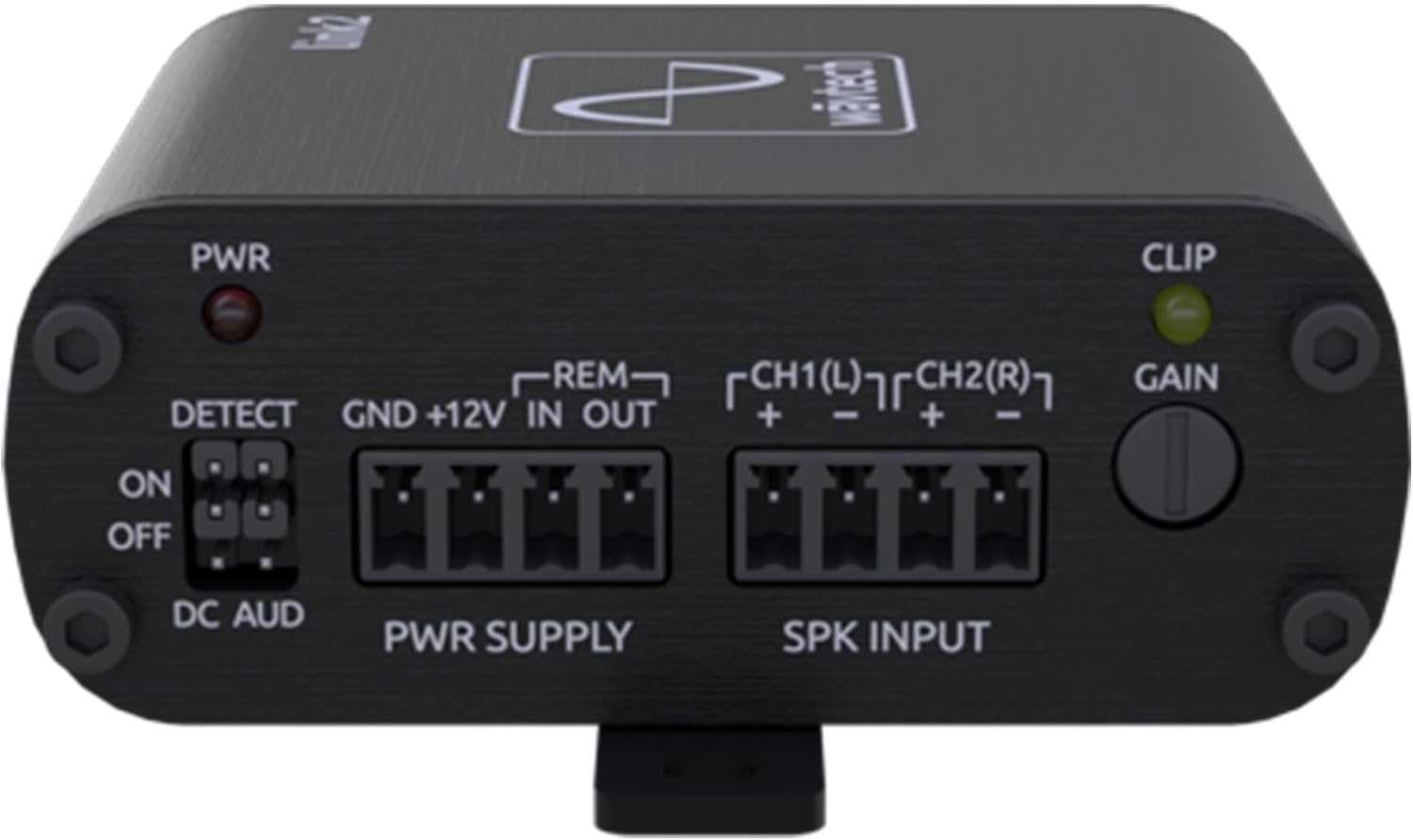
Малюнак 4.2: Топ view of the Wavtech link2, illustrating the power (PWR), detect (DETECT), power supply (PWR SUPPLY), speaker input (SPK INPUT), clip indicator (CLIP), and gain control (GAIN) sections.

Малюнак 4.3: Тыл view of the Wavtech link2, displaying the CH1(L) and CH2(R) RCA output connectors.

Малюнак 4.4: Топ view of the Wavtech link2, indicating approximate width (2.5 inches) and depth (2.9 inches) dimensions.

Малюнак 4.5: Збоку view of the Wavtech link2, showing the approximate height dimension (1.1 inches).
5. Настройка і ўстаноўка
Правільная ўстаноўка мае вырашальнае значэнне для аптымальнай прадукцыйнасці. Уважліва выконвайце наступныя дзеянні.
5.1 Правадныя злучэнні
- Power Supply (PWR SUPPLY):
- GND: Connect to a clean, solid chassis ground point in the vehicle. Ensure good metal-to-metal contact.
- + 12В: Connect to a constant +12V power source from the vehicle's battery, fused appropriately (e.g., 1A fuse, not included).
- REM IN: Connect to the remote turn-on output of your head unit (if available). This will turn the link2 on/off with the head unit.
- REM OUT: Provides a remote turn-on signal for your aftermarket ampзадымнік.
- Speaker Input (SPK INPUT): Connect the high-level speaker wires from your factory or aftermarket head unit to these terminals. Ensure correct polarity.
- CH1(L) + / -: Connect to the left channel speaker output wires.
- CH2(R) + / -: Connect to the right channel speaker output wires.
- The link2 accepts up to 40V RMS input.
- Output (OUTPUT): Connect standard RCA cables from the link2's CH1(L) and CH2(R) outputs to the input of your aftermarket ampзадымнік.
5.2 DETECT Switch
The DETECT switch manages how the link2 turns on and off.
- ВКЛ: The link2 will turn on when it detects an audio signal on the speaker inputs. This is suitable for most factory systems that do not provide a remote turn-on wire.
- OFF (DC AUD): The link2 will turn on when it detects a DC offset on the speaker inputs. This is common in some factory systems.
- If using the REM IN terminal for turn-on, the DETECT switch setting is less critical, but it is generally recommended to set it to 'OFF' or 'DC AUD' if a dedicated remote wire is used.
5.3 Рэгуляванне ўзмацнення
The GAIN knob controls the output level of the link2. Adjust this to match the input sensitivity of your ampзадымнік.
- Start with the GAIN knob fully counter-clockwise (minimum).
- Play a test tone (e.g., 0dB, 1kHz) at about 75% of your head unit's maximum volume.
- Slowly turn the GAIN knob clockwise until the CLIP indicator light just begins to flicker, then back it off slightly until the light remains off. This ensures a clean, unclipped signal to your ampзадымнік.
5.4 Load Sense
The link2 features load detect functionality for factory systems that require resistance on the speaker outputs to remain active. This ensures the factory head unit does not shut down or reduce output when connected to the link2.
6. Інструкцыя па эксплуатацыі
Once installed and configured, the Wavtech link2 operates automatically. It will turn on and off with your head unit based on the DETECT switch setting or the remote input. The primary operational aspect is ensuring the gain is set correctly to provide a clean signal to your amplifier without clipping.
7. Тэхнічнае абслугоўванне
The Wavtech link2 requires minimal maintenance.
- Трымайце прыладу чыстай ад пылу і смецця. Выкарыстоўвайце мяккую сухую тканіну для чысткі.
- Пераканайцеся, што ўсе злучэнні надзейныя. Перыядычна правярайце праводку на наяўнасць зносу або карозіі.
- Пазбягайце ўздзеяння на прыладу экстрэмальных тэмператур або вільгаці.
8. Выпраўленне непаладак
If you encounter issues with your Wavtech link2, refer to the following common problems and solutions:
| праблема | Магчымая прычына | Рашэнне |
|---|---|---|
| Няма аўдыявыхаду |
|
|
| Прылада не ўключаецца |
|
|
| Скажонае аўдыё |
|
|
9. Тэхнічныя характарыстыкі
- Вага прадмета: 8 унцыі
- Памеры прадукту: 78.74 x 78.74 x 23.62 inches (Note: These dimensions appear to be incorrect based on product images showing 2.5" x 2.9" x 1.1". Please refer to physical product for accurate measurements.)
- Нумар мадэлі тавару: link2
- ASIN: B09BB4SRTY
- вытворца: Wavtech
- Уваходны кнtage: Up to 40V RMS (Speaker Level)
- Каналы: 2-канальны
- Асаблівасці: Load Detect, Remote Turn-On Output
10. Гарантыя і падтрымка
The Wavtech link2 comes with a 1-гадовая гарантыя ад вытворцы. For warranty claims or technical support, please contact Wavtech customer service or the authorized dealer from whom you purchased the product. Keep your proof of purchase for warranty validation.
For further assistance, visit the Wavtech website or consult your local authorized dealer.