
1. Уводзіны
The Sonoro Easy is a compact and portable digital radio designed to provide powerful sound for various occasions. It features FM, DAB+, and Bluetooth connectivity, along with an AUX input for external devices. Its small footprint allows for easy placement in any room, and the intuitive controls ensure straightforward operation. The integrated LED night light and USB charging port add to its versatility, making it an ideal companion for your bedroom, kitchen, or on the go.
2. Настройка
2.1 Распакаванне
Carefully remove the Sonoro Easy radio from its packaging. Ensure all components are present:
- Sonoro Easy Digital Radio
- Адаптар сілкавання
- Кіраўніцтва карыстальніка (гэты дакумент)
2.2 Уключэнне
The Sonoro Easy can be powered via the included mains adapter or by batteries for portable use.
Магутнасць ад сеткі:
- Connect the power adapter to the "12V - 2.5A" DC input port on the rear of the radio.
- Падключыце адаптар сілкавання да адпаведнай разеткі.
- Націсніце Магутнасць button on the front panel to turn on the device.
Магутнасць батарэі:
The radio supports alkaline or NiMH rechargeable batteries (not included). The battery compartment is located on the bottom of the unit.
- Адкрыйце крышку батарэйнага адсека.
- Устаўце неабходныя батарэі, выконваючы палярнасць.
- Надзейна зачыніце крышку батарэйнага адсека.
- Націсніце Магутнасць кнопка для ўключэння прылады.

Figure 1: Rear panel connections including power input and antenna.
2.3 Initial Setup and Antenna
Upon first power-on, the radio may perform an initial scan for DAB+ stations. Extend the telescopic antenna for optimal reception for both FM and DAB+ radio.

Figure 2: Front display and controls of the Sonoro Easy radio.
3. Інструкцыя па эксплуатацыі
3.1 Асноўныя элементы кіравання
The Sonoro Easy features intuitive controls located on the top and front panels.
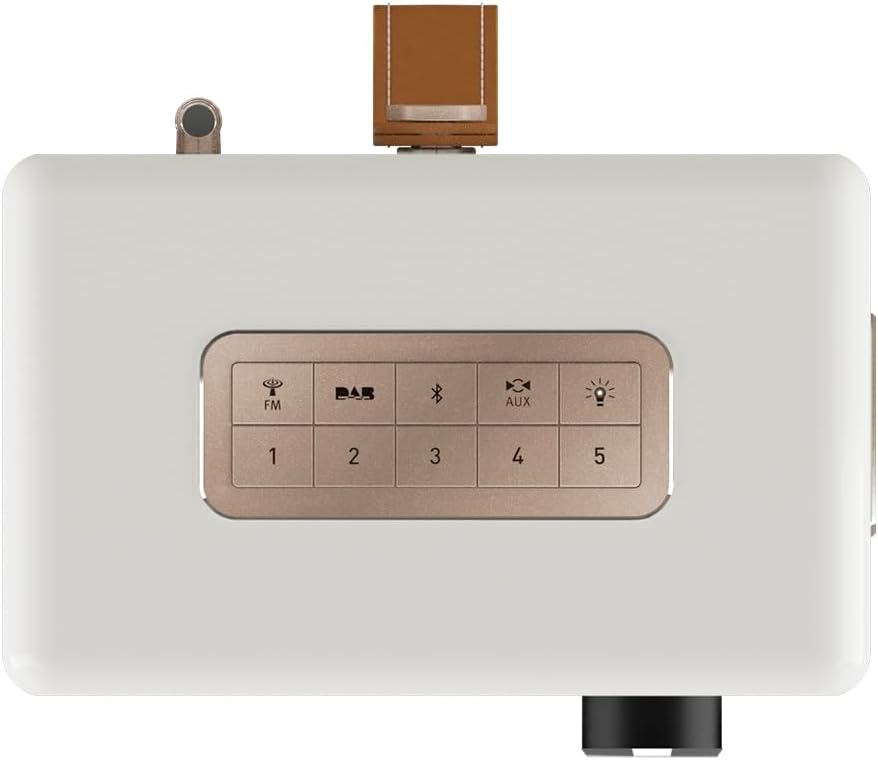
Figure 3: Top panel controls including preset and function buttons.
- Кнопка харчавання: Уключае або выключае радыё.
- Паваротная ручка: Used for volume control, menu navigation, and selection.
- Кнопкі загадзя настроеных налад (1-5): Захоўвайце і выклікайце свае любімыя радыёстанцыі.
- Function Buttons (FM, DAB, Bluetooth, AUX, Night Light): Выберыце патрэбны рэжым працы.
3.2 Radio Modes (DAB+ / FM)
DAB+ радыё:
- Націсніце DAB button to enter DAB+ mode.
- The radio will automatically scan for available stations.
- Use the rotary knob to scroll through the station list and press to select.
- Каб захаваць станцыю ў якасці прадусталяванай налады, націсніце і ўтрымлівайце адну з Кнопкі загадзя ўсталяваных налад (1-5) until the display confirms.
FM-радыё:
- Націсніце FM кнопку для ўваходу ў рэжым FM.
- Use the rotary knob to manually tune to a frequency or press and hold to auto-scan for the next available station.
- Каб захаваць станцыю ў якасці прадусталяванай налады, націсніце і ўтрымлівайце адну з Кнопкі загадзя ўсталяваных налад (1-5) until the display confirms.
3.3 Злучэнне Bluetooth
- Націсніце Bluetooth button to activate Bluetooth pairing mode. The display will show "Pairing".
- On your mobile device, enable Bluetooth and search for "Sonoro Easy".
- Select "Sonoro Easy" from the list of available devices to connect.
- Once connected, you can stream audio from your device to the radio.
3.4 AUX ўваход
- Connect an external audio device (e.g., MP3 player) to the "AUX IN" port on the rear of the radio using a 3.5mm audio cable (not included).
- Націсніце ДАП button to select AUX input mode.
- Кіруйце прайграваннем са знешняй прылады.
3.5 Будзільнік і таймер сну
The Sonoro Easy features a dual alarm function and a sleep timer.
- Налада будзільнікаў: Access the alarm settings through the menu (usually by pressing the rotary knob and navigating). Follow on-screen prompts to set alarm time, source (buzzer, FM, DAB+), and volume.
- Таймер сну: The sleep timer allows the radio to turn off automatically after a set period. This function is typically accessed via the menu.
- Функцыя затрымкі: When an alarm sounds, pressing the rotary knob or a designated snooze button will temporarily pause the alarm.
3.6 Night Light and USB Charging
- Начнік: Націсніце Начнік button (often represented by a light bulb icon) to activate the integrated LED night light on the rear of the unit. This provides subtle background illumination.
- USB-зарадка: The USB port (5V - 2.1A) on the side of the radio can be used to charge compatible smartphones or other small devices. Connect your device using its charging cable.
4. Тэхнічнае абслугоўванне
4.1 Ачыстка
To maintain the appearance of your Sonoro Easy radio:
- Перад чысткай пераканайцеся, што прылада выключана і адключана ад сеткі.
- Выкарыстоўвайце мяккую, сухую тканіну без ворса для працірання паверхняў.
- Для ўстойлівых плям злёгкуampпрамыйце тканіну вадой. Пазбягайце абразіўных ачышчальнікаў, растваральнікаў або хімічных спрэяў.
4.2 Захоўванне
When not in use for extended periods, store the radio in a cool, dry place away from direct sunlight and extreme temperatures. If using batteries, remove them to prevent leakage.
5. Выпраўленне непаладак
| праблема | Магчымая прычына | Рашэнне |
|---|---|---|
| Няма харчавання / радыё не ўключаецца. | Power adapter not connected or faulty. Batteries depleted or incorrectly inserted. | Check power adapter connection and wall outlet. Replace or recharge batteries, ensuring correct polarity. |
| Poor radio reception (DAB+ / FM). | Antenna not extended. Weak signal in the area. Interference from other electronics. | Fully extend the telescopic antenna. Try repositioning the radio. Move away from other electronic devices. |
| Прылада Bluetooth не можа падключыцца. | Radio not in pairing mode. Device too far away. Bluetooth disabled on source device. | Ensure radio is in Bluetooth pairing mode. Move device closer to the radio. Enable Bluetooth on your source device. |
| Няма гуку з AUX-уваходу. | AUX cable not connected properly. Radio not in AUX mode. Volume too low on radio or source device. | Check AUX cable connection. Select AUX mode on the radio. Increase volume on both the radio and the external device. |
| Дысплей занадта яркі або занадта цьмяны. | Display brightness setting needs adjustment. | Adjust display brightness through the radio's menu settings. |
6. Тэхнічныя характарыстыкі
| Асаблівасць | Дэталь |
|---|---|
| Марка | Санора |
| Нумар мадэлі | 88f59bc4-6f28-4e95-95de-ba49a597f237 |
| Колер | Белы матавы |
| Тэхналогія цюнінгу | DAB+, FM |
| Сувязь | Bluetooth, AUX In, USB (charging) |
| Асаблівасці | Portable, Dual Alarm, Sleep Timer, Snooze, Dimmable Display, LED Night Light, USB Charging Port |
| Крыніца харчавання | Mains (12V - 2.5A), Battery (Alkaline or NiMH, not included) |
| USB выхад | 5V - 2.1A (for charging external devices) |
| Памеры (Д х Ш х У) | 18.6 см х 15.6 см х 11.8 см |
| Дакладчык | 3" Full-range speaker with Bass Reflex tube |
| Матэрыял | Hand-polished wooden cabinet |
7. Гарантыя і падтрымка
7.1 Гарантыя на выраб
The Sonoro Easy Digital Radio comes with a 2-гадовая гарантыя вытворцы з даты пакупкі. Гэтая гарантыя распаўсюджваецца на дэфекты матэрыялаў і вырабу пры нармальным выкарыстанні. Калі ласка, захавайце пацвярджэнне пакупкі для прэтэнзій па гарантыі.
Гарантыя не распаўсюджваецца на:
- Шкода, выкліканая аварыяй, злоўжываннем, няправільным выкарыстаннем, паводкай, пажарам, землятрусам або іншымі знешнімі прычынамі.
- Damage caused by operating the product outside the permitted or intended uses described in this manual.
- Damage caused by service performed by anyone who is not an authorized representative of Sonoro.
- Products or parts that have been modified to alter functionality or capability without the written permission of Sonoro.
7.2 Падтрымка кліентаў
For technical assistance, warranty claims, or further information, please contact Sonoro customer support. Contact details can typically be found on the official Sonoro webсайце або на ўпакоўцы прадукту.
Please visit the official Sonoro website for the most up-to-date support information and contact options.