
1. Уводзіны
This instruction manual provides detailed information on the setup, operation, maintenance, and troubleshooting for your Aibecy withzoom 1080P 3X Optical Zoom Webcam. Please read this manual thoroughly before using the product to ensure proper functionality and to prevent damage.
2. Прадукт скончыўсяview
2.1 Асноўныя магчымасці
- 1080P Full HD Video Resolution
- Аб'ектыў з 3-кратным аптычным павелічэннем
- 355° Horizontal Rotation and 90° Vertical Rotation
- Праца дыстанцыйнага кіравання
- Падключэнне USB
- Compatible with Windows, Mac, Linux, and Chromebook operating systems
- Infrared (IR) support
2.2 Змест пакета
Праверце наяўнасць усіх прадметаў у камплекце:
- Aibecy withzoom Webкамера
- Пульт дыстанцыйнага кіравання
- Адаптар пераменнага току
- Кабель USB
- Мантажны кранштэйн
- Шрубы для ўстаноўкі

Малюнак 1: Змест пакета
2.3 Дыяграма прадукту

Малюнак 2: Спераду View і кампаненты
- Аб'ектыў HD: Запісвае відэа высокай выразнасці.
- 355° Rotating Gimbal: Allows for wide-angle coverage and precise positioning.
- IR Infrared Receiver: Прымае сігналы з пульта дыстанцыйнага кіравання.
- Індыкатар харчавання: Паказвае стан харчавання прылады.
- Remote Indicator: Lights up when a remote control signal is received.
3. Кіраўніцтва па наладцы
3.1 Метады ўстаноўкі
The Aibecy withzoom webcam offers flexible installation options:
- Размяшчэнне стала: Place the camera on a flat surface such as a desk or conference table.
- Потолочное мацаванне: Use the included mounting bracket and screws to attach the camera to the ceiling. Ensure the image flip function is enabled if mounting upside down.
- Кранштэйны для мацавання: Attach the camera to a tripod or other compatible bracket using the screw hole at the bottom.

Figure 3: Installation Options
3.2 Падключэнне камеры
Follow these steps to connect your webкамера:
- Падключэнне сілкавання: Connect the AC power adapter to the camera's 12V power input port and plug it into a power outlet.
- USB-злучэнне: Connect the USB cable from the camera's USB port to an available USB port on your computer (Windows, Mac, Linux, or Chromebook). The camera is plug-and-play and does not require driver software.
- Optional RS232/RS422 Connection: If advanced control via RS232 or RS422 is required, connect the appropriate cable from the camera to your control device.

Малюнак 4: Схема злучэння
Once connected, open your video conferencing software (e.g., Zoom, Skype, Microsoft Teams) and select the Aibecy withzoom camera as your video input device.
4. Інструкцыя па эксплуатацыі
4.1 Асноўныя аперацыі
- Уключэнне: After connecting the power adapter, the camera will automatically power on. The Power Indicator light will illuminate.
- Выключэнне: Disconnect the power adapter from the camera.
4.2 Выкарыстанне пульта дыстанцыйнага кіравання
The included remote control allows for easy adjustment of camera functions.

Малюнак 5: Webcam and Remote Control
- Camera Selection Buttons: If multiple cameras are connected, use these buttons to select the camera you wish to control.
- Рэгуляванне хуткасці кручэння: Adjust the pan/tilt speed for smoother movements.
- Pan/Tilt/Zoom (PTZ) Controls: Use the directional arrows to pan (left/right) and tilt (up/down) the camera. Use the zoom in/out buttons to adjust the optical zoom.
- Preset Function Area: Save and recall specific camera positions and zoom levels using the preset buttons.
4.3 Camera Movement and Zoom
The camera supports wide-range movement for comprehensive coverage:
- Гарызантальнае паварот: The camera head can rotate 355 degrees horizontally.
- Вертыкальнае паварот: The camera head can tilt 90 degrees vertically.
- аптычны зум: Utilize the 3X optical zoom to focus on specific areas without loss of image quality.
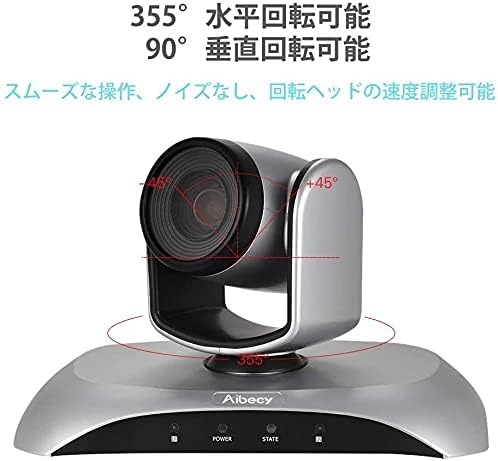
Figure 6: Camera Rotation Capabilities
4.4 Функцыя перавароту выявы
If the camera is mounted upside down (e.g., on a ceiling), you can use the image flip function to correct the video orientation.

Figure 7: Image Flip Function in Use
Refer to the remote control instructions for the specific button to activate or deactivate the image flip function.
5. Тэхнічнае абслугоўванне
Правільнае абслугоўванне забяспечвае даўгавечнасць і аптымальную прадукцыйнасць вашага webкулачок.
- Уборка: Для чысткі корпуса камеры выкарыстоўвайце мяккую сухую тканіну. Для аб'ектыва выкарыстоўвайце спецыяльную тканіну для чысткі аб'ектыва і раствор. Пазбягайце абразіўных ачышчальнікаў або растваральнікаў.
- захоўванне: Калі камера не выкарыстоўваецца працяглы час, захоўвайце яе ў прахалодным, сухім месцы, удалечыні ад прамых сонечных прамянёў і экстрэмальных тэмператур.
- Апрацоўка: Пазбягайце падзення камеры або моцных удараў.
6. Выпраўленне непаладак
If you encounter issues with your Aibecy withzoom webcam, refer to the table below for common problems and solutions.
| праблема | Магчымая прычына | Рашэнне |
|---|---|---|
| No image or video output | Power not connected; USB cable loose; Incorrect camera selected in software. | Ensure power adapter is securely connected. Check USB cable connection. Select the Aibecy withzoom camera in your video conferencing software settings. |
| Пульт дыстанцыйнага кіравання не працуе | Batteries low/dead; Obstruction between remote and camera; Remote not pointed at IR receiver. | Replace remote control batteries. Ensure a clear line of sight to the camera's IR receiver. Point the remote directly at the camera. |
| Image is upside down | Camera mounted upside down and image flip not activated. | Activate the image flip function using the remote control. |
| Дрэнная якасць відэа | Insufficient lighting; Dirty lens; Network bandwidth issues. | Ensure adequate lighting in the room. Clean the camera lens. Check your internet connection speed. |
7. Тэхнічныя характарыстыкі
| Асаблівасць | Спецыфікацыя |
|---|---|
| Марка | Айбецы |
| Нумар мадэлі | withzoom |
| Дазвол відэазахопу | 1080p |
| Аптычны зум | 3X |
| Гарызантальнае паварот | 355° |
| Вертыкальнае кручэнне | 90° |
| Тэхналогія падлучэння | USB |
| Сумяшчальныя прылады | Windows, Mac, Linux, Chromebook |
| Асаблівасці | Remote Control, Infrared |
| Стабілізацыя выявы | няма |
| Памеры ўпакоўкі | 29.7 х 22.4 х 19.9 см |
| Вага прадмета | 1.51 кг |
8. Інфармацыя аб падтрымцы
For further assistance or inquiries not covered in this manual, please refer to the official Aibecy support channels or contact your retailer. Keep your purchase receipt for warranty purposes.