
1. Уводзіны
This instruction manual provides essential information for the safe and efficient operation of your Beatfoxx Silent Guide V2 SDT-BP30 Bodypack Transmitter. Please read this manual thoroughly before use and retain it for future reference.
The Beatfoxx Silent Guide V2 SDT-BP30 is a wireless UHF stereo bodypack transmitter designed for tour guide systems, silent disco applications, and similar scenarios requiring clear audio transmission to multiple receivers. It operates on 3 channels within the 863-865 MHz frequency range.

Image 1.1: Beatfoxx Silent Guide V2 SDT-BP30 Transmitter in a typical usage scenario.
2. Інфармацыя па бяспецы
- Перад эксплуатацыяй прылады прачытайце ўсе інструкцыі.
- Не падвяргайце прыладу ўздзеянню дажджу або вільгаці.
- Не разбірайце прыладу. Любое абслугоўванне звяртайцеся да кваліфікаванага персаналу.
- Use only the specified power source (2 AA batteries, standard or rechargeable).
- Трымайце прыладу далей ад экстрэмальных тэмператур і прамых сонечных прамянёў.
- Забяспечце належную вентыляцыю, каб прадухіліць перагрэў.
- This device is not compatible with "Silent V1" systems.
3. Змесціва ўпакоўкі
Праверце, ці ўсе пералічаныя ніжэй прадметы ўваходзяць у вашу ўпакоўку:
- Beatfoxx Silent Guide V2 SDT-BP30 Bodypack Transmitter
- External Antenna (pre-attached or to be attached)
- Зарадны кабель (USB)
- Metal Belt Clip (pre-attached)
4. Прадукт скончыўсяview
The SDT-BP30 transmitter features a compact design with essential controls and inputs for versatile use.

Выява 4.1: Спераду view of the transmitter showing the display and control buttons.
- Дысплей: Shows selected channel and battery status.
- "M" Button (Menu): Used for channel selection and adjusting audio/microphone volume.
- "Down" Button: Decreases channel number or volume.
- "Up" Button: Increases channel number or volume.
- Індыкатар разраду батарэі: LED light indicating low battery.
- Power ON Indicator: LED light indicating the device is powered on.
- Знешняя антэна: For enhanced signal range.

Малюнак 4.2: Верх view of the transmitter with audio and microphone input ports.
- Аўдыё ўваход: 3.5mm stereo jack for connecting external audio sources (e.g., music player, mixer).
- Мікрафонны ўваход: 3.5mm mono jack for connecting an external microphone (e.g., Beatfoxx SDH-100, sold separately).
- Порт USB: For charging rechargeable batteries (if used).
- Выключальнік сілкавання: Каб уключыць або выключыць прыладу.

Малюнак 4.3: Спіна view of the transmitter showing the metal belt clip.
The integrated metal belt clip allows for convenient and secure attachment to clothing.
5. Настройка
5.1. Устаноўка батарэй
The SDT-BP30 requires two AA batteries (standard or rechargeable).
- Адкрыйце вечка батарэйнага адсека на задняй панэлі прылады.
- Устаўце дзве батарэйкі тыпу АА, сачыце за правільнай палярнасцю (+/-).
- Надзейна зачыніце крышку батарэйнага адсека.
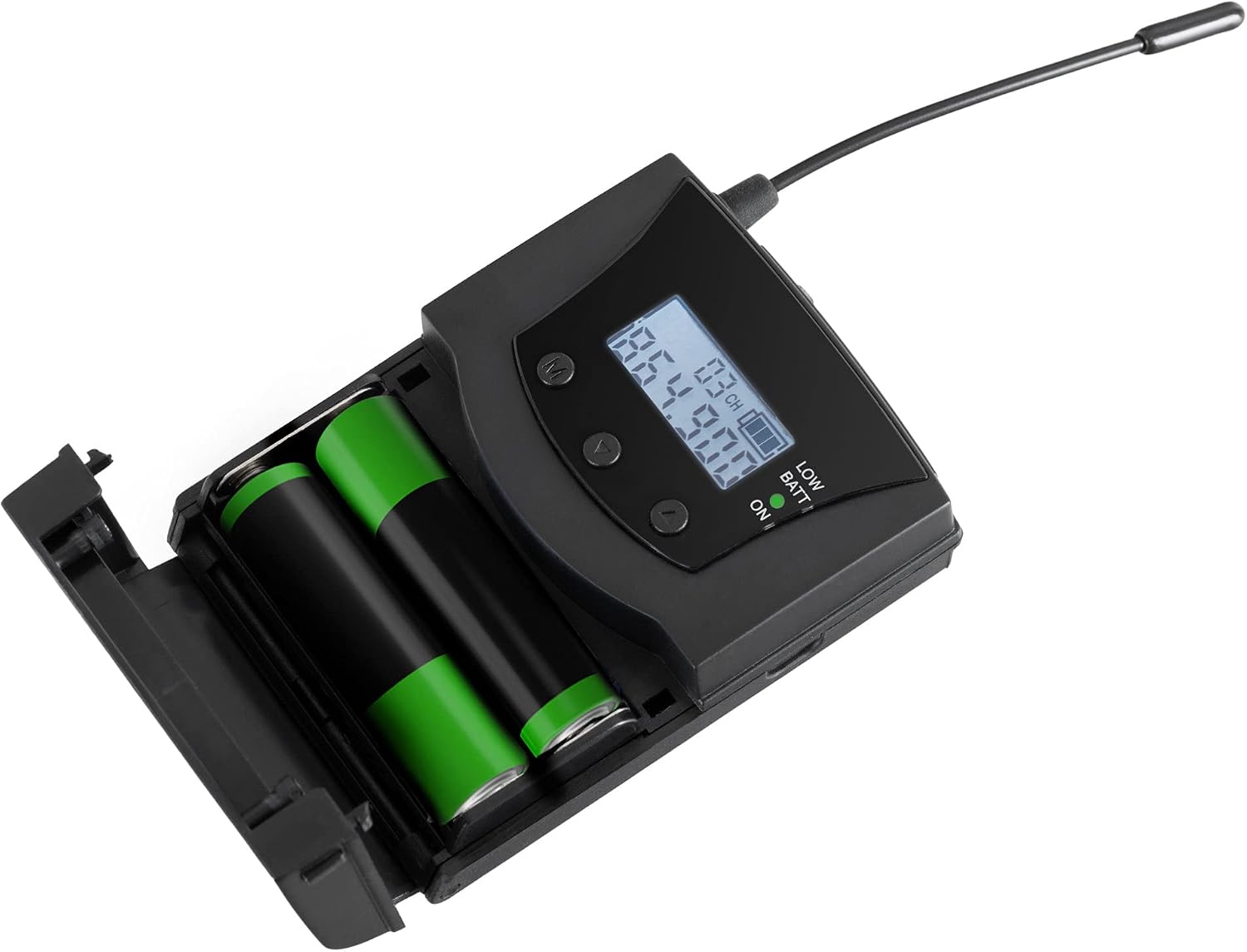
Image 5.1: Inserting AA batteries into the transmitter.
5.2. Падключэнне крыніц гуку
You can connect either a microphone or an auxiliary audio source.
- Мікрафон: Plug a 3.5mm mono jack microphone into the "MIC" input.
- Auxiliary Audio: Connect an audio player, mixer, or other source using a 3.5mm stereo jack cable to the "AUDIO" input.
5.3. Падключэнне антэны
Ensure the external antenna is securely attached to the designated port for optimal signal transmission.
6. Інструкцыя па эксплуатацыі
6.1. Уключэнне / выключэнне харчавання
Slide the power switch to the "ON" position to turn on the transmitter. The power indicator LED will illuminate. Slide it to "OFF" to power down.
6.2. Выбар канала
The transmitter offers 3 selectable UHF channels: 863.3 MHz, 863.9 MHz, and 864.9 MHz.
- Press the "M" (Menu) button to enter channel selection mode. The channel number on the display will flash.
- Use the "Up" and "Down" buttons to cycle through the available channels.
- Press the "M" button again to confirm your selection.
Note: Ensure the transmitter and all connected receivers are set to the same channel for proper operation.
6.3. Рэгуляванне гучнасці
You can adjust the microphone and audio input volumes independently.
- Press the "M" button repeatedly until the volume indicator (e.g., "VOL MIC" or "VOL AUX") appears on the display.
- Use the "Up" and "Down" buttons to increase or decrease the respective volume level.
- The setting will be saved automatically after a few seconds of inactivity or by pressing "M" again to exit the menu.
6.4. Charging Rechargeable Batteries
If using rechargeable AA batteries, connect the included charging cable to the USB port on the transmitter and to a suitable USB power adapter (not included). Charging time is approximately 12 hours.
Note: Only rechargeable batteries can be charged directly in the unit. Do not attempt to charge standard alkaline batteries.
7. Тэхнічнае абслугоўванне
7.1. Уборка
Працірайце прыладу мяккай сухой тканінай. Не выкарыстоўвайце вадкія ачышчальнікі або абразіўныя матэрыялы.
7.2. Сыход за батарэяй
Remove batteries if the device will not be used for an extended period to prevent leakage. Dispose of used batteries responsibly according to local regulations.
8. Выпраўленне непаладак
| праблема | Магчымая прычына | Рашэнне |
|---|---|---|
| No sound from receivers. |
|
|
| Poor signal quality or limited range. |
|
|
| Уключаны індыкатар разраду батарэі. | Батарэі разраджаны. | Replace or recharge batteries immediately. |
9. Тэхнічныя характарыстыкі
| Асаблівасць | Дэталь |
|---|---|
| мадэль | SDT-BP30 |
| Марка | Beatfoxx |
| Сістэма перадачы | UHF Stereo |
| Каналы | 3 |
| Частоты перадачы | 863.3 МГц, 863.9 МГц, 864.9 МГц |
| Дыяпазон | Да 75 метраў (прыблізна 246 футаў) |
| Аўдыё ўваход | 3.5mm Stereo Jack (AUX) |
| Мікрафонны ўваход | 3.5mm Mono Jack (MIC) |
| Электразабеспячэнне | 2 x AA Batteries (standard or rechargeable) |
| Тэрмін службы батарэі | Прыбл. 24 гадзіны |
| Charging Time (rechargeable) | Прыбл. 12 гадзіны |
| Памеры (без антэны) | 8.5 х 6.5 х 2.5 см (3.35 х 2.56 х 0.98 цалі) |
| Даўжыня антэны | 8 см (3.15 цалі) |
| Вага (без акумулятараў) | 62 г (2.19 унцыі) |
| Колер | Чорны |
| Сумяшчальнасць | Not compatible with "Silent V1" systems. |

Image 9.1: Physical dimensions of the Beatfoxx SDT-BP30 transmitter.
10. Гарантыя і падтрымка
For warranty information and technical support, please refer to the official Beatfoxx website or contact your retailer. Beatfoxx is a brand of Musikhaus Kirstein.
You can find more information about Beatfoxx products and support at their official brand store: Beatfoxx Brand Store.