
Уводзіны
The FreedConn T-COMVB Bluetooth Helmet Headset is designed to provide wireless communication for motorcyclists. This system allows for hands-free phone calls, music listening, FM radio, GPS voice prompts, and intercom communication between riders. It features Bluetooth 5.0 technology, noise cancellation, and a waterproof design for various riding conditions.
Што ў скрынцы
Праверце наяўнасць усіх кампанентаў у вашай упакоўцы:
- FreedConn T-COMVB Bluetooth Headset Unit (x2 for 2-pack)
- Стэрэадынамікі
- Boom Microphone (for open-face/modular helmets)
- Soft-Wire Microphone (for full-face helmets)
- Helmet Mount Bracket (clip-on and adhesive options)
- USB-кабель для зарадкі
- Кіраўніцтва карыстальніка
- Velcro Pads for Speakers and Microphone
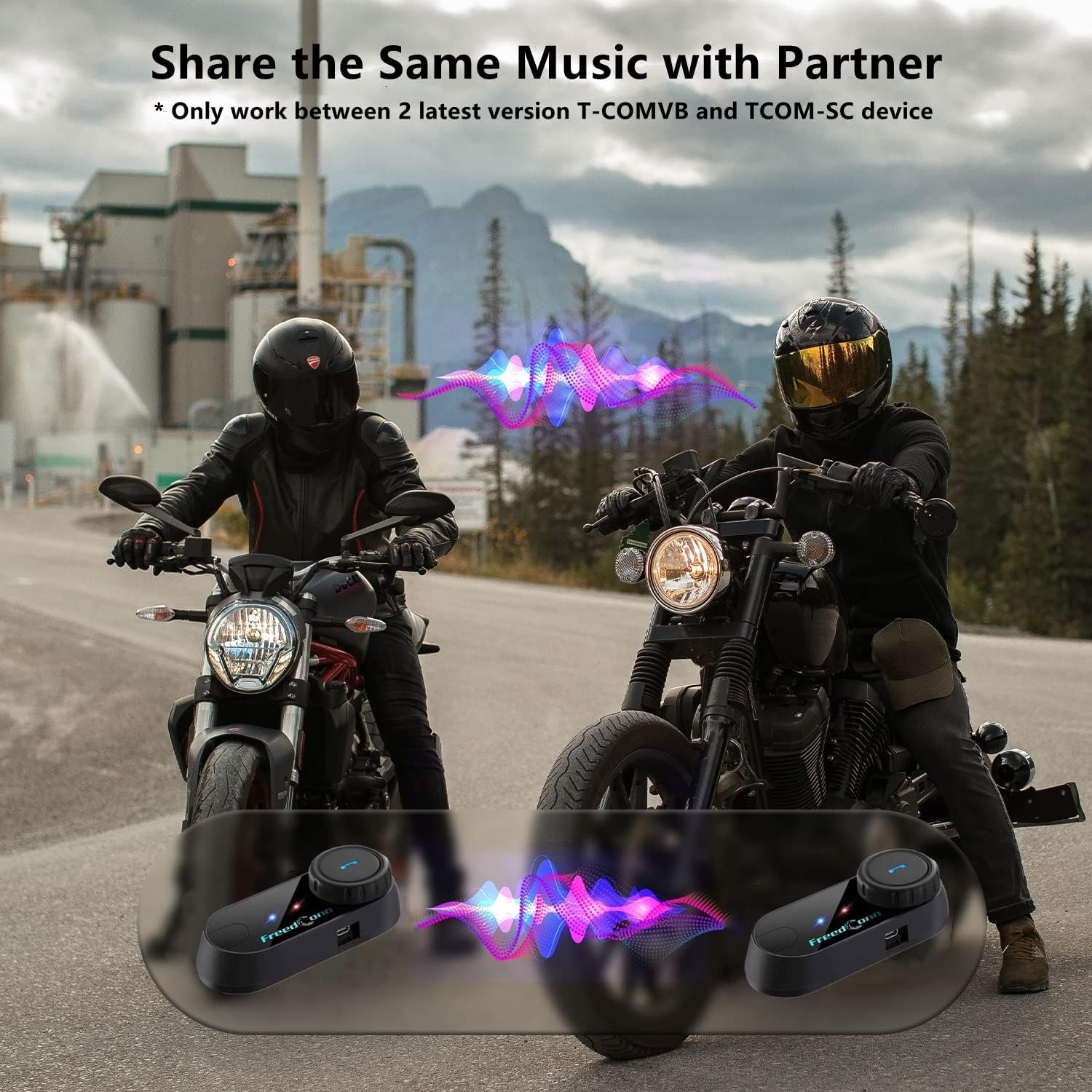
Image: Package contents for the FreedConn T-COMVB Bluetooth Helmet Headset 2-pack, showing all included accessories.
Настройка
1. Зарадка прылады
Before first use, fully charge the T-COMVB unit. Connect the USB charging cable to the headset's charging port and a USB power source. The indicator light will show charging status.
- Час зарадкі: Прыкладна 3-4 гадзін.
- Тэрмін службы батарэі: Up to 7-8 hours of intercom, 10 hours of phone calls/music, 300 hours standby.

Image: Visual representation of the 400mAh battery capacity and estimated usage times for intercom, phone calls, and standby.
2. Выбар мікрафона
Выберыце адпаведны мікрафон для тыпу вашага шлема:
- Мікрафон-штамб: Recommended for open-face, half, and modular flip-up helmets.
- Soft-Wire Microphone: Recommended for full-face and off-road helmets.
Connect the chosen microphone and speakers to the corresponding ports on the headset unit.
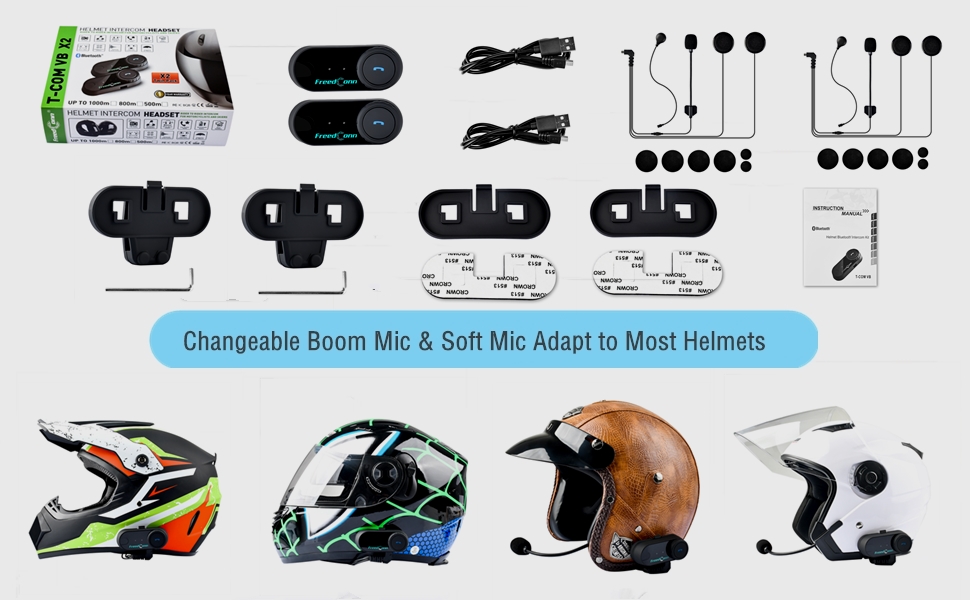
Image: Illustration demonstrating the compatibility of boom and soft-wire microphones with various helmet styles.
3. Усталёўка шлема
Mount the T-COMVB unit to the side of your helmet using either the clip-on bracket or the adhesive bracket. Ensure the unit is securely attached and the speakers are positioned correctly inside the helmet for optimal audio.

Image: A FreedConn T-COMVB unit securely installed on the exterior of a motorcycle helmet.
Інструкцыя па эксплуатацыі
1. Уключэнне/выключэнне харчавання
- Уключэнне: Націсніце і ўтрымлівайце кнопку харчавання, пакуль не пачне міргаць індыкатар.
- Выключэнне: Націсніце і ўтрымлівайце кнопку харчавання, пакуль не пагасне індыкатар.
2. Спалучэнне праз Bluetooth (з тэлефонам/GPS)
To connect your T-COMVB to a Bluetooth-enabled device (phone, GPS):
- Ensure the T-COMVB is off.
- Press and hold the Power button for approximately 5-7 seconds until the indicator light flashes red and blue alternately, indicating pairing mode.
- On your phone or GPS, enable Bluetooth and search for available devices.
- Select "FreedConn T-COMVB" from the list. If prompted, enter "0000" as the PIN.
- Once paired, the indicator light will flash blue slowly.

Image: The T-COMVB headset demonstrating its Bluetooth 5.0 and universal connectivity with different devices and helmet types.
3. Intercom Communication (Rider to Rider)
The T-COMVB supports intercom communication with other T-COMVB or TCOM-SC units.
- Ensure both units are powered on and not connected to other Bluetooth devices.
- On one unit, press and hold the Intercom button until the indicator light flashes red and blue alternately.
- On the second unit, press the Intercom button once.
- The units will automatically search and pair. Once connected, the indicator lights will flash blue slowly.
- To initiate intercom, press the Intercom button once. To end, press it again.
4. Прайграванне і сумеснае выкарыстанне музыкі
Once paired with your phone, you can play music. Music sharing is supported between two latest version T-COMVB and TCOM-SC devices.
- Прайграванне/Паўза: Націсніце шматфункцыянальную кнопку адзін раз.
- Наступны трэк: Rotate the Multi-function button clockwise.
- Папярэдні трэк: Rotate the Multi-function button counter-clockwise.
- Абмен музыкай: While music is playing, press and hold the Intercom button on both units to initiate music sharing.

Image: Two riders sharing music through their FreedConn T-COMVB headsets, highlighting the music sharing feature.
5. FM-радыё
To activate the built-in FM radio:
- Turn On FM: Press the FM button once.
- Сканіраванне каналаў: Rotate the Multi-function button to scan for stations.
- Turn Off FM: Press the FM button again.
6. Тэлефонныя званкі
When paired with your phone, the T-COMVB allows for hands-free calls.
- Адказаць на званок: Націсніце шматфункцыянальную кнопку адзін раз.
- Завяршыць выклік: Націсніце шматфункцыянальную кнопку адзін раз падчас размовы.
- Адхіліць выклік: Націсніце і ўтрымлівайце шматфункцыянальную кнопку на працягу 2 секунд.
- Паўторны набор апошняга нумара: Двойчы націсніце шматфункцыянальную кнопку.
- Voice Assistant (Siri/Google Voice): Press the Voice Assistant button to activate your phone's voice assistant.

Image: Icons representing voice assistant activation (Siri, Google Voice) for hands-free calling functionality.
Тэхнічнае абслугоўванне
- Уборка: Выкарыстоўвайце мяккі, damp cloth to clean the unit. Do not use harsh chemicals or solvents.
- Воданепранікальнасць: The unit is waterproof, but avoid submerging it in water. Ensure all ports are securely closed when exposed to rain.
- Сыход за батарэяй: If the device is not used for an extended period, charge it at least once a month to preserve battery life.

Image: The FreedConn T-COMVB headset on a helmet, illustrating its waterproof feature in rainy conditions.
Ліквідацыю непаладак
- Няма харчавання: Ensure the unit is fully charged. Connect to a power source and check the charging indicator.
- Немагчыма падключыць Bluetooth: Ensure the unit is in pairing mode (red and blue flashing light). Make sure other Bluetooth devices are disconnected. Try restarting both the headset and your phone/GPS.
- Няма гуку з дынамікаў: Check that the speakers are securely plugged into the headset unit. Ensure volume is not set to minimum.
- Дамафон не падключаецца: Ensure both units are T-COMVB or TCOM-SC models and are in intercom pairing mode. Keep units within range (up to 800 meters).
- Дрэнная якасць гуку/шум: Ensure the microphone is positioned correctly, close to your mouth. The T-COMVB features advanced noise cancellation technology.

Image: A visual representation of the advanced noise cancellation technology, demonstrating its effect on sound quality.
Тэхнічныя характарыстыкі
| мадэль | Т-КОМВБ |
| Версія Bluetooth | 5.0 + EDR |
| Дыяпазон дамафонаў | Да 800 метраў (2-3 гоншчыкаў) |
| Ёмістасць батарэі | 400 мАг |
| Час зарадкі | 3-4 гадзін |
| Час дамафона | 7-8 гадзін |
| Phone Call/Music Time | 10 гадзіны |
| Час чакання | 300 гадзіны |
| Воданепранікальнасць | Воданепранікальны |
| Метад кантролю | Voice, Manual Buttons |
| Асаблівасці | Microphone Included, Noise Cancellation, FM Radio |
| Матэрыял | Палімер |
| Вага прадмета | Approximately 1.15 pounds (for 2 units) |
Гарантыя і падтрымка
For warranty information, technical support, or service inquiries, please refer to the contact details provided with your purchase or visit the official FreedConn webсайт. Захоўвайце пацвярджэнне пакупкі для прэтэнзій па гарантыі.