
Уводзіны
The Studebaker Retro Edge Big Sound Bluetooth Boombox (Model SB2150B) is a versatile audio system designed for portable entertainment. It combines classic retro aesthetics with modern features, including a CD player, cassette player/recorder, AM/FM stereo radio, and Bluetooth connectivity. This manual provides detailed instructions for setup, operation, maintenance, and troubleshooting to ensure optimal performance and longevity of your device.
Важная інфармацыя па бяспецы
Please read all instructions carefully before operating this unit. Keep this manual for future reference.
- Не падвяргайце прыладу ўздзеянню дажджу або вільгаці.
- Не закрывайце вентыляцыйныя адтуліны.
- Не ўстанаўлівайце побач з крыніцамі цяпла, такімі як радыятары, абагравальнікі, пліты або іншыя прылады (у тым ліку ampLifiers), якія вырабляюць цяпло.
- Абараніце сеткавы шнур ад наступання або заціскання.
- Выкарыстоўвайце толькі насадкі/аксэсуары, указаныя вытворцам.
- Адключайце прыладу ад сеткі падчас навальніцы або калі яна не выкарыстоўваецца на працягу доўгага часу.
- Звяртайцеся да кваліфікаванага абслугоўваючага персаналу.
Змест пакета
Пераканайцеся, што ўсе прадметы наяўныя пры распакаванні:
- Studebaker Retro Edge Big Sound Bluetooth Boombox (SB2150B)
- Шнур сілкавання
- Кіраўніцтва па эксплуатацыі
Асаблівасці і элементы кіравання прадуктам
Familiarize yourself with the various components and controls of your boombox.
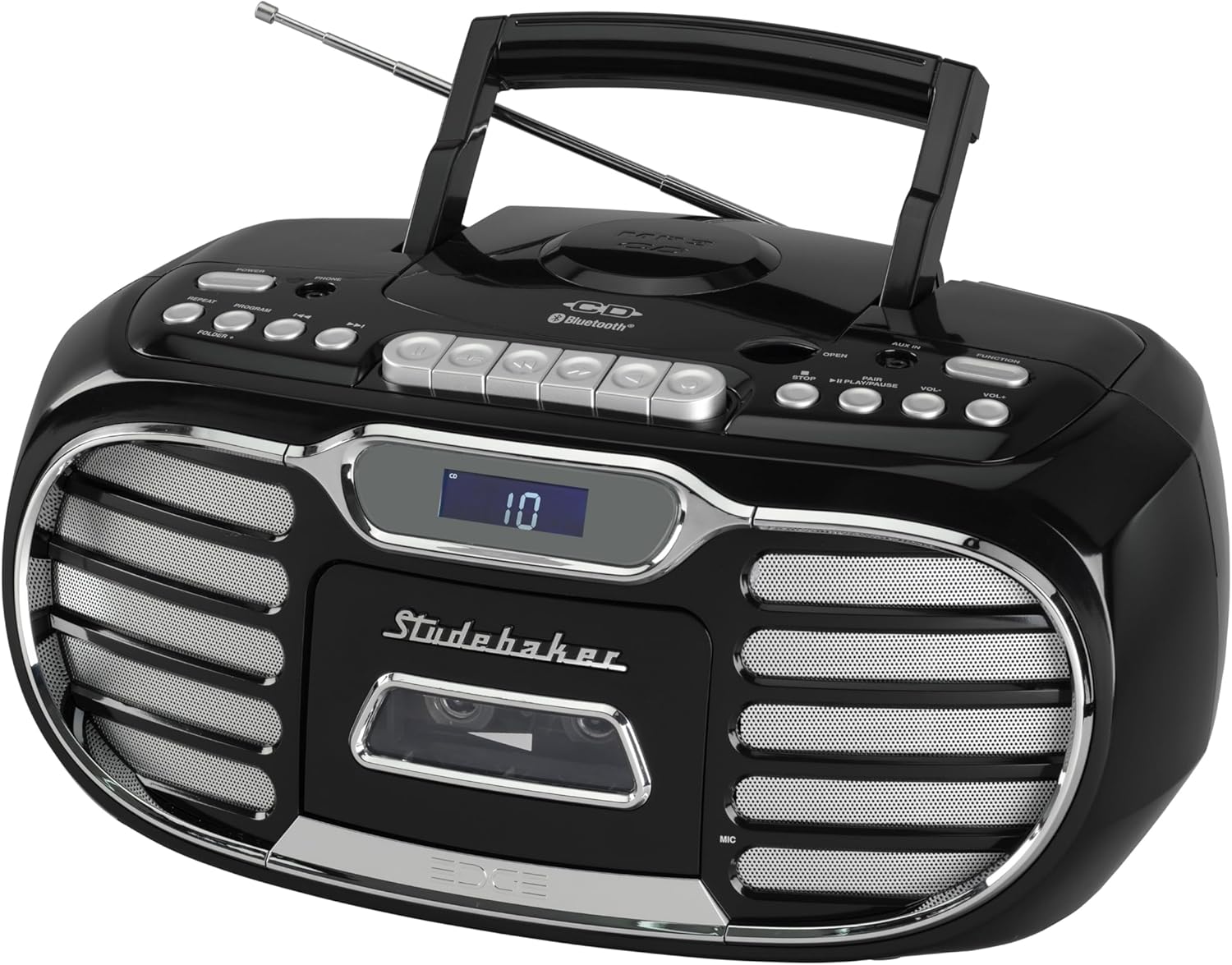
Малюнак 1: У цэлым view of the Studebaker Retro Edge Boombox, showcasing its classic design, integrated handle, and front-facing controls and speakers.

Малюнак 2: Фронт view highlighting the central LCD display, cassette compartment, and speaker grilles on either side. Control buttons are visible above the display.

Малюнак 3: Падрабязны view of the cassette player compartment, showing the tape mechanism and the transparent cover for tape visibility.

Малюнак 4: Close-up of the top-loading CD player with a disc inserted, illustrating the open compartment for disc placement.
Панэль кіравання скончыласяview:
- Кнопка харчавання: Уключае/выключае прыладу.
- Выбар функцый: Switches between CD, Cassette, AM, FM, Bluetooth, and AUX modes.
- Рэгулятар гучнасці: Рэгулюе ўзровень выхаднога гуку.
- Кіраванне кампакт-дыскамі: Play/Pause, Stop, Skip/Search (Forward/Backward), Program, Repeat.
- Cassette Controls: Play, Record, Fast Forward, Rewind, Stop/Eject, Pause.
- Элементы кіравання радыё: Tuning knob/buttons, Band selector (AM/FM).
- Кнопка спалучэння Bluetooth: Запускае рэжым спалучэння Bluetooth.
- ВК-дысплей: Shows current mode, track number, radio frequency, etc.
- Раз'ём AUX-in: Для падлучэння знешніх аўдыёпрылад.
- Раз'ём для навушнікаў: Для прыватнага праслухоўвання.
- Built-in Condenser Microphone: For recording audio to cassette.
- Тэлескапічная антэна: Для прыёму FM-радыё.
Настройка
Харчаванне прылады:
The boombox can be powered by AC power or batteries (not included).
- Праца з пераменным токам: Connect the supplied AC power cord to the AC IN jack on the unit and then to a standard AC outlet (120V~60Hz).
- Праца ад батарэі: Open the battery compartment, insert the required number of batteries (e.g., 8 x 'C' size, not supplied) ensuring correct polarity (+/-), and close the compartment.
Першапачатковае выкарыстанне:
Extend the telescopic antenna fully for optimal FM radio reception. For AM, rotate the unit for best reception.
Інструкцыя па эксплуатацыі
Праца CD-плэера:
- Націсніце кнопку харчавання, каб уключыць прыбор.
- Press the Function button repeatedly to select "CD" mode.
- Open the CD compartment door by pressing the "OPEN" button.
- Place a CD (CD-R/RW or MP3 CD) onto the spindle with the label side facing up.
- Close the CD compartment door. The LCD display will show the total number of tracks.
- Націсніце кнопку Прайграванне/Паўза, каб пачаць прайграванне.
- Use the Skip/Search buttons to navigate tracks.
- Каб спыніць прайграванне, націсніце кнопку "Стоп".
- Use the Program button to program tracks for playback in a specific order.
- Use the Repeat button to repeat a single track or the entire CD.
Праца касетнага прайгравальніка/магнітафона:
- Націсніце кнопку харчавання, каб уключыць прыбор.
- Press the Function button repeatedly to select "TAPE" mode.
- Press the Stop/Eject button to open the cassette compartment.
- Устаўце касету адкрытым краем уніз.
- Зачыніце адсек для касеты.
- Націсніце кнопку "Прайграць", каб пачаць прайграванне.
- Use Fast Forward and Rewind buttons to navigate the tape.
- Press the Stop/Eject button to stop playback or eject the tape.
- Запіс:
- From Built-in Microphone: Ensure the unit is in TAPE mode. Press the Record button. The unit will start recording from the built-in microphone.
- From Radio/CD/AUX/Bluetooth: Select the desired source (Radio, CD, AUX, or Bluetooth). Press the Record button on the cassette player. The unit will record the audio playing from the selected source.
- Press the Stop/Eject button to stop recording. The cassette player features auto-stop.
Праца AM/FM-радыё:
- Націсніце кнопку харчавання, каб уключыць прыбор.
- Press the Function button repeatedly to select "AM" or "FM" mode.
- Высуньце тэлескапічную антэну для прыёму FM. Для прыёму AM павярніце прыладу для найлепшага прыёму.
- Use the Tuning control to select your desired radio station. The frequency will be displayed on the LCD.
Праца Bluetooth:
- Націсніце кнопку харчавання, каб уключыць прыбор.
- Press the Function button repeatedly to select "BT" (Bluetooth) mode. The LCD display will show "BT" and flash, indicating it's in pairing mode.
- Уключыце Bluetooth на мабільнай прыладзе (смартфоне, планшэце і г.д.) і знайдзіце даступныя прылады.
- Select "SB2150B" from the list of devices.
- Once paired, the "BT" indicator on the LCD display will stop flashing and remain solid. You can now play audio from your device through the boombox.
- To disconnect, disable Bluetooth on your mobile device or select a different function mode on the boombox.
AUX-in Operation:
- Націсніце кнопку харчавання, каб уключыць прыбор.
- Press the Function button repeatedly to select "AUX" mode.
- Connect one end of a 3.5mm audio cable (not supplied) to the AUX-in jack on the boombox and the other end to the headphone jack or audio output of your external audio device (e.g., MP3 player, smartphone).
- Play audio from your external device. The sound will be output through the boombox speakers.
Праца навушнікаў:
For private listening, connect a pair of headphones (not supplied) to the Headphone Jack. The sound from the speakers will be muted automatically.
Тэхнічнае абслугоўванне
- Уборка: Працярыце прыладу мяккай дamp тканіна. Не выкарыстоўвайце абразіўныя ачышчальнікі або растваральнікі.
- Прайгравальнік кампакт-дыскаў: Keep the CD compartment clean. Do not touch the lens.
- Касетны прайгравальнік: Periodically clean the tape heads and pinch rollers with a cotton swab lightly moistened with isopropyl alcohol.
- захоўванне: If storing the unit for an extended period, remove batteries (if used) and disconnect from AC power.
Ліквідацыю непаладак
| праблема | Магчымая прычына | Рашэнне |
|---|---|---|
| Прылада не ўключаецца. | Шнур харчавання не падключаны; батарэйкі разраджаныя або няправільна ўстаўленыя. | Ensure AC cord is securely plugged in. If using batteries, check polarity and replace if necessary. |
| Няма гуку з дынамікаў. | Volume too low; Incorrect function mode selected; Headphones connected. | Increase volume. Select the correct function mode (CD, TAPE, AM/FM, BT, AUX). Disconnect headphones. |
| CD не прайграваецца. | Кампакт-дыск устаўлены няправільна; кампакт-дыск брудны або падрапаны; прылада ў няправільным рэжыме. | Ensure CD is inserted label-side up. Clean or replace CD. Select "CD" function mode. |
| Cassette tape does not play/record. | Tape inserted incorrectly; Tape is damaged; Unit in wrong mode. | Ensure tape is inserted correctly. Try a different tape. Select "TAPE" function mode. |
| Дрэнны прыём радыё. | Антэна няправільна выцягнута/размешчана; Перашкоды. | Fully extend and adjust the telescopic antenna for FM. Rotate the unit for best AM reception. Move away from other electronic devices. |
| Збой спалучэння Bluetooth. | Прылада не ў рэжыме спалучэння; Прылада занадта далёка; Прылада ўжо спалучана з іншай прыладай. | Ensure boombox is in "BT" mode and flashing. Move device closer. Disconnect from other Bluetooth devices. Try restarting both devices. |
Тэхнічныя характарыстыкі
- мадэль: SB2150B
- Памеры прадукту (Д х Ш х У): 9.41 х 14.57 х 7.03 цалі
- Вага прадмета: 6.78 фунта
- Крыніца харчавання: AC 120V~60Hz or DC Battery Operation (Batteries not included)
- Тып дынаміка: Стэрэа
- Тэхналогія падключэння: Дапаможны, Bluetooth
- Выходная магутнасць: 2.2W х 2
- Сумяшчальнасць з CD: CD, CD-R/RW, MP3-CD
- Cassette Features: Player/Recorder, Auto Stop
- Дыяпазоны радыё: AM/FM PLL Stereo
- Дадатковыя магчымасці: Headphone Jack, Built-in Condenser Microphone, LCD Display with Backlight, Built-in Carrying Handle
Гарантыя і падтрымка
For warranty information and technical support, please refer to the warranty card included with your product or contact Studebaker customer service directly. You may also visit the official Studebaker webсайт з найноўшымі рэсурсамі падтрымкі.
вытворца: Кампанія Spectra Merchandising International, Inc.