
ieGeek S2
ieGeek 2K Magnetic Base WiFi Security Camera S2 User Manual
Model: S2 | Brand: ieGeek
Уводзіны
Thank you for choosing the ieGeek 2K Magnetic Base WiFi Security Camera S2. This camera offers advanced features such as 2K resolution, color night vision, 300° pan, Wi-Fi 6 connectivity, AI/PIR motion detection, and two-way audio. This manual will guide you through the installation, operation, and maintenance to ensure optimal performance and security for your home or property.
Што ў скрынцы
Калі ласка, праверце змесціва вашай упакоўкі, каб пераканацца ў наяўнасці ўсіх прадметаў:
- ieGeek Camera S2
- Кіраўніцтва карыстальніка
- Магнітнае мацаванне камеры
- Магнітная база
- Зарадны кабель USB-C
- Screw Bag (3 x Screws & Nuts)
- Клей 3М

Image: All components included in the ieGeek S2 camera package.
Прадукт скончаныview
Кампаненты камеры

Фронт view: Ultra HD lens, spotlight, PIR sensor.

Назад view: Speaker grille, QR code for setup.
Асноўныя характарыстыкі
- 2K Ultra HD відэа: Захоплівае выразныя і дэталізаваныя здымкі ежыtage.
- 300° Pan Field of View: Прапановы панарамны views, covering a wide area.
- Падключэнне да Wi-Fi 6: Provides faster and more reliable image transfer, reduced interference, and enhanced security.
- Каляровы начны бачанне: See in full color even in low-light conditions up to 10 meters.
- AI/PIR Motion Detection: Advanced detection system recognizes individuals and sends real-time alerts (0.2s to 3s).
- Сірэна сігналізацыі: Automatically or manually trigger a siren to deter intruders.
- Двухбаковы аўдыё: Built-in microphone and speaker for real-time conversations.
- 100% Wire-Free & Rechargeable Battery: Easy installation without cables, suitable for both indoor and outdoor use.
- IP65 Воданепранікальнасць: Распрацаваны, каб вытрымліваць розныя ўмовы надвор'я.
Настройка і ўстаноўка
Першапачатковая зарадка
Before first use, ensure the camera is fully charged using the provided USB-C cable. A standard 5V USB power adapter (not included) is required.
Ўстаноўка прыкладання і падключэнне
- Step 1: Download the ieGeek Cam App. Пошук "ieGeek Cam" on your smartphone's app store (Android 5.0+ or iOS 8.0+).
- Step 2: Connect to 2.4GHz Wi-Fi. Ensure your camera is within range of a 2.4GHz Wi-Fi network for initial setup.
- Step 3: Start Recording. Follow the in-app instructions to pair your camera and begin monitoring.
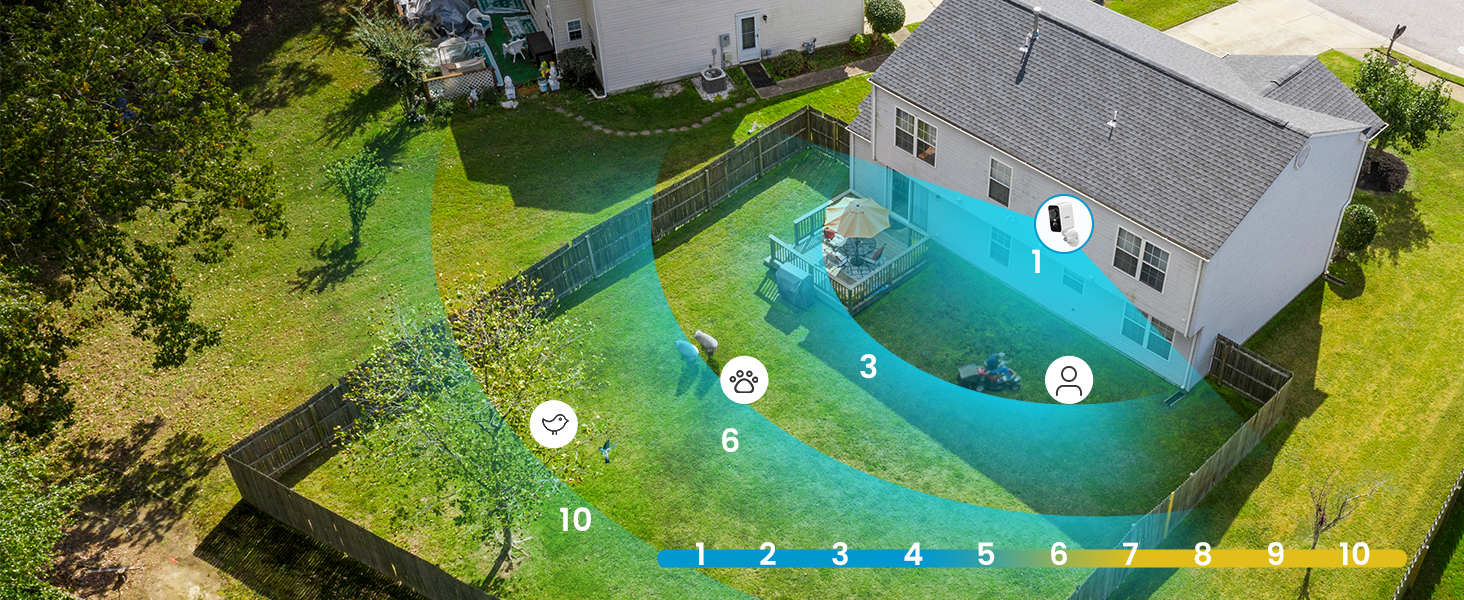
Image: Simplified setup process using the ieGeek Cam app.
Варыянты мантажу
The ieGeek S2 camera offers flexible installation with its magnetic base. You can choose between adhesive mounting or screw mounting:
- Method 1: Adhesive Mounting (Tool-free).
- Install the 3M adhesive on a clean, flat wall surface.
- Allow the adhesive to rest for 8 hours to achieve optimal adhesion before attaching the magnetic base.
- Fix the magnetic base to the adhesive.
- Прымацуеце камеру да магнітнай асновы.
- Method 2: Screw Mounting.
- Drill three holes in the desired location.
- Fix the magnetic camera mount to the wall using the provided screws and nuts.
- Прымацуеце камеру да магнітнага мацавання.
The magnetic base allows for easy removal of the camera for recharging or repositioning.

Image: Magnetic base for easy, tool-free installation.

Image: Two installation methods for the ieGeek S2 camera.
Інструкцыя па эксплуатацыі
жыць View і прайграванне
Access live video streams and recorded footage through the ieGeek Cam app. The app supports simultaneous viewing of up to 4 cameras and allows sharing access with family members.
300° Pan Control
Utilize the in-app controls to remotely adjust the camera's horizontal viewing angle up to 300°, ensuring comprehensive coverage without blind spots.

Image: The camera's 300° pan capability provides wide area surveillance.
2K Ultra HD and Color Night Vision
The camera records in 2K resolution, providing sharp images. With its color night vision feature, you can see clear, full-color images even at night, up to 10 meters. Infrared night vision is also available.

Image: 2K 3MP HD image quality for clear details.

Image: Color night vision provides clear, vibrant images in low light.
AI/PIR Motion Detection and Alarm
The camera's advanced AI/PIR detection system identifies human shapes, reducing false alarms. Upon detection, you receive real-time alerts (0.2s to 3s) on your phone. You can also configure the camera to automatically trigger a siren or a strong light alarm to deter intruders.

Image: AI recognition minimizes false alarms by focusing on human shapes.

Image: PIR motion detection with siren and light alarm for immediate deterrence.
Двухбаковае аўдыё
Communicate directly with visitors or deter unwanted guests using the camera's integrated microphone and speaker. This feature allows for real-time, two-way conversations through the app.

Image: Two-way audio for real-time communication.
Параметры захоўвання
The camera supports local storage via a Micro SD card (up to 128GB, not included). Additionally, a free 6-second loop cloud storage is available through the ieGeek Cam app.

Image: Storage options including Micro SD card and cloud storage.
Тэхнічнае абслугоўванне
- Зарадка акумулятара: Recharge the camera battery as needed. The magnetic base allows for easy removal for charging.
- Уборка: Перыядычна працірайце аб'ектыў і корпус камеры мяккай сурвэткайamp тканінай, каб выдаліць пыл і смецце. Пазбягайце агрэсіўных хімічных рэчываў.
- Абарона ад надвор'я: While the camera is IP65 weatherproof, ensure it is installed in a location that minimizes direct exposure to extreme weather conditions for prolonged durability.
Ліквідацыю непаладак
- Камера не падключаецца да Wi-Fi:
- Пераканайцеся, што ваша сетка Wi-Fi працуе на частаце 2.4 ГГц. Камера не падтрымлівае Wi-Fi на частаце 5 ГГц.
- Check the Wi-Fi signal strength at the camera's installation location.
- Праверце, ці правільны пароль Wi-Fi, уведзены ў дадатку.
- Перазагрузіце маршрутызатар і камеру.
- Празмерны разрад батарэі:
- Frequent motion detection events, especially in high-traffic areas, can increase battery consumption. Adjust motion detection sensitivity and detection zones in the app.
- жыць viewing for extended periods also consumes more battery.
- Ensure the camera is fully charged before deployment.
- Ілжывыя трывогі:
- Adjust the AI/PIR detection sensitivity in the app.
- Define specific detection zones to exclude areas with irrelevant movement (e.g., trees swaying, distant traffic).
- Пераканайцеся, што аб'ектыў камеры чысты і не мае перашкод.
- Дрэнная якасць выявы:
- Праверце хуткасць падключэння да Інтэрнэту.
- Пераканайцеся, што аб'ектыў камеры чысты.
- Verify that the camera is set to 2K resolution in the app settings.
For further assistance, please refer to the ieGeek Cam app's help section or contact ieGeek customer support.
Тэхнічныя характарыстыкі
| Асаблівасць | Спецыфікацыя |
|---|---|
| Дазвол запісу відэа | 2K |
| Эфектыўнае дазвол відэа | 1296p |
| Колер | Белы |
| Тэхналогія бесправадной сувязі | Wi-Fi (2.4 ГГц) |
| Viewing кут | 300° (Pan) |
| Дыяпазон начнога бачання | 10 метраў |
| Узровень воданепранікальнасці | IP65 (воданепранікальны) |
| Матэрыял | Extra resistant ABS+PC material (heat and rust resistant) |
| Крыніца харчавання | Працуе ад батарэі (літый-іённая) |
| Падтрымка памяці | 32-128GB (Micro SD card) |
| Сумяшчальнасць аперацыйнай сістэмы | Android 5.0+, iOS 8.0+ |
| Памеры прадмета (Д х Ш х У) | 17.5 х 6.6 х 5.5 см |
Гарантыя і падтрымка
The ieGeek 2K Magnetic Base WiFi Security Camera S2 comes with a 2-гадовая гарантыя вытворцы.
For any questions, technical support, or warranty claims, please contact ieGeek customer service. Their team is available to assist you within 24 hours on business days.
You can find contact information and additional resources within the ieGeek Cam app or on the official ieGeek webсайт.