
Sonel SON001
Інструкцыя па эксплуатацыі прамысловага мультыметра Sonel CMM 30
Model: SON001
1. Уводзіны
The Sonel CMM 30 is an advanced industrial multimeter engineered for versatility, modern functionality, and exceptional durability. This device integrates 11 fundamental measurement functions along with additional features, providing a broad spectrum of applications for professionals. Its robust design includes drop protection and an IP67 rated casing, ensuring reliable performance even in challenging environments.
Key features include a smartphone application for remote reading and data saving via wireless communication, an automatically adjusting backlight for optimal screen visibility, and a built-in flashlight for illumination in dark conditions. This manual provides essential information for the safe and effective use of your CMM 30 multimeter.
2. Інфармацыя па бяспецы
Always adhere to the following safety precautions to prevent electric shock, injury, or damage to the meter or equipment under test.
- Read and understand all instructions and safety information in this manual before operating the meter.
- Не выкарыстоўвайце вымяральны прыбор, калі ён выглядае пашкоджаным або калі ізаляцыя на вымяральных правадах парушаная.
- Заўсёды адключайце харчаванне ад ланцуга і разраджайце ўсе высокавольтныяtage capacitors before making resistance, continuity, diode, or capacitance measurements.
- Будзьце асцярожныя пры працы з voltagвышэй за 30 В пераменнага току (RMS), 42 В пікавага або 60 В пастаяннага току. Гэтыя аб'ёмыtagуяўляюць небяспеку паражэння.
- Не перавышайце максімальныя ліміты ўводу для любой функцыі.
- Перад падключэннем вымяральных кабеляў да ланцуга пераканайцеся, што перамыкач функцый знаходзіцца ў правільным становішчы для патрэбнага вымярэння.
- Replace batteries as soon as the low battery indicator appears to ensure accurate readings.
- Не выкарыстоўвайце лічыльнік у асяроддзі выбухованебяспечных газаў, пароў або пылу.
3. Змесціва ўпакоўкі
Пасля адкрыцця ўпакоўкі пераканайцеся, што ўсе пералічаныя ніжэй прадметы ёсць у наяўнасці і не пашкоджаны:
- Sonel CMM 30 Industrial Multimeter
- Вымяральныя дроты (чырвоны і чорны)
- Temperature Probe (K-type thermocouple)
- 4 x AAA Batteries (pre-installed or separate)
- Кіраўніцтва карыстальніка (гэты дакумент)
Калі якія-небудзь тавары адсутнічаюць або пашкоджваюцца, неадкладна звярніцеся да пастаўшчыка.
4. Прадукт скончыўсяview
Familiarize yourself with the components of your Sonel CMM 30 multimeter:
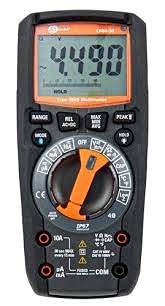
Малюнак 4.1: Спераду view of the Sonel CMM 30 Industrial Multimeter. This image displays the device's main components, including the digital display, the central rotary function switch, and the various input terminals for test leads.
4.1. Дысплей
The large LCD shows measurement readings, units, function indicators, and battery status. It features an automatic backlight that adjusts to ambient light conditions for optimal visibility.
4.2. Паваротны перамыкач функцый
This central switch is used to select the desired measurement function (e.g., Voltage, Current, Resistance, Capacitance, Temperature, Frequency).
4.3. Функцыянальныя кнопкі
Various buttons provide additional controls and features:
- RANGE: Toggles between manual and automatic ranging.
- Рэжым: Selects sub-functions within a main rotary switch position (e.g., AC/DC voltage, Diode/Continuity).
- ТРЫМАЦЬ: Зафіксуе бягучыя паказанні на дысплеі.
- MAX/MIN/AVG: Records maximum, minimum, and average readings.
- REL: Relative mode, subtracts a stored value from subsequent measurements.
- Bluetooth/Light: Activates Bluetooth connectivity for the smartphone app and controls the built-in flashlight.
4.4. Input Jacks
These are the connection points for the test leads:
- COM: Common terminal for the black test lead.
- VΩHzCAP°C: Уваход для тtage, resistance, frequency, capacitance, and temperature measurements (red test lead).
- мАмкА: Увод для міліampтут і мікраampвымярэнні току (чырвоны вымяральны провад).
- 10А: Input for up to 10 Ampвымярэнні току (чырвоны вымяральны провад).
5. Настройка
5.1. Устаноўка батарэі
The Sonel CMM 30 requires 4 AAA batteries. These may be pre-installed or included separately.
- Пераканайцеся, што мультыметр выключаны.
- Знайдзіце батарэйны адсек на задняй панэлі глюкометра.
- Выкарыстайце адвёртку, каб аслабіць шрубу(ы), якія мацуюць вечка батарэйнага адсека.
- Зніміце вечка батарэі.
- Insert the 4 AAA batteries, observing the correct polarity (+ and -) as indicated inside the compartment.
- Устаўце вечка батарэйнага адсека і шчыльна зацягніце шрубу(-ы).
Заўвага: Always use fresh batteries of the same type. Remove batteries if the meter is not used for an extended period to prevent leakage.
6. Інструкцыя па эксплуатацыі
6.1. Уключэнне / выключэнне харчавання
Turn the rotary function switch from the OFF position to any desired measurement function to power on the meter. To power off, turn the switch back to the OFF position.
6.2. Basic Measurement Procedures
Before any measurement, ensure the test leads are correctly inserted into the appropriate input jacks for the selected function.
6.2.1. ВыпtagВымярэнне (пераменны/пастаянны ток)
- Insert the black test lead into the COM jack and the red test lead into the VΩHzCAP°C jack.
- Turn the rotary switch to the V~ (AC Voltage) або V- (DC Voltage) position. If both are combined, use the MODE button to select AC or DC.
- Падключыце вымяральныя кабелі паралельна да ланцуга або кампанента, які трэба вымераць.
- Прачытайце тtage значэнне на дысплеі.
6.2.2. Вымярэнне току (пераменны/пастаянны)
Увага: Ніколі не падключайце лічыльнік паралельна для вымярэння току. Заўсёды падключайце яго паслядоўна да ланцуга.
- Insert the black test lead into the COM jack. For currents up to 10A, insert the red test lead into the 10A jack. For smaller currents (mA/µA), insert the red test lead into the mAµA jack.
- Turn the rotary switch to the A~ (AC Current) or A- (DC Current) position, or the mA/µA position as appropriate. Use the MODE button to select AC or DC if needed.
- Open the circuit where current is to be measured and connect the meter in series.
- Прачытайце бягучае значэнне на дысплеі.
6.2.3. Вымярэнне супраціву
- Insert the black test lead into the COM jack and the red test lead into the VΩHzCAP°C jack.
- Turn the rotary switch to the Ω (Resistance) position.
- Перад падключэннем вымяральных правадоў да ланцуга або кампанента пераканайцеся, што ён адключаны ад напругі.
- Прачытайце значэнне супраціву на дысплеі.
6.2.4. Вымярэнне ёмістасці
- Insert the black test lead into the COM jack and the red test lead into the VΩHzCAP°C jack.
- Turn the rotary switch to the CAP (Capacitance) position.
- Ensure the capacitor is fully discharged before connecting the test leads across it.
- Прачытайце значэнне ёмістасці на дысплеі.
6.2.5. Вымярэнне тэмпературы
- Insert the temperature probe into the VΩHzCAP°C and COM jacks, observing polarity if applicable.
- Turn the rotary switch to the °C/°F (Temperature) position.
- Размясціце кончык тэмпературнага зонда на аб'екце, тэмпературу якога трэба вымераць, або побач з ім.
- Прачытайце значэнне тэмпературы на дысплеі.
6.3. Пашыраныя магчымасці
6.3.1. Вымярэнне сапраўднага сярэднеквадратычнага значэння
The CMM 30 features True RMS for AC voltage and current measurements, providing accurate readings for non-sinusoidal waveforms.
6.3.2. Wireless Communication and Smartphone App
The CMM 30 can connect wirelessly to a smartphone application, allowing for remote reading and saving of measurements. This is particularly useful in hard-to-reach or hazardous locations.
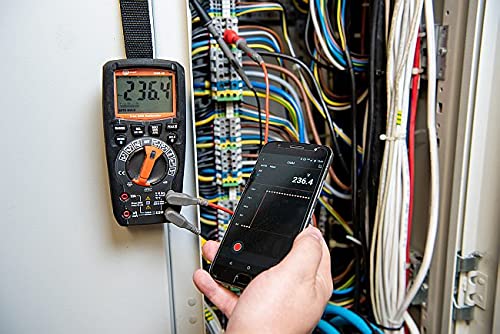
Figure 6.1: The Sonel CMM 30 Multimeter connected to an electrical panel, demonstrating its wireless communication feature. A smartphone displays the measurement reading remotely, highlighting the convenience for inaccessible areas.
Каб выкарыстоўваць гэтую функцыю:
- Download the official Sonel CMM app from your smartphone's app store.
- Уключыце Bluetooth на вашым смартфоне.
- Press the Bluetooth button on the multimeter to activate its wireless communication.
- Follow the app's instructions to pair with your CMM 30 and begin remote monitoring.
6.3.3. Убудаваны ліхтарык
The integrated flashlight assists in illuminating measurement areas, especially in low-light conditions. Activate it by pressing the dedicated light button.
6.4. Durability and IP67 Rating
The CMM 30 is designed with an IP67 rating, signifying its protection against dust ingress and immersion in water up to 1 meter for 30 minutes. This makes it suitable for demanding industrial environments.
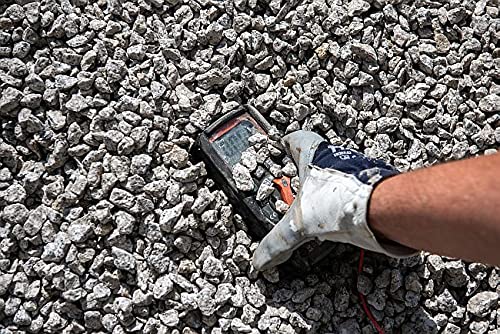
Figure 6.2: The Sonel CMM 30 Multimeter partially submerged in gravel, illustrating its robust construction and resistance to dust and debris, a testament to its IP67 rating.
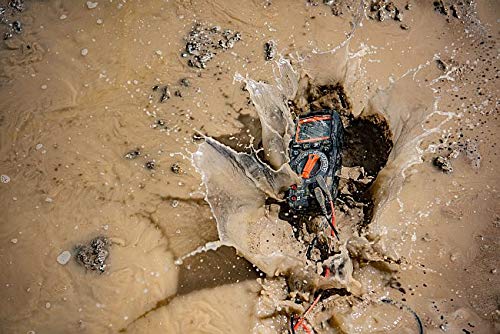
Figure 6.3: The Sonel CMM 30 Multimeter creating a splash as it impacts a muddy puddle, demonstrating its exceptional water resistance and ability to withstand harsh, wet conditions.
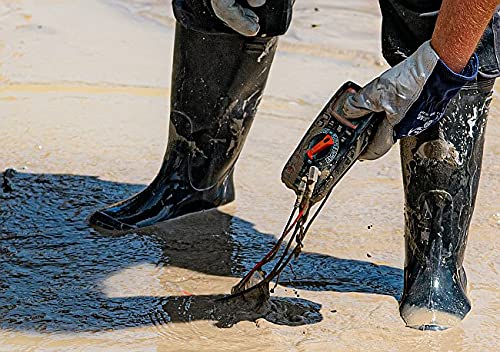
Figure 6.4: A person, wearing protective boots and gloves, retrieves the Sonel CMM 30 Multimeter from a muddy environment. This image emphasizes the device's resilience and ease of handling even after exposure to challenging conditions.
7. Тэхнічнае абслугоўванне
7.1. Уборка
Працярыце лямпу глюкометраasing з аб'явайamp тканінай і мяккім мыйным сродкам. Не выкарыстоўвайце абразіўныя рэчывы або растваральнікі. Перад выкарыстаннем пераканайцеся, што глюкометр цалкам сухі.
7.2. Замена батарэі
Refer to Section 5.1 for battery replacement instructions. Replace batteries promptly when the low battery indicator appears on the display.
7.3. Захоўванне
When not in use for extended periods, store the multimeter in a dry, cool place, away from direct sunlight and extreme temperatures. Remove the batteries to prevent leakage.
8. Выпраўленне непаладак
| праблема | Магчымая прычына | Рашэнне |
|---|---|---|
| Лічыльнік не ўключаецца. | Разраджаныя або няправільна ўсталяваныя батарэйкі. | Праверце палярнасць батарэек або заменіце батарэйкі. |
| Паказанні адсутнічаюць або адлюстроўваецца "OL" (перагрузка). | Incorrect function selected; open circuit; measurement exceeds range. | Select correct function; check circuit continuity; switch to a higher range or auto-range. |
| Няправільныя паказанні. | Low battery; dirty test leads/jacks; external interference. | Replace batteries; clean leads/jacks; move away from strong electromagnetic fields. |
| Праблемы з падключэннем Bluetooth. | Bluetooth not enabled on meter/phone; app issues; distance. | Ensure Bluetooth is on; restart app/phone; reduce distance between devices. |
9. Тэхнічныя характарыстыкі
| Асаблівасць | Спецыфікацыя |
|---|---|
| Марка | Сонель |
| Нумар мадэлі | СЫН001 |
| Колер | Чорны |
| Вага прадмета | 418 г |
| Памеры ўпакоўкі | 30 х 15 х 10 см |
| Батарэі | Патрабуецца 4 батарэйка ААА (у камплекце) |
| Функцыі вымярэнняў | AC/DC Voltage, AC/DC Current, Resistance, Capacity, Temperature, Duty Cycle, Frequency |
| Ранжыраванне | Ручной і аўтаматычны |
| Сапраўднае RMS | Yes (for AC voltagе і ток) |
| Рэйтынг абароны ад пранікнення (IP). | IP67 |
| Сувязь | Wireless (Smartphone App) |
| Дадатковыя магчымасці | HOLD function, Built-in flashlight, Backlight auto-adjustment |
10. Гарантыя і падтрымка
10.1. Інфармацыя аб гарантыі
Sonel products are manufactured to high standards and are warranted against defects in materials and workmanship for a period specified by your regional distributor from the date of purchase. This warranty does not cover damage caused by misuse, unauthorized modification, accident, or neglect. Please retain your proof of purchase for warranty claims.
10.2. Тэхнічная падтрымка
For technical assistance, troubleshooting beyond this manual, or warranty inquiries, please contact your local Sonel distributor or the authorized service center. Contact information can typically be found on the Sonel official webна сайце або праз месца пакупкі.
When contacting support, please have your product model number (SON001) and purchase date readily available.