
1. Уводзіны і большview
The Godox V860III-S is an advanced TTL 2.4G GN60 HSS camera flash designed for Sony cameras. This speedlite features a powerful lithium battery, a 10-speed adjustable modeling light, and a quick switch for TTL and manual modes. It is engineered to provide reliable and versatile lighting solutions for various photographic needs.
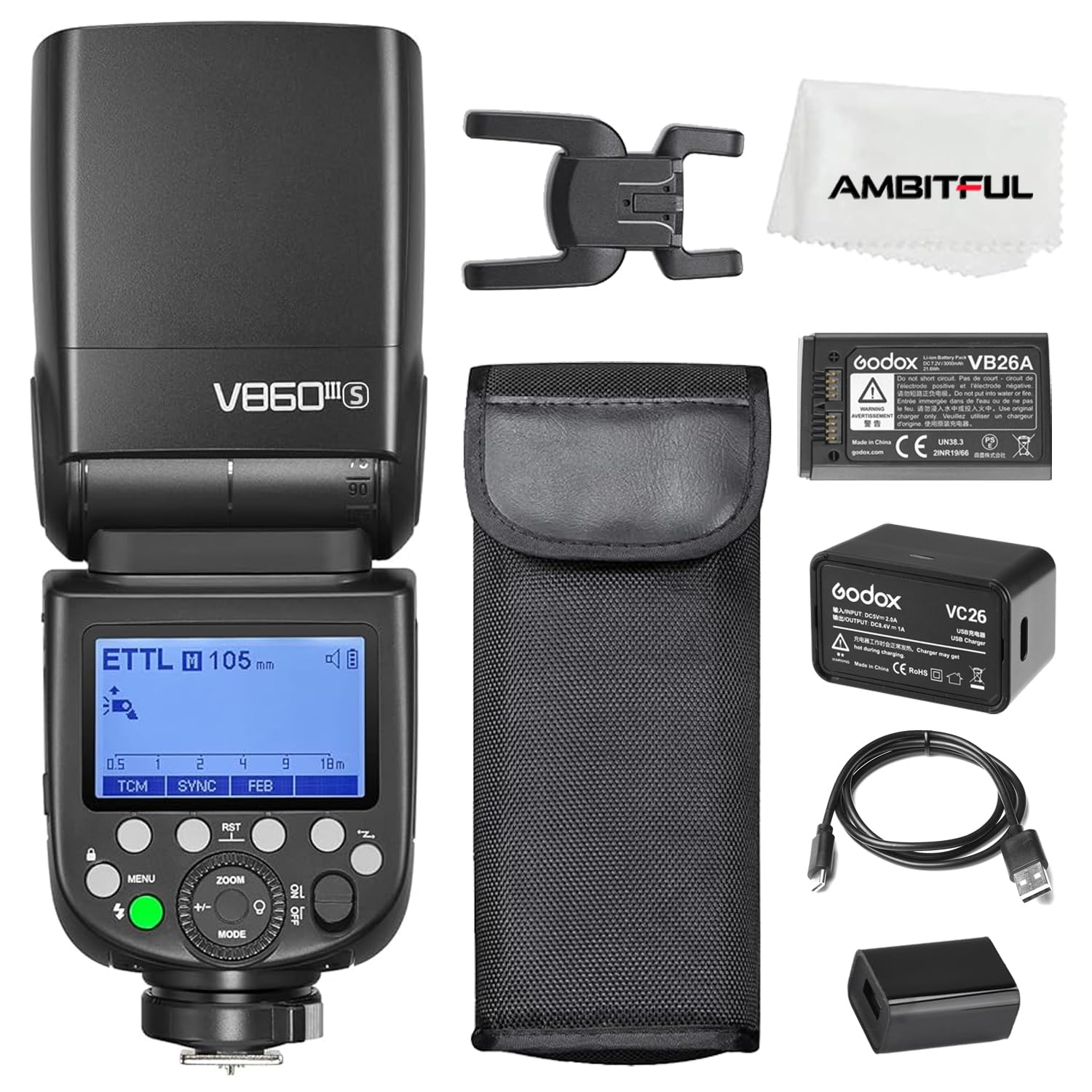
Figure 1: Godox V860III-S TTL 2.4G GN60 HSS Camera Flash for Sony.
2. Змесціва ўпакоўкі
Праверце, ці ўсе прадметы ўваходзяць у ваш пакет:
- Flash Unit ×1
- Літыевая батарэя ×1
- Зарадная прылада ×1
- Кабель USB × 1
- Інструкцыя па эксплуатацыі × 1
- Mini Stand ×1
- USB Battery Charger ×1
- Protection Case ×1

Figure 2: All components included in the Godox V860III-S package.
3. Асноўныя магчымасці
- Integrated Modeling Light: A front-facing modeling light with 10 levels of brightness adjustment for pre-visualization and ambient light blending.
- Quick TTL/Manual Switch: A dedicated button on the side allows for rapid switching between TTL automatic mode and manual flash mode.
- Enhanced Battery Performance: Features a 7.2V / 2600mAh lithium battery, offering a 1.5s recycling time and approximately 450 full-power flashes. The battery is interchangeable with the Godox V1.
- Quick Release Lock: An updated quick lever mechanism for secure and swift attachment/detachment of the flash unit to your camera's hot shoe.
- Бесправадная сістэма Godox 2.4G X: Built-in transmitter and receiver functions for flexible wireless control across various scenarios.
- TCM Conversion Feature: Enables instant conversion from TTL mode to manual mode, retaining flash output settings for efficient lighting setup.
- Multi-angle Flexible Adjustment: The flash head can rotate vertically from -7° to 120° and horizontally from 0° to 330° for versatile lighting techniques.

Figure 3: The built-in 2W LED modeling light with adjustable brightness.

Figure 4: Detail of the one-click TTL/M switchover and the quick release hot shoe lock.

Figure 5: High-capacity lithium battery provides fast recycle times and numerous full-power flashes.
4. Настройка
4.1 Устаноўка батарэі
- Пераканайцеся, што ўспышка выключана.
- Locate the battery compartment on the side of the flash.
- Insert the VB26 Lithium Battery, ensuring correct polarity.
- Надзейна зачыніце батарэйны адсек.
4.2 Мацаванне да камеры
- Надзеньце ўспышку на гарачы башмак камеры.
- Engage the quick release lock lever to secure the flash in place.
- Ensure the flash is firmly attached before operation.

Figure 6: The Godox V860III-S flash unit securely mounted on a camera.
5. Аперацыя
This section details the various operational aspects of your Godox V860III-S flash unit. For a visual guide, please refer to the embedded video below.
Video 1: Godox V860III Flash Operation Tutorial. This video provides a comprehensive guide to the flash's functions and settings.
5.1 Асноўныя элементы кіравання
- Уключэнне/выключэнне харчавання: Press and hold the power button to turn the flash on or off. The flash defaults to TTL mode upon startup.
- Выбар рэжыму: Press the 'MODE' button to cycle through TTL, Manual (M), and Multi-flash modes.
- Кампенсацыя экспазіцыі: In TTL mode, press the '+/-' button and turn the dial to adjust the exposure compensation value. Confirm with the setting button.
- Рэгуляванне маштабу: Press the 'ZOOM' button and turn the dial to adjust the focal distance of the light head. Confirm with the setting button.
5.2 Мадэлюючае святло
To activate the modeling light:
- Press the modeling light button.
- Press the setting button in the middle to turn the modeling light on/off.
- Turn the dial to adjust the brightness from 1 to 10 levels.

Figure 7: Visual representation of the 10-level adjustable modeling light.
5.3 Пашыраныя функцыі
- TCM Conversion: Press the 'TCM' button to switch between TTL and Manual mode while retaining the flash output from TTL.
- Рэжымы сінхранізацыі: Press the 'SYNC' button to activate high-speed sync and rear-curtain sync modes.
- FEB Mode: Press the 'FEB' button to enable Flash Exposure Bracketing, allowing you to shoot three images with correct, under, and over exposure.
- S1/S2 Flash Mode: In manual mode, press the 'S1/S2' button to select S1 or S2 optical slave flash modes.
- Рэжым некалькіх успышкаў: In MULTI mode, press the 'Times' button to adjust flash times and the 'Hz' button to adjust flash frequency. Use the '+/-' dial to adjust flash output.
5.4 Wireless Connectivity (Godox 2.4G X System)
The V860III-S features a built-in Godox 2.4G Wireless X System for remote control. To set up wireless communication:
- Turn on the V860III-S.
- Press the 'MENU' button and turn the dial to select 'CH' (Channel) or 'ID'.
- Set the channel to '18' and ID to '01' (or desired values) and confirm with the setting button.
- Set one flash as a transmitter unit (e.g., Group A) and another as a receiver unit (e.g., Group B).
- Ensure both units have matching channel and ID settings.
- Adjust the settings of the receiver flash from the transmitter flash.

Figure 8: Wireless lighting control using the Godox 2.4G X System.
6. Тэхнічнае абслугоўванне
- Трымайце прыладу сухім. Не дакранайцеся да яе мокрымі рукамі і не апускайце ў ваду.
- Пазбягайце моцных удараў або падзення прылады.
- Захоўваць у месцах, недаступных дзецям.
- Clean the flash head and body with a soft, dry cloth. Do not use solvents or harsh chemicals.
- Store the flash in a cool, dry place when not in use. Remove the battery if storing for extended periods.
7. Выпраўленне непаладак
- Успышка не спрацоўвае: Check battery level, ensure flash is securely mounted, and verify camera settings (e.g., flash enabled, shutter speed within sync limits).
- Няправільная экспазіцыя: Adjust flash output or exposure compensation. Ensure flash mode (TTL/M) is appropriate for the shooting conditions.
- Праблемы з бесправадным падключэннем: Verify that both transmitter and receiver units are on the same channel and ID. Check for obstructions or interference.
- Перагрэў успышкі: Allow the flash to cool down if it has been used for rapid consecutive flashes. Reduce flash power or increase recycle time.
7.1 Resetting Settings
Каб скінуць параметры ўспышкі да значэнняў па змаўчанні, адначасова націсніце другую і трэцюю кнопкі, пакуль на дысплеі не з'явіцца надпіс «RESET».
7.2 Locking the Control Panel
To lock or unlock the control panel, long-press the 'MENU' button. "LOCKED" will appear on the display when activated.
7.3 Clearing Menu Settings
To clear the menu settings, long-press the 'CLEAR' button (indicated on the display) until "OK" appears.
8. Тэхнічныя характарыстыкі
| Асаблівасць | Дэталь |
|---|---|
| Марка | ГОДОКС |
| Нумар мадэлі | V860III-S |
| Сумяшчальныя мацавання | Sony |
| Кіраўнічы нумар | 60 |
| Хуткасць сінхранізацыі ўспышкі | 1/250 секунды |
| Тып кантролю экспазіцыі | Automatic, Manual, High-Speed Sync |
| Бесправадныя тэхналогіі | RF (2.4G Godox X System) |
| Колькасць батарэек | Патрабуецца 1 літый-іённы акумулятар |
| Вага прадмета | 500 грам |
| Абсталяванне інтэрфейсу | USB тыпу C |
| Святлоадчувальнасць | ISO 100-25600 |
| Viewшукальнік Тып | ВК-экран |
| Узровень воданепранікальнасці | Не воданепранікальны |
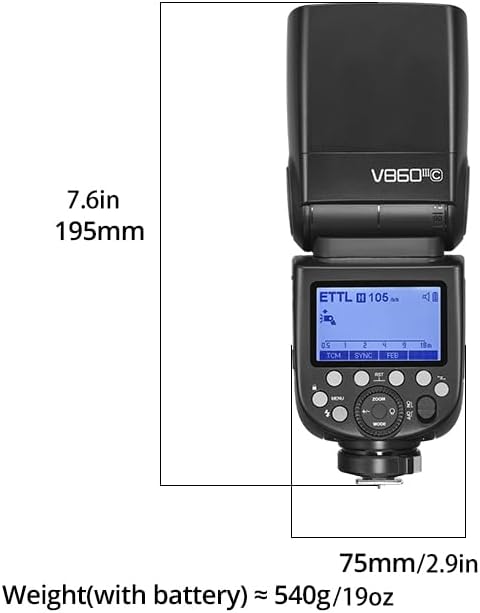
Figure 9: Product dimensions and weight for the Godox V860III-S.
9. Гарантыя і падтрымка
The Godox V860III-S comes with a one-year warranty. For warranty claims, technical support, or further assistance, please contact your retailer or visit the official GODOX webсайт. Вы таксама можаце знайсці больш інфармацыі і прадуктаў на Крама GODOX на Amazon.