
1. Уводзіны
Thank you for choosing the A4tech FG1112 Fstyler Wireless Keyboard and Mouse Set. This compact and efficient combo provides a reliable 2.4GHz wireless connection, offering convenience and comfort for your daily computing needs. The keyboard features a Q Turkish layout with FN multimedia keys, while the mouse offers precise 1200 DPI optical tracking. This manual will guide you through the setup, operation, and maintenance of your new device.
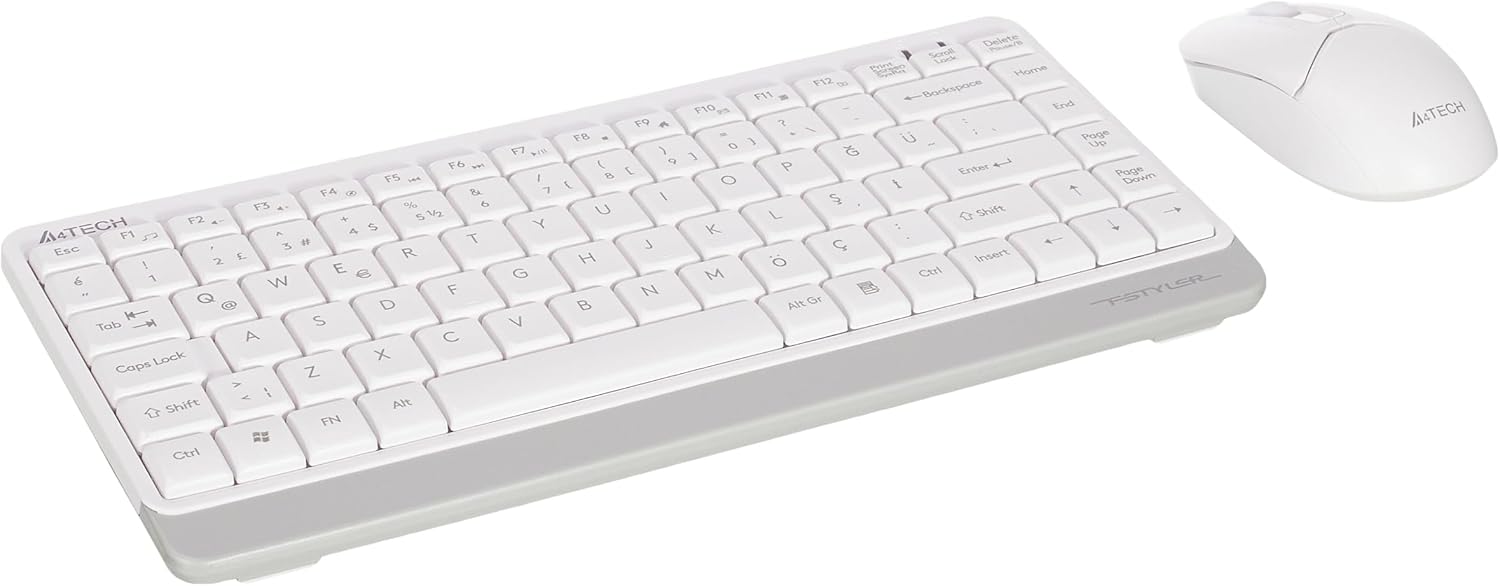
Image 1.1: A4tech FG1112 Fstyler Wireless Keyboard and Mouse Set (White)
2. Змесціва ўпакоўкі
Калі ласка, праверце змесціва пакета, каб пераканацца ў наяўнасці ўсіх прадметаў:
- 1 x A4tech FG1112 Wireless Keyboard
- 1 x A4tech Fstyler Wireless Mouse
- 1 х USB-нанапрыёмнік
- 2 батарэйкі тыпу AAA (для клавіятуры)
- 1 x AA Battery (for mouse, typically included)
- 1 х Кіраўніцтва карыстальніка (гэты дакумент)
3. Інструкцыі па ўсталёўцы
- Устаўце батарэі:
- For the keyboard: Open the battery compartment cover on the underside of the keyboard. Insert two AAA batteries, ensuring correct polarity (+/-). Close the cover.
- For the mouse: Open the battery compartment cover on the underside of the mouse. Insert one AA battery, ensuring correct polarity (+/-). Close the cover.

Image 3.1: Mouse bottom view showing battery compartment and power switch.
- Падключыце USB Nano-прыёмнік: Locate the USB Nano Receiver, typically stored inside the mouse's battery compartment or packaged separately. Plug the receiver into an available USB port on your computer.
- Уключэнне:
- For the keyboard: Ensure the keyboard is powered on. There might be a power switch on the top right or underside.
- Для мышы: перасуньце выключальнік харчавання на ніжняй частцы мышы ў становішча «ON».
- Аўтаматычнае падключэнне: Your computer should automatically detect and install the necessary drivers for the keyboard and mouse. This process may take a few moments. Once complete, your devices are ready for use.
Video 3.1: A short demonstration of the A4tech Fstyler Wireless Keyboard and Mouse Set, showing its compact design and wireless connectivity. This video illustrates the product's features and ease of use.
4. Інструкцыя па эксплуатацыі
4.1 Выкарыстанне клавіятуры
The A4tech FG1112 keyboard features a compact design with a Q Turkish layout. It is designed for comfortable and quiet typing.

Малюнак 4.1: Верх view of the A4tech FG1112 Wireless Keyboard, highlighting its Q Turkish layout.
Мультымедыйныя і функцыянальныя клавішы:
The keyboard includes 12 multimedia and internet function keys integrated into the F1-F12 keys. To activate these functions, press the FN адначасова з патрэбнай F-клавішай.
- FN + F1: Медыяплэер
- FN + F2: Памяншэнне гучнасці
- FN + F3: Павялічыць гучнасць
- FN + F4: Прыглушыць
- FN + F5: Папярэдні трэк
- FN + F6: наступны трэк
- FN + F7: Прайграванне/Паўза
- FN + F8: Спыніцеся
- FN + F9: Home Page
- FN + F10: Email
- FN + F11: Мой кампутар
- FN + F12: Калькулятар

Image 4.2: Illustration of FN key functionality for multimedia controls.
4.2 Выкарыстанне мышы
The A4tech Fstyler mouse provides precise 1200 DPI optical tracking for smooth and accurate cursor movement.

Малюнак 4.3: Верх view of the A4tech Fstyler Wireless Mouse.
Асноўныя функцыі:
- Пстрычка левай кнопкай мышы: Primary function, used for selecting items, opening fileс і г.д.
- Пстрыкніце правай кнопкай мышы: Secondary function, typically opens context menus.
- Кола пракруткі: Used for scrolling documents and web pages vertically. Can also function as a middle click button.
5. Тэхнічнае абслугоўванне
- Уборка: Для чысткі клавіятуры і мышы выкарыстоўвайце мяккую сухую тканіну. Для ўстойлівага бруду злёгкуamp можна выкарыстоўваць тканіну, але сачыце за тым, каб вадкасць не патрапіла ўнутр прылад.
- Замена батарэі: When the keyboard or mouse becomes unresponsive or exhibits delayed input, it's time to replace the batteries. Follow the "Insert Batteries" steps in the Setup section.
- захоўванне: When not in use for extended periods, turn off the mouse to conserve battery life. Store the devices in a cool, dry place.
6. Выпраўленне непаладак
| праблема | Магчымае рашэнне |
|---|---|
| Клавіятура/мыш не рэагуе |
|
| Delayed or intermittent response |
|
| Мультымедыйныя клавішы не працуюць |
|
7. Тэхнічныя характарыстыкі
| Асаблівасць | Дэталь |
|---|---|
| Марка | A4tech |
| мадэль | FG1112 |
| Тэхналогія падлучэння | 2.4 ГГц бесправадная |
| Раскладка клавіятуры | Q Turkish |
| Тып клавіятуры | Multimedia Membrane |
| Мыш DPI | 1200 DPI Optical |
| Крыніца харчавання клавіятуры | 2 х ААА батарэі |
| Крыніца харчавання мышы | 1 x AA Battery (typical) |
| Асаблівасці | Wireless, Mini, Multimedia Keys, Optical Mouse, Laser Printed Keys, Water-resistant design (with drainage channels) |
| Вага прадукту | 0.62 Kilograms (Set) |
| Памеры (клавіятура) | Approx. 315mm (Width) x 146mm (Depth) x 25mm (Height) |
| Памеры (мыш) | Approx. 64mm (Width) x 108mm (Depth) x 35mm (Height) |

Image 7.1: Dimensions of the A4tech FG1112 Keyboard and Mouse.
8. Гарантыя і падтрымка
This A4tech FG1112 Fstyler Wireless Keyboard and Mouse Set comes with a Гарантыя 2 год з даты пакупкі. Калі ласка, захавайце пацвярджэнне пакупкі для прэтэнзій па гарантыі.
For technical support, troubleshooting assistance, or warranty inquiries, please contact A4tech customer service through their official webсайт або ваш мясцовы дыстрыб'ютар.
Больш падрабязную інфармацыю і рэсурсы падтрымкі можна знайсці на A4tech Store on Amazon.